Square Appointments compared with Magpie

Square Appointments vs Magpie: an in-depth comparison

Square Appointments and Magpie both give a business a page where customers book a service. Both book a member of staff for it. They are built around different things.

  1. Square Appointments is appointment booking built into Square's payments: a booking site, a calendar for the team, and the checkout, card readers and reminders around each visit. It is built for a business that takes payment for each appointment: a salon, a barber, a spa, a studio.
  2. Magpie is one subscription for a small business's software, and Appointments is one part of it. Beside the booking page it includes Contacts, Invoicing, Accounting, a website, email at your domain and more. It is built for a business whose bookings are one part of running it.
Create account
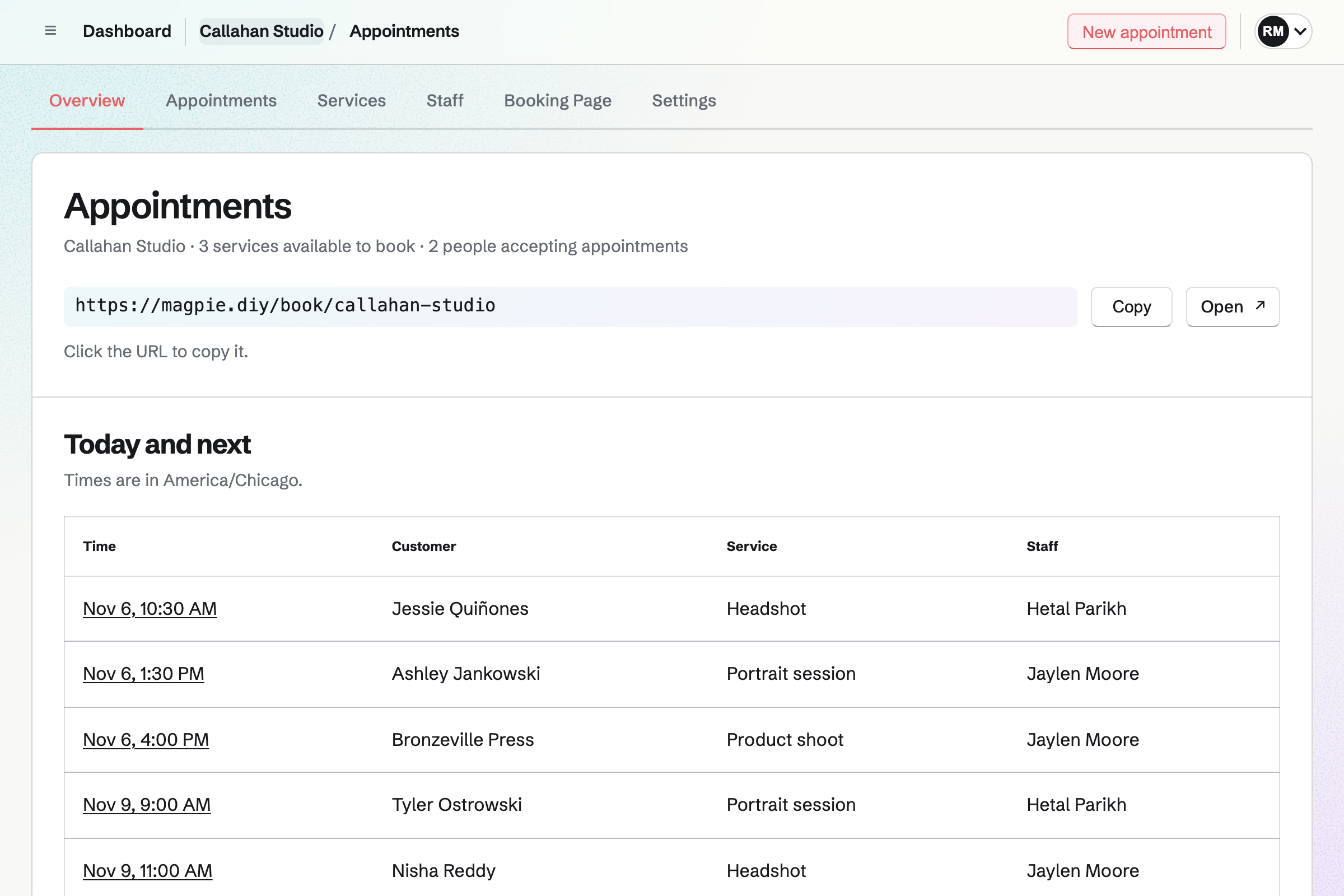
Appointments overview for a fictional studio with its booking address and today’s and upcoming appointments by staff member.

How is Magpie different?

1. Booking comes with the rest of the business

One Magpie subscription includes the areas a small business would otherwise buy one at a time:

  • Appointments for services, staff and rooms, and Meetings for a meeting page of your own
  • Contacts, where each customer's page lists their appointments beside your notes
  • Invoicing, with online payment through your Stripe account, and Accounting for the books
  • Websites for the business's site, and Mail for email at your domain
  • Staff Scheduling for the rota, Outreach for email campaigns, and E-Signatures for contracts
  • Calendar, Forms, Store, Payroll and the other areas, in the same team

Everything is in one account with one bill.

2. Rooms and buffers are on every plan

On every Magpie plan, a service can require a room or a piece of equipment from Resource Booking. A time is offered only when it is free, and it is reserved with the appointment. Each service also keeps time free before and after it. Square reserves resources on Premium, and adds time after a service on Plus and Premium.

3. The books are kept as you work

Accounting keeps the business's books in the same team as Appointments. Invoices, their payments, Store sales and Stripe fees are added to them by themselves. Payments taken when someone books an appointment are not added yet. Square keeps no books of its own. It sends sales, refunds and transfers to accounting software such as QuickBooks or Xero.

Comparing Magpie and Square Appointments

Square does more around each appointment and its payment; Magpie does more around the business. Every line in the tables below was checked against Square's own pages, linked from each row, and against Magpie's code and Help.

Platform

WhatSquare AppointmentsMagpie
Booking pageCustomers choose a service, a person and a time Yes Yes
A button on your own websiteA booking button or the booking flow inside another site Yes Link only
Your own brandingYour colours, fonts and layout on the booking page Yes Partly
Book from Instagram, Facebook and GoogleA Book button on your profiles and in Google Maps Yes Link in a profile
A directory of businessesNew clients find you in an app Square Go, in the United States No
Add-ons and several servicesExtras, or a cut and a colour, in one visit Yes No
Processing timeAnother client booked while colour develops Plus and Premium No
BuffersTime kept free around a service Plus and Premium Yes
Rooms and equipmentReserved with each booking Premium Yes
ClassesSeveral people book places in one class Plus and Premium Partly
Repeat bookingsThe same time every week, booked at once Yes No
WaitlistCustomers hear when a time opens Plus and Premium No
Several locationsEach with its own staff, hours and time zone Plus and Premium Partly
Your Google Calendar checkedBusy times in Google kept free Plus and Premium Magpie's Calendar only
Payment or a deposit at bookingCharged as the time is chosen Yes Yes
No-show and late cancellation feesA card held and charged afterwards Plus and Premium No
Cards taken in personA card reader or Tap to Pay on a phone Yes No
Tips and commissionsShared between staff by the services they did Yes No
Invoices paid onlineCharge for work by invoice Yes Yes
Contracts to signSigned online before the work Yes Yes
PackagesSessions paid up front and booked over time Plus and Premium No
Gift cardsBought for someone to spend on a visit Yes Store only
Loyalty rewardsPoints spent on a later visit Yes No
Email remindersSent before each appointment Yes Yes
Text reminders and repliesClients confirm or move a time by text Yes No
Intake formsA form or agreement sent with the booking Plus and Premium No
Email campaignsNews and offers to your clients Plus and Premium Pro and the Team plan
Text campaignsOffers sent by text message Plus and Premium No
Staff shiftsA rota, time off and hours worked Plus and Premium No time clock
ReportsBooked earnings and how each staff member is doing Premium No
APIBookings made from your own software Plus and Premium Pro
Phone appThe appointment book on a phone or tablet Yes In the browser
A websiteThe business's site in the same account Yes Yes
The booksAccounting kept beside the sales Through other software Yes
Free planTake bookings without a monthly fee Yes Partly

Good to know: Where Magpie says No or Partly, the line under the row says what Magpie does instead. Each gap has an item on Magpie's roadmap, and the line changes on the day it ships.

Booking site and booking channels

Both give customers a page to choose a service, a person and a time, without an account. Square adds add-ons and several services in one visit. It also takes bookings from a button on another website, from Instagram and Facebook, and from Google.

WhatSquare AppointmentsMagpie
Let customers book a service online from a booking page of your own Source Yes Yes
Offer each service with its own length, price and description Source Yes Yes
Offer extras when someone books that add to the time and price Source Magpie: A customer books one service at its own length and price; an extra has to be a service of its own. Yes No
Let a customer book several services in one visit, each with the staff member who does it Source Magpie: Each booking is one service with one staff member, so a cut and a colour are two separate bookings. Yes No
Book an appointment for a client yourself, for a phone call or a walk-in Source Yes Yes
Show times in the customer's own time zone Source Magpie: Times are shown in the booking page's time zone, which the page names. A customer in another zone works out the time themselves. Yes Partly
Share the booking page by a link or a QR code Source Yes Yes
Add a booking button or the booking flow to a website you already have Source Magpie: Another website can link to the booking page, but Magpie gives no button code, and its pages refuse to open inside another site. Yes Partly
Make the booking page look like your brand: colours, fonts and layout Source Magpie: The page carries the business's name and description, and the emails are sent in its name. There is no logo, colour or layout to choose, and Magpie's own top bar and footer stay. Yes Partly
Let people book from a Book button on your Instagram and Facebook pages Source Magpie: The booking page's address can go in a profile's link, and Share booking page starts a Social Media draft with it, but nothing connects a Book button on Instagram or Facebook. Yes Partly
Let people book from Google Search and Maps Source Magpie: The booking page has its own address only; nothing connects it to Google's booking button. Yes No
Be found by new clients in an app where people look for a service near them Source Magpie: Customers reach a booking page only through its address. Magpie has no directory or app where people find businesses to book. Yes No
Build the business's website in the same place as its bookings Source Yes Yes

Good to know: The booking page, the page where a customer manages an appointment, and their emails can be in English, French, Spanish or German. Websites builds the business's site in the same account.

Scheduling, staff and calendars

Both set each person's weekly hours, notice, how far ahead people book and how often times start. Square adds one-off hours, processing time, classes, repeat bookings, a waitlist and several locations. They do it better than we do today.

WhatSquare AppointmentsMagpie
Set each staff member's weekly hours and the services they provide Source Yes Yes
Change a staff member's hours for one week, or keep a holiday free Source Magpie: A Calendar event the staff member created or is going to blocks its time, so an all-day event keeps a day free. Weekly hours cannot be changed for one date or week. Yes Partly
Add every staff member who takes appointments, without a limit Source Magpie: Any team member can take appointments. A team on Free has 3 members and one on the Team plan 25. Yes Partly
Stop last-minute bookings, set how far ahead people book, and how often times start Source Yes Yes
Cap how many appointments customers can book in a day Source Magpie: Every free time stays open, however many appointments the day already has. Yes No
Leave time free after an appointment Source Yes Yes
Book another client during the waiting time in a service, such as while colour develops Source Magpie: A service holds its staff member for its whole length, buffers included. Yes No
Reserve a room, chair or piece of equipment with each booking Source Yes Yes
Run a class where several people book places, once or every week Source Magpie: Appointments books one customer for each time. A Calendar event takes RSVPs up to a capacity, but people sign in to answer, pay nothing, and each date is an event of its own; Webinars is closed to members. Courses sells a course taught in cohorts with a number of seats and live sessions, which suits a course of lessons more than a class on a timetable. Yes Partly
Book a client into the same time every week in one go Source Magpie: Each booking is one appointment. A weekly client books, or is booked, one time after another. Yes No
See every staff member's appointments side by side for the day Source Magpie: The team's Calendar shows every appointment in Agenda, Day and Month views, all in one column, and Appointments' Today list names each booking's staff member. No view gives each person a column. The Magpie app, not yet in the App Store or Google Play, also narrows its list to one staff member. Yes Partly
Take bookings at several locations, each with its own staff, hours and time zone Source Magpie: A service names a location, shown to the customer. One booking page has one time zone and one set of staff, so a second location needs a team of its own. Yes Partly
Keep times that are busy in your Google Calendar from being booked Source Magpie: Each booking adds an event to the staff member's Magpie Calendar, which can be copied to a connected Google Calendar, and Magpie Calendar events block time. Busy times in Google are checked for Meetings but not for Appointments. Yes Partly
Let customers join a waitlist and hear when a time opens Source Magpie: A full day shows no times, and nothing lets a customer wait for one. Yes No

Good to know: A service can require a resource from Resource Booking, such as a treatment room, on every plan. A time is offered only when it is free, and it is reserved with the appointment.

Payments, deposits and no-shows

Both take full payment or a deposit when someone books. Square also holds a card for no-show fees and takes cards in person. It adds tips, commissions, packages, gift cards and discounts at checkout, and Appointments has none of these.

WhatSquare AppointmentsMagpie
Take full payment or a deposit when someone books Source Yes Yes
Hold a card and charge a fee for a no-show or a late cancellation Source Magpie: A paid service takes its price or a deposit when someone books, but no card is kept to charge later. Cancelling a paid appointment keeps the payment unless you refund it. Yes No
Show customers your cancellation policy when they book Source Magpie: Nothing is shown for the customer to read or agree to. Cancellation and Rescheduling only close the customer's own links some time before the start. Yes No
Let customers reschedule or cancel themselves, up to a cut-off Source Yes Yes
Charge a client for their appointment when it is done, with the service already on the bill Source Magpie: A paid service takes its price or a deposit when the customer books online, but nothing charges for an appointment when it is done. Invoicing emails an invoice the customer pays by card through the team's Stripe account, and a contact's page starts one, but nothing fills it in from the appointment. Yes Partly
Take card payments in person, on a phone or a card reader Source Magpie: Nothing takes a card in person; Appointments takes cards only when customers book online. A Store order made by hand can send the customer a payment link to pay by card on their own phone. The Magpie app's Sell screen, not yet in the App Store or Google Play, sells Store items for cash only. Yes No
Take tips and keep track of each staff member's commission Source Magpie: A paid booking charges the service's price or a deposit with no tip to add, and nothing records commission on the services someone does. Yes No
Send invoices, ask for a deposit, bill on a schedule and remind clients to pay Source Magpie: Invoicing emails invoices the client pays by card, repeats them every month, quarter or year, and sends reminders. A single invoice is paid in full; only a proposal's payment schedule issues a deposit invoice and one for each milestone. Yes Partly
Send a client a contract to sign online Source Yes Yes
Sell a bundle of sessions that the client books over time Source Magpie: Appointments takes a service's price or a deposit for one booking at a time. Nothing sells a number of sessions to book later. Yes No
Sell gift cards that clients spend on a booking Source Magpie: A Store sells gift cards with a balance, but the code is spent only in the Store's checkout, not on an appointment. Yes Partly
Give customers a discount or a coupon code for a service Source Magpie: An invoice for the service can take a discount off. Store discount codes work on Store orders only, and nothing takes a code off a booking. Yes Partly

Good to know: Invoicing emails invoices that customers pay by card through your own Stripe account. It sends reminders, and Magpie takes no fee on invoices. E-Signatures sends a contract to sign and can link it to an invoice.

Reminders and client messages

Both email a reminder before each appointment. Square also sends text reminders and asks clients to confirm they are coming. Clients can reply to a text to confirm, move or cancel. Magpie sends its confirmation, reminder and notices of changes by email only.

WhatSquare AppointmentsMagpie
Remind customers by email before their appointment Source Yes Yes
Remind customers by text message before their appointment Source Magpie: Appointments sends no text messages. Meetings' text reminders reach numbers in the United States and Canada only, and only for meetings. Yes No
Let customers confirm, cancel or move an appointment by replying to a text Source Magpie: Customers change an appointment only from the link in their confirmation email. Yes No
Ask customers to confirm they are still coming Source Magpie: Nothing asks the customer to confirm. Appointments sends the booking confirmation, a reminder and notices of changes, and none of them asks for an answer. Yes No
Write your own wording for booking emails and texts Source Magpie: Magpie writes the confirmation, reminder, change and cancellation emails, and their wording cannot be changed. Yes No
Text and email clients from one inbox, with each conversation kept Source Magpie: Mail sends and receives email at the team's own addresses, and Helpdesk shares customer conversations in team inboxes, but Magpie sends and receives no text messages with customers. Yes Partly
Send an intake form or agreement to fill in and sign when someone books Source Magpie: The booking form asks for a name, an email address and an optional phone number. No question can be added, and no Form or signature request goes out with a booking. Yes No

Good to know: Each confirmation links to a page where the customer reschedules with the same staff member or cancels. The link works until the notice you set in Settings.

Clients and marketing

Both keep a record of each client with their visits and your notes, and both send email campaigns. Square adds loyalty points, automatic campaigns for birthdays and lapsed clients, and offers by text.

WhatSquare AppointmentsMagpie
Keep a record of each client, with their visits and your notes Source Yes Yes
Reward returning clients with points they spend on a later visit Source Magpie: Nothing counts visits or purchases toward a reward. Yes No
Email your clients news and offers Source Yes Yes
Email clients by themselves: a welcome, a birthday offer, or a nudge when they have not been back Source Magpie: Outreach sends a campaign to the people you add to it; nothing starts one from a first visit, a birthday or time since the last appointment. Yes No
Send offers to clients by text message Source Magpie: Outreach and Newsletter send email only. Yes No

Good to know: Each booking links the customer to the contact with the same email address, or adds one. Outreach sends a campaign to the contacts with a tag, from your own Mail address. It needs Pro or the Team plan.

Integrations, reports and the team

Square has a phone app, a time clock, and reports on future bookings and on each staff member. Its permissions can limit someone to their own calendar. Magpie works in a phone's browser, and Accounting keeps the books.

WhatSquare AppointmentsMagpie
Book, move and cancel appointments from your own software Source Yes Yes
See reports on booked earnings and how each staff member is doing Source Magpie: Appointments lists Today, Upcoming, Past and Cancelled bookings; there are no reports or exports. Yes No
Record what each service costs you to provide Source Magpie: A service has a price but no cost. Accounting records spending as bills and expenses, not against a service. Yes No
Ask an assistant about your bookings and the rest of the business Source Yes Yes
Let each staff member see only their own calendar Source Magpie: Team members with edit access change Appointments and members with view access only see it, and a member can be limited to some areas. Everyone with access sees every appointment and customer. Yes Partly
Schedule staff shifts, handle time off and record hours worked Source Magpie: Staff Scheduling plans and publishes shifts, with time off, swaps and cover. Staff record the hours they work by starting Time Tracking from a shift, and a report sets them against the schedule, but there is no time clock to punch in and out of. Yes Partly
Run the appointment book from a phone or tablet Source Yes Yes
Take bookings without paying a monthly fee Source Magpie: Appointments and its booking page are on the Free plan with no limit on services. Each new customer is added to Contacts, though, and once Personal or a team on Free has 100 contacts, a customer who is not one already cannot book. Yes Partly
Keep the business's books in the same place as its sales Source Square Appointments: Square sends sales, refunds and transfers to accounting apps such as QuickBooks and Xero through integrations; it keeps no books of its own.Magpie: Accounting keeps the books, and adds invoices and their payments, Store sales, Form payments, supporter payments and Stripe fees from the other areas by itself. Payments taken when customers book an appointment are not added yet. No Partly

Good to know: Staff Scheduling plans and publishes shifts, with time off, swaps and cover. The assistant answers questions about the team's appointments and Magpie's other areas.

Price comparison

How Square Appointments charges

Square charges by plan: Free, Plus or Premium, for each location. Free has no monthly fee and charges only on payments taken. Every plan has unlimited staff and online booking, and takes payment at booking. Plus adds processing time, classes, a waitlist, no-show fees and packages. Premium adds resources and staff reports. The paid plans also lower the card fees. Prices are on Square's pricing page.

How Magpie charges

Magpie charges by plan too, Free or a paid plan, for everything in the account: booking pages, invoicing, contacts and the rest. The plan sets limits, such as how many contacts you keep, not which areas you can use. The Team plan is one price for up to 25 people. Appointments takes payment at booking with a Magpie fee of 4%. Invoicing takes payment through your own Stripe account with no Magpie fee. Prices are on Magpie's pricing page.

On top of the planSquare AppointmentsMagpie
Monthly fee to take bookingsNone on Free; Plus and Premium are priced for each locationNone on Free; a paid plan covers every area
StaffUnlimited on every plan3 in a free team, 25 on the Team plan
Payment at bookingEvery plan, with card feesEvery plan, through your own Stripe account, with a Magpie fee of 4%
Online card fees3.3% and a fixed fee on Free, 2.9% and a fixed fee on Plus and PremiumStripe's fees, through your own Stripe account
Cards in person2.6% and a fixed fee on Free, less on Plus and PremiumNot available
Gift cards2.5% to load one on Free and Plus; none on PremiumStore gift cards, with 4% of Store sales
Text marketing500 texts a month on Plus and 2,500 on Premium, then a charge for each textNot available
Rooms and equipmentPremiumEvery plan
Reports on future bookings and staffPremiumNot available
Another locationA Plus or Premium plan for each locationA team of its own
The booksThrough accounting software, such as QuickBooks or XeroAccounting, included

When to choose Magpie or Square Appointments

  • Want booking beside invoices, contacts, the books, a website and email, with rooms on every plan? Go with Magpie.
  • Want no-show fees, text reminders, card readers, packages and tips, all in one checkout? Square Appointments is the right choice.

Recommendations by kind of business

For a salon or a barber
Square Appointments. Square books other clients during processing time, and a cut and a colour can be one visit with two stylists. The payment and tip are taken at the chair. Magpie takes a deposit at booking, but books one service at a time and takes no tip.
For a spa or a studio that sells packages
Square Appointments. Packages, gift cards and loyalty points are spent on later visits, and classes have a number of spots. Appointments books one customer for each time and sells nothing to spend on a booking.
For a business that takes cards at the counter
Square Appointments. Square's card readers and Tap to Pay take the payment and credit the staff member. Magpie takes no card in person.
For a consultant or a tradesperson who invoices after the work
Magpie. Appointments, Invoicing, Contacts and Accounting are in one subscription, with a website and email at your domain. Each customer who books becomes a contact you can invoice from.
For a business with treatment rooms
Either. Both reserve a room or equipment with each booking and offer a time only when it is free. Magpie does it on every plan, Square on Premium. Choose by whether you need cards in person and text reminders, or the books beside your bookings.
For a business starting out
Either. Both take bookings and payment at booking without a monthly fee. Square charges a card fee on each payment it takes. Magpie adds a fee of 4% to Stripe's, and its Free plan holds 100 contacts beside a website and Invoicing. Choose by whether you take cards in person, or want the rest of the business beside your bookings.

Frequently asked questions

What is the difference between Square Appointments and Magpie?

Square Appointments is appointment booking built into Square's payments, with the checkout, card readers and reminders around each visit. Magpie is one subscription for a small business's software. Its Appointments area is beside Invoicing, Contacts, Accounting, a website and email. Square does more around each appointment and its payment; Magpie does more around the business.

Does Magpie replace Square Appointments?

Yes, for a business that wants a booking page for its services, staff and rooms. Magpie puts it beside the invoices, contacts, books and a website. Customers book without an account and can reschedule or cancel from their confirmation.

Consider keeping Square if you charge no-show fees or take cards in person. Keep it too if you send text reminders, sell packages or loyalty rewards, or use processing time. Square does each of these better than Magpie does today.

How much does Square Appointments cost?

Square has three plans, Free, Plus and Premium, and the paid plans are priced for each location. Free has no monthly fee; Square charges a fee on each payment, lower on the paid plans. Plus adds processing time, classes, a waitlist, no-show fees and packages. Premium adds resources and staff reports. The prices are on Square's pricing page.

How much does Magpie cost?

Magpie has a Free plan and paid plans, each covering every area. Appointments is on Free with no limit on services. Free holds 100 contacts and a team of 3. The Team plan is one price for up to 25 people. The prices are on Magpie's pricing page.

Can Magpie take a deposit or payment when someone books?

Yes. A service takes its full price or a deposit by card on Stripe's page, and the appointment is booked once Stripe confirms. The money goes to your team's Stripe account, and Magpie's fee is 4% of each payment. No card is kept for a no-show fee. Square takes a deposit or full payment at booking on every plan.

Does Magpie send appointment reminders?

Yes, by email. Appointments emails each customer a reminder 1 day before, or 1 hour, 2 hours or 2 days before, as you choose in Settings. It links to a page where the customer cancels or chooses another time. Appointments sends no text and asks nobody to confirm. Square sends email and text reminders on every plan. Clients can reply to a text to move or cancel.

Can Magpie take card payments in person?

No. Magpie has no card reader and no Tap to Pay. A Store order made by hand can send a payment link to the customer's own phone. Square takes cards with its readers and with Tap to Pay on iPhone and Android.

Can a customer book several services or add-ons in one Magpie booking?

No. Each booking is one service with one staff member, at that service's length and price. A cut and a colour are two bookings, and an extra has to be a service of its own. Square books several services in one visit and offers add-ons. On Plus and Premium, each service can have its own staff member.

Does Magpie have processing time for services?

No. A service holds its staff member for its whole length, buffers included. Processing time is on Magpie's roadmap. On Plus and Premium, Square splits a service into a first part, a wait and a last part. Other clients can book into the wait.

Can Magpie run classes?

Partly. Appointments books one customer for each time. A Calendar event takes RSVPs up to a capacity, from people who sign in, and takes no payment. Courses sells a course in cohorts with seats and live sessions. Square runs one-time and repeating classes with a price and a number of spots, on Plus and Premium.

Does Magpie sell packages, gift cards or loyalty rewards for appointments?

No. Appointments takes payment for one booking at a time, and sells nothing to spend on later bookings. A Store sells gift cards, spent only at the Store's checkout, and nothing counts visits toward a reward. Square sells packages on Plus and Premium, and gift cards and loyalty rewards spent on visits.

Can people book my Magpie appointments from Google, Instagram or Facebook?

No. The booking page's address can go in a profile's link. Share booking page starts a Social Media draft with it. Nothing connects a Book button on Instagram, Facebook or Google Maps. Square connects all three on every plan.

Can I put a Magpie booking button on my website?

No. Another website can link to the booking page. Magpie gives no button code, and its pages do not open inside another site. A button or an embed is on Magpie's roadmap. Square gives a ready-made button, an embed code and widgets for chosen services or staff.

Does Magpie check my Google Calendar for appointments?

No. Each booking adds an event to the staff member's Magpie Calendar. That event can be copied to a connected Google Calendar. Magpie Calendar events block time, but busy times in Google are checked for Meetings, not for Appointments. Square checks a linked Google Calendar on Plus and Premium.

Does Magpie have reports on appointments?

No. Appointments lists today's, upcoming, past and cancelled bookings, and you mark each past one Completed or No-show. There are no reports or exports. Reports are on Magpie's roadmap. Square's Premium reports on future bookings and staff, and every plan exports appointment history.

Can Magpie reserve a room or a chair with each appointment?

Yes, on every plan. A service can require a resource from Resource Booking, such as a treatment room. A time is offered only when the room is free, and it is reserved with the appointment. Square reserves rooms, stations and chairs on Premium.

Does Magpie have a phone app for appointments?

Appointments works in a phone's browser. You add, reschedule and cancel bookings there, and change services, staff and hours. The Magpie app is not yet in the App Store or Google Play. Square's app for iPhone, iPad and Android holds the calendar, booking and checkout.

Does Square Appointments keep the books?

No. Square sends sales, refunds and transfers to accounting software such as QuickBooks and Xero. Magpie's Accounting keeps the books in the same team as Appointments. It adds invoices, their payments, Store sales and Stripe fees by itself. Payments taken when someone books an appointment are not added yet.

Can I use Square Appointments and Magpie together?

Yes. Square can keep taking bookings and payments while Magpie runs your website, invoices, books and email at your domain. A Magpie website links to your Square booking site. Bookings made in Square do not appear in Magpie's Contacts by themselves.

How do I move from Square Appointments to Magpie?

Open Appointments and choose a business type, such as Salon or barber, for suggested services. Change each service's length, price and buffers, switch on your staff and set their hours. Bring your client list in as a JSON document in Contacts. Magpie does not read Square's appointments. Add upcoming ones with New appointment, or keep Square until they are past.

What is included in Magpie's Free plan?

Appointments with no limit on services, Meetings, Calendar, Contacts, Invoicing, a website, Forms and a team of 3. Free holds 100 contacts; past that, a new customer cannot book. A paid plan raises the limits and adds email at your domain.
If a line on this page is wrong, tell us and we will correct it.

Square changes, and so does Magpie. If a line is out of date about either product, email support@magpie.diy with the page that shows it. We check the line against that page, change it, and give it the new date. That goes for Square's own team as much as for anyone who uses it.

Make a booking page on Magpie's Free plan.

Create a Magpie account, then open Appointments and add your first service.

Create account