Lemlist compared with Magpie

Lemlist vs Magpie: an in-depth comparison

Lemlist and Magpie both send a series of follow-up emails that stops when someone replies. They are built for very different amounts of prospecting.

  1. Lemlist is a sales outreach platform with a database of prospects, mailbox warm-up and AI agents. It is built for salespeople who reach new prospects by email, LinkedIn, calls, texts and WhatsApp.
  2. Magpie is one subscription for a small business's software, and Outreach is one part of it. Beside the campaigns it includes Mail, Contacts, booking pages, proposals, invoicing and more. It is built for someone writing to a few dozen people a day.
Create account
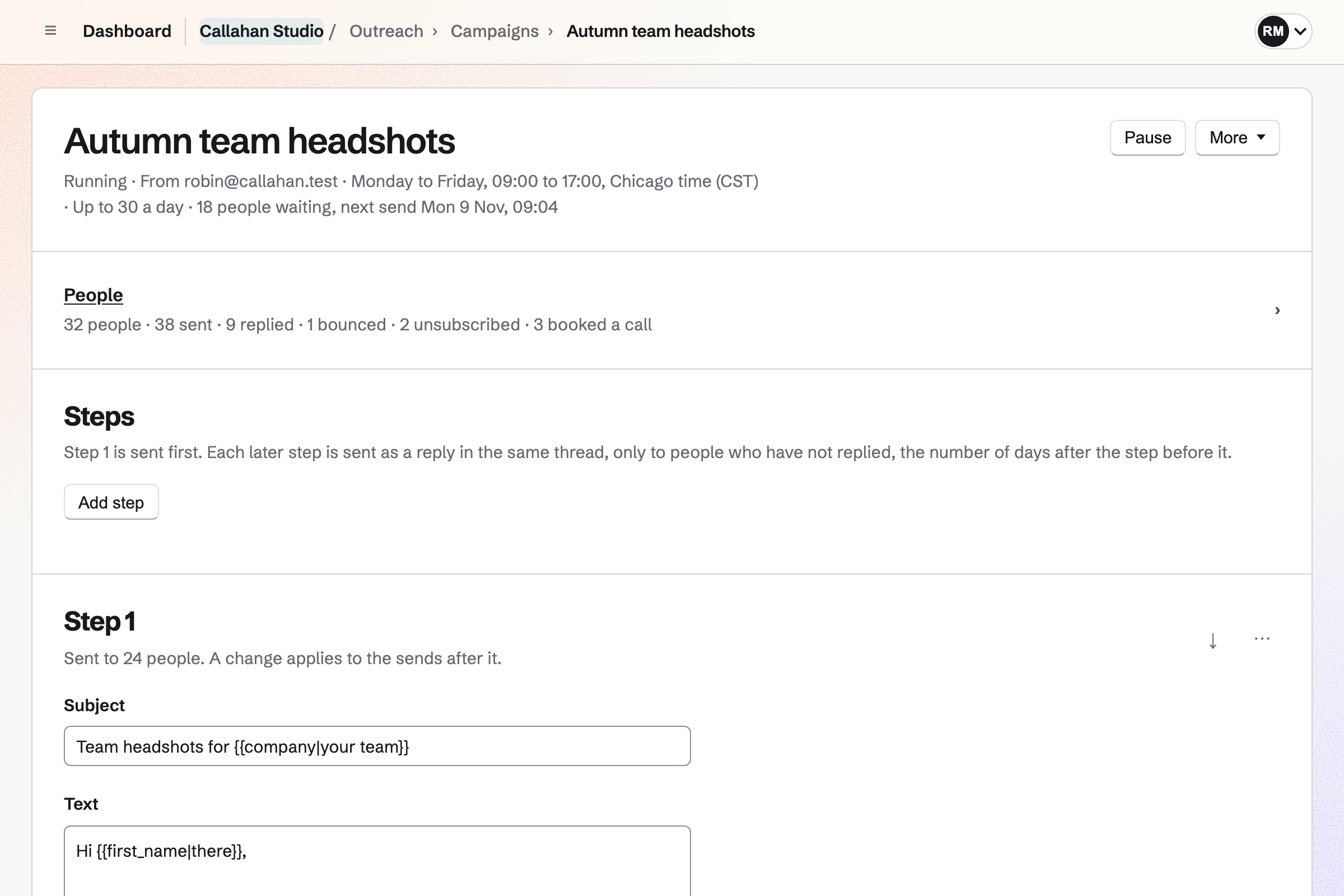
An Outreach campaign page for a fictional photo studio: the campaign is running from a Mail address on weekdays from 9 to 5, with its people’s counts and its first step’s subject and text.

How is Magpie different?

1. Outreach comes with the rest of the business

One Magpie subscription includes the areas a small business would otherwise buy one at a time:

  • Outreach for campaigns of follow-up emails that stop on a reply
  • Mail for addresses at your domain, and DNS for the domain's records
  • Contacts, where everyone in a campaign is kept
  • Appointments for the booking page a campaign links to
  • Proposals and Invoicing for what comes after a yes
  • Newsletter, Helpdesk, Websites, Calendar and the other areas, in the same team

Everything is in one account with one bill. Lemlist sells data credits, buying signals, WhatsApp and phone numbers as add-ons. Lemcal, its booking product, is separate.

2. Every message is an ordinary email from your own address

A campaign sends from a Mail address on your own verified domain. Each message is plain text, signed with the domain's key and stored in the mailbox's Sent folder. Replies arrive in the same mailbox. There is no tracking image, and click tracking is off unless you turn it on.

3. A booking ends the campaign by itself

A merge field puts your Appointments page in a step. When someone books with the same address, they become Booked a call and nothing more is sent. They are already a contact, so their proposals and invoices go on the same page.

Comparing Magpie and Lemlist

Lemlist does far more to find people and reach them on several channels; Magpie does more around a small number of conversations. Every line in the tables below was checked against Lemlist's own pages, linked from each row, and against Magpie's code and Help.

Platform

WhatLemlistMagpie
Follow-up campaignsA series of emails, days apart, that stops on a reply Yes Yes
Database of prospectsFind companies and people to write to Yes No
Email and phone finderFind and check a person's work address or number Credits No
LinkedIn stepsVisit, invite and message people in the same campaign Multichannel and Enterprise No
Calls, texts and WhatsAppOther channels as steps of a campaign Yes No
Branches in a sequenceA different next step for what the person did Yes Partly
A/B testsTwo versions of a step, and the better one kept Yes No
Pictures and landing pages for each personA picture or page made with their details Yes No
Mailbox warm-upBuild a new mailbox's reputation before a campaign Yes No
Send from Gmail or OutlookConnect a mailbox you already use Yes Mail addresses only
Several mailboxes per campaignSpread one campaign's sending across inboxes Yes No
Replies in one listEvery campaign's replies, ready to answer Yes Yes
AI agentsCampaigns, research and replies written for you Yes No
Domains and mailboxesBuy them, set up, in the same place Yes Domain bought elsewhere
Booking pagePeople book a call on a page of your own Lemcal, separate Yes
Your own sending serverA mail server you rent, set up for you No Yes
Stop every campaign at onceOne button holds all sending Not stated Yes
CRM syncHubSpot, Salesforce, Pipedrive and Attio Yes No
API and ZapierRun campaigns from your own software Yes API only
SAML single sign-onSign in through your company's identity provider Enterprise No

Good to know: Where Magpie says No or Partly, the line under the row says what Magpie does instead. Each gap has an item on Magpie's roadmap, and the line changes on the day it ships.

Finding prospects

Lemlist finds people for you in a database of more than 650 million. It finds their addresses and numbers too. Magpie writes only to people you bring: your contacts, or a file you import. Lemlist does this better than we do today.

WhatLemlistMagpie
Find new people to contact in a database of companies and people Source Magpie: Magpie has no database of people. Everyone in a campaign is one of your own contacts, added by tag, chosen one by one, or imported from a file or a pasted list. The Outreach specification says Magpie finds no addresses, looks nothing up and enriches nothing. Yes No
Find and check a person's work email address or phone number Source Magpie: Magpie checks only that an address is written correctly. It finds no addresses or phone numbers and does not check that a mailbox exists; an address that bounces goes on the do-not-email list. Yes No
Add people to a campaign from LinkedIn while browsing it Source Magpie: There is no browser extension for Outreach; Magpie's browser extension is for Password Vault. People come from your contacts, a file or a pasted list. Yes No
Import a list of people from a spreadsheet file Source Yes Yes
Keep one person from getting two campaigns at the same time Source Yes Yes
Keep each person as one contact, with every campaign they are in Source Yes Yes
Rank people by how much they have engaged Source Magpie: The people list narrows by stage, name, address and who they are assigned to. There is no score. Yes No
Be told when a company I want to reach is hiring, raises money or visits my website Source Magpie: Outreach watches nothing outside Magpie. A person's page shows the links they followed in campaign emails. Yes No
Have AI research each person and write an opening line for them Source Magpie: The {{about}} merge field holds one line you write for each person, by hand or in the import's about column. Magpie writes no text itself. Yes No

Good to know: An import into Outreach takes up to 5,000 people and asks where the addresses came from. Someone already waiting for another campaign of the team is held back, and the page names that campaign.

Campaigns and sequences

Both send steps days apart, fill in each person's name and stop on a reply. Lemlist adds branches, A/B tests, changing text, pictures made for each person and formatted emails. They do it better than we do today.

WhatLemlistMagpie
Send a series of follow-up emails automatically, days apart Source Yes Yes
Stop writing to a person as soon as they reply Source Yes Yes
Fill in each person's name, company and other details in the email Source Magpie: Merge fields fill in the first name, last name, name, company, the line about the person, the sender's name and the Appointments page link, each with an optional fallback, and a campaign will not start while one without a fallback is empty. Other columns of an imported file are not kept, so they cannot be used. Yes Partly
Change a sentence depending on who the person is, or vary the wording between people Source Magpie: A merge field can have a fallback for people without a value. There is no text that changes by condition and no random wording. Yes Partly
Send a different next step depending on what the person did, such as opening an email or clicking a link Source Magpie: Every person gets the same steps in order. What happens next moves people who reach No reply into another campaign; nothing else changes the path. Yes Partly
Try two versions of an email and keep the one that works better Source Magpie: Each step has one version. Two campaigns with the same people split by hand are the only way to compare. Yes No
Put a picture or a landing page made for each person in the email Source Magpie: Steps are plain text, with web addresses shown as links. There are no pictures or landing pages in Outreach. Yes No
Add formatting, a signature or a file to campaign emails Source Magpie: Every message is plain text by design, with blank lines between paragraphs, followed by the unsubscribe line and an optional postal address. There is no signature, formatting or attachment; the specification lists formatted messages and attachments as later work. Yes No
Start a campaign from emails I saved, or from a library of examples Source Magpie: Paste JSON creates a draft campaign with its steps from a document, and Copy the prompt gives an assistant you use the instructions to write one. A campaign cannot be copied and there are no saved emails or examples to start from. Yes Partly
Send only on chosen days and hours, a few at a time Source Yes Yes
Send at a good hour in each person's own time zone Source Magpie: The send window uses the campaign's one time zone. People in other zones get their emails at the same moment as everyone else; the specification lists a time zone per person as later work. Yes Partly
See each step as a person will get it, and send myself a test Source Yes Yes
Change one step's text for one person before it is sent Source Magpie: Every person gets the step's shared text, filled in by merge fields. The line about the person is the only text written for one person. Yes No
Not count an out-of-office message as a reply, and write again later Source Yes Yes
Stop writing to everyone at a company once one of them replies or asks to stop Source Magpie: Each person is handled alone. Colleagues at the same company keep getting their steps, and the do-not-email list takes addresses, not domains. Yes No
Get a reminder in the sequence to do something by hand, such as a call Source Magpie: Campaigns contain only emails. Contacts has follow-ups and To-dos, but a campaign does not create them. Yes No

Good to know: A Magpie campaign has up to 10 steps, each sent as a reply in the first email's thread. An out-of-office reply is not counted as a reply, and moves the next step 3 days later.

LinkedIn, calls, text messages and WhatsApp

Lemlist's Multichannel plan adds LinkedIn, calls, text messages and WhatsApp as steps of the same campaign. Magpie's Outreach sends email only.

WhatLemlistMagpie
Visit, invite and message people on LinkedIn as steps of the same campaign Source Magpie: Outreach sends email only. Yes No
Call people from the campaign, with recordings and summaries Source Magpie: Outreach has no calls. A contact's history can hold a call written down by hand. Yes No
Send text messages or WhatsApp messages as steps of a campaign Source Magpie: Outreach sends email only. Yes No

Good to know: Everyone in a Magpie campaign is a contact in Contacts. A contact's history holds the notes and calls you write down, beside their campaigns.

Replies and the inbox

Both gather every reply in one list, set each person's stage and give a person to a teammate. Lemlist's inbox also holds LinkedIn, WhatsApp and text messages, and AI sorts and drafts replies.

WhatLemlistMagpie
See replies from every campaign in one list and answer them Source Yes Yes
Mark who is interested, and see everyone by stage on a board Source Yes Yes
Have replies sorted into interested and not interested automatically Source Magpie: Magpie marks a person Replied; a member reads the reply and sets the stage. Yes No
Have a reply to a prospect drafted for me Source Magpie: Replies are written by hand in Mail. A connected app or the assistant cannot draft them. Yes No
Give a person to a teammate to follow up Source Yes Yes
Invite people to book a call, and see who booked Source Yes Yes
Run campaigns and read replies in a phone app Source Lemlist: Neither the pricing page nor the help centre names a phone app; the Chrome extension works in Gmail and LinkedIn.Magpie: Outreach works in a phone's browser: campaigns are started and paused, steps written, people added and their stage set, and Replies lists every reply, with Open in Mail to answer it. The Magpie app does the same in a phone app, but it is not yet in the App Store or Google Play. Not stated Partly

Good to know: Outreach's board has a column for each stage, and dragging a card sets it. Someone who books on your Appointments page within 90 days of their last step becomes Booked a call.

Deliverability

Lemlist connects Gmail, Outlook or any mailbox and warms it up with Lemwarm. One campaign can send from several. Magpie sends each campaign from one Mail address, slowly, through a sending route a team admin sets up.

WhatLemlistMagpie
Send campaigns from the Gmail, Outlook or other mailbox I already use Source Magpie: A campaign sends from a Mail address on a verified domain, and the member who starts it must be able to open that mailbox in Mail. The team's own SMTP server, such as Amazon SES or Postmark, can carry the messages, but a Gmail or Outlook mailbox cannot be connected. Yes Partly
Spread one campaign across several mailboxes Source Magpie: Each campaign sends from one mailbox. Sending more means more campaigns, each with its own mailbox and daily cap. Yes No
Warm up a new mailbox before sending to strangers Source Magpie: Magpie does not warm up mailboxes. The daily cap and the send window control how fast a campaign sends. Yes No
Check that my domain's SPF, DKIM and DMARC records are right Source Yes Yes
Buy a sending domain and its mailboxes in the same place Source Magpie: Mail adds addresses on a domain you own and DNS hosts its records, but the domain is bought from another registrar. Yes Partly
Use my own domain for tracked links Source Magpie: Tracked links use Magpie's address, so the help says to leave click tracking off when the real address matters more than the count. Yes No
See whether my emails reach the inbox, and be warned when they stop Source Magpie: The Sending band on the Outreach page counts the messages sent in the last 24 hours, and the bounces and spam complaints of the last 30 days. Sending holds while 5% or more of those addresses bounced or complained, and after 5 failed sends in a row Magpie pauses the campaign and emails the team's admins. There are no inbox placement tests. Yes Partly
Add an unsubscribe link and never email those people again Source Yes Yes
Stop sending to addresses that bounce Source Yes Yes
Stop every campaign at once Source Lemlist: The help centre describes pausing a campaign or a single lead; no page found describes one control that stops every campaign in a team. Not stated Yes
Send through a mail server of my own that is set up for me Source Lemlist: Lemlist connects a Google, Microsoft or SMTP account you already have, or sells mailboxes on a domain bought in Lemlist; it does not set up a server you rent. No Yes

Good to know: A team sends at most 30 messages in any 24 hours, across all its campaigns. Stop all sending holds every campaign in the team at once, and a team admin starts it again.

AI agents

Lemlist's agents find people, research them, and write a campaign with its timing and branches. Its MCP server lets Claude or ChatGPT build and start campaigns. Magpie writes no text itself.

WhatLemlistMagpie
Describe what I want and have the campaign written for me Source Magpie: Copy the prompt gives an assistant you already use the instructions to write a campaign as a document, and Paste JSON turns it into a draft. Magpie writes no text itself. Yes Partly
Let Claude or ChatGPT build, start and report on my campaigns Source Magpie: A connected app, or the assistant, can search the team's campaigns with their counts of people, sends and replies. It cannot see the people, the steps or the replies, or make or change a campaign. Yes Partly

Good to know: Copy the prompt gives an assistant you already use the instructions to write a campaign. Pasting its answer as JSON makes a draft campaign with its steps.

Teams, reports and integrations

Both share campaigns with a team and count clicks. Lemlist adds reports across campaigns and teammates, open tracking, CSV export, CRM sync, Zapier, custom roles and SAML sign-in.

WhatLemlistMagpie
Share campaigns with my team and choose who can change them Source Yes Yes
Make my own roles with exactly the permissions each person needs Source Magpie: A team admin chooses which areas each member can use, and whether members can edit the team's work or only view it applies to all members together. There are no roles made of individual permissions. Yes Partly
Compare campaigns, steps and teammates in reports Source Magpie: Each campaign's page counts its people, messages sent, replies, bounces, unsubscribes and its goal, each step says how many people it was sent to, and a person's page shows what they were sent. There are no replies by step, and no comparison across campaigns, by member or over time. Yes Partly
See who opened my emails Source Magpie: Magpie never adds a tracking image and records no opens, by a decision in the Outreach specification: open pixels are a spam signal and no longer measure reliably. Yes No
See which links each person clicked Source Yes Yes
Download a campaign's people and results as a spreadsheet Source Magpie: There is no export from Outreach. The people are contacts, but Contacts has no export either. Yes No
Keep HubSpot, Salesforce or Pipedrive up to date with my campaigns Source Magpie: The people are Magpie contacts, and Contacts is the record of them. Nothing is sent to another CRM. Yes No
Connect my own software or Zapier to add people and read results Source Magpie: A Pro API key reaches Outreach's routes: it reads campaigns, their people and replies, creates campaigns and writes their steps, adds people, sets their stages, and starts or pauses a campaign. The routes are listed in the OpenAPI file but not described in the API reference, and there are no Outreach webhooks or Zapier connection. Yes Partly
Sign in through my company's identity provider Source Magpie: People sign in with a password and two-factor code, an emailed link or code, a passkey, or a Google, Apple, LinkedIn or GitHub account. There is no SAML single sign-on. Yes Partly

Good to know: Members who can open Outreach see the team's campaigns, people and replies. Members with edit access run campaigns, and team admins choose the sending route.

Price comparison

How Lemlist charges

Lemlist charges by plan: Email, Multichannel and Enterprise, which is priced on request. The Email plan sends up to 50,000 emails a month. Multichannel adds LinkedIn, calls, WhatsApp and manual steps, with monthly credits for finding contact details. Data credits, buying signals, WhatsApp for each person sending and phone numbers are add-ons. Prices are on Lemlist's pricing page.

How Magpie charges

Magpie charges by plan, Free or a paid plan, for everything in the account. Outreach needs a paid plan: Pro for Personal, or the Team plan for a team. It sends from a Mail address on your own domain, which a paid plan includes. The mail goes through your SMTP service, such as Amazon SES or Postmark, or a server you rent. That is paid for separately, unless Magpie has allowed the team to use Magpie's route. Prices are on Magpie's pricing page.

On top of the planLemlistMagpie
Emails you can sendUp to 50,000 a month on the Email plan30 a team in any 24 hours
Sending mailboxesUnlimited on Email; 5 for each person on MultichannelMail addresses at your domain, one for each campaign
Warm-upLemwarm, in every planNot offered
Finding contact detailsCredits: monthly on Multichannel and Enterprise, more with the data add-onNot offered
LinkedIn and callsMultichannel and Enterprise; calls include 400 minutes a month on Multichannel, 800 on EnterpriseNot offered
Text messages and WhatsAppA number bought in Lemlist and 6 credits a text; WhatsApp an add-on for each person sendingNot offered
Buying signalsAn add-onNot offered
Domains and mailboxesBought in Lemlist, set up with SPF, DKIM and DMARCDomain bought elsewhere; Mail addresses included in a paid plan
Custom roles and SAML sign-inEnterpriseNot offered
TeammatesAdmin and Member roles on every plan25 people on the Team plan
Booking page, proposals and invoicesLemcal, a separate scheduling productIncluded

When to choose Magpie or Lemlist

  • Want to follow up a few dozen people a day, with their bookings and invoices in the same team? Go with Magpie.
  • Want prospects found for you, and reached by email, LinkedIn, calls and WhatsApp in one sequence? Lemlist is the right choice.

Recommendations by kind of business

For a sales team prospecting on several channels
Lemlist. One sequence visits a LinkedIn profile, sends an invitation, rings the person and writes on WhatsApp. Magpie's Outreach sends email only, at most 30 messages a team in any 24 hours.
For someone who has no list yet
Lemlist. The database searches more than 650 million people by job, company and hiring. The finder gets their verified addresses. Magpie writes only to people you already have.
For a team that tests its wording
Lemlist. Lemlist tests two versions of a step, and changes a sentence by a lead's job or industry. A Magpie step has one version for everyone.
For a consultant or a freelancer following up people they know of
Magpie. Write a few steps and add the people from Contacts. A booking on your Appointments page ends their campaign. The proposal and the invoice follow in the same team.
For a small business that wants one bill
Magpie. Outreach, Mail, Contacts, booking pages, proposals and Invoicing are in one subscription. Lemlist covers prospecting, with Lemcal for bookings beside it.
For a first try at cold email
Either. Both send follow-ups that stop on a reply, with a preview and a test send first. Choose Lemlist for a list found for you, LinkedIn steps or more emails a day.

Frequently asked questions

What is the difference between Lemlist and Magpie?

Lemlist is a sales outreach platform. It finds prospects, warms up mailboxes and reaches people by email, LinkedIn, calls, texts and WhatsApp. Magpie is one subscription for a small business's software, and Outreach is one of its areas. Outreach sends a few follow-ups a day from your own Mail address, beside Contacts, Appointments, Proposals and Invoicing.

Does Magpie replace Lemlist?

No, for most people who use Lemlist today. Magpie's Outreach sends email only, at most 30 messages a team in any 24 hours. Yes, for a business writing to a few dozen people it already knows of. It gets the replies, bookings and invoices in one place.

Consider keeping Lemlist if you need prospects found for you, LinkedIn or call steps, or mailboxes warmed up. Keep it too for branches, A/B tests, AI agents or CRM sync. Lemlist does each of these better than Magpie does today.

How much does Lemlist cost?

Lemlist's pricing page shows the Email and Multichannel plans, and Enterprise, priced on request. Email sends up to 50,000 emails a month; Multichannel adds LinkedIn, calls and WhatsApp. Data credits, buying signals, WhatsApp for each person sending and phone numbers are add-ons. The prices are on Lemlist's pricing page.

How much does Magpie cost?

Magpie has a Free plan and paid plans, each covering every area. Outreach needs a paid plan: Pro for Personal, or the Team plan for a team of up to 25 people. The Mail addresses it sends from are included. An SMTP service such as Amazon SES or Postmark, or a server you rent, is paid for separately. The prices are on Magpie's pricing page.

How many emails can Magpie's Outreach send a day?

A team sends at most 30 messages in any 24 hours, across all its campaigns. Messages go 45 to 90 seconds apart, inside each campaign's send window and daily cap. Lemlist's Email plan sends up to 50,000 emails a month.

Does Magpie have a database of prospects?

No. Magpie finds no people and no addresses. Everyone in a campaign is one of your contacts. You add them by tag, one by one, or from a file or a pasted list. Lemlist's database holds more than 650 million people, filtered by job, company, technology, funding and hiring.

Does Magpie find or check email addresses?

No. Magpie checks only that an address is written correctly. An address that bounces becomes Bounced and goes on the do-not-email list. Lemlist's email finder asks several data providers until one finds a verified address. It charges credits only for finds.

Can Magpie send LinkedIn messages?

No. Outreach sends email only, and there is no browser extension for LinkedIn. Lemlist's LinkedIn steps visit a profile, send an invitation, a message, a voice message or an InMail. Its Chrome extension adds people from a LinkedIn search to a campaign.

Can Magpie call people or send text messages in a campaign?

No. A Magpie campaign contains only emails. A call is written down by hand in a contact's history. Lemlist's call steps ring the person and record, transcribe and summarise each call. Its text message and WhatsApp steps send from Lemlist, with replies in its inbox.

Does Magpie warm up mailboxes?

No. A campaign's daily cap and send window set how fast it sends. The whole team sends at most 30 messages in any 24 hours. Lemlist's Lemwarm exchanges emails between real inboxes to build a mailbox's reputation, in every plan.

Can I send Outreach campaigns from Gmail or Outlook?

No. A campaign sends from a Mail address on your own verified domain. The messages go through your SMTP service, such as Amazon SES, or a server Magpie set up for the team. Lemlist connects Google, Microsoft and any SMTP and IMAP account. It spreads a campaign across several of them.

Can a Magpie campaign take a different path for different people?

Partly. Every person gets the same steps in order. What happens next moves people who reach No reply into another campaign. Lemlist's conditions split a sequence on a click, an accepted LinkedIn invitation or a lead's data. Its help says the advanced conditions need Multichannel or Enterprise.

Does Magpie have A/B tests?

No. Each step has one version. Two campaigns with the people split by hand are the only way to compare. Lemlist gives a step a version A and a version B. A whole sequence can be tested too.

Can I add formatting, pictures or a signature to Outreach emails?

No. Every Outreach message is plain text. It ends with the unsubscribe line and, if you choose, your postal address. Lemlist's steps hold HTML, GIFs, a saved signature, and pictures made with each lead's name or logo.

Does Magpie track opens?

No. Magpie never adds a tracking image and records no opens. Click tracking is a campaign setting, off by default, and a person's page lists the links they followed. Lemlist tracks opens and clicks, and a click can start a branch.

Can Magpie write my campaign or answer replies with AI?

No. Magpie writes no text itself. Copy the prompt gives an assistant you already use the instructions to write a campaign. Pasting its answer makes a draft. Replies are answered by hand in Mail. Lemlist's LemAgent writes a campaign for each channel, and AI sorts replies into interested and not interested.

Does Lemlist have a booking page?

Yes, through Lemcal, Lemlist's separate scheduling product, which gives a booking link to put in the emails. Magpie's Outreach puts your Appointments page in a step, and a booking ends that person's campaign. Magpie also has Proposals and Invoicing for what comes next.

Can I stop every campaign at once?

In Magpie, yes. Stop all sending holds every campaign in the team at once, and a team admin starts sending again. We found no page in Lemlist's help that describes one control for every campaign. Its help describes pausing a campaign or a single lead.

Does Magpie connect to HubSpot, Salesforce or Zapier?

No. Outreach syncs with no other CRM and sends no webhooks; the people are Magpie contacts. A Pro API key can read campaigns, add people, set stages and start or pause a campaign. Lemlist syncs HubSpot, Salesforce, Pipedrive and Attio both ways, and connects Zapier, Make, n8n and Clay.

Can I download a campaign's results?

No. Outreach has no export, and Contacts has none either. Each campaign's page counts its people, sends, replies, bounces and unsubscribes. Lemlist exports campaign results and lead lists as CSV files, and compares campaigns and teammates in reports.

Can I use Lemlist and Magpie together?

Yes. Lemlist can run the prospecting while Magpie runs the bookings, proposals and invoices. A Lemlist step can link to your Magpie Appointments page. Magpie's Mail cannot be connected to Lemlist, because Mail has no IMAP or SMTP access.

How do I move from Lemlist to Magpie?

Export your leads from Lemlist as a CSV file. In a Magpie campaign, Add people takes the file. It reads the email, name, company and about columns, and drops the rest. Write the steps again, or paste them as JSON. Add your unsubscribe list's addresses to the do-not-email list.

What is included in Magpie's Free plan?

Booking pages, Invoicing, Store, a website, the Newsletter, Forms, Password Vault, Secure Files and a team of 3. Outreach and Mail are not on the Free plan: campaigns need Pro or the Team plan.
If a line on this page is wrong, tell us and we will correct it.

Lemlist changes, and so does Magpie. If a line is out of date about either product, email support@magpie.diy with the page that shows it. We check the line against that page, change it, and give it the new date. That goes for Lemlist's own team as much as for anyone who uses it.

Follow up from your own address, beside the rest of the business.

Create a Magpie account, then add your domain to Mail.

Create account