Proposify compared with Magpie

Proposify vs Magpie: an in-depth comparison

Proposify and Magpie both send a priced proposal that the client reads, chooses from and signs online. They are built around different things.

  1. Proposify is proposal software with a page designer, a content library, pricing tables, e-signatures and tracking. It is built for a sales team that sends many proposals, often from deals in a CRM.
  2. Magpie is one subscription for a small business's software, and Proposals is one part of it. Beside the proposal it includes E-Signatures, Invoicing, Contacts, Client Portal and the other areas a business runs on. It is built for someone whose proposals are one part of running the business.
Create account
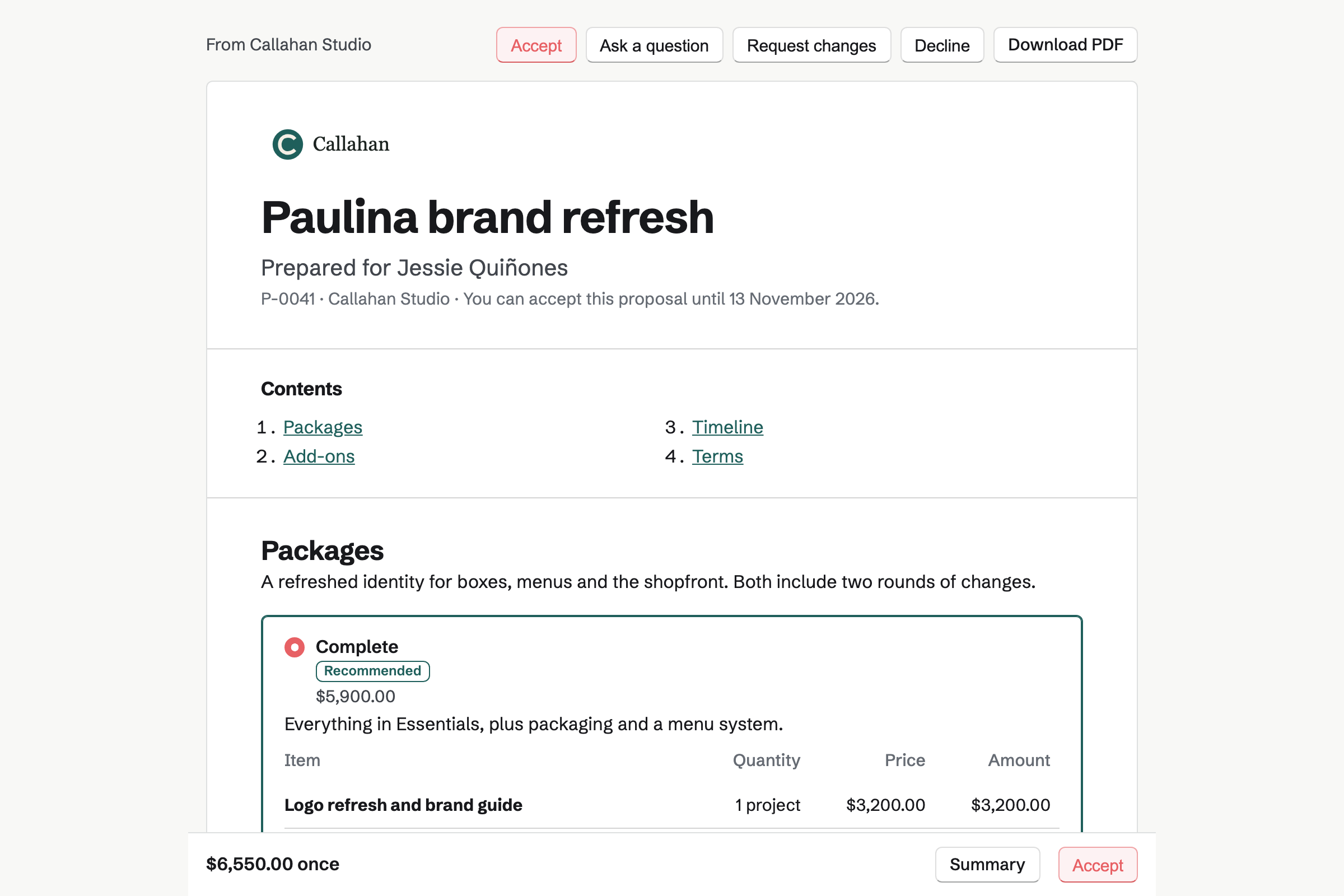
A client’s proposal page for a fictional bakery brand refresh, with the cover, a list of contents, the recommended Complete package chosen, and the total in a bar at the foot of the screen.

How is Magpie different?

1. Proposals come with the rest of the business

One Magpie subscription includes the areas a small business would otherwise buy one at a time:

  • Proposals, with packages, options, a deposit and a payment schedule
  • E-Signatures for any PDF, and Agreements for standard contracts filled in from your answers
  • Invoicing, with recurring invoices and payment by card
  • Client Portal and Contacts for the clients and their work
  • Time Tracking, To-dos, Meetings, Mail, Websites and the other areas, in the same team

Everything is in one account with one bill. A contact's page lists their proposals beside their invoices and bookings.

2. An accepted proposal becomes the work

The payment schedule splits the total into up to 10 payments: a deposit, dated payments, milestones and a final payment. Each becomes an invoice in Invoicing, and they add up exactly to the accepted total. The client can pay the deposit by card as soon as they sign. When the work starts, Magpie can make a Time Tracking project and a To-do List, and start the recurring invoices.

3. The Free plan sends priced proposals

Magpie's Free plan sends 5 proposals a month with every part of Proposals: packages, options, deposits, approvals and reports. A paid plan has no limit. The Team plan is one price for up to 25 people, not a price for each user.

Comparing Magpie and Proposify

Proposify does more on the page and with your other software; Magpie does more after the proposal is signed. Every line below was checked against Proposify's own pages, linked from each row. Magpie's lines were checked against its code and Help.

Platform

WhatProposifyMagpie
Proposals and quotesA document with prices the client reads online Yes Yes
Electronic signaturesSeveral people sign the proposal, or a PDF you bring in Yes Yes
Sending without payingSend priced proposals on a free plan No Yes
Content librarySections, text and pictures the team reuses Yes Yes
Page designerPlace text, pictures and shapes anywhere on a page Yes No
Tables and custom fieldsTables in the text, and fields you name yourself Yes No
PackagesThe client chooses exactly one of several Partly Yes
Automatic follow-upsReminders to clients who have not opened or signed Legacy Proposify Yes
Payment when signingThe client pays a deposit by card as they accept Legacy Proposify Yes
Invoices from the proposalThe deposit, milestones and monthly fees billed Through QuickBooks Online Yes
Approvals and rolesA manager approves before sending; roles set who does what Grow and Scale Partly
Your own domainProposals at your own web address Yes No
AI writingAI drafts and rewrites the proposal's text Yes Partly
CRM connectionsProposals made from deals in HubSpot, Salesforce and others Yes No
Zapier and APIWork with proposals from your other software Yes Pro, no Zapier app
Phone appsSend proposals and follow them from a phone Legacy Proposify In the browser
Security audit and single sign-onSOC 2, and sign-in through the company's identity provider Yes No
Calls and template designTalk to the company's team, or have a starter designed for you Yes No

Good to know: Where Magpie says No or Partly, the line under the row says what Magpie does instead. Each gap has an item on Magpie's roadmap, and the line changes on the day it ships. Accounts made since May 2025 use New Proposify. A mark that says Legacy Proposify is one only the older version has.

Creating and editing documents

Both start a proposal from a ready-made one in your brand. Saved sections and the client's details go in too. Proposify's editor is a page you place things on, with tables, shapes and fields you name yourself. They do it better than we do today.

WhatProposifyMagpie
Start each proposal from a ready-made one my team keeps Source Yes Yes
Start from a proposal already written and designed for my kind of work Source Yes Yes
Have AI draft and rewrite a proposal's text Source Magpie: Copy the prompt, in the JSON import box, gives an assistant you use, such as Claude or ChatGPT, what it needs to write a whole proposal as JSON, which is pasted in as a draft. Nothing in the proposal editor writes or rewrites text with AI. Yes Partly
Lay out each page freely, placing text, pictures and shapes where I want them Source Magpie: A proposal is a column of sections in order (cover, text, pricing, timeline, pictures, video, team, testimonials, questions, terms and files) that Magpie lays out with your accent colour, fonts and logo. Nothing is placed freely on a page, and there are no shapes. Yes No
Put a table in a proposal, such as a comparison or a schedule Source Magpie: Proposal text has headings, lists, checklists and quotes but no tables; prices go in pricing sections and dates in a timeline section. Documents has tables, but a Document cannot be put into a proposal. Yes No
Make every proposal look like my brand, with my logo, colours and fonts Source Yes Yes
Keep approved sections, text and pictures to reuse in any proposal Source Yes Yes
Have the client's name, company and other details filled in by themselves Source Yes Yes
Add my own fields to a proposal, such as a purchase order number or a start date Source Magpie: The fields are a fixed set of the client's, the proposal's, the business's and the writer's details. A detail such as a purchase order number is typed into the text. Yes No
Stop team members changing parts of a proposal, such as the terms Source Yes Yes
Add pictures and videos to a proposal Source Yes Yes
Bring a finished PDF in to have it signed and see when it is opened Source Yes Yes
Download the proposal as a PDF that matches the page Source Yes Yes
Let the client jump to the part of the proposal they want Source Yes Yes

Good to know: Magpie's starters for kinds of work mark their sample text and example prices. A proposal cannot be sent while one is left.

Quoting and pricing

Both add up lines with tax, show monthly fees and keep a list of prices. In both, the client ticks extras and changes quantities. Proposify discounts one line on its own; Magpie lets the client choose exactly one package.

WhatProposifyMagpie
Add a priced list of work that adds up the lines, tax and total Source Yes Yes
Let the client tick optional extras and change quantities Source Yes Yes
Offer two to four packages and have the client choose one Source Proposify: The help shows a way round it: optional pricing tables side by side, one ticked to start, which the client ticks and unticks. Nothing makes the client choose exactly one, and the current version's help describes optional rows only. Partly Yes
Show monthly or yearly fees beside one-time ones Source Yes Yes
Give a discount on one line or on the whole quote Source Magpie: A proposal has one discount, a fixed amount or a percentage of its one-time lines. One line cannot be discounted on its own, and recurring lines are not discounted. Yes Partly
Quote in my client's currency Source Yes Yes
Keep a list of my products and prices to add to quotes Source Yes Yes

Good to know: A Magpie pricing section can offer 2 to 4 packages, one marked Recommended. The client must choose one before accepting.

Sending, signing and payment

Both send by email or link, set an expiry date and keep a record of each signature. Proposify adds your own domain and the client's page in 15 languages. Magpie adds follow-ups, a deposit by card and invoices made from the accepted total.

WhatProposifyMagpie
Keep a list of clients and their companies to send proposals to Source Yes Yes
Send the proposal by email with my own message Source Yes Yes
Let clients open and sign without setting anything up Source Yes Yes
Show proposals at my own web address, with emails from my own domain Source Magpie: Proposals open at Magpie's address, and their emails come from your business name via Magpie, with replies going to you. Yes No
Have several people sign the proposal with a legally binding e-signature Source Yes Yes
Keep a record of who signed, when and from where Source Yes Yes
Set a date after which the proposal can no longer be accepted Source Yes Yes
Remind clients by themselves when they have not opened or signed it Source Proposify: Legacy Proposify sends scheduled reminder emails until the client views it. In New Proposify, which accounts made since May 2025 use, automatic follow-ups and signature reminders are listed as coming soon. Partly Yes
Have the client fill in details, such as a billing address or a purchase order number, as they sign Source Proposify: Legacy Proposify's client input forms, required or not, collect answers as the client signs, on its Team plan and above. New Proposify lists forms for 2027.Magpie: The acceptance step asks only for the signer's full name and signature. The client can ask a question or request changes instead, and E-Signatures' text and checkbox fields collect details on a PDF sent for signing. Partly No
Take a deposit by card when the client signs Source Proposify: Legacy Proposify connects Stripe to collect a share of the total right after the last signature. New Proposify lists Stripe payments for 2027. Partly Yes
Turn the accepted proposal into a payment schedule and invoices Source Proposify: When a document is marked Won, a QuickBooks Online flow can add the client and an invoice with every priced line; invoices are made in the accounting software, not in Proposify. Partly Yes
Have the work set up by itself once the client accepts Source Proposify: Flows move the deal to a stage in HubSpot, Salesforce, Pipedrive or Zoho when a document's status changes, and Zapier can start other actions. All plans. Partly Yes
Show the client's page in my client's language Source Magpie: A proposal's client page, PDF and emails are in English, French, Spanish or German. Yes Partly

Good to know: Magpie makes a free account for each recipient at the address it was sent to. The email's button signs them in the first time, and nobody chooses a password.

Tracking and analytics

Both tell you when the client opens it and how long each section was read. Both keep versions and report a win rate. Proposify also shows each person a forwarded link reaches.

WhatProposifyMagpie
Be told when the client opens the proposal Source Yes Yes
See how long each person spent on each section Source Yes Yes
See everything that happened to a proposal, in order Source Yes Yes
Let the client pass the proposal to a colleague, and see who that is Source Magpie: A proposal opens only in its recipients' Magpie accounts, so a forwarded email does not open it for anyone else. You add the colleague as a recipient, who signs or only reads. Yes No
See my win rate and how long proposals take to close, by person Source Yes Yes
Discuss the proposal with the client on the proposal itself Source Yes Yes
Revise a sent proposal and keep the earlier versions Source Yes Yes

Good to know: Magpie's reading time counts each section while it is on screen and the client is using the page. The client's page tells them so.

Collaboration and workflow

Both comment privately with the team and ask a manager to approve large or discounted proposals. Proposify adds custom roles, outside collaborators on one document and separate spaces for each branch.

WhatProposifyMagpie
Comment on a draft with my team before it goes out Source Yes Yes
Have a manager approve large or discounted proposals before they go out Source Yes Yes
Choose exactly what each person may do with proposals Source Magpie: A team member uses Proposals with view or edit access, and team admins change Proposals settings and locked sections. There are no custom roles, so edit access writes, sends and deletes drafts alike. Yes Partly
Bring someone outside the team in to edit or approve one proposal Source Magpie: A team guest can be given the whole Proposals area, with view or edit access, but not one proposal on its own. Yes Partly
Give each branch or franchise its own space, overseen from head office Source Magpie: Each branch can be its own team, with its own proposals, starters and settings, and one person can belong to many teams. Nothing lets a head office see across the teams or share starters between them. Yes Partly

Good to know: Magpie's approval rules ask again after any change to an approved proposal. A team admin can lock a section of a starter for members.

Integrations and automation

Proposify connects to HubSpot, Salesforce, Pipedrive, Zoho, Microsoft Dynamics, Zapier, Claude and ChatGPT. Magpie works inside its own areas, and they do this better than we do today.

WhatProposifyMagpie
Make proposals from the deals in my CRM, and move a deal on when it is won Source Magpie: Proposals use Magpie's own Contacts, which show each client's proposals and what happened to them; there is no connection to a CRM. Yes No
Start actions in my other apps when a proposal is viewed, signed or won Source Magpie: On Pro, a signed webhook set up through the API is sent when a proposal is sent, viewed, accepted or declined, so Zapier or any service that takes webhooks can act on it, but Magpie has no Zapier app to choose. Inside Magpie, acceptance itself starts the invoices, a Time Tracking project, To-dos and Client Portal sharing. Yes Partly
Work with proposals from my own software through an API Source Yes Yes
Write and change proposals from Claude or ChatGPT Source Magpie: A connected app such as Claude or ChatGPT can search proposals by title, number or client, with their state and total, but cannot read their content or write one. A proposal an assistant writes as JSON can be pasted in. Yes Partly

Good to know: On Pro, Magpie's version 1 API lists, starts, reads and downloads proposals. Webhooks report each one sent, viewed, accepted or declined.

Plans, security and support

Proposify has SOC 2 Type 2, single sign-on on Scale, calls with its team and a template design service. Magpie has a Free plan, two-factor sign-in and passkeys, and support by message.

WhatProposifyMagpie
Send proposals without paying for each user Source Proposify: There is no free plan: a 14-day trial, then Build and Grow, priced per user a month and lower billed yearly, and Scale, priced by the year for 10 users. Each plan has a monthly number of sends, with a fee for each send beyond it. No Yes
Work on proposals from my phone Source Proposify: Legacy Proposify has iPhone and Android apps to send proposals and follow their activity. New Proposify lists its mobile app as coming. Partly Yes
Protect sign-in with a second step Source Yes Yes
Sign in through the company's identity provider Source Magpie: Members sign in with a password, a passkey, a link Magpie emails, or an account they already have with Google, Apple and others. There is no SAML single sign-on. Yes No
See an independent security audit before trusting it with clients' details Source Magpie: Magpie has no independent security audit report to show. Yes No
Talk to someone at the company on a call Source Magpie: Support is by message, from Contact support. Yes No
Have someone design a proposal template in my brand for me Source Magpie: Magpie's starters and the look settings are there to start from; nobody at Magpie designs a starter for you. Yes No

Good to know: Proposals works in a phone's browser: writing a draft, sending, revising and answering questions. A first send counts toward the Free plan's limit; a new version of it does not.

Price comparison

How Proposify charges

Proposify charges for each user, on Build, Grow and Scale, with a 14-day trial and no free plan. Scale is priced by the year, from 10 users. Each plan has a number of sends a month, with a fee for each send beyond it. Custom fields, approvals, roles, the API and account reports need Grow or Scale. Separate accounts for each branch and single sign-on need Scale. Prices are on Proposify's pricing page.

How Magpie charges

Magpie charges by plan, Free or a paid plan, for everything in the account. The Free plan sends 5 proposals a month with every part of Proposals; a paid plan has no limit. The Team plan is one price for up to 25 people. Prices are on Magpie's pricing page.

On top of the planProposifyMagpie
Sending without payingA 14-day trial5 proposals a month, with every part of Proposals
How a team paysFor each user; Scale by the year, from 10 usersOne Team plan for up to 25 people
Sends beyond the planA fee for each send over the plan's numberNo limit on a paid plan
Custom fields, approvals, roles and APIGrow and ScaleApprovals included; API on Pro; no custom fields or roles
Outside collaborators1, 3 or 5 seats by plan, more for a monthly fee eachTeam guests, given the whole Proposals area
Salesforce managed packageA monthly fee for each user on top of the planNot offered
A template designed in your brandA paid service, or part of ScaleNot offered
Deposit by cardLegacy Proposify, through StripeIncluded, through your own Stripe account
InvoicingThrough QuickBooks OnlineIncluded

When to choose Magpie or Proposify

  • Want proposals that take a deposit and turn into invoices, a project and To-dos, with a Free plan that sends them? Go with Magpie.
  • Want a page you design freely, tables and fields of your own, and proposals made from the deals in your CRM? Proposify is the right choice.

Recommendations by kind of business

For a sales team on HubSpot or Salesforce
Proposify. Its CRM connections fill a proposal from the deal and move the deal on when it is won. Magpie connects to no outside CRM.
For an agency that sells on design
Proposify. Its editor places text, pictures, shapes and tables anywhere on a page. Its designers can build a template in your brand. Magpie lays out sections in order with your colour, fonts and logo.
For a franchise or a company with branches
Proposify. On Scale, each branch gets its own account and branding, overseen from head office. Magpie gives each branch a team, with nothing that sees across them.
For a freelancer or a consultant
Magpie. The client chooses a package, signs and pays the deposit on one page. The deposit, milestones and monthly fees then become invoices, and the hours become a Time Tracking project.
For a service business with monthly clients
Magpie. Recurring lines in an accepted proposal become recurring invoices when the work starts. Follow-ups remind clients who have not opened or signed.
For a small team that sends a few proposals a month
Either. Both send a priced proposal with options, tracking and online signing. Choose Proposify for more control over the page and your CRM, and Magpie for what happens after it is signed.

Frequently asked questions

What is the difference between Proposify and Magpie?

Proposify is proposal software with a page designer, a content library, tracking and CRM connections, built for sales teams. Magpie is one subscription for a small business's software. Its Proposals area sits beside E-Signatures, Invoicing, Contacts and Client Portal. Proposify does more on the page; Magpie does more after it is signed.

Does Magpie replace Proposify?

Yes, for a business that writes its own proposals and sends them a few at a time. Magpie sends priced proposals with packages and options, follows them up, takes the deposit, and turns the proposal into invoices.

Consider keeping Proposify if you design each page freely, with tables and shapes. Keep it if you make proposals from a CRM, or need custom roles, single sign-on or a SOC 2 report. Keep it too for your own domain, or a client's page in 15 languages. Proposify does each of these better than Magpie does today.

How much does Proposify cost?

Proposify has three plans, Build, Grow and Scale, priced for each user, and a 14-day trial. Scale is priced by the year, from 10 users. Each plan has a number of sends a month, with a fee for each send beyond it. The prices are on Proposify's pricing page.

How much does Magpie cost?

Magpie has a Free plan and paid plans, each covering every area. The Free plan sends 5 proposals a month, and a paid plan has no limit. The Team plan is one price for up to 25 people, not a price for each user. The prices are on Magpie's pricing page.

Does Proposify have a free plan?

No. Proposify has a 14-day trial, then a paid plan for each user. Magpie's Free plan sends 5 proposals a month with packages, deposits, approvals and reports.

Can I design a Magpie proposal freely on the page?

No. A Magpie proposal is a column of sections in order: cover, text, pricing, timeline, pictures, video, team, testimonials, questions, terms and files. Magpie lays them out with your accent colour, fonts and logo. A free page layout is on Magpie's roadmap. Proposify's editor places blocks and shapes anywhere on a page.

Can I put a table in a Magpie proposal?

No. Proposal text has headings, lists, checklists and quotes, but no tables. Prices go in pricing sections and dates in a timeline section. Tables are on Magpie's roadmap. Proposify has a Text Table block on every plan.

Does Magpie have custom fields?

No. Insert field adds a fixed set of the client's, the proposal's, the business's and the writer's details. A detail such as a purchase order number is typed into the text. Fields you name yourself are on Magpie's roadmap. Proposify has custom fields on Grow and Scale.

Can a client choose one package in Proposify?

Partly. Proposify's help shows optional pricing tables side by side, one ticked to start. Nothing makes the client choose exactly one. In Magpie, a pricing section offers 2 to 4 packages, and the client must choose one before accepting.

Can I discount one line in a Magpie proposal?

No. A Magpie proposal has one discount, a fixed amount or a percentage of its one-time lines. Recurring lines are not discounted. Line discounts are on Magpie's roadmap. Proposify discounts one line or the whole table, as a percentage or an amount.

Does Proposify send reminders by itself?

In legacy Proposify, yes, until the client views it. In New Proposify, which accounts made since May 2025 use, automatic follow-ups are listed as coming soon. Magpie's follow-ups email recipients who have not opened it, and signers who have not answered. A proposal has up to 3.

Can the client pay when they sign?

In Magpie, yes. The deposit's invoice is issued on acceptance, and the client pays it by card through your own Stripe account. Legacy Proposify collects a share of the total through Stripe after the last signature. New Proposify lists Stripe payments for 2027.

Does Proposify make invoices?

Not of its own. When a document is marked Won, its QuickBooks Online flow can add the client and an invoice in QuickBooks. Magpie's Invoicing makes an invoice for each payment in the schedule, and recurring lines become recurring invoices.

Can Magpie proposals show at my own domain?

No. Proposals open at Magpie's address, and their emails come from your business name via Magpie, with replies to you. Your own domain is on Magpie's roadmap. Proposify lists a custom domain such as proposals.yourdomain.com.

Does Magpie connect to HubSpot or Salesforce?

No. Proposals use Magpie's own Contacts, which show each client's proposals and what happened to them. A CRM connection is on Magpie's roadmap. Proposify connects to HubSpot, Salesforce, Pipedrive, Zoho and Microsoft Dynamics, and moves the deal on as the document changes.

Can AI write a proposal in Magpie?

Not in the editor. Copy the prompt gives an assistant you use, such as Claude or ChatGPT, what it needs to write a proposal as JSON. You paste that in as a draft. Nothing in the editor writes or rewrites text with AI. Proposify's AI assistant drafts and rewrites text on every plan.

Can I see who a client forwarded the proposal to?

Not in Magpie. A proposal opens only in its recipients' Magpie accounts, so a forwarded email does not open it. You add the colleague as a recipient, who signs or only reads. Proposify's forwarded link opens for anyone who types their email address, and each one shows in the tracking.

Does Magpie have SOC 2 or single sign-on?

No. Magpie has no independent security audit report and no SAML single sign-on yet; both are on its roadmap. Members sign in with a password, a passkey, an emailed link, or Google or Apple. Proposify is SOC 2 Type 2 certified, with single sign-on on Scale as an add-on.

Does Magpie have a phone app for proposals?

Proposals works in a phone's browser, where its pages fit the screen. The Magpie app writes, sends and revises proposals, but it is not yet in the App Store or Google Play. Legacy Proposify has iPhone and Android apps; New Proposify lists its app as coming.

Do my clients need an account?

In Magpie, yes, and Magpie makes it. When a proposal is sent, each recipient gets a free Magpie account at that address. The email's button signs them in the first time. A Proposify link opens without an account.

Can I use Proposify and Magpie together?

Yes, side by side, though they do not connect. A business might send CRM proposals from Proposify, and its invoices and client work from Magpie.

How do I move from Proposify to Magpie?

For each template you send often, start a proposal in Magpie and paste in its text. Add your prices to the price list, then use Save as starter. Keep your Proposify account until you have the signed copies you need from it.

What is included in Magpie's Free plan?

Proposals sends 5 a month, with packages, deposits, approvals and reports. E-Signatures has no limit, and Invoicing sends 5 invoices a month. Contacts, Client Portal, a team of 3 and the other areas are included too.
If a line on this page is wrong, tell us and we will correct it.

Proposify changes, and so does Magpie. If a line is out of date about either product, email support@magpie.diy with the page that shows it. We check the line against that page, change it, and give it the new date. That goes for Proposify's own team as much as for anyone who uses it.

Send your first proposal on Magpie's Free plan.

Create a Magpie account, then start a proposal from one of Magpie's starters.

Create account