Ko-fi compared with Magpie

Ko-fi vs Magpie: an in-depth comparison

Ko-fi and Magpie both give a creator a page where fans support them. Both have paid tiers, a shop and posts. They are built around different things.

  1. Ko-fi is a free page where fans send one-off tips, join memberships, buy from a shop and order commissions. It adds goals, a gallery and alerts on a live stream. It is built for artists, streamers and writers whose fans pay them directly.
  2. Magpie is one subscription for a small business's software, and Supporters is one part of it. Beside the paid posts it includes a shop, a newsletter, a podcast, invoices and a website. It is built for someone whose supporters are one part of running the business.
Create account
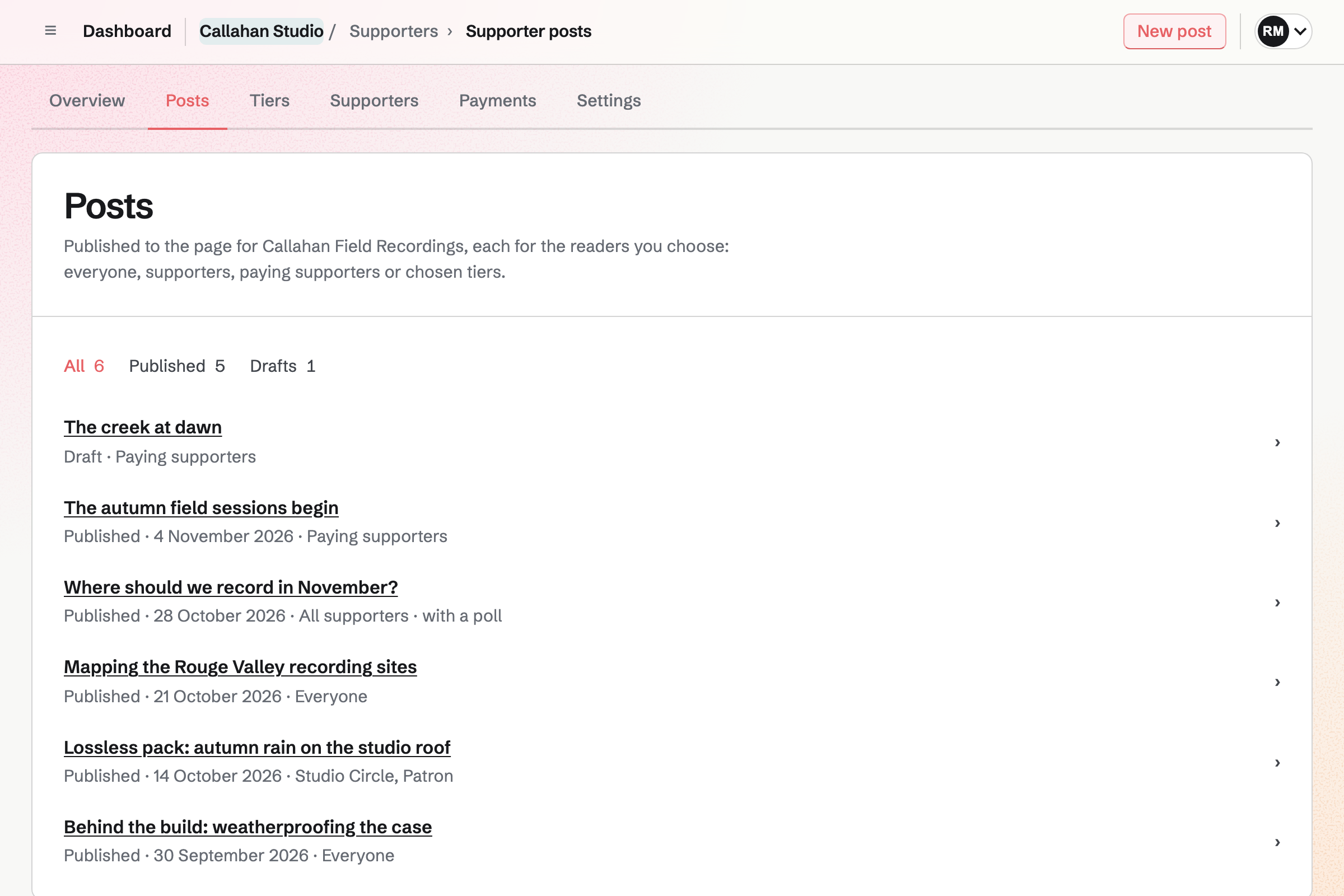
Callahan Studio’s Supporters posts: a draft and five published posts, each with its date and who it is for, from everyone to paying supporters and chosen tiers, one with a poll.

How is Magpie different?

1. Paid posts come with the rest of the business

One Magpie subscription includes the areas a creator would otherwise buy one at a time:

  • Supporters, the area this page is about, for free and paid tiers and the posts kept for them
  • Store for downloads and physical products, and Courses for lessons at a school of your own
  • Newsletter for email to subscribers, and Podcast for a show with its own feed
  • Meetings and Appointments for booking pages, and Invoicing for invoices paid online
  • Websites, Link-In-Bio List, QR Codes, Forms, Contacts and the other areas, in the same team

Everything is in one account with one bill. Ko-fi covers tips, memberships, a shop, commissions, posts and stream alerts. Its pages describe no newsletter, no podcast feed and no invoices.

2. Store is a whole shop

Store sells downloads and physical products from the same cart. It tracks stock for each variant and warns you when stock is low. It can keep selling as a back order. Shipping zones by country, state or postal code each have their own prices. Free shipping over an amount, local pickup and local delivery are options. Buyers are emailed the tracking number when you add a shipment.

3. Locked posts and your own address come on every plan

A post can be for everyone, all supporters, paying supporters or chosen tiers, on the Free plan too. Readers a post is locked for see its title, cover and excerpt, and the tiers that open it. You choose the page's address, /support/ and a name of your own. Free allows 3 paid tiers and 200 posts; Pro and the Team plan have no limit.

On Ko-fi, posts for supporters only and a shorter page name come with Contributor status or Gold.

Comparing Magpie and Ko-fi

Ko-fi does more for the fan who wants to give; Magpie does more around the creator's business. Every line in the tables below was checked against Ko-fi's own pages, linked from each row, and against Magpie's code and Help.

Platform

WhatKo-fiMagpie
Creator pageA free page where fans support you Yes Yes
Your page's colour and videoYour own colour, an intro video and the section shown first Yes No
One-off tipsA fan pays once, with a message Yes Partly
Fans choose their monthly amountPay more than a tier's price, or give monthly at any amount Yes Fixed price per tier
Funding goalA target on your page, and how close you are Yes No
Membership tiersTiers with their own price and benefits Yes Yes
Posts kept for supportersFor all supporters, or a tier and those above Contributor status or Gold Yes
Limited tiersA cap on how many people join a tier Yes No
Welcome message per tierEach tier greets new members in its own words Yes One for every tier
Discord rolesSupporters get a role in your server Contributor status or Gold No
Shop for downloadsFiles buyers download from their order Yes Store
Physical products with shippingStock, shipping prices and tracking Yes Store
CommissionsCustom work with slots, add-ons and your terms Yes Partly
Paid sessionsFans book and pay for a call with you Partly Yes
Posts with text, pictures, video and pollsFor everyone or chosen readers Yes Yes
Audio postsUpload audio to a post Contributor status or Gold No
Scheduled postsSet a post to publish later Contributor status or Gold No
GalleryPictures on your page, some kept for supporters Yes No
Stream alertsEach tip shown on your live stream Yes No
Button for your websiteButtons for other sites, and a WordPress plugin Yes A link
Google AnalyticsSee your page's visitors Contributor status or Gold No
Messages from supportersSupporters write to you from your page Yes Partly
Email newsletterEmails to everyone who follows your work No Yes
Podcast hostingA show with an RSS feed for podcast apps No Yes
InvoicesBill a client for custom work No Yes
PayPal and VenmoWays to pay besides a card Yes Cards only
Paid into your own accountNothing held by the platform Yes Yes
Platform feeWhat comes off each payment 0% on one-off tips, 5% on the rest 4%
Plan with no fee on paymentsA monthly price instead of a share Gold No

Good to know: Where Magpie says No or Partly, the line under the row says what Magpie does instead. Each gap has an item on Magpie's roadmap, and the line changes on the day it ships.

Your page

Both give you a free page at a short address. Ko-fi adds your own colour, an intro video and a choice of which section visitors see first. They do it better than we do today.

WhatKo-fiMagpie
Publish a free page where fans can support me Source Yes Yes
Give my page my own colour, an intro video and the section visitors see first Source Magpie: The page shows the cover image, name and description, then the tiers, the About section and the posts, inside Magpie's own top bar and footer. Its colours and the order of its sections cannot be changed, and it has no intro video. Yes Partly
Choose a short address for my page Source Yes Yes

Good to know: Supporters settings can show how many support you and how many are on each tier. They can also show what the paid tiers add up to each month. All three are off until you turn them on.

Tips and goals

Ko-fi's first way to earn is a one-off tip. A goal on the page shows how close you are. Supporters has neither. Fans join a free tier, or a paid tier at its set price, monthly or yearly.

WhatKo-fiMagpie
Let fans send me a one-off tip Source Magpie: Supporters has no one-off tip: support is a free tier or a paid tier billed monthly or yearly. A Store product can be pay what you want, with a minimum and a suggested price, and a Long text personalisation field can take the fan's message, so a fan can buy it as a tip through the Store cart and checkout; it is not shown on the Supporters page. Yes Partly
Let fans choose how much they pay each month Source Magpie: Each paid tier has one fixed monthly price, and a fixed yearly one if offered, at least the minimum for the Stripe account's currency. A supporter cannot pay more than the tier's price or choose their own amount. Yes Partly
Show a funding goal on my page, with how close I am to it Source Magpie: There is no goal. Supporters settings can show on the page how many support it, how many are on each tier and what the paid tiers add up to each month, but not a target or progress toward one. Yes No

Good to know: A Store product can be pay what you want, with a minimum and a suggested price. A Long text field can ask the buyer for a message. It is sold in the Store, not on the Supporters page.

Memberships

Both offer monthly tiers with their own price and benefits, and posts kept for them. A Magpie tier can also have a yearly price. Ko-fi adds tiers fans can pay more for, limits on members, a welcome for each tier and Discord roles.

WhatKo-fiMagpie
Offer membership tiers, each with its own price and benefits Source Yes Yes
Keep posts for paying supporters, or for a tier and those above it Source Yes Yes
Limit how many people can join a tier Source Magpie: A tier is open to join or closed, with no limit on how many people join it. Yes No
Send new members of each tier a welcome message of its own Source Magpie: Supporters settings hold one welcome message that every new supporter reads, whatever their tier. Yes Partly
Give my supporters a role in my Discord server Source Magpie: Supporters does not connect to Discord. Yes No
Keep some shop items and requests for my members Source Magpie: A Store discount code can be shared in a post kept for supporters, or kept for a saved group of customers, but Store does not know who supports you and cannot keep a product for them. Yes Partly

Good to know: Give complimentary access opens any Magpie tier to someone for free, with an optional end date. Free allows 3 paid tiers; Pro and the Team plan have no limit.

Shop

Both sell downloads and physical products, and email buyers a tracking link. Magpie's Store adds shipping zones, stock for each variant, low stock alerts and back orders.

WhatKo-fiMagpie
Sell digital downloads from my page Source Yes Yes
Sell physical products, and show them sold out when stock runs out Source Yes Yes
Choose where I ship and what shipping costs Source Yes Yes
Mark an order shipped and send the buyer its tracking link Source Yes Yes

Good to know: Store takes 4% of each sale, through the same Stripe account as Supporters. It can email buyers a new version of a file they bought.

Commissions

Ko-fi's commissions open and close when you choose, with slots, add-ons and your own terms. They do it better than we do today. Magpie sells custom work as a Store product.

WhatKo-fiMagpie
Take paid commissions for custom work, with a limited number of slots Source Magpie: Store can sell custom work as a product: tracked stock limits the slots, personalisation fields ask for the details and can add to the price, and Remove from store turns the product back into a draft to close it. The finished piece cannot be sent to the buyer through their order, and there is no deposit with the rest paid later. Yes Partly
Let fans book and pay for a session or a call with me Source Ko-fi: A commission can be a booking, such as a one-to-one tutorial, paid for up front. Ko-fi's pages do not describe choosing a time from a calendar. Partly Yes

Good to know: In Store, tracked stock limits the slots, and a personalisation field can add to the price. Invoicing can bill a client for custom work, with a Pay online button. Appointments takes payment or a deposit when a fan books a session.

Posts and gallery

Both publish posts with text, pictures, video and polls. Ko-fi adds audio and scheduled posts with Contributor status or Gold, and a gallery on the page.

WhatKo-fiMagpie
Publish posts with text, pictures and video Source Yes Yes
Upload audio to a post Source Magpie: A post holds text, pictures, Screen Recorder videos and a poll. It cannot carry an audio player or a file to download. Yes No
Ask supporters a question in a poll Source Yes Yes
Schedule a post to publish later Source Magpie: A post is a draft or published; it cannot be set to publish at a later time. Yes No
Show my work in a gallery on my page, with some pictures kept for supporters Source Magpie: The page lists posts newest first, each with a cover image. There is no gallery of pictures. Yes No

Good to know: A Supporters post is written in the Notes editor, with videos from Screen Recorder. A poll is a published Form, and its answers are collected in Forms.

Stream alerts

Ko-fi shows each tip on your stream with a GIF, and can read the message aloud. A goal on screen updates as tips come in. Magpie shows nothing on a live stream today.

WhatKo-fiMagpie
Show an alert on my live stream when someone supports me Source Magpie: Nothing in Magpie shows a supporter or a payment on a live stream. Yes No

Good to know: Supporters settings can email team admins about each new supporter.

Sharing and connections

Ko-fi makes buttons for other sites and a WordPress plugin, connects Google Analytics and lets supporters message you. Magpie adds a Newsletter and a Podcast, which Ko-fi does not offer.

WhatKo-fiMagpie
Put a support button on my website or blog Source Magpie: The Supporters page has its own address to link to from anywhere, and a Links page can carry a Magpie page block that opens it, but there is no button, widget or WordPress plugin to put on a site. Yes Partly
See my page's visitors in Google Analytics Source Magpie: A Supporters page puts no analytics code on the page; the overview counts supporters and payments only. Yes No
Let supporters message me privately from my page Source Magpie: A supporter's page has Email in its More menu, which opens your own mail program, and Team chat reaches anyone by handle, as a request until they accept. Supporters cannot message you from your page. Yes Partly
Email a newsletter to everyone who follows my work Source Ko-fi: Ko-fi has no newsletter: its feature pages and its comparison with Patreon list none, and its help on direct messages says it has no bulk messaging, suggesting the supporters CSV to email them outside Ko-fi. No Yes
Host my podcast and its feed where my supporters find me Source Ko-fi: Ko-fi for Podcasters offers tips, memberships with bonus episodes, goals and a shop, but no podcast hosting or RSS feed. No Yes

Good to know: A Link-In-Bio List can carry a block that opens your Supporters page. QR Codes makes a code for the page's address.

Payments, fees and plans

Both pay into your own payment account, with nothing held by the platform. Ko-fi adds PayPal, Venmo and local payment methods. Gold is a monthly price with no fee on payments.

WhatKo-fiMagpie
Get paid straight into my own payment account, with nothing held by the platform Source Yes Yes
Let fans pay with PayPal or Venmo as well as a card Source Magpie: Supporters checkout is Stripe's, set to take cards only. There is no PayPal or Venmo, and a creator without Stripe cannot take paid support. Yes Partly
Pay the platform 5% or less of what fans pay Source Yes Yes
Pay a fixed monthly price instead of a share of each payment Source Magpie: The Supporters fee is the same 4% on every plan; Pro and the Team plan do not lower it. Yes No
Send a client an invoice for custom work Source Ko-fi: A commission is bought through the creator's page; the Commissions page and Ko-fi's feature pages offer no invoices. No Yes

Good to know: Supporters › Payments lists each payment with its fees and any refund. A refund made in Stripe returns Magpie's fee in proportion.

Price comparison

How Ko-fi charges

Ko-fi is free to start. Ko-fi Free takes 0% of one-off tips and 5% of memberships, monthly tips, shop sales and commissions. Contributor status is free and adds features, and it takes 5% of tips too. Ko-fi Gold is a monthly subscription that takes 0% of every payment. PayPal's or Stripe's processing fees come on top. The details are on Ko-fi's pricing page.

How Magpie charges

Magpie charges by plan, Free or a paid plan, for every area in the account. The plan sets how many paid tiers and posts you have, not which areas you can use. Magpie takes 4% of Supporters payments and 4% of Store sales. Stripe's fees come on top. Prices are on Magpie's pricing page.

On top of the planKo-fiMagpie
Monthly feeNone, or GoldFree plan, or a paid plan
Fee on one-off tips0% on Ko-fi Free; 5% with Contributor status4% on a pay-what-you-want Store product
Fee on memberships5%, or 0% with Gold4% on Supporters
Fee on shop sales and commissions5%, or 0% with Gold4% on Store
Payment processingPayPal's or Stripe's feesStripe's fees, through your own Stripe account
PayoutsStraight into your PayPal or Stripe accountStripe pays your bank on its own schedule
Email newsletterNot offeredIncluded, with subscriber limits by plan
Podcast hostingNot offeredIncluded

When to choose Magpie or Ko-fi

  • Want monthly supporters beside a full shop, a newsletter, a podcast and invoices, in one account? Go with Magpie.
  • Want one-off tips with no fee, a goal, commissions, stream alerts and PayPal, free to start? Ko-fi is the right choice.

Recommendations by kind of business

For a streamer
Ko-fi. Each tip shows on your stream, with a GIF and the message read aloud. Tips through stream alerts carry no Ko-fi fee. Magpie shows nothing on a live stream today.
For an artist who takes commissions
Ko-fi. Commissions open with slots, add-ons and your own terms, and a gallery shows your work. Magpie sells custom work only as a Store product today.
For a maker who ships things
Magpie. Store ships physical products with shipping zones, stock and tracking, and sells downloads too. Supporters and Store pay into the same Stripe account.
For a writer or a podcaster
Magpie. Paid posts sit beside a Newsletter and a Podcast with its own feed, in one account. Ko-fi offers neither.
For a creator with monthly supporters
Either. Both keep posts for chosen tiers and pay into your own account. Ko-fi adds Discord roles and tiers fans can pay more for. Magpie adds a full shop and the rest of the business. Choose by whether Discord or the shop matters more.

Frequently asked questions

What is the difference between Ko-fi and Magpie?

Ko-fi is a free page where fans tip you, join memberships, buy from a shop and order commissions. Magpie is one subscription for a small business's software. Its Supporters area is one part, beside Store, Newsletter, Podcast and Invoicing. Ko-fi does more for the fan who wants to give; Magpie does more around it.

Does Magpie replace Ko-fi?

Yes, for a creator whose monthly supporters are one part of a business. Supporters has free and paid tiers, monthly or yearly, and posts for chosen tiers. Store sells downloads and physical products. Payments go to your own Stripe account.

Consider keeping Ko-fi if your fans tip you once, or you take commissions or stream. Keep it too if you want a goal, a gallery, Discord roles or PayPal. Ko-fi does each of these better than Magpie does today.

How much does Ko-fi cost?

Ko-fi is free to start. Ko-fi Free takes 0% of one-off tips and 5% of memberships, shop sales and commissions. Contributor status is free and takes 5% of tips too. Ko-fi Gold is a monthly subscription with no fee on payments. Processing fees come on top.

How much does Magpie cost?

Magpie has a Free plan and paid plans, each covering every area. Free allows 3 paid tiers and 200 posts; a paid plan has no limit. Magpie takes 4% of Supporters payments and 4% of Store sales, and Stripe's fees come on top. The prices are on Magpie's pricing page.

Can fans send me a one-off tip on Magpie?

Partly. Supporters has no one-off payment: a fan joins a free tier or a paid tier, billed monthly or yearly. A Store product can be pay what you want, with a minimum and a suggested price. It can ask the buyer for a message. Ko-fi's one-off tip is the first thing on its page.

Can fans choose how much they pay each month on Magpie?

No. Each paid tier has one fixed monthly price, and a supporter pays that price. A different amount needs another tier. On Ko-fi a fan can give monthly at their own amount. A fan can also pay more than a tier's minimum.

Does Magpie have a funding goal?

No. The Supporters page has no target and no progress toward one. Supporters settings can show what the paid tiers add up to each month. Ko-fi shows a goal on your page and on your stream.

Can I take commissions on Magpie?

Partly. Store can sell custom work as a product. Tracked stock limits the slots. Personalisation fields ask for the details and can add to the price. The finished piece cannot be sent through the buyer's order, and there is no deposit. Ko-fi's commissions have slots, add-ons and your own terms.

Can fans book and pay for a session on Magpie?

Yes. An Appointments service can take its full price or a deposit by card when someone books, paid into your team's Stripe account. Magpie takes 4% of the payment. On Ko-fi, a commission can be a session paid for up front, and its pages do not describe choosing a time from a calendar.

Can I limit how many people join a tier on Magpie?

No. A tier is open to join or closed, with no cap on how many join it. Ko-fi can cap a tier at a number of members.

Does Magpie connect to Discord?

No. Supporters does not connect to Discord. Ko-fi gives each tier its own Discord role, removed when the membership ends.

Can I post audio or schedule posts on Magpie?

No. A Supporters post holds text, pictures, Screen Recorder videos and a poll. A post is a draft or published, with no time set to publish later. Ko-fi offers audio uploads and scheduled posts with Contributor status or Gold.

Does Magpie have a gallery?

No. The Supporters page lists posts newest first, each with a cover image. Ko-fi's Gallery tab shows your pictures, with some locked for supporters.

Does Magpie have stream alerts?

No. Nothing in Magpie shows a supporter or a payment on a live stream. Ko-fi's stream alerts work with Twitch, YouTube, Facebook and anything that runs OBS.

Can supporters message me from my page on Magpie?

Partly. A supporter's page in Supporters has Email, which opens your own mail program. Team chat reaches anyone by handle, as a request until they accept. Supporters cannot write to you from your page. Ko-fi has a button on the page for supporters to message you.

Can fans pay with PayPal or Venmo on Magpie?

No. Supporter checkout is Stripe's and takes cards. A creator without a Stripe account cannot take paid support. Ko-fi takes PayPal, Venmo, cards, Apple Pay, Google Pay and local payment methods.

Does Magpie have a plan with no fee on payments?

No. The Supporters fee is 4% on every plan. Pro and the Team plan do not lower it. Ko-fi Gold is a monthly subscription that takes 0% of every payment.

Can I put a support button on my website with Magpie?

Partly. The Supporters page has its own address to link to from anywhere. A Link-In-Bio List can carry a block that opens it. There is no button, widget or WordPress plugin. Ko-fi makes buttons for other sites and has a WordPress plugin.

Does Ko-fi have an email newsletter?

No. Ko-fi's pages list no newsletter, and its help says it has no bulk messaging. Magpie's Newsletter emails subscribers who sign up on its own page or on a signup form on your website. It keeps a public archive.

Does Ko-fi host podcasts?

No. Ko-fi for Podcasters offers tips, memberships with bonus episodes, goals and a shop, with no RSS feed. Magpie's Podcast gives a show its own page and an RSS feed for Apple Podcasts and Spotify.

Can I send invoices with Ko-fi?

No. A Ko-fi commission is bought through your page, and Ko-fi's pages offer no invoices. Magpie's Invoicing bills a saved contact with line items, discounts and tax. An invoice can carry a Pay online button for cards.

Do fans need an account to support me on Magpie?

Yes. Joining any tier starts with signing in to Magpie or making an account, then Stripe's checkout. A Store purchase needs no sign-in first. The order goes into an account for the buyer's email address.

Can I use Ko-fi and Magpie together?

Yes. Ko-fi can take tips and commissions while Magpie runs your shop, newsletter, podcast and website. A Magpie website or Link-In-Bio List can link to your Ko-fi page.

How do I move from Ko-fi to Magpie?

Set up Supporters and add your tiers, then publish the page. Paying members cannot be imported: each one joins again through the page and Stripe's checkout. Ko-fi's help points to a CSV file of your supporters. Newsletter imports a CSV file of people who agreed to hear from you. Then you can email them the new address.

What is included in Magpie's Free plan?

Supporters with a free tier, 3 paid tiers and 200 posts. Store, a podcast, booking pages, Invoicing, the Newsletter, QR Codes and a team of 3. A paid plan removes the tier and post limits and raises the others.
If a line on this page is wrong, tell us and we will correct it.

Ko-fi changes, and so does Magpie. If a line is out of date about either product, email support@magpie.diy with the page that shows it. We check the line against that page, change it, and give it the new date. That goes for Ko-fi's own team as much as for anyone who uses it.

Start a Supporters page on Magpie's Free plan.

Create a Magpie account, then set up Supporters.

Create account