Miro compared with Magpie

Miro vs Magpie: an in-depth comparison

Miro and Magpie both give a team a canvas with no edges for notes, pictures and lines. They are built for different teams.

  1. Miro is a whiteboard built for teams that plan and run workshops together. Docs, tables, slides, Kanban, Talktrack and AI all work on the same board. It is built for product, design and agile teams, and for people who run workshops.
  2. Magpie is one subscription for a small business's software, and Idea Boards is one part of it. Beside the boards it includes Design Canvas, Presentations, Kanban Boards and the areas a business runs on. It is built for someone whose boards are one part of running the business.
Create account
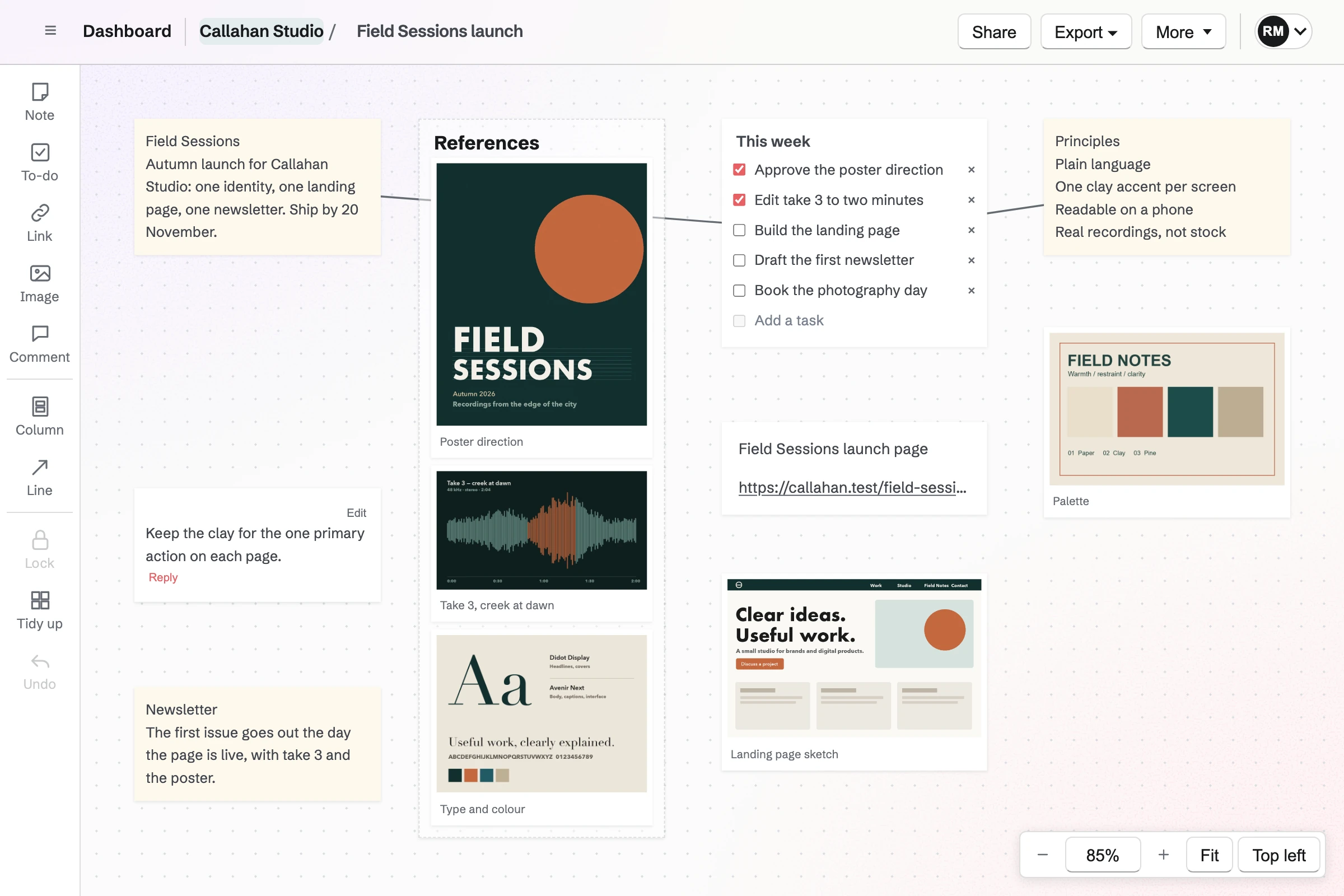
Callahan Studio’s Idea Board for an autumn launch, with a brief and principles joined to the week’s checklist, a column of references, the palette, a page sketch, a link, a comment and a note on the newsletter.

How is Magpie different?

1. The boards come with the rest of the business

One Magpie subscription includes the areas a small business would otherwise buy one at a time:

  • Idea Boards for notes, to-dos, links, pictures and lines on a canvas
  • Design Canvas for shapes, drawing, flowcharts and clickable prototypes
  • Kanban Boards, Presentations, Documents and Screen Recorder for the work that follows
  • Meetings, Invoicing, Store, Mail, Contacts and the other areas, in the same team

Everything is in one account with one bill. Miro covers the board and what grows from it. Bookings, invoices and email are left to other software.

2. Every plan keeps boards private and exports them in full

A board in Personal opens only for you, on the Free plan too. Export downloads every item as a PNG or a PDF on every plan. People who can only view a board can export it as well.

3. A team pays one price

The Team plan is one price for up to 25 people, and each can use Idea Boards. You add a teammate without changing the bill. Someone outside the team can join as a guest and use only the areas they are given.

Comparing Magpie and Miro

Miro does more on the board; Magpie does more around it. Every line in the tables below was checked against Miro's own pages, linked from each row, and against Magpie's code and Help.

Platform

WhatMiroMagpie
WhiteboardNotes, pictures and lines on a canvas with no edges Yes Idea Boards
Sticky notes in colours and tagsSort notes by colour, tag or author Yes Partly
TemplatesStart a board from a ready-made one or the team's own Yes No
Shapes, flowcharts and drawingShapes joined by lines, and a pen Yes Design Canvas
Mind mapsBranches added and laid out as the map grows Yes No
Technical diagramsCloud, UML and database shapes, or Mermaid code Yes No
PrototypesClickable screens people comment on Business Design Canvas
Working on a board togetherEveryone's changes and pointers shown as they happen Yes Partly
Voting, a timer and private modeWorkshop exercises run on the board Starter and above No
Live pollsPolls and word clouds answered from phones Business No
Video callsTalk while you work Starter and above Video Chat, two people
Comments with mentionsTag a teammate so they are told Yes Partly
Version historyGo back to an earlier board Starter and above No
Public linkOpen a board without an account Yes No
Private boardsA board only you can open Starter and above Yes
Full-resolution exportThe board as a PDF or a picture Starter and above Yes
KanbanCards in columns with an owner and a due date Yes Kanban Boards
SlidesPresent the work full screen with your notes Yes Presentations
Recorded walkthroughsYour voice and camera over the board Talktrack Screen Recorder
AI on the boardIdeas added, notes grouped and summed up Yes Partly
IntegrationsJira, Slack, Teams and more than 250 others Yes No
API and MCPBuild on boards, or let an AI app use them Yes Yes
Desktop appMiro or Magpie on a Mac or a Windows computer Yes No
Bookings, invoices and emailThe rest of the business in the same account No Yes

Good to know: Where Magpie says No or Partly, the line under the row says what Magpie does instead. Each gap has an item on Magpie's roadmap, and the line changes on the day it ships.

The canvas

Both put notes, pictures and links on a canvas with no edges, lined up as you drag. Miro adds colours, tags, templates, frames and embedded pages. They do these better than we do today.

WhatMiroMagpie
Make a board and lay ideas out on a canvas with no edges Source Yes Yes
Add sticky notes and sort them by colour or tag Source Magpie: Note adds a note, as do N and a double-click on empty canvas, but every note looks the same: there is no colour, tag or text style to sort them by. Yes Partly
Turn a list, or rows from a spreadsheet, into a note each in one go Source Magpie: Pasted text becomes a single note. Import JSON adds columns of cards from a document, which an AI chat can write from a list using Copy the prompt. Yes Partly
Turn a photo of paper sticky notes into notes on the board Source Magpie: A pasted or uploaded photo becomes an image item; the writing on it is not read into notes. Yes No
Put pictures, PDFs and office files on the board Source Magpie: Image adds pictures from Your images or a new upload, several at once, and a pasted screenshot becomes an image. A PDF or other file cannot go on a board, only a link to it. Yes Partly
Paste a link and see the page itself, such as a video or a spreadsheet, on the board Source Magpie: A pasted web address becomes a link card with a title and description you type; the page is not previewed or played on the board. Yes Partly
Divide the board into frames that each hold part of the work Source Magpie: A Column holds items stacked in order and moves them with it. There is no frame that holds items laid out freely, or that becomes a slide or a page of the export. Yes Partly
Start a board from a template, or from one my team saved Source Magpie: Every board starts blank. Import JSON lays out columns and cards from a document, and Copy the prompt has an AI chat write one; there are no ready-made boards or saved ones to start from. Yes No
Line items up neatly without placing each one by hand Source Yes Yes

Good to know: A Magpie board holds notes, to-do lists, links, images, comments and columns. The Free plan has 3 boards of up to 150 items, and a paid plan has no limit.

Diagrams and mind maps

Miro draws shapes, flowcharts, mind maps and technical diagrams on the board itself. In Magpie, shapes, drawing and prototypes are in Design Canvas, apart from the board.

WhatMiroMagpie
Draw shapes on the board and join them with lines into a flowchart Source Magpie: Design Canvas draws rectangles, ellipses, diamonds and other shapes with labels, joined by arrows that follow them when they move. An Idea Board has arrows between its cards but no shapes, so a flowchart and the notes it came from sit in different places. Yes Partly
Sketch freehand with a pen or a stylus Source Magpie: Draw in Design Canvas sketches freehand, thicker or thinner with a stylus's pressure, and Eraser removes strokes. An Idea Board has no pen. Yes Partly
Build a mind map that lays its branches out as it grows Source Magpie: Notes on an Idea Board can be joined by arrows drawn by hand; nothing adds branches or lays them out. Yes No
Draw technical diagrams, such as cloud architecture, UML or database diagrams, from shape libraries or Mermaid code Source Magpie: Design Canvas has general shapes and arrows, but no cloud, UML or BPMN libraries, no Mermaid, and no Visio or Lucidchart import. Yes No
Turn screens into a clickable prototype Source Yes Yes

Good to know: Design Canvas joins shapes with arrows that follow them, and its Draw follows a stylus's pressure. Prototypes are on every plan.

Docs, tables, slides and recordings

Miro turns a board into a Doc, a table, a Kanban or slides without leaving it. Magpie has Documents, Kanban Boards, Presentations and Screen Recorder as areas of their own.

WhatMiroMagpie
Turn the notes on a board into a written document Source Magpie: The assistant on Dashboard can read a board's items and write a Document from them, and copying items puts their text on the clipboard to paste into one. Nothing on the board itself makes a document, and the Document is kept apart from the board. Yes Partly
Plan work in a table and see it on a timeline Source Magpie: Spreadsheets keep work in a grid, and the Roadmap in Issues lists dated projects; nothing draws work as bars on a timeline. Yes Partly
Track tasks as cards in columns, with who owns each one and when it is due Source Yes Yes
Present the board as slides, with notes only I can see Source Magpie: Presentations shows a deck full screen, with each slide's speaker notes in a presenter view only you see, but the deck is made separately; an Idea Board has no way to present it. Yes Partly
Record a voice and video walkthrough of a board for people to watch later Source Yes Yes

Good to know: Presentations has a presenter view with your speaker notes. On the Free plan, Screen Recorder records one video a week of up to 3 minutes. A paid plan records up to 30 minutes.

Meetings and workshops

Miro is built for live sessions, with everyone on one board at once. It adds votes, a timer, private mode, polls and a call. They do this better than we do today.

WhatMiroMagpie
Work on the same board at the same time and see where everyone is Source Magpie: A board open in several tabs, or by several people, shows the others' new items, edits and deletions within a few seconds while it is in view. When two people change the same card at once, both changes are kept. Nobody else's pointer shows, and nothing says who else has the board open. Yes Partly
Vote on the ideas on a board Source Magpie: Idea Boards have no votes. Kanban cards take hearts and Message Boards posts take votes. Yes No
Time each exercise with a timer everyone on the board sees Source Magpie: Nothing on a board keeps time for a group. Yes No
Collect everyone's notes hidden until all have finished, without names Source Magpie: Every item shows to everyone who opens the board as soon as it is saved. Yes No
Run live polls, word clouds and rankings that people answer from their phones Source Magpie: Webinars has live polls but is closed to members for now; Forms collects answers, but not live during a session. Yes No
Talk on a video call while working on the board Source Magpie: Video Chat holds a timed call for two people in another tab, up to 2 or 5 minutes on the free plan and 2, 5 or 10 on a paid plan; it does not open beside a board, but either person can share a screen, a window or a tab to show the board. Calls for a group, of up to 6 people, are scheduled only from Hiring interviews, Courses live sessions and Coaching sessions, on Pro and Team plans. Yes Partly

Good to know: A Magpie board open in several places shows the others' changes within a few seconds. When two people change the same card at once, both changes are kept.

Sharing and permissions

Miro shares one board with chosen people, as editors, commenters or viewers, or with anyone by link. A Magpie board opens for its team, as each member's access allows.

WhatMiroMagpie
Comment on a spot on the board and mention a teammate so they are told Source Magpie: A Comment item holds a thread of replies anywhere on the board, but replies carry no name, nobody can be mentioned, and nobody is told. Yes Partly
Share one board with chosen people as editors, commenters or viewers Source Magpie: A board is open to everyone in its team, who edit or only view it as the team's member access says. It cannot be shared with one person alone, a guest given Idea Boards sees every board in the team, and there is no commenter role. Yes Partly
Let people from outside the company into the boards Source Yes Yes
Let anyone with a link open a board, or add to it, without signing in Source Magpie: Opening a board needs a Magpie account, which is free; Share sends the address to people who can already open the board. Yes No
Keep a board to myself Source Miro: Private boards need Starter or above; the Free plan has none. Partly Yes
Go back to an earlier version of a board Source Magpie: Undo reverses moves, tidies, resizes and deletions made since the board was opened; there is no history to go back to after that. Yes No
Download the whole board as a PDF or a picture Source Miro: Boards export as a PDF or an image, but the Free plan exports only at low resolution; full-resolution JPG and PDF need Starter. Partly Yes
Show a live board inside another tool or on my website Source Magpie: A board opens only on Magpie's website; Share sends its address. Yes No
Group boards into spaces or folders Source Magpie: Boards are listed in Personal and in each team, with no folders within them. Yes Partly

Good to know: A board in Personal opens only for you, on every plan. Anyone who can open a board can export it as a PNG or a PDF.

AI

Miro AI adds notes, groups them by theme and sums up a board, using monthly credits. Magpie's assistant works on boards from Dashboard.

WhatMiroMagpie
Ask AI to add ideas to a board, group the notes into themes, and sum it up Source Magpie: The assistant on Dashboard creates boards, adds and changes notes, to-dos, columns and lines, and searches a board's items to answer about them; Import JSON lays out what any AI chat writes. Nothing is asked from inside the board, and notes are not grouped by theme in one step. Yes Partly
Save a multi-step AI task as a workflow the team runs again Source Magpie: The assistant on Dashboard carries out one request at a time; a request cannot be saved as a workflow and run again. Yes No
Let AI apps such as Claude or Cursor read and change boards Source Yes Yes

Good to know: The assistant creates boards and adds or changes notes, to-dos, columns and lines. Connected apps such as Claude, ChatGPT and Cursor can do the same through MCP.

Integrations and apps

Miro connects to more than 250 apps, has desktop and phone apps, and offers single sign-on on Business. Magpie runs in the browser and has an API.

WhatMiroMagpie
Connect boards to Jira, Slack, Teams and the other tools a team uses Source Magpie: Idea Boards connect to no other tool. Kanban Boards, Issues and To-dos do the work of Jira and Asana inside Magpie, and the API reaches boards. Yes No
Build on boards with an API Source Yes Yes
Use boards on a phone or a tablet Source Yes Yes
An app for Mac and Windows Source Magpie: Magpie is used in a browser on a computer. Yes No
Sign in through a company identity provider Source Magpie: People sign in with a password, an emailed link or code, a passkey, or a Google, Apple, LinkedIn or GitHub account, with a two-factor code if they turn it on; nothing connects to a company identity provider. Yes No

Good to know: Idea Boards works in a phone's or a tablet's browser. Two fingers move the canvas, and pinching zooms.

Price comparison

How Miro charges

Miro charges per member per month, on the Free, Starter, Business and Enterprise plans. Free has 3 boards you can edit. Starter adds boards without limit, private boards, version history, voting, a timer and private mode. Business adds guests, interactive prototypes, live polls and single sign-on, and Enterprise is by quote. Free, Starter and Business have monthly AI credits. Prices are on Miro's pricing page.

How Magpie charges

Magpie charges by plan, Free or a paid plan, for everything in the account. Idea Boards, Design Canvas and Presentations are on every plan. The Team plan is one price for up to 25 people, not a price per member. Prices are on Magpie's pricing page.

On top of the planMiroMagpie
Boards without paying3 boards you can edit3 boards of up to 150 items
How a team paysPer member, per monthOne Team plan for up to 25 people
Private boardsStarter and aboveEvery plan
Full-resolution exportStarter and aboveEvery plan
Version historyStarter and aboveNot available
Guests from outside the companyBusinessEvery team, limited to the areas they are given
AI10 credits a month on Free, 25 a member on Starter, 50 on BusinessThe assistant on Dashboard; no AI on the board
Recorded walkthroughs5 Talktracks on Free; no limit on paid plansScreen Recorder: 1 a week on Free; no weekly limit on a paid plan
Bookings, invoices and emailNot offeredIncluded

When to choose Magpie or Miro

  • Want a whiteboard, design files, decks and Kanban beside your bookings, invoices, website and email, for one price for the whole team? Go with Magpie.
  • Want live workshops on one board, with templates, votes, a timer, diagrams, AI and your team's other software connected? Miro is the right choice.

Recommendations by kind of business

For a team that runs workshops
Miro. Everyone works on one board at once, with votes, a timer, private mode and a call. Magpie's boards show other people's changes within a few seconds, with no pointers, votes or timer.
For a product or engineering team
Miro. Technical diagrams, Mermaid code, two-way Jira sync and more than 250 apps fit a team planning software. Magpie's boards connect to no other software.
For a small business planning its own work
Magpie. A board for ideas sits beside Kanban Boards, Documents and Presentations in the same team. The bookings, invoices and email it plans for are there too.
For one person thinking on a canvas
Magpie. A board in Personal is private on the Free plan, and Export gives the whole board as a PDF. Miro's Free plan has no private boards.
For a designer sketching ideas
Either. Miro has shapes, a pen and prototypes on the same board as the notes. Magpie keeps notes in Idea Boards, and shapes, drawing and prototypes in Design Canvas. Choose by whether the notes and the drawing should be on one canvas.

Frequently asked questions

What is the difference between Miro and Magpie?

Miro is a whiteboard for teams, priced per member. Docs, tables, slides, Kanban, Talktrack and AI work on the same board. Magpie is one subscription for a small business's software. Its Idea Boards is one area beside Design Canvas, Presentations, Kanban Boards, bookings, invoicing and mail. Miro does more on the board; Magpie does more around it.

Does Magpie replace Miro?

Yes, for a business that uses a board to lay out its own ideas and plans. Magpie has notes, to-dos, links, pictures, comments, columns and lines on a canvas with no edges. Every plan exports the board.

Consider keeping Miro if your team runs live sessions on one board and follows each other's pointers. Keep it too for workshops with votes, a timer and polls. Keep it if you start from templates, draw mind maps on the board, or connect Jira and Slack. Miro does each of these better than Magpie does today.

How much does Miro cost?

Miro has a Free plan and the Starter, Business and Enterprise plans, priced per member per month. Free has 3 boards you can edit and 10 AI credits a month. Enterprise is by quote. The prices are on Miro's pricing page.

How much does Magpie cost?

Magpie has a Free plan and paid plans, each covering every area. Idea Boards has 3 boards on the Free plan and no limit on a paid plan. A free team has 3 people, and the Team plan is one price for up to 25. The prices are on Magpie's pricing page.

Can several people work on a Magpie board at the same time?

Partly. A board open in several places shows the others' new items, edits and deletions within a few seconds. When two people change the same card at once, both changes are kept. Nobody else's pointer shows, and nothing says who else has the board open. Live pointers are on Magpie's roadmap. Miro shows everyone's changes and cursors as they happen.

Does Magpie have whiteboard templates?

No. Every board starts blank. Import JSON lays out columns and cards from a file. Copy the prompt has an AI chat write one. Templates are on Magpie's roadmap. Miro has more than 7,000 templates on every plan.

Can I change the colour of a sticky note in Magpie?

No. Every note on an Idea Board looks the same, with no colour, tag or text style. Note colours and tags are on Magpie's roadmap. Miro's notes come in several colours, with tags, and group by colour, tag or author.

Does Magpie have voting, a timer or private mode?

No. Nothing on an Idea Board takes votes, keeps time for a group or hides notes until everyone has finished. Each is on Magpie's roadmap. Miro has all three on Starter and above.

Does Magpie have mind maps?

No. Notes on an Idea Board can be joined by lines you draw. Nothing adds branches or lays them out. Mind maps are on Magpie's roadmap. Miro adds a branch with one click and keeps the map in line.

Can I draw shapes and flowcharts in Magpie?

Yes, in Design Canvas. It draws rectangles, ellipses, diamonds and other shapes with labels, joined by arrows that follow them. Draw sketches freehand. An Idea Board has lines between its items, but no shapes or pen. Miro has both on the same board as the notes.

Can I tag someone in a comment on a board?

Not in Magpie yet. A Comment item holds a thread of replies anywhere on the board. Nobody can be mentioned, and nobody is told. Mentions are on Magpie's roadmap. Miro's comments tag teammates to start a discussion or to leave them something to look at.

Can I share a board with someone who has no account?

Not in Magpie. Opening a board needs a free Magpie account and a place in the board's team, as a member or a guest. Miro boards open from a public link without an account; on Starter and above, visitors can edit too.

Does Magpie keep a history of my board?

No. Undo reverses moves, tidies, resizes and deletions made since you opened the board. Version history is on Magpie's roadmap. Miro's board history brings back earlier versions on Starter and above.

Does Miro have private boards on the Free plan?

No. Private boards need Starter or above. In Magpie, a board in Personal opens only for you, on every plan.

Does Miro export full-resolution PDFs on the Free plan?

No. Miro's Free plan exports boards at low resolution, and full-resolution JPG and PDF need Starter. Magpie's Export downloads every item as a PNG or a PDF on every plan.

Does Magpie have AI on the board?

Partly. The assistant on Dashboard creates boards and adds or changes notes, to-dos, columns and lines. It answers questions about a board. Nothing is asked from inside the board, and notes are not grouped by theme in one step. Miro AI does both from the board, using monthly credits.

Does Magpie connect to Jira or Slack?

No. Idea Boards connect to no other software. Kanban Boards, Issues and To-dos do the work of Jira and Asana inside Magpie. Team chat does the work of Slack. Miro connects to more than 250 apps.

Does Magpie have a desktop or phone app?

No desktop app. Idea Boards works in a browser on a computer, a phone or a tablet. On a phone, the tools are in a strip under the canvas. The Magpie app is not yet in the App Store or Google Play. Miro has apps for Mac, Windows, iOS and Android.

Does Miro have bookings or invoicing?

No. Miro covers the board and the docs, tables, slides and Kanban that grow from it. Magpie includes Meetings, Appointments and Invoicing in every plan, in the same team as Idea Boards.

Can I use Miro and Magpie together?

Yes. A team can run its workshops in Miro while the business runs on Magpie. A Magpie Document, a Kanban card or a Team chat message can hold a link to a Miro board.

How do I move from Miro to Magpie?

Make each board again in Idea Boards. Import JSON lays out columns and cards from a file. Copy the prompt has an AI chat write that file from your notes. Export pictures from Miro and add them as images. Keep your Miro account until every board you need is rebuilt.

What is included in Magpie's Free plan?

Idea Boards with 3 boards of up to 150 items, private boards and export. Also Design Canvas, Presentations, Kanban Boards, a website, booking pages, Invoicing, Store and a team of 3.
If a line on this page is wrong, tell us and we will correct it.

Miro changes, and so does Magpie. If a line is out of date about either product, email support@magpie.diy with the page that shows it. We check the line against that page, change it, and give it the new date. That goes for Miro's own team as much as for anyone who uses it.

Make your first board on Magpie's Free plan.

Create a Magpie account, then open Idea Boards.

Create account