Evernote compared with Magpie

Evernote vs Magpie: an in-depth comparison

Evernote and Magpie both keep your notes in one account, searchable and on every device. They are built around different things.

  1. Evernote is a note app for keeping everything you capture: notes, web pages, scans, files, recordings and tasks, in notebooks and tags. It is built for someone who wants one searchable place for all of it. Its apps work offline.
  2. Magpie is one subscription for a small business's software, and Notes is one part of it. Beside Notes it includes To-dos, Calendar, Documents, booking pages, invoicing, email at your domain and more. It is built for someone whose notes are one part of running the business.
Create account
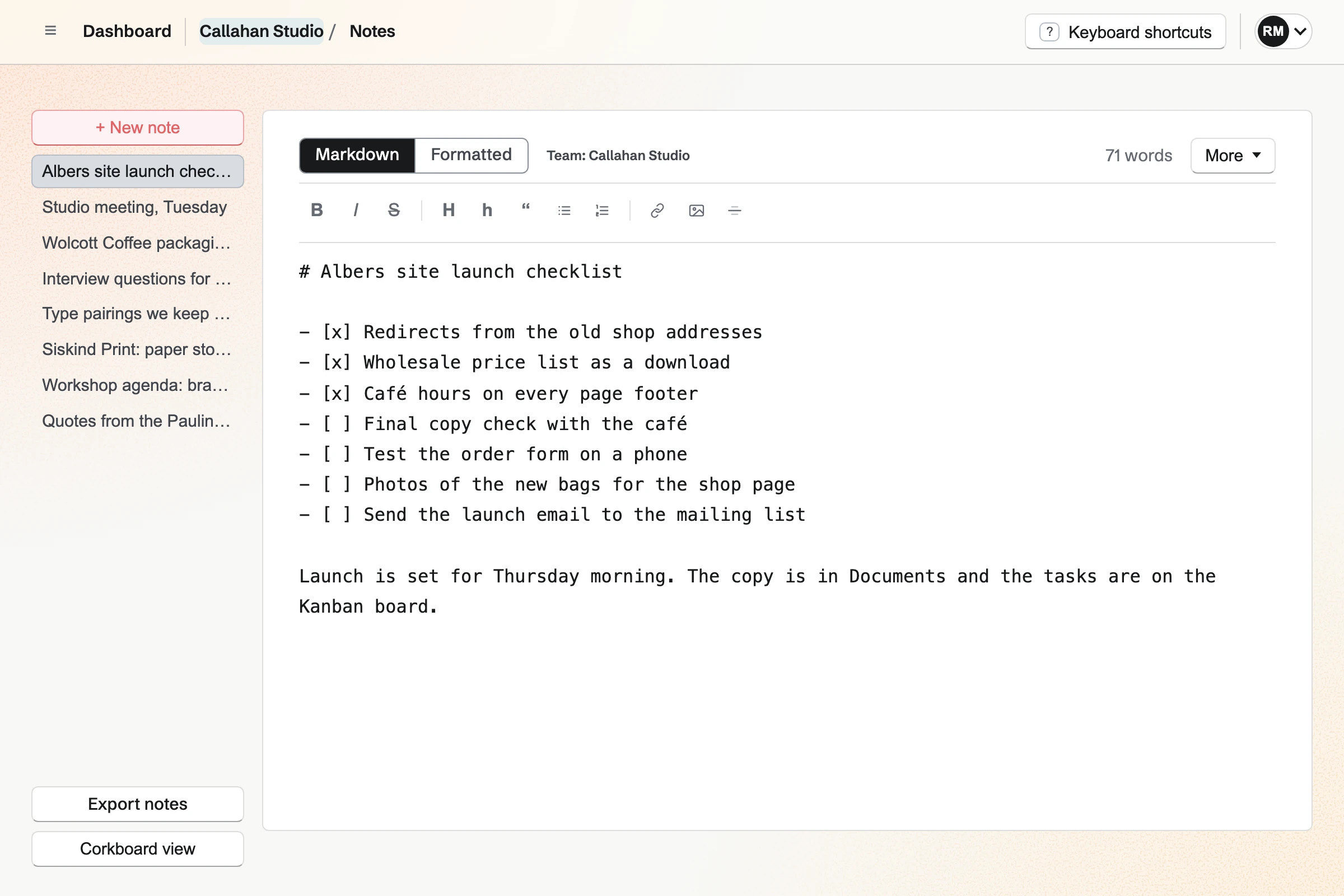
Callahan Studio’s Notes, with the team’s notes listed and the Albers site launch checklist open in the Markdown editor.

How is Magpie different?

1. The notes come with the rest of the business

One Magpie subscription includes the areas a small business would otherwise buy one at a time:

  • Notes for Markdown notes, Bookmarks for saved pages, and Documents for writing that is printed or signed
  • To-dos, which a checklist line in a Note becomes with one button, with dates, repeats and reminders
  • Calendar for events and To-dos, and Meetings and Appointments for booking pages
  • Invoicing and Store, with payment through your own Stripe account
  • Mail for email at your domain, and Team chat and Video Chat for the team
  • Contacts, Helpdesk, Websites, Password Vault, PDF Editor and the other areas, in the same team

Everything is in one account with one bill. Evernote covers notes, tasks, a calendar and AI, and leaves bookings, invoices and email to other software.

2. A Note is plain Markdown you keep

A Note is stored as Markdown. You write in the Markdown view or the Formatted view, and both change the same text. Copy text copies a whole Note as Markdown. Each Note downloads as a .md or .txt file. Export notes downloads every Note in Personal or the team as a .zip of Markdown files. Any text editor opens them.

3. The Free plan has no device limit

Magpie's Free plan holds 200 Notes in Personal and 200 in each team, with 5 GB of storage. The same Notes open on a computer and in a phone's browser, with no limit on devices. A paid plan holds 1,000 Notes. Both plans' prices are on Magpie's pricing page and Evernote's.

Comparing Magpie and Evernote

Evernote does more inside a note; Magpie does more around it. Every line in the tables below was checked against Evernote's own pages, linked from each row, and against Magpie's code and Help.

Platform

WhatEvernoteMagpie
Notes with formattingHeadings, lists, links, pictures and bold text Yes Yes
Checklists, tables and calloutsBoxes to tick, tables to edit, and boxed tips Yes Partly
Notebooks and tagsNotes grouped in notebooks and found by tag Yes No
Files and PDFs in a noteAttachments kept inside a note and marked up there Yes No
Note historyEarlier versions of a note, restored Yes Documents only
TemplatesA new note started from a saved layout Yes Documents only
Web clipperSave a web page from the browser Yes Bookmarks
Email into notesForward an email and it becomes a note Yes No
Document scanningA phone's camera takes a page into a note Yes Partly
Audio recording and transcriptsA meeting or a voice memo recorded and written out Yes No
Search inside pictures and PDFsWords in scans, pictures and handwriting found Paid plans No
Tasks and remindersTasks with dates, reminders, repeats and an assignee Yes To-dos
CalendarYour Google or Outlook calendar beside your notes Yes Google, read-only
Home pageNotes, tasks and a calendar on one page Yes Partly
Shared notes for a teamA group's notes in one shared place Yes Yes
Share a note by linkOne note opened from a link Yes No
AI assistantA chat that finds, writes and changes notes Yes Yes
AI apps over MCPClaude or ChatGPT reads and writes your notes Paid plans Yes
Desktop and phone appsApps for Mac, Windows, iPhone and Android Yes In the browser
OfflineRead and write notes with no connection Yes No
Single sign-onSign in through a company identity provider Enterprise No
Notes as Markdown filesEvery note downloaded as plain Markdown No Yes
Booking, invoices and emailBooking pages, invoices paid online, and email at your domain No Yes
Free planUse it without paying 50 notes on 1 device Yes

Good to know: Where Magpie says No or Partly, the line under the row says what Magpie does instead. Each gap has an item on Magpie's roadmap, and the line changes on the day it ships.

Notes and the editor

Both write notes with headings, lists, links and pictures. Evernote adds tables, callouts, toggles, attachments, sketches, templates and note history. They do it better than we do today.

WhatEvernoteMagpie
Write a note with headings, lists, links and bold text Source Yes Yes
Keep a checklist in a note and tick items off Source Magpie: A checklist is written in Markdown (- [ ]) and shown with its boxes, but a box cannot be ticked by clicking it: it is ticked by changing its Markdown, or by turning the line into a To-do, which ticks it. The toolbar has no checklist button. Yes Partly
Add a table to a note and change its rows and columns Source Magpie: A table typed in Markdown is shown as a table and kept when the Formatted view is edited, but no button inserts one or adds a row or a column. Yes Partly
Box a tip or a warning in a note Source Magpie: A Note has quotes but no callout box. Yes No
Fold part of a long note away until I need it Source Magpie: A Note always shows all of its text; nothing folds. Yes No
See a long note's headings and jump to one Source Magpie: Notes has no outline or table of contents of a Note's headings. A Document can have a table of contents built from its headings. Yes Partly
Write a maths formula and see it set as mathematics Source Magpie: A formula in a Note stays as the characters typed. A Document's Equation keeps the LaTeX but shows it as code, not as mathematics. Yes No
Find words inside one long note Source Magpie: Notes has no find of its own; the browser's Find finds words in the open Note. A Document has Find and replace. Yes Partly
Choose the font, size and colour my notes are written in Source Magpie: Notes uses Magpie's own type. Appearance chooses only Light, Dark or System. Yes No
Put pictures in a note among the text Source Yes Yes
Attach a PDF or any other file to a note Source Magpie: A Note holds text and pictures only. Yes No
Mark up a PDF or a picture kept in a note Source Magpie: The PDF Editor draws, highlights and adds shapes, arrows and notes on a PDF, but apart from Notes: a Note cannot hold a PDF, and a picture in a Note cannot be marked up. Yes Partly
Draw a sketch in a note Source Magpie: A Note has no drawing; a drawing made elsewhere can be added as a picture. Yes No
Link one note to another Source Magpie: A Note has its own address, which Search and Dashboard open, and that address can be added with Link; it opens the Note for anyone who can open it. But the Notes page does not show the open Note's address or offer Copy link, and nothing finds a Note by its title to link it. Yes Partly
Show a link in a note as a preview of the page Source Magpie: A link in a Note is shown as linked text. Yes No
Start a note from a template Source Magpie: A Note starts empty, and Notes has no starters. Copy text copies a whole Note to paste into a new one. Documents has starters. Yes No
See earlier versions of a note and bring one back Source Magpie: A Note keeps only its latest text. A Document keeps the versions you save by name, and Restore brings any of them back. Yes Partly
Lock private text in a note behind a password Source Magpie: A Note cannot be locked. A secure note in Password Vault is encrypted in the browser behind the Password Vault password, but it is plain text, not a Note. Yes Partly

Good to know: A Magpie Note's title is its first line, and it saves as you type. A pasted picture or screenshot is uploaded to Your images and added to the Note.

Notebooks, tags and shortcuts

Evernote keeps every note in a notebook, with stacks, nested tags and shortcuts. Magpie's Notes is one list in Personal and in each team, the most recently changed first.

WhatEvernoteMagpie
Keep notes in notebooks, and group notebooks together Source Magpie: Notes has no folders: the list shows every Note in Personal or the team, the most recently changed first, and Corkboard view shows them as cards. Personal and each team keep their Notes apart. Yes No
Tag notes, with tags nested inside tags Source Magpie: Notes has no tags: the list shows every Note in Personal or the team, the most recently changed first. Yes No
Keep the notes I use most where one click opens them Source Magpie: Notes lists the most recently changed Note first, and Dashboard shows the latest Notes; nothing keeps a chosen Note at the top. Pinned tools on Dashboard hold areas, not Notes. Yes No
Keep as many notes as I like Source Magpie: Personal and each team hold 200 Notes on the free plan and 1,000 with Pro or the Team plan. Yes Partly

Good to know: Corkboard view shows every Note as a card. Search (Cmd or Ctrl K) finds a Note in Personal and every team. Each result names its team.

Web Clipper, email, scanning and recordings

Evernote clips web pages, takes forwarded email, scans paper and records audio into notes. Magpie saves web pages to Bookmarks, and a Note holds text and pictures.

WhatEvernoteMagpie
Save a web page, or part of it, from the browser Source Magpie: Bookmarks' browser button saves the page you are on to Bookmarks, with the text you selected as the bookmark's note, and an article keeps its text for reading. The bookmark's Send to a new note then makes a Note with its link, that note and its highlights, but not the page itself. Yes Partly
Save an email into my notes Source Magpie: Mail keeps email, but nothing turns an email into a Note; its text is copied and pasted. Yes No
Scan paper documents into a note with my phone's camera Source Magpie: In a phone's browser, Insert image takes a photo of a page into a Note, but nothing finds the page's edges or straightens it, and a Note cannot hold a PDF. The Magpie app's PDF Editor scans pages into a PDF, finding and straightening each one, but the app is not yet in the App Store or Google Play. Yes Partly
Photograph a business card and keep the person's details Source Magpie: A contact is typed in. QR Codes' scanner reads a contact card only when it is held in a QR code, and offers it as a vCard to download. Yes No
Record a meeting or a voice memo in a note, and get a transcript and a summary Source Magpie: A Note cannot hold a recording. Meeting Notes records, transcribes and writes up meetings, but it is built and not yet open to members. Yes No
Start a note from my phone's home screen Source Magpie: Dashboard's New note writes a Note without opening Notes, in a phone's browser too, but there are no home screen or lock screen widgets and no shortcut that starts a Note. The Magpie app starts one from + Create or from another app's share sheet, but it is not yet in the App Store or Google Play. Yes Partly

Good to know: Bookmarks' browser button saves the page you are on, with any text you selected. Send to a new note then makes a Note with its link, your note and your highlights.

Home, Tasks and Calendar

Evernote keeps tasks inside notes and arranges a Home page of widgets. Magpie keeps tasks in To-dos, and a checklist line in a Note becomes one.

WhatEvernoteMagpie
Start the day on one page with my notes, tasks and calendar, arranged as I like Source Magpie: Dashboard shows the assistant, the latest Notes from Personal and every team, To-dos to tick off, unread mail and the latest bookmarks. Each section can be hidden or moved up and down, but not resized, and Dashboard shows no calendar and no chosen Note. Yes Partly
Put a task with a date and a reminder inside a note Source Magpie: The → To-do button beside a checklist line makes a To-do from it, linked back to the Note, and ticks the line. The To-do's date, reminder and repeat are set in To-dos, and the Note shows only the ticked line. Yes Partly
Give a task to someone and follow it Source Yes Yes
Make a task repeat Source Yes Yes
Be reminded about a note on a date I choose Source Magpie: A Note has no reminder. Convert to To-do makes a To-do for a chosen day, which can have a reminder, linked back to the Note. Yes Partly
See my Google or Outlook calendar beside my notes and tasks Source Magpie: Calendar shows events, To-dos and deadlines, and your Google events on your Personal Calendar once Google Calendar is connected, read-only in Magpie. An Outlook calendar cannot be connected. Yes Partly
Start a note from a calendar event, linked to it Source Magpie: A Note cannot be linked to an event or started from one. Meeting Notes starts a meeting note from a calendar event, but it is built and not yet open to members. Yes No

Good to know: A To-do repeats every day, weekday, week, two weeks, month or year. In a team it can be assigned to one person, who is emailed its reminder.

Sharing and Spaces

Both give a team one shared place for its notes. Evernote also shares one note with chosen people or by link; a Magpie Note is shared with its whole team.

WhatEvernoteMagpie
Work on notes with my team in one shared place Source Yes Yes
Share one note with chosen people, inside or outside my team Source Magpie: A team's Notes are open to all of its members. Someone outside the team can be made a guest with the whole Notes area, but one Note cannot be shared on its own, as a Document can. Yes Partly
Share a note by link with someone who has no account Source Magpie: A Note cannot be shared by link. A Document can, and its link opens without an account. A link to other private work, a Note included, opens only for someone signed in to Magpie, and a person with no account gets a free one. Yes No

Good to know: A Note made in a team belongs to the team, and every member opens it. Someone outside the team can be a guest with the Notes area: 10 guests on the Free plan.

AI features

Both have an AI chat that searches, writes and changes notes, and both connect Claude and ChatGPT. Evernote also edits a selection in the note editor.

WhatEvernoteMagpie
Ask an AI to find, write and organize my notes Source Yes Yes
Have AI summarise, rewrite, correct or translate text while I write a note Source Magpie: The assistant on Dashboard rewrites or shortens a Note when asked, but the Notes editor has no writing help for a selection. Yes Partly
Let an AI app such as Claude or ChatGPT read and write my notes Source Yes Yes
Choose whether my notes are sent to an AI provider Source Yes Yes

Good to know: Nothing goes to the assistant's AI provider until you allow it. Connected apps reach Notes through MCP: 2 apps on the Free plan and 10 on a paid one.

Apps, sync and plans

Evernote has apps for iPhone, Android, Mac and Windows that work offline, and limits devices by plan. Magpie is used in the browser, on a computer or a phone.

WhatEvernoteMagpie
Have my notes on my phone and computer, kept up to date Source Yes Yes
Keep my notes on all my devices without paying Source Evernote: Free holds 50 notes in 1 notebook on 1 device, with 250 MB of uploads a month and 1 GB in all. Partly Yes
Keep notes in an app on my Mac or Windows computer Source Magpie: Magpie is used in a browser on a computer. Yes No
Read and write notes with no connection Source Magpie: Notes needs a connection. A failed save keeps the text in the editor until it can be saved. Yes No
Keep many gigabytes of attachments and pictures Source Magpie: Pictures in Notes come from Your images, which count in Personal storage: 5 GB on the free plan and 100 GB on Pro. A Note holds no other attachments. Yes Partly

Good to know: If a save fails, the editor keeps your text until it can be saved. The Magpie app, not yet in the App Store or Google Play, lists and edits Notes.

Security and Enterprise

Both protect an account with a second step at sign-in. Evernote adds single sign-on and an activity history for Enterprise admins.

WhatEvernoteMagpie
Protect my account with a second step at sign-in Source Yes Yes
Sign in through my company's identity provider Source Magpie: People sign in with a password, an emailed link or code, a passkey, or Apple, Google, LinkedIn or GitHub. Yes No
See who in my team opened and changed our notes Source Magpie: A team's Audit log lists changes to its members, guests, API keys and Stripe account, not who opened or changed a Note, and a Note keeps no history of its changes. Yes No

Good to know: People sign in to Magpie with a password, an emailed link or code, or a passkey. Apple, Google, LinkedIn and GitHub work too. Two-factor authentication uses an authenticator app and recovery codes.

Integrations, import and export

Evernote connects Google Drive, Gmail, Google Calendar, Slack and Outlook, and exports ENEX or HTML. Magpie exports Markdown and keeps chat and mail in its own areas.

WhatEvernoteMagpie
Bring Google Drive files and Slack messages into my notes Source Magpie: Notes connects to none of them. Magpie has its own Team chat, Mail and Secure Files, and Google Calendar connects to Calendar and Meetings. Yes No
Bring my notes over from another app Source Evernote: The Mac and Windows apps import ENEX files, Evernote's own export format, into a new notebook; the notebooks they came from are not kept.Magpie: Notes has no import. A Note is written or pasted in, or made by the assistant, the API or a bookmark's Send to a new note. Partly No
Download my notes to keep a copy Source Yes Yes
Keep my notes as plain Markdown that any app opens Source Evernote: Notes export as ENEX or HTML only. No Yes

Good to know: Export notes downloads every Note in Personal or the team as a .zip of Markdown files. Each Note also downloads on its own as .md or .txt.

Price comparison

How Evernote charges

Evernote charges by plan: Free, Starter, Advanced and Enterprise. The plan sets how many notes, notebooks, tags, devices and spaces you have, and how much you can upload. Free holds 50 notes in 1 notebook on 1 device. Starter holds 1,000 notes in 20 notebooks on 3 devices, and Advanced sets no limit on them. Search inside pictures and PDFs, assigning tasks and Evernote MCP are on paid plans. Prices are on Evernote's plans page.

How Magpie charges

Magpie charges by plan, Free or a paid plan, for everything in the account. Personal is on Free or Pro, and a team on Free or the Team plan, one price for up to 25 people. The plan sets limits such as Notes, storage and guests, not which areas you can use. Prices are on Magpie's pricing page.

On top of the planEvernoteMagpie
Notes50 on Free, 1,000 on Starter, no set number on Advanced200 on Free, 1,000 on a paid plan, in Personal and in each team
Notebooks and tags1 notebook and 20 tags on Free, 20 and 100 on Starter, no set number on AdvancedNot offered
Devices1 on Free, the web counting as one; 3 on Starter; no set number on AdvancedNo limit on any plan
Storage1 GB on Free with 250 MB of uploads a month, 5 GB on Starter, no set limit on Advanced5 GB on Free, 100 GB on Pro, 1 TB for a team on the Team plan
Attachments200 on Free, 1,000 on Starter, no set number on AdvancedNotes hold text and pictures only
Outside calendars1 on Free, 5 on paid plans, Google or OutlookGoogle Calendar, shown read-only
AI apps through MCPPaid plans2 on Free, 10 on a paid plan
Booking pages, invoicing and email at your domainNot offeredIncluded; Mail needs a paid plan

When to choose Magpie or Evernote

  • Want Markdown notes beside To-dos, booking pages, invoices and email, with no limit on devices? Go with Magpie.
  • Want notebooks, tags, a web clipper, scanning, files and recordings in your notes, with apps that work offline? Evernote is the right choice.

Recommendations by kind of business

For someone who keeps everything
Evernote. The Web Clipper, forwarded email, scanning and recordings put articles, receipts and meetings in one place. Search reads the words in pictures and PDFs on paid plans. Magpie's Notes hold text and pictures, and files go elsewhere.
For someone who works offline or from paper
Evernote. The Mac and Windows apps keep every note on the computer. The phone apps keep chosen notebooks for use offline. The camera scans a page and finds its edges. Magpie needs a connection.
For a service business: a consultant, a coach, a tradesperson
Magpie. Notes are in the same team as booking pages, invoices paid online, Contacts and email at your domain. A checklist line in a Note becomes a To-do with a reminder.
For a writer who wants plain text
Magpie. A Note is Markdown, and Export notes downloads all of them as Markdown files. Evernote exports ENEX or HTML.
For a small team sharing notes
Either. Evernote's spaces gather notebooks for a group. One note can also be shared with chosen people or by link. Every member of a Magpie team opens the team's Notes. Choose by whether you share notes one at a time or keep them together as a team.
For someone who plans the day in their notes
Either. Evernote keeps tasks inside notes, with dates, reminders and an assignee, and arranges them on Home. Magpie's To-dos are an area of their own, with repeats, reminders and assignment. Choose by whether tasks belong inside your notes or in a list beside them.

Frequently asked questions

What is the difference between Evernote and Magpie?

Evernote keeps everything you capture in notebooks and tags: notes, web pages, scans, files and recordings. Magpie is one subscription for a small business's software. Its Notes is one area beside To-dos, Calendar, booking pages, invoicing and email. Evernote does more inside a note; Magpie does more around it.

Does Magpie replace Evernote?

Yes, for notes written in text and pictures and shared with a team. Magpie keeps them in Markdown, finds them with Search, and turns a checklist line into a To-do. It adds the booking, invoicing and email the business was buying elsewhere.

Consider keeping Evernote if you sort notes into notebooks and tags. Keep it if you clip web pages, scan paper or attach PDFs to notes. Keep it too if you need apps that work offline. Evernote does each of these better than Magpie does today.

How much does Evernote cost?

Evernote has four plans: Free, Starter, Advanced and Enterprise. Free holds 50 notes in 1 notebook on 1 device. Starter holds 1,000 notes on 3 devices, and Advanced sets no limit on notes or devices. The prices are on Evernote's plans page.

How much does Magpie cost?

Magpie has a Free plan and paid plans, each covering every area. Personal is on Free or Pro. A team is on Free or the Team plan, one price for up to 25 people. Notes holds 200 Notes on Free and 1,000 on a paid plan. The prices are on Magpie's pricing page.

Does Magpie have notebooks or tags?

No. Notes is one list in Personal and in each team, the most recently changed first. Personal and each team keep their Notes apart. Folders and tags for Notes are on Magpie's roadmap. Evernote keeps every note in a notebook, with stacks and nested tags.

Can I attach a PDF or a file to a Magpie note?

No. A Note holds text and pictures only. The PDF Editor opens a PDF and marks it up, apart from Notes. Attachments in Notes are on Magpie's roadmap. Evernote attaches PDFs, Office files, audio and video to a note.

Does Magpie have a web clipper?

Partly. Bookmarks' browser button saves the page you are on, with any text you selected. An article keeps its text for reading. Send to a new note makes a Note with the link and your highlights, not the page itself. Evernote's Web Clipper saves an article, the full page or a marked-up screenshot into a notebook.

Can I email notes into Magpie?

No. Mail keeps email, but nothing turns an email into a Note; its text is copied and pasted. Saving an email as a Note is on Magpie's roadmap. Evernote gives each account an address, and a forwarded email becomes a note.

Can Magpie scan paper documents?

Partly. In a phone's browser, Insert image takes a photo of a page into a Note. Nothing finds the page's edges or straightens it. Evernote's camera finds a page's edges, takes it by itself, and keeps business cards as notes.

Can Magpie record audio or transcribe a meeting?

No. A Note cannot hold a recording, and no Magpie area open to members writes one out. Recording in a Note is on Magpie's roadmap. Evernote records a meeting or a voice memo in a note. AI Transcribe writes out recordings of up to 2 hours.

Can Magpie search the text in pictures and PDFs?

No. Search reads a Note's title and text, not its pictures. The PDF Editor recognises the text in a PDF, apart from Notes. Evernote's search reads PDFs, scans, pictures and handwriting on paid plans.

Does Magpie keep a history of a note?

No. A Note keeps only its latest text. A Document keeps the versions you save by name, and Restore brings any of them back. Note history is on Magpie's roadmap. Evernote lists earlier versions of a note on Mac, Windows and the web.

Can I share a Magpie note with someone outside my team?

Not one Note on its own. A team's Notes are open to all of its members. Someone outside the team can be a guest with the whole Notes area. A Document can be shared with chosen people, or by a link that opens without an account. Evernote shares one note by email or by link.

Does Magpie have tasks and reminders?

Yes, in To-dos. A checklist line in a Note becomes a To-do with one button, linked back to the Note. A To-do has a date, a reminder and a repeat. In a team it can be assigned to one person. Evernote keeps tasks inside notes, and a note can take a reminder of its own.

Can I see my Google or Outlook calendar in Magpie?

Google, yes; Outlook, no. Once Google Calendar is connected, your Google events show on your Personal Calendar, read-only in Magpie. Calendar also shows Magpie's events, To-dos and deadlines. Evernote connects Google and Outlook calendars and changes their events.

Does Magpie have a desktop or phone app?

No. Magpie is used in a browser on a computer or a phone. The Magpie app for iPhone, iPad and Android is built but not yet in the App Store or Google Play. Evernote has apps for iPhone, Android, Mac and Windows.

Can I use Magpie offline?

No. Notes needs a connection; a save that fails keeps your text in the editor to save later. Offline editing is on Magpie's roadmap. Evernote's computer apps keep every note offline, and its phone apps keep chosen notebooks.

Does Evernote have booking pages, invoicing or email at my domain?

No. Evernote's plans cover notes, tasks, a calendar and AI. Magpie includes Meetings, Appointments and Invoicing in every plan. Mail hosts email at your domain on a paid plan.

Can I connect Claude or ChatGPT to my notes?

Yes, in both. Magpie's Connected apps gives Claude, ChatGPT or Cursor the assistant's tools through MCP, Notes included. It reads only unless you allow changes. The Free plan has 2 connected apps. Evernote MCP connects Claude and ChatGPT on every paid plan.

Can I keep my notes as Markdown?

In Magpie, yes. A Note is Markdown text, and Export notes downloads every Note as a .zip of Markdown files. Evernote exports notes as ENEX or HTML files.

Can I use Evernote and Magpie together?

Yes. Evernote can keep your clippings, scans and files while Magpie runs your To-dos, bookings, invoices and email. A note in either can link to the other's pages.

How do I move from Evernote to Magpie?

Export your notes from Evernote as HTML, up to 100 notes at a time. Import each file into Documents, which reads .html files, or paste a note's text into a new Note. Notes has no import, and nothing reads ENEX files. Importing notes is on Magpie's roadmap.

What is included in Magpie's Free plan?

Notes with 200 Notes in Personal and in each team, on every device. To-dos, Calendar, Documents, Bookmarks, booking pages, Invoicing and most other areas. A team of 3, 5 GB of storage and 2 connected apps. Mail is not on the Free plan: email at your domain needs Pro or the Team plan.
If a line on this page is wrong, tell us and we will correct it.

Evernote changes, and so does Magpie. If a line is out of date about either product, email support@magpie.diy with the page that shows it. We check the line against that page, change it, and give it the new date. That goes for Evernote's own team as much as for anyone who uses it.

Put your notes beside the rest of the business.

Create a Magpie account, then write your first Note.

Create account