Dropbox Sign compared with Magpie

Dropbox Sign vs Magpie: an in-depth comparison

Dropbox Sign and Magpie both send a document to people to sign online, with a record of who signed and when. They are built around different things.

  1. Dropbox Sign is an electronic signature service from Dropbox, with templates, bulk sending, signing links and an API built around the signature. It is built for a business that sends many agreements, often from Dropbox, Google Drive, HubSpot or Salesforce.
  2. Magpie is one subscription for a small business's software, and E-Signatures is one part of it. Beside the signing it includes ready-made agreements, proposals, invoicing, contacts and the other areas a business runs on. It is built for someone whose contracts are one part of running the business.
Create account
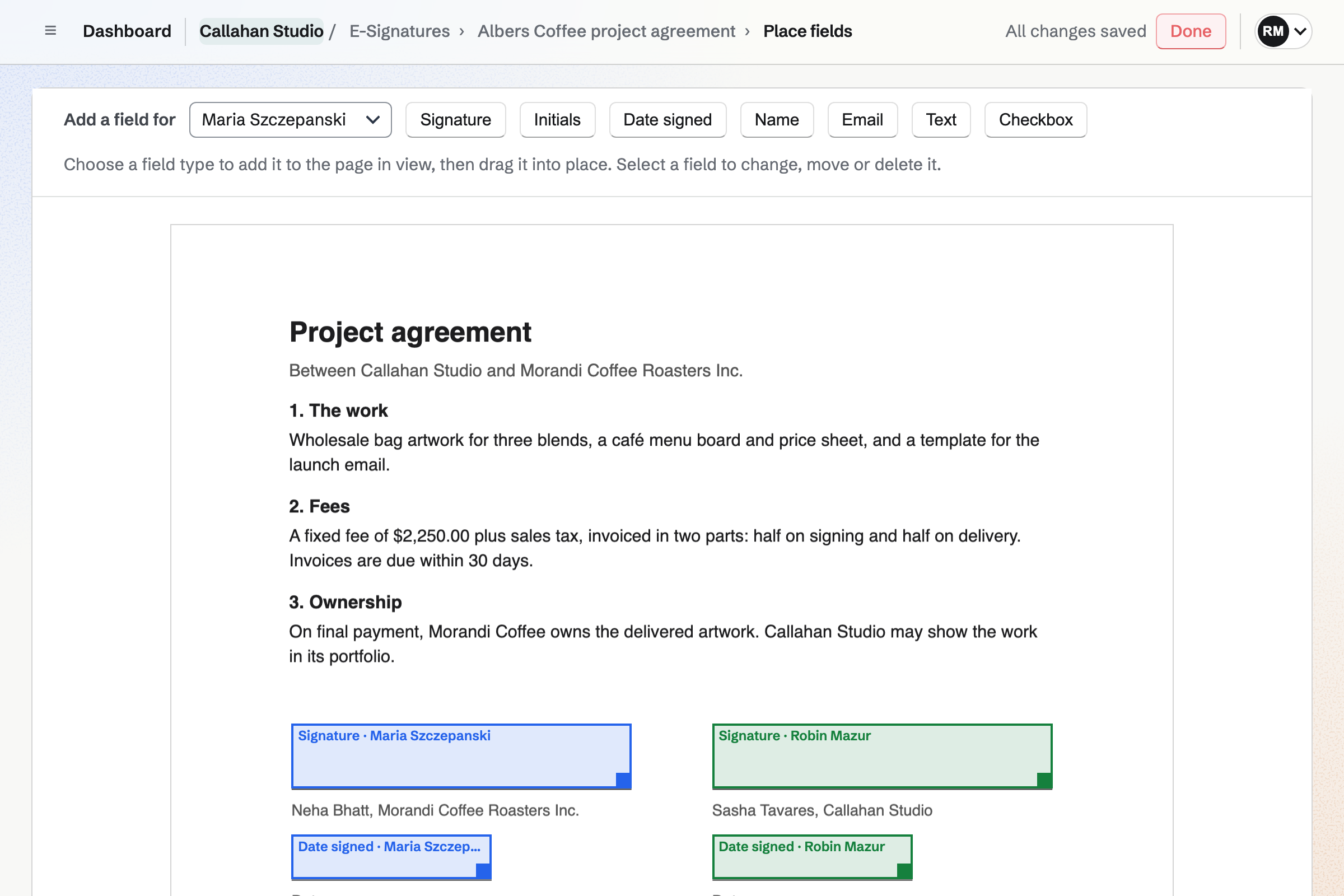
Placing fields on Callahan Studio’s project agreement with Albers Coffee: a signature and a date field for Maria Szczepanski and for Robin Mazur, each in their own colour.

How is Magpie different?

1. Signing comes with the rest of the business

One Magpie subscription includes the areas a small business would otherwise buy one at a time:

  • E-Signatures, for any PDF, with starters, signing order, reminders and a certificate of completion
  • Agreements, with standard agreements from named publishers filled in by answering questions
  • Proposals, where the client chooses a package, signs and pays a deposit on one page
  • Invoicing, with recurring invoices and payment by card
  • Contacts, Documents, PDF Editor, Meetings, Mail, Websites and the other areas, in the same team

Everything is in one account with one bill. A contact's page lists the documents they signed, beside their invoices and proposals.

2. The Free plan sends with no monthly limit

E-Signatures is on every Magpie plan, the Free plan included. No plan limits how many requests or starters you have. Dropbox Sign's Free plan sends 3 requests a month, and templates start on Essentials.

3. Signers keep their signed copies

Magpie makes each signer a free account with no password at their address. The email's button signs them in, and nobody fills in a sign-up form. The signed PDF and its certificate stay in their account under Sent to you. They stay even if the sender deletes the request.

Comparing Magpie and Dropbox Sign

Dropbox Sign does more around the signature; Magpie does more around the business. Every line in the tables below was checked against Dropbox Sign's own pages, linked from each row, and against Magpie's code and Help.

Platform

WhatDropbox SignMagpie
Electronic signaturesSend a document to people to sign online Yes Yes
Sending without payingSend for signature on a free plan 3 a month Yes
Reusable documentsA document saved with its roles and fields Essentials and above Yes
Ready-made documentsStandard contracts to start from United States only Partly
Word, Excel and PowerPoint filesSend a file that is not a PDF Yes PDF only
Bulk sendOne document to a list, each person signing their own copy Standard and Premium No
Signing link for a websiteA link anyone can open, fill in and sign Essentials and above No
In-person signingSomeone signs on your tablet Standard and Premium No
Your own brandingYour logo on the signing emails and pages Standard and Premium Partly
Identity checks by text messageA code sent to the signer's phone Standard and Premium No
Advanced and qualified signaturesThe EU's higher eIDAS levels API Premium No
Phone appsSend and sign in an iPhone or Android app Dropbox app, one signer In the browser
Cloud storageSend from and save to Dropbox, Google Drive, OneDrive or Box Yes No
Connections to other softwareWord, Google Docs, HubSpot, Salesforce and more Yes No
APISend and track documents from your own software Separate subscription Partly
ProposalsPackages and options the client chooses, signs and pays for No Yes
Payment when signingThe signer pays by card as part of signing No Yes
InvoicingInvoices paid online No Yes
Contact recordsEvery document a client signed, on their record Through HubSpot and Salesforce Yes
Security certificationsSOC 2 Type II and ISO 27001 Standard and Premium No
HIPAA agreementA business associate agreement for health information Yearly Standard and Premium No

Good to know: Where Magpie says No or Partly, the line under the row says what Magpie does instead. Each gap has an item on Magpie's roadmap, and the line changes on the day it ships.

Core features: sending, signing and templates

Both upload a document, place fields for each signer, set a signing order and remind signers. Dropbox Sign takes Word, Excel and PowerPoint files and several files in one request. It also keeps your signature for the next document, and they do these better than we do today.

WhatDropbox SignMagpie
Upload a document and send it to people to sign by email Source Yes Yes
Place signature, initials, date and text fields for each signer Source Yes Yes
Sign a document myself Source Yes Yes
Choose whether people sign one after another or all at once Source Yes Yes
Remind signers who have not signed, automatically or when I choose Source Yes Yes
Set a date after which the request can no longer be signed Source Yes Yes
See who has opened and signed a document, and who is still to sign Source Yes Yes
Save a document with its signer roles and fields to send again Source Yes Yes
Start from a ready-made document, such as an NDA, an offer letter or a lease Source Magpie: The Agreements Library has standard agreements from named publishers for fundraising, confidentiality, services, software, data protection and partnerships, filled in by answering questions and sent with their fields already placed. It has no offer letters, leases, purchase orders or tax forms. Yes Partly
Keep my own signature, drawn once or from a photo of my handwritten one, and use it on every document Source Magpie: Signature and Initials are drawn or typed each time, and Adopt and sign uses the same one for the rest of that document. Nothing keeps a signature for the next document, and a photo of a handwritten signature cannot be used. Yes Partly
Send documents for signature without paying, and without a monthly limit Source Dropbox Sign: Free sends 3 signature requests a month, renewed every 30 days, with unlimited self-signing and no bulk sending; the paid plans have no monthly limit. Partly Yes
Send a Word file, a spreadsheet or a slide deck for signature, not only a PDF Source Magpie: E-Signatures takes PDFs only. A Word file can be imported into Documents and downloaded as a PDF, and the PDF Editor turns pictures into a PDF and sends it for signature, so any other file takes a step first. Yes Partly
Send several documents to the same people in one request Source Magpie: A request holds one PDF. Merge PDFs in the PDF Editor joins several into one first, and each other document needs a request of its own. Yes Partly
Let people sign without signing up or installing anything, on any device Source Yes Yes
Let signers find every document they signed in one place later Source Dropbox Sign: Signers are emailed a copy when everyone has signed. To see their signed documents in Dropbox Sign, they have to create an account with the address the request went to. Partly Yes
Lead the signer from one field to the next Source Yes Yes
Send and sign from a phone app Source Dropbox Sign: The Dropbox app on iPhone and Android sends a PDF for signature to one signer only, without templates; every field it adds is required.Magpie: E-Signatures works in a phone's browser: a request is made from a PDF, its fields are placed with a finger, and it is sent and tracked, and a signer draws their signature with a finger. The Magpie app for iPhone and Android does all of this too, but it is not yet in the App Store or Google Play. Partly Partly
Keep a record of who signed, when and how, as proof later Source Yes Yes
Use it, and have signers sign, in their own language Source Magpie: The signing page and emails follow the team's Language for customers, or the signer's own: English, French, Spanish or German. Yes Partly

Good to know: A Magpie request takes a PDF of up to 25 MB and 500 pages, for up to 20 signers. The PDF Editor joins, fills in or rearranges PDFs first, and its Send for signature starts the request.

Workflow

Both let a signer decline with a reason and change a signer before they sign. Dropbox Sign adds copies for people who do not sign, signing links, in-person signing and fields that show by condition.

WhatDropbox SignMagpie
Let a signer refuse to sign and say why Source Yes Yes
Send a copy of the signed document to people who do not sign Source Magpie: In Proposals a recipient can read only, reading the proposal and asking questions without signing. In E-Signatures everyone on a request is a signer with at least one field, and anyone else gets the signed PDF from you. Yes Partly
Put a signing link on my website that anyone can open, fill in and sign Source Magpie: The sender names every signer by email address before a request is sent, and each signing link opens only for its own signer. Yes No
Have someone sign in person on my tablet or phone Source Magpie: Each signer signs in the Magpie account at their own email address, so on the sender's device they would first have to sign in there with a link or code emailed to them. Yes No
Send signers to a page of my own website once they have signed Source Magpie: After Finish signing, the signer stays on the document's page in Magpie, which says they have signed and, once everyone has, offers the signed PDF. Yes No
Show or hide fields depending on what the signer answers Source Magpie: Every field in a request is always shown. In Proposals, the totals are worked out again from the package and options the client chooses, but no field appears or hides. Yes No
Fix a mistake in a request after sending it Source Magpie: Before someone signs, Change signer replaces a signer's name and address, and the expiry can be extended. The document and fields cannot change after sending: Void request and Duplicate request send a corrected copy. Yes Partly
Send the signing link by text message Source Magpie: Invitations and reminders go by email. Get signing link copies a signer's link to send another way, such as a text message from your own phone. Yes Partly
Have the fields placed for me on a document I upload Source Dropbox Sign: AI Auto-place Fields finds where text and date fields belong on up to 10 pages at a time, for review before sending. It is in a closed beta, turned on by support.Magpie: Send for signature on an agreement puts a signature field on each party's signature line and a Date signed field on each date line. On an uploaded PDF every field is placed by hand, or comes ready from a starter. Partly Partly

Good to know: Get signing link copies a signer's link, so you can send it by text message from your own phone. It opens only in the Magpie account at that signer's address.

Customization

Both leave out a role a saved document does not need this time. Dropbox Sign adds bulk send, your logo, uploads from the signer, drop-down lists, checked phone numbers and masked fields.

WhatDropbox SignMagpie
Fill in each client's details on a saved document before it goes out Source Magpie: A starter's fields are all for its signers, and nothing on it asks the sender for details. The PDF Editor fills in a PDF before it is sent, Mail merge in Documents makes a copy with its placeholders filled in to download as a PDF, and a proposal starter fills in the client's details for each client. Yes Partly
Show my logo and my own wording on the signing emails and pages Source Magpie: A proposal shows your logo, accent colour and fonts, and its email shows your business name. E-Signatures' emails and signing page name the sender and their team, with the subject and message you write, but no logo of the team's own. Yes Partly
Send the same document to a list of people, each signing their own copy Source Magpie: Each request is one document for its own signers, so sending to many people takes a request for each, which a starter makes quicker. Yes No
Ask a signer to upload a file, such as a copy of their ID, when they sign Source Magpie: Signers fill in fields only; nothing asks them for a file. Yes No
Check that what a signer types is a proper email address, phone number or number Source Magpie: An Email field accepts only an email address, and a Text field can have a maximum length. Nothing checks for a number, a phone number or a pattern of your own. Yes Partly
Offer drop-down lists, option buttons and clickable links in the document Source Magpie: Fields are Signature, Initials, Date signed, Name, Email, Text and Checkbox. Nothing offers a list of choices or a link. Yes No
Let a signer pass the document to the right person to sign it Source Magpie: The sender can replace a signer with Change signer before they sign; the signer cannot pass the document on themselves. Yes Partly
Leave out a signer a saved document does not need this time Source Yes Yes
Hide a sensitive answer, such as a bank account number, on the signed copy Source Magpie: What a signer types into a field is printed on the signed PDF that every signer and the sender receive. Yes No

Good to know: A Magpie Email field accepts only an email address, and a Text field can have a maximum length. A starter's roles, fields, signing order and email text come with every request made from it.

Security and trust

Both can ask for an access code before a document opens, and both protect your own account with two-factor sign-in. Dropbox Sign adds codes by text message, a seal a PDF reader checks, certifications and a HIPAA agreement.

WhatDropbox SignMagpie
Seal the signed PDF so any later change shows when it is opened Source Magpie: The certificate records a fingerprint of the original and signed files, and the signed PDF keeps the original's bytes unchanged, so a copy can be checked against them. The PDF carries no digital certificate that a PDF reader checks by itself. Yes Partly
Make a signer enter a code before the document opens Source Yes Yes
Check a signer's identity with a code sent to their phone Source Magpie: Identity rests on the signer's Magpie account at the invited address, its confirmed email address and an optional access code; nothing checks a phone number. Yes No
Sign at the EU's advanced or qualified electronic signature level Source Magpie: Magpie's signatures are simple electronic signatures, backed by the signer's account and the certificate of completion. Yes No
Protect my own account with two-factor sign-in Source Yes Yes
Check that the service holds independent security certifications Source Magpie: Magpie has no SOC 2 report or ISO 27001 certificate. Yes No
Collect signatures on patients' health information under a HIPAA agreement Source Magpie: Magpie signs no business associate agreement. The Agreements Library has business associate agreements to send to others, which is a different thing. Yes No
Choose the country where signed documents are stored Source Magpie: Every document is stored on Magpie's own servers, with no choice of region. Yes No
Delete old signed documents in bulk, or after a set time Source Magpie: Delete in a request's More menu removes one request at a time; a completed one stays with its signers. Nothing deletes requests after a set time or several at once. Yes Partly

Good to know: A Magpie signer signs in to the account at their address before Finish signing. The certificate records how and when they signed in, and the SHA-256 of the original and signed files.

Administration and teams

Both share templates and sent documents with a team, and both run separate teams for parts of a business. Dropbox Sign adds emailed CSV reports and single sign-on.

WhatDropbox SignMagpie
Share templates and sent documents with my team, with roles that control who does what Source Yes Yes
Run separate teams for different parts of the business Source Yes Yes
See reports on documents sent, signed and waiting, and export them Source Magpie: E-Signatures' Requests has a tab for each state with how many requests it holds, search, and filters by contact, starter and sender, with no report or export. Proposals has reports on proposals sent, accepted, declined and expired, with a CSV download. Yes Partly
Sign in through the company's identity provider Source Magpie: Members sign in with a password, an emailed link or code, a passkey, or Google, Apple, LinkedIn or GitHub; there is no SAML single sign-on. Yes No

Good to know: Requests and starters belong to Personal or a team. Members with edit access send them, and members with view access see them and download the files.

Integrations and API

Dropbox Sign sends from Dropbox, Google Drive, OneDrive and Box, and saves the signed copy back. It works inside Word, Google Docs, HubSpot and Salesforce. Magpie works inside its own areas, and they do this better than we do today.

WhatDropbox SignMagpie
Send a document straight from my cloud storage, and have the signed copy saved back there Source Magpie: A PDF in Secure Files opens in the PDF Editor, whose Send for signature starts a request from it. The signed copy stays in E-Signatures and the signers' accounts to download: nothing saves it to Secure Files, and nothing connects to Dropbox, Google Drive, OneDrive or Box. Yes Partly
Send for signature from inside Word, Google Docs, HubSpot or Salesforce Source Magpie: E-Signatures works with Magpie's own Contacts, Invoicing, Agreements, Proposals and PDF Editor, and connects to no outside writing or sales tool. Yes No
Send documents for signature from my own software, and be told when they are signed Source Magpie: With Pro, an API key reaches the E-Signatures routes listed in the OpenAPI file, which upload, set up and send requests and read their status. No webhook says when a signature request is signed, and signing cannot be placed inside another site. Yes Partly

Good to know: On Pro, Magpie's version 1 API uploads, sets up and sends signature requests and reads their status. Its endpoints are in the OpenAPI file.

Where Magpie does more

Dropbox Sign signs documents that are already written. Magpie also writes the proposal, takes the payment and keeps the signed copy on the client's contact record.

WhatDropbox SignMagpie
Take payment when the client signs Source Dropbox Sign: Neither the pricing page nor the features page offers taking a payment with a signature. No Yes
Send a priced proposal that the client chooses from, signs and pays a deposit on Source Dropbox Sign: Dropbox Sign signs documents that are already written; neither the pricing page nor the features page offers priced proposals or choices for the client. No Yes
See every document a client has signed on their contact record Source Dropbox Sign: Only in a sales tool: the HubSpot and Salesforce integrations show the status of requests inside those tools. Partly Yes

Good to know: A request linked to an invoice offers Pay once its contact has signed. Payment is by card, through your team's own Stripe account.

Price comparison

How Dropbox Sign charges

Dropbox Sign charges by plan: Free, Essentials, Standard and Premium, billed monthly or yearly. Free sends 3 requests a month, with self-signing that does not count. Essentials is for one person, Standard is priced per user for two or more, and Premium is priced by quote. Templates are 5 on Essentials, 15 on Standard and no limit on Premium. The API is a separate subscription with a free test mode. Prices are on Dropbox Sign's pricing page.

How Magpie charges

Magpie charges by plan, Free or a paid plan, for everything in the account. E-Signatures has no limit on requests or starters on any plan. The Free plan sends 5 proposals and 5 invoices a month, and a paid plan has no limit on either. The Team plan is one price for up to 25 people. Prices are on Magpie's pricing page.

On top of the planDropbox SignMagpie
Sending without paying3 requests a month on FreeNo limit on the Free plan
Templates5 on Essentials, 15 on Standard, no limit on PremiumNo limit on any plan
How a team paysPer user on Standard, for two or moreOne Team plan for up to 25 people
Bulk send, in-person signing and brandingStandard and PremiumNot offered; emails name the sender and their team
Conditional fields, single sign-on and a choice of regionPremiumNot offered
SalesforceAn add-on on Standard and PremiumNot offered
APIA separate subscription, with a free test modePro
Proposals and invoicesNot offeredIncluded: 5 proposals and 5 invoices a month on Free, no limit on a paid plan

When to choose Magpie or Dropbox Sign

  • Want free e-signatures with no monthly limit, beside your proposals, invoices, contracts and contacts? Go with Magpie.
  • Want bulk send, signing links, in-person signing and signing from Dropbox, Google Drive, HubSpot or Salesforce? Dropbox Sign is the right choice.

Recommendations by kind of business

For a freelancer or a consultant
Magpie. Send a proposal the client signs and pays a deposit on, then invoice the rest. Sending for signature costs nothing on the Free plan, with no monthly limit.
For a business that sends one form to many people
Dropbox Sign. Bulk send gives each person on a spreadsheet their own copy, up to 250 at a time. A template link on your website takes signers you do not know yet. Magpie needs a request for each person.
For a team that keeps its files in Dropbox or Google Drive
Dropbox Sign. It sends from cloud storage and saves the signed copy back there. It also works inside Word, Google Docs, HubSpot and Salesforce. Magpie keeps signed copies in E-Signatures, to download.
For a clinic or a practice handling health information
Dropbox Sign. It signs a HIPAA business associate agreement on yearly Standard and Premium plans. Magpie signs no such agreement.
For a startup raising money or signing its first customers
Magpie. The Agreements Library fills in a SAFE, an NDA or a services agreement from your answers. It goes for signature with its fields placed, and the signed copy is linked to the contact.
For a small team that signs a few documents a month
Either. Both send a PDF, remind signers and keep a record of who signed. Choose Dropbox Sign if your files are in Dropbox, and Magpie for signing beside the rest of the business.

Frequently asked questions

What is the difference between Dropbox Sign and Magpie?

Dropbox Sign is an electronic signature service, with templates, bulk sending, signing links and an API. Magpie is one subscription for a small business's software. Its E-Signatures area is beside Agreements, Proposals, Invoicing and Contacts. Dropbox Sign does more around the signature; Magpie does more around the business.

Does Magpie replace Dropbox Sign?

Yes, for a business that sends its own contracts, proposals and forms to a few people at a time. Magpie sends any PDF for signature, keeps starters, reminds signers and makes a certificate of completion, on every plan.

Consider keeping Dropbox Sign if you send one document to a list, or put a signing link on your website. Keep it if your files are in Dropbox or Google Drive, or you sign from HubSpot or Salesforce. Keep it too for text message checks or a HIPAA agreement. Dropbox Sign does each of these better than Magpie does today.

How much does Dropbox Sign cost?

Dropbox Sign has Free, Essentials, Standard and Premium plans, billed monthly or yearly. Free sends 3 requests a month. Essentials is for one person, Standard is priced per user for two or more, and Premium is priced by quote. The API is a separate subscription. The prices are on Dropbox Sign's pricing page.

How much does Magpie cost?

Magpie has a Free plan and paid plans, each covering every area. E-Signatures has no limit on requests on any plan. The Team plan is one price for up to 25 people, not a price per user. The prices are on Magpie's pricing page.

Can I send documents for signature for free?

Yes, in both. Dropbox Sign's Free plan sends 3 requests a month and lets you sign your own documents without a limit. Magpie's Free plan has no monthly limit on requests. Each Magpie account emails a limited number of people a day across every area, 1,000 once it pays.

Do signers need an account?

Dropbox Sign signers need no account to sign, but need one to see their signed documents later. Magpie makes a free account with no password at the signer's address. The email's button signs them in the first time, and nobody fills in a sign-up form. The signed copy stays in their account under Sent to you.

Does Magpie have bulk send?

No. Each request is one document for its own signers, so sending to many people takes a request for each. A starter makes each one quicker, since it needs only a name and an address. Bulk send is on Magpie's roadmap. Dropbox Sign's bulk send, on Standard and Premium, takes a spreadsheet of up to 250 people.

Can I put a signing link on my website?

Not in Magpie. Every signer is named by email address before a request is sent. Each link opens only for its own signer. Dropbox Sign's template links, on its paid plans, give an address anyone can open and sign.

Can someone sign in person on my tablet?

Not in Magpie. Each signer signs in the Magpie account at their own address. On your tablet, they would first sign in with a link or code emailed to them. Dropbox Sign's in-person signing, on Standard and Premium, opens a document on a tablet for one signer.

Does Magpie check a signer's identity by text message?

No. A Magpie signer signs in to the account at the invited address. You can add an access code that you give them another way. Nothing checks a phone number. Dropbox Sign sends a code by text message on Standard and Premium.

Does Magpie keep my signature for the next document?

No. A signature is drawn or typed on each document. Adopt and sign uses it for the rest of that document. A photo of a handwritten signature cannot be used. Dropbox Sign keeps a drawn, typed or uploaded signature in your account.

Can I send a Word file for signature?

Dropbox Sign takes Word, Excel and PowerPoint files as well as PDFs. Magpie's E-Signatures takes PDFs only. A Word file can be imported into Documents and downloaded as a PDF first. The PDF Editor turns pictures into a PDF.

Can I send several documents in one request?

In Dropbox Sign, yes, and they count as one request. A Magpie request holds one PDF. Merge PDFs in the PDF Editor joins several into one before you send it.

Does Magpie connect to Dropbox or Google Drive?

No. A PDF in Magpie's Secure Files opens in the PDF Editor, which sends it for signature. The signed copy stays in E-Signatures and in the signers' accounts, to download. Dropbox Sign sends from Dropbox, Google Drive, OneDrive and Box, and saves signed copies back.

Does Magpie have an API for e-signatures?

Partly. On Pro, the version 1 API uploads, sets up and sends requests and reads their status. No webhook says when a request is signed, and signing cannot be placed inside another site. Dropbox Sign's API, a separate subscription, does both.

Does Magpie offer advanced or qualified electronic signatures?

No. Magpie's are simple electronic signatures, backed by the signer's account and the certificate of completion. Dropbox Sign offers eIDAS advanced and qualified signatures through its API's Premium plan, with an identity check.

Does Magpie sign a HIPAA business associate agreement?

No. Magpie signs no business associate agreement, and one is on its roadmap. The Agreements Library has business associate agreements to send to others, which is a different thing. Dropbox Sign signs one for teams on a yearly Standard or Premium plan above a minimum contract value.

Does Magpie have SOC 2 or ISO 27001?

No. Magpie has no SOC 2 report or ISO 27001 certificate yet, and an independent audit is on its roadmap. Dropbox Sign lists both for Standard and Premium.

What proof does Magpie keep of a signature?

A certificate of completion for every finished request. It lists each signer's name, address, account, signing time, IP address and browser, and the consent they gave. It also has the activity list and the SHA-256 of the original and signed files. Every signer keeps it in their own account.

Does Dropbox Sign do proposals or take payments?

No. Its pricing and features pages offer no priced proposals and no payment with a signature. In Magpie the client chooses a package and options, signs and pays the deposit on one page. A signature request linked to an invoice offers Pay once its contact has signed.

Does Magpie have ready-made contracts?

Yes, in Agreements. The Library has standard agreements from Y Combinator, Common Paper, Bonterms, oneNDA, Papertrail and Series Seed. You answer questions, and the agreement goes for signature with its fields placed. It has no offer letters, leases or tax forms, which Dropbox Sign's Template Gallery has for users in the United States.

Can I use Dropbox Sign and Magpie together?

Yes, side by side, though they do not connect. A business might bulk send from Dropbox Sign, and send its proposals, invoices and everyday contracts from Magpie.

How do I move from Dropbox Sign to Magpie?

Upload each document you send often to E-Signatures as a PDF, place its fields, and use Save as starter. A new request then needs only each signer's name and address. Keep your Dropbox Sign account until you have downloaded the signed copies you need from it.

What is included in Magpie's Free plan?

E-Signatures with no limit on requests, Agreements, the PDF Editor and Contacts. Proposals sends 5 a month and Invoicing 5 a month. A team of 3, and the other areas, are included too.
If a line on this page is wrong, tell us and we will correct it.

Dropbox Sign changes, and so does Magpie. If a line is out of date about either product, email support@magpie.diy with the page that shows it. We check the line against that page, change it, and give it the new date. That goes for Dropbox Sign's own team as much as for anyone who uses it.

Send your first document for signature on Magpie's Free plan.

Create a Magpie account, then upload a PDF to E-Signatures.

Create account