Help Scout compared with Magpie

Help Scout vs Magpie: an in-depth comparison

Help Scout and Magpie both turn the email customers send into conversations a team answers together. Help Scout builds out from the inbox; Magpie builds around it.

  1. Help Scout is customer support software built around a shared inbox, with a help centre, live chat, AI and reports. It is built for a support team that answers customers on email, chat and social messages and measures how it does.
  2. Magpie is one subscription for a small business's software, and Helpdesk is one part of it. Beside the shared support inbox it includes contacts, booking pages, invoicing, a website and more. It is built for a small team, where customer email is one part of running the business.
Create account
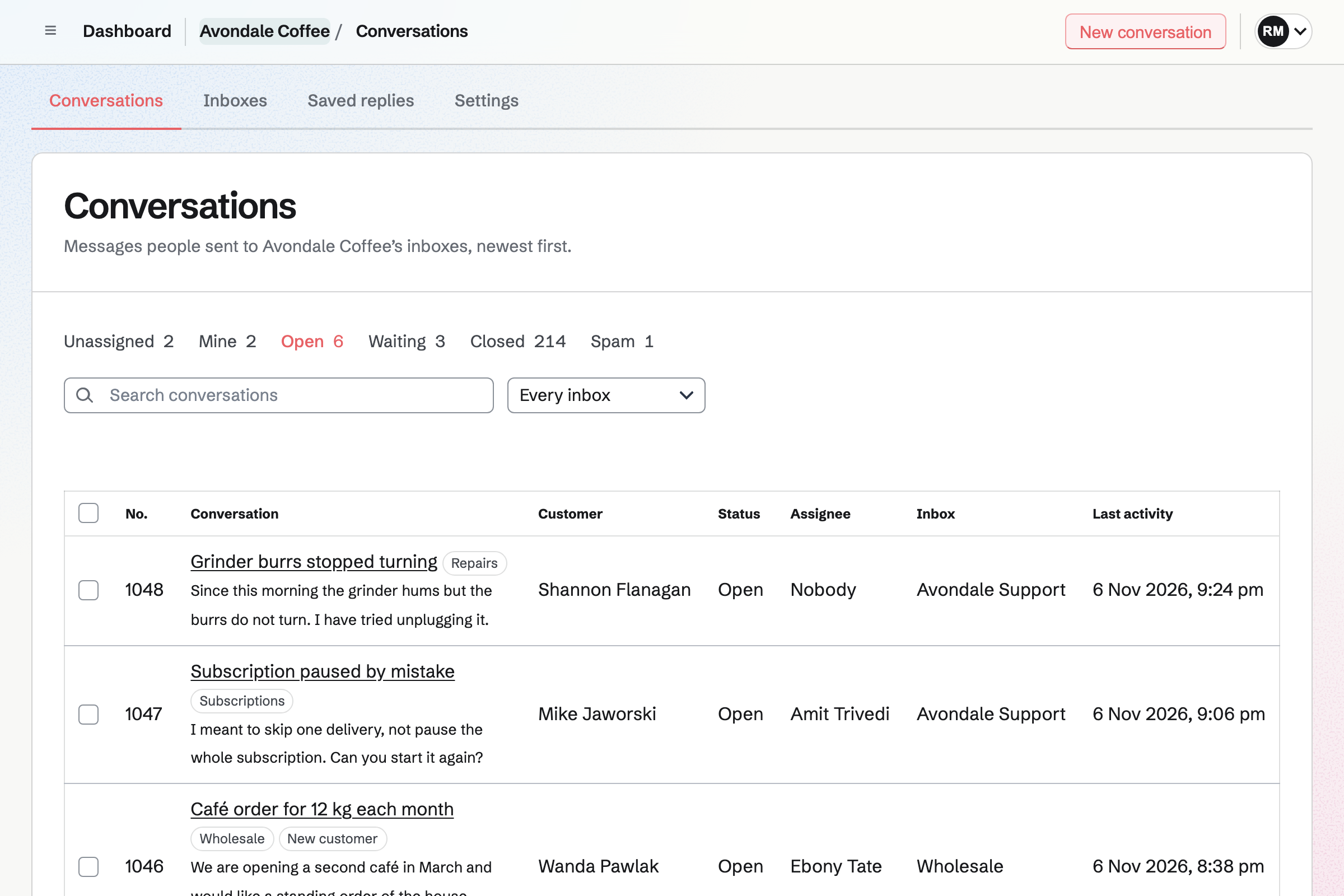
Helpdesk conversations list for a fictional coffee roastery, with open conversations, their customers, assignees and tags.

How is Magpie different?

1. Support comes with the rest of the business

One Magpie subscription includes the areas a small business would otherwise buy one at a time:

  • Helpdesk, for the email sent to a support address and its contact page
  • Contacts, where each customer's invoices, proposals and bookings are listed
  • Meetings and Appointments for booking pages
  • Invoicing, with recurring invoices and online payment, and Store for selling online
  • Mail for email at your domain, and Websites for the site your customers find
  • Issues, Staff Scheduling, Message Boards and the other areas, in the same team

Everything is in one account with one bill. Help Scout covers customer support in depth and connects to other software for the rest.

2. A team pays one price

The Team plan is one price for up to 25 people. Everyone who answers customers is included, and adding a person does not change the bill. Help Scout prices its paid plans per user, per month.

3. The Free plan has no monthly limit

A team on Magpie's Free plan has 1 Helpdesk inbox with its contact page. It has up to 3 members. Conversations, customers, tags and saved replies have no limit. Email from your support address comes in through a Mail mailbox, which needs a paid plan.

Comparing Magpie and Help Scout

Help Scout does far more inside customer support; Magpie does more around it. Every line in the tables below was checked against Help Scout's own pages, linked from each row, and against Magpie's code and Help.

Platform

WhatHelp ScoutMagpie
Shared support inboxCustomer email answered by the team in one list Yes Yes
Contact formCustomers write from a form, without an email program Yes Yes
Live chatChat with visitors on your website Yes No
Social and WhatsApp messagesMessenger, Instagram and WhatsApp in the same list Paid plans No
Text messagesCustomers text a support number Paid plans, with Twilio No
Phone supportCalls kept with the customer's conversations Through Aircall, an add-on No
Help centreHelp articles customers search, at your domain Yes No
Help button on your websiteAnswers, a form and chat in a widget Beacon No
Messages and surveys on your websiteBanners, pop-ups and surveys for visitors Yes No
AI agentAI answers customers by itself Add-on, paid per resolution No
AI drafts and summariesAI writes a reply or sums up a conversation Plus and Pro No
WorkflowsRules that assign, tag, reply or close by themselves Yes No
Routing in turnNew conversations shared out among the team Plus and Pro No
Response targetsHow fast you answer, and what is running late Yes No
ReportsHow many conversations arrive and how fast they are answered Yes No
Satisfaction ratingsCustomers rate each reply Yes No
Customer portalCustomers see all their past conversations Plus and Pro Partly
Phone appsAnswer customers on iPhone and Android Yes In the browser
IntegrationsShopify, Salesforce, HubSpot, Jira and more Yes No
API and webhooksConversations read and changed from your own code Yes API on Pro, no webhooks
Single sign-onSign in through a company identity provider Pro No
Health information under HIPAAA business associate agreement Pro No
Booking pagesCustomers choose a time with you No Yes
InvoicingInvoices paid online No Yes
Website and shopPages and products for sale No Yes
One price for the whole teamNot a price for each user No Yes
Free planAnswer customers without paying 100 contacts a month Contact page; email on paid plans

Good to know: Where Magpie says No or Partly, the line under the row says what Magpie does instead. Each gap has an item on Magpie's roadmap, and the line changes on the day it ships.

Shared inbox and email

Both bring a support address's email into one list, with an automatic reply and a signature. Help Scout adds office hours, a spam filter that learns and an import from other helpdesks. They do these better than we do today.

WhatHelp ScoutMagpie
Bring the email sent to our support address into one list the whole team answers Source Yes Yes
Send replies from our own support address Source Yes Yes
Keep separate inboxes for different addresses or brands Source Yes Yes
Send an automatic reply when a new message arrives Source Yes Yes
Set office hours, so the automatic reply goes only when nobody is working Source Magpie: The acknowledgement goes at any hour when it is on; Helpdesk has no working hours. Yes No
Sign every reply, with the name of the person who wrote it Source Magpie: Each inbox has one plain-text signature, the same whoever replies; the customer's own page shows who wrote each reply, but the email does not. Yes Partly
Keep spam and automatic mail out of the list Source Magpie: Mark as spam sends the address's later messages to Spam, an out-of-office reply never reopens a conversation, and Spam is deleted after 30 days; there is no list to block or allow a whole domain. Yes Partly
Bring our past emails and tickets over from another helpdesk Source Magpie: Saved replies import from a JSON document; earlier conversations stay where they were, and Helpdesk starts with the mail that arrives after setup. Yes No

Good to know: Each Helpdesk inbox has its own address, contact page and signature, and its files count in the team's storage. A connected Mail mailbox sends replies from your own address.

Chat, text and phone

Help Scout takes email, live chat, social messages and texts in one place, and calls through Aircall. Magpie's Helpdesk takes email, its own contact page and a Store's contact form.

WhatHelp ScoutMagpie
Chat with visitors on our website while they are there Source Magpie: Helpdesk takes email, its contact page and a Store's contact form. Magpie's Live chat is only on Magpie's own front page, run by its staff. Yes No
Answer messages from Instagram, Facebook Messenger and WhatsApp in the same list Source Magpie: Conversations come only from email, the contact page and a Store's contact form. Yes No
Send and receive text messages with customers Source Magpie: Conversations come only from email, the contact page and a Store's contact form. Yes No
Take support calls and keep them with the customer's conversations Source Help Scout: Calls come through an integration such as Aircall, an add-on on Standard and Plus, rather than in Help Scout itself.Magpie: Helpdesk has no phone line; a note in the conversation is the place to record a call. Partly No
Let people write to us from a form, without an email program Source Yes Yes

Good to know: The contact page asks for a name, an address and a message, with up to 5 files. It is a page on Magpie that your website links to.

Answering conversations

Both reply, leave notes and keep saved replies. Both show who else is in a conversation and change many at once. Help Scout adds Send Later, snooze, mentions, merging, moving and forwarding. They do these better than we do today.

WhatHelp ScoutMagpie
Reply to the customer, or leave a note only the team sees Source Yes Yes
Keep the answers we give most and put one into a reply Source Yes Yes
See when a teammate is reading or answering the same conversation Source Yes Yes
Write to a customer first Source Yes Yes
Write a reply now and have it sent later Source Magpie: A reply goes when it is sent. Mail schedules messages, but Helpdesk does not. Yes No
Put a conversation aside until a day and time, then have it come back Source Magpie: Waiting marks a conversation as waiting on the customer, and it reopens when they write; nothing brings it back at a time. Mail snoozes messages, but Helpdesk does not. Yes No
Mention a teammate in a note so they are told Source Magpie: A note is seen by the team but tells nobody; the assignee hears only of customers' messages. Yes No
Follow one conversation and be told of everything that happens in it Source Magpie: A member follows a whole inbox, to hear of each new conversation, and the assignee hears when its customer writes; one conversation cannot be followed. Yes Partly
Answer a customer by replying to the notification email Source Magpie: Notification emails link to the conversation, and the answer is written on its page. Yes No
Join two conversations from the same customer into one Source Magpie: A customer's later email on the same subject within 14 days joins their open conversation, but two conversations cannot be joined by hand. Yes No
Move a conversation to another inbox Source Magpie: A conversation stays in the inbox it arrived at. Yes No
Forward a conversation to someone outside the team Source Magpie: Replies go only to the customer and the people in Cc of their last message. Yes No
Change many conversations at once Source Yes Yes
Find a conversation by its words, its customer or its number Source Yes Yes
Answer customers from a phone Source Yes Yes

Good to know: Magpie keeps each reply's draft as you type. A line under the box says when someone else replied while you were writing.

Organising, routing and automation

Both assign conversations, file them under tags and show what nobody has taken. Help Scout adds saved views, workflows, routing, teams, response targets and custom fields.

WhatHelp ScoutMagpie
Take a conversation or give it to a teammate, and see what nobody has taken Source Yes Yes
File conversations under tags Source Yes Yes
Save my own lists, such as untagged or waiting more than a day Source Magpie: The list has fixed filters (Unassigned, Mine, Open, Waiting, Closed, Spam), an inbox and a search, and sorts by any of its columns; it cannot be filtered by tag or by time waiting, or saved. Yes Partly
Have rules assign, tag, answer or close conversations by themselves Source Magpie: Every change to a conversation is made by a member, one at a time or in bulk. Yes No
Share new conversations out among the team in turn Source Magpie: New conversations wait in Unassigned until someone takes them. Yes No
Give a conversation to a group, such as Billing, rather than one person Source Magpie: A conversation is assigned to one member or to nobody; tags can mark a group's work. Yes No
Set how fast we answer, and see which conversations are running late Source Magpie: The list shows each conversation's last activity; there are no targets. Yes No
Record our own details on each conversation, such as an order number or a product Source Magpie: A conversation has a status, an assignee and tags, and nothing of the team's own. Yes No
Choose who can reply, and give people only the inboxes they work in Source Magpie: Team admins set up inboxes, members who can edit answer, View only members read, and guests can be given Helpdesk; everyone who can open Helpdesk sees every inbox. Yes Partly

Good to know: Unassigned lists the open conversations nobody has taken. Mine lists the ones assigned to you.

Customers and companies

Both show who the customer is and their other conversations beside each one. Help Scout adds company profiles, properties of your own and apps that show orders in the sidebar.

WhatHelp ScoutMagpie
See who the customer is and their earlier conversations beside each conversation Source Yes Yes
Keep extra details of our own on each customer, such as their plan Source Magpie: A linked Contact keeps a company, several emails, phones and addresses, tags and About text, but no fields of the team's own, and the conversation shows only the name, address and Contact. Yes Partly
See every conversation with people from one company together Source Magpie: A Contact records a company name, but Helpdesk lists conversations by customer only. Yes Partly
See the customer's orders, bookings and invoices beside their conversation Source Magpie: The customer's Contact page, one click away, lists their invoices, proposals and tracked time, and the meetings they booked with whoever is looking; the conversation itself shows none of it. A Store customer can be added to Contacts, but the Contact page does not list their Store orders. Yes Partly
Let customers see all their past conversations with us and carry on online Source Magpie: Every email ends with a link to that conversation, where the customer signs in with a link by email, reads it and answers; there is no page listing all their conversations. Yes Partly

Good to know: A customer in Helpdesk is one click from their Contact page. It lists their invoices, proposals, tracked time and booked meetings.

Help centre, Beacon and messages

Help Scout's Docs publishes a help centre at your own domain. Beacon puts its answers, a form and chat on your website. Magpie has neither.

WhatHelp ScoutMagpie
Publish help articles customers can search, at our own domain Source Magpie: Websites publishes pages at the team's own domain, but there is no help centre with search, article ratings or links from replies. Yes No
Put a help button on our website or app that finds answers and takes messages Source Magpie: The contact page is a page on Magpie that the website links to; nothing sits on the team's own pages. Yes No
Show a message or a survey to people while they are on our website Source Magpie: Helpdesk answers people who write first; Outreach and Newsletters send email. Yes No

Good to know: Every Helpdesk email links to its conversation. The customer signs in with a link by email, then reads and answers it online.

AI

Help Scout's AI agent answers customers by itself and hands the rest to a person. On higher plans AI also drafts, tidies, sums up and translates. Magpie's replies are all written by members.

WhatHelp ScoutMagpie
Have AI answer customers' questions by itself, and hand the rest to us Source Magpie: Every answer is written by a member. Yes No
Have AI draft a reply from our past answers, or tidy one I wrote Source Magpie: Replies are written by hand, with saved replies; the assistant never reads or writes a conversation's messages. Yes No
Get the gist of a long conversation without reading it all Source Magpie: The assistant finds conversations by their subject, number, customer and status, but never reads their messages. Yes No
Read and answer customers in their own language Source Magpie: Messages are shown and sent as written. Yes No
Let Claude or ChatGPT read our support conversations Source Magpie: A connected app such as Claude or ChatGPT finds Helpdesk conversations by subject, number, customer, inbox and status, but never reads their messages or notes. Yes Partly

Good to know: Saved replies fill in the customer's name and the inbox's name. They have no limit on any plan, and they import from a JSON document.

Reports and feedback

Help Scout reports on volume, speed, each person and ratings, and asks customers to rate each reply. Magpie's Helpdesk has no reports yet.

WhatHelp ScoutMagpie
See how many conversations we get and how fast we answer them Source Magpie: The list shows how many conversations each filter holds now; there are no reports. Yes No
Ask customers to rate each reply Source Magpie: Replies carry the inbox's signature and a link to read or answer online, and no rating. Yes No

Good to know: Dashboard lists the conversations assigned to you whose customer wrote last, from every team.

Apps, security and price

Help Scout connects to more than 100 apps and lists SOC 2 Type II compliance. Pro adds single sign-on and HIPAA cover. Magpie has none of these, and charges one team price with a Free plan.

WhatHelp ScoutMagpie
Connect the helpdesk to the other tools we use Source Magpie: Helpdesk works with Magpie's own Mail and Contacts, and connects to no outside tool. Yes No
Turn a customer's bug report into an issue for the team Source Magpie: Issues is in Magpie too, but a conversation cannot make an issue or link to one. Yes No
Read and change conversations from our own code, and be told when they change Source Magpie: With an API key on Pro, the version 1 API lists, reads and changes conversations, inboxes and saved replies; Helpdesk sends no webhooks. Yes Partly
Sign in through a company identity provider Source Magpie: People sign in with a password and two-factor code, a passkey, a link by email, or a Google, Apple, LinkedIn or GitHub account; there is no SAML. Yes No
Keep patients' health information in the helpdesk under a HIPAA agreement Source Magpie: Magpie offers no business associate agreement. Yes No
See an independent security audit before trusting it with customers' details Source Magpie: Magpie has no SOC 2 report. Yes No
Pay one price for the whole support team, not a price per person Source Help Scout: Paid plans are priced per user a month on Standard, Plus and Pro, each costing more than the last, with at least 10 users on Pro. No Yes
Answer every customer who writes, on the free plan Source Help Scout: Free has 5 users and 1 inbox, but helps 100 contacts a month, with 10 saved replies, 10 tags and 30 days of reports.Magpie: A team on Free has 1 inbox with its contact page and up to 3 members for as long as it likes, with no limit on conversations, customers, tags or saved replies. Email reaches an inbox through a connected Mail mailbox, which needs a paid plan, until Magpie addresses for forwarding are available. Partly Partly

Good to know: Magpie's API reads and changes conversations, inboxes and saved replies with an API key on Pro. Connected AI apps can find conversations, but not read them.

Price comparison

How Help Scout charges

Help Scout charges per user, per month, on Standard, Plus and Pro, and Pro needs at least 10 users. Its Free plan has 5 users and 1 inbox, and helps 100 contacts a month. Plus adds custom fields, teams, routing, the customer portal and AI drafts. Pro adds single sign-on and HIPAA cover. Extra inboxes, extra help centre sites and the AI agent cost more. Prices are on Help Scout's pricing page.

How Magpie charges

Magpie charges by plan, Free or a paid plan, for everything in the account. Helpdesk, Contacts, bookings and invoicing are all included. The Team plan is one price for up to 25 people. Email through a Mail mailbox needs a paid plan. Prices are on Magpie's pricing page.

On top of the planHelp ScoutMagpie
How a team paysPer user, per month; Pro for at least 10 usersOne Team plan for up to 25 people
Answering customers without payingFree plan: 5 users, 1 inbox, 100 contacts helped a monthFree plan: 1 inbox with its contact page, 3 members, no monthly limit
Support inboxes2 on Standard, 5 on Plus, 10 on Pro; more for a monthly fee each1 on Free, 5 on a paid plan
Saved replies and tags10 of each on Free; no limit on paid plansNo limit on any plan
Help centre1 site of 10 articles on Free; more sites by plan, and extra sites for a monthly feeNot available
AI agentA paid add-on, charged for each conversation it resolvesNot available
AI drafts, summaries and tidyingPlus and ProNot available
Phone callsThrough Aircall, an add-on on Standard and PlusNot available
Importing past conversationsFree up to 500,000 records, on Standard and aboveNot available
Single sign-on and HIPAA coverProNot available
Booking pages, invoicing and a websiteNot offeredIncluded

When to choose Magpie or Help Scout

  • Want a shared support inbox beside your contacts, bookings and invoices, for one price for the whole team? Go with Magpie.
  • Want a shared inbox with a help centre, live chat, workflows, AI answers, reports and phone apps? Help Scout is the right choice.

Recommendations by kind of business

For a support team that measures its work
Help Scout. Reports, satisfaction ratings and response targets show how fast the team answers and how customers rate it. Magpie's Helpdesk has none of these yet.
For a business whose customers look for answers first
Help Scout. Docs publishes a help centre at your domain. Beacon offers its articles on every page of your website. Magpie has no help centre.
For a clinic or a health business
Help Scout. Pro includes a business associate agreement under HIPAA. Magpie offers none.
For a service business with a support@ address
Magpie. Helpdesk shares the support email with the team, with notes and assignees. The same team has the bookings, invoices and contacts, on one bill.
For a small team that pays per user today
Magpie. The Team plan is one price for up to 25 people. Adding someone to answer customers does not change the bill.
For a small software company
Either. Help Scout puts Beacon in your app and makes Jira, Linear and GitHub issues from conversations. Magpie has Issues and Git Repositories in the same team as Helpdesk. Choose by whether customers write from inside your app or by email.

Frequently asked questions

What is the difference between Help Scout and Magpie?

Help Scout is customer support software: a shared inbox, a help centre, live chat, AI and reports, priced per user. Magpie is one subscription for a small business's software. Its Helpdesk is one area beside contacts, booking pages, invoicing and a website. Help Scout does far more inside customer support; Magpie does more around it.

Does Magpie replace Help Scout?

Yes, for a small team whose customers write by email. Helpdesk shares the support address with the team, with replies, notes, assignees, tags and saved replies. The customer's Contact page, bookings and invoices are in the same team.

Consider keeping Help Scout if you need a help centre, live chat or Beacon on your website. Keep it too if you rely on workflows, reports, satisfaction ratings, AI drafts or its phone apps. Help Scout does each of these better than Magpie does today.

How much does Help Scout cost?

Help Scout has a Free plan and three paid plans: Standard, Plus and Pro. The paid plans are priced per user, per month. Pro needs at least 10 users. Extra inboxes, extra help centre sites and the AI agent cost more. The prices are on Help Scout's pricing page.

How much does Magpie cost?

Magpie has a Free plan and paid plans, each covering every area. Helpdesk has 1 inbox on Free and 5 on a paid plan. The Team plan is one price for up to 25 people, not a price per user. The prices are on Magpie's pricing page.

Does Help Scout have a free plan?

Yes. Help Scout's Free plan has 5 users and 1 inbox, and helps 100 contacts a month. It keeps 10 saved replies, 10 tags and 30 days of reports. Magpie's Free plan has 1 inbox with its contact page and 3 members, with no monthly limit. Email comes in through a Mail mailbox, which needs a paid plan.

Does Magpie have live chat?

No. Helpdesk takes email, a Store's contact form and its own contact page, a page on Magpie your website links to. Nothing on your website's pages chats with visitors. Live chat for Helpdesk is on Magpie's roadmap. Help Scout's Beacon brings chats into the inbox and queues them for whoever is available.

Does Magpie have a help centre like Help Scout Docs?

No. Websites publishes pages at your own domain. There is no help centre with search or article ratings. Replies cannot link to articles. A help centre is on Magpie's roadmap. Help Scout's Docs publishes one at your domain on every plan, with 10 articles on Free.

Does Magpie have something like Beacon?

No. The contact page is a page of its own, and nothing is added to your website's pages. A help button for your website is on Magpie's roadmap. Help Scout's Beacon searches Docs, takes messages and offers chat and AI answers on your website.

Does Magpie take text messages or phone calls?

No. Helpdesk has no phone line and no text messages. A note in the conversation can record a call. Both are on Magpie's roadmap. Help Scout sends and receives texts through your own Twilio numbers on paid plans. It takes calls through Aircall.

Does Magpie have AI that answers customers or drafts replies?

No. Every reply in Helpdesk is written by a member, with saved replies for common answers. The assistant finds conversations but does not read or write their messages. Help Scout's AI agent answers customers by itself, and AI Drafts writes replies on Plus and Pro.

Does Magpie have workflows or automatic assignment?

No. New conversations wait in Unassigned until someone takes them or is given them. Every change is made by a member, one conversation at a time or many together. Rules and routing in turn are on Magpie's roadmap. Help Scout's workflows assign, tag, reply and close by themselves. Routing shares out new conversations on Plus and Pro.

Does Magpie have reports or satisfaction ratings?

No. The list shows how many conversations each filter holds now. Nothing measures response times or asks customers for a rating. Both are on Magpie's roadmap. Help Scout reports on every channel and person, and can put rating links under every reply.

Can I snooze a conversation or send a reply later in Magpie?

No. Waiting marks a conversation as waiting on the customer, and it reopens when they write. Nothing brings it back at a time, and a reply goes when it is sent. Both are on Magpie's roadmap. Help Scout has Snooze and Send Later on every plan.

Can I mention a teammate in a note?

No. A note is seen by the team, but it tells nobody. The assignee hears only when the customer writes. Mentions are on Magpie's roadmap. Help Scout notifies a person or a team mentioned with @ in a note.

Can I merge or move conversations in Magpie?

No. A customer's later email on the same subject joins their open conversation by itself. Two conversations cannot be joined by hand, and a conversation stays in the inbox it arrived at. Both are on Magpie's roadmap. Help Scout merges two conversations and moves them between inboxes.

Can I add my own fields to a conversation?

No. A Helpdesk conversation has a status, an assignee and tags, and nothing of the team's own. Custom fields are on Magpie's roadmap. Help Scout has up to 10 custom fields per inbox on Plus and Pro.

Does Help Scout have booking pages or invoicing?

No. Help Scout is built for customer support and connects to other software for the rest. Magpie includes Meetings, Appointments and Invoicing in every plan, in the same team as Helpdesk.

Can I answer customers from my phone?

Yes, in Magpie through a phone's browser: the list, replies, notes, saved replies, assigning, status and tags. Helpdesk emails you when a conversation is assigned to you or its customer writes. The Magpie app is not yet in the App Store or Google Play. Help Scout has free apps for iPhone and Android.

Can customers see their past conversations?

Partly, in Magpie. Every email links to its conversation. The customer signs in with a link by email, then reads and answers it. No page lists all of a customer's conversations. Help Scout's customer portal lists them on Plus and Pro.

Does Magpie connect to Shopify, Salesforce or Jira?

No. Helpdesk has no ready-made connections. The API reads and changes conversations with an API key on Pro, and sends no webhooks. Help Scout connects to more than 100 apps, including all three.

Can I use Help Scout and Magpie together?

Yes. Help Scout can answer your customers while Magpie runs your bookings, invoices, website and email at your domain. A reply from Help Scout can include a link to a Magpie booking page.

How do I move from Help Scout to Magpie?

Add an inbox in Helpdesk. On a paid plan, make your support address a shared mailbox in Mail. Then connect it to the inbox. New mail arrives in Helpdesk from then on. Past conversations cannot be imported, so they stay in Help Scout. Keep your account until you no longer need them. Saved replies import from a JSON document.

What is included in Magpie's Free plan?

1 Helpdesk inbox with its contact page, and a team of 3. Booking pages, Invoicing, Store, a website, the Newsletter, Forms and Contacts are included too. Email to your support address comes in through a Mail mailbox, which needs a paid plan.
If a line on this page is wrong, tell us and we will correct it.

Help Scout changes, and so does Magpie. If a line is out of date about either product, email support@magpie.diy with the page that shows it. We check the line against that page, change it, and give it the new date. That goes for Help Scout's own team as much as for anyone who uses it.

Answer your customers together on Magpie's Free plan.

Create a Magpie account, then add your first Helpdesk inbox.

Create account