Jira compared with Magpie

Jira vs Magpie: an in-depth comparison

Jira and Magpie both track a team's work as numbered issues on a board, planned in sprints. Jira is built around planning and measuring the work. Magpie is built around the business the work is for.

  1. Jira is a tracker from Atlassian for planning and following a team's work. It is built for software teams and the companies around them. A site has workflows, reports and thousands of connected apps, for up to 100,000 users.
  2. Magpie is one subscription for a small business's software, and Issues is one of its areas. Beside it are Git Repositories, Helpdesk, Time Tracking, Invoicing, Team chat and the rest. It is built for a small team whose tracked work is one part of running the business.
Create account
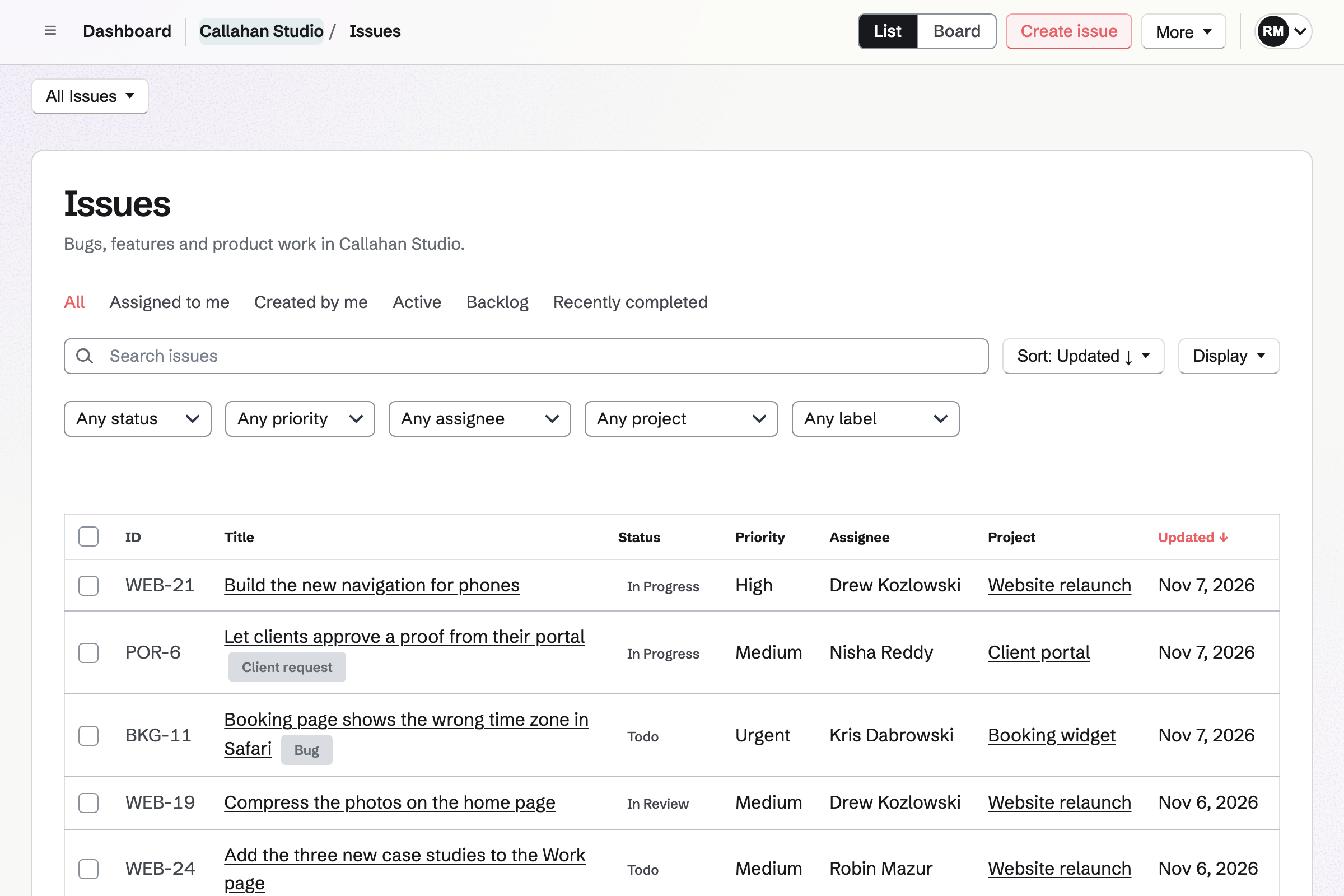
Callahan Studio’s Issues list, newest change first, with each issue’s identifier, status, priority, assignee and project, across its website, booking widget and client portal work.

How is Magpie different?

1. The tracker comes with the rest of the business

One Magpie subscription includes the areas a small business would otherwise buy one at a time:

  • Issues, with a board, projects, milestones, cycles, triage, custom fields and automation rules
  • Git Repositories for the team's code, cloned and pushed with Git
  • Helpdesk for customer email, in the same account as the work
  • Time Tracking, Invoicing and a Client Portal for the client the work is for
  • Team chat, Documents, Mail, Meetings, Websites and the other areas, in the same team

Everything is in one account with one bill. Jira covers planning and tracking the work. A help desk, code hosting and invoicing are other products.

2. Time on an issue goes on the client's invoice

Start timer on an issue runs a Time Tracking timer linked to it. A team admin adds billable time to an invoice, with a contact and an hourly rate. Issuing the invoice marks that time Invoiced. The client pays online through your own Stripe account.

3. One price covers the whole team

The Team plan is one price for up to 25 members. Adding a member does not change the bill. Guests take no member place, up to 100 on a paid plan. No plan limits the number of issues. Both plans' prices are on Magpie's pricing page and Jira's.

Comparing Magpie and Jira

Jira does more to plan and measure the work; Magpie does more around it. Every line in the tables below was checked against Jira's own pages, linked from each row, and against Magpie's code and Help.

Platform

WhatJiraMagpie
Issue trackingNumbered work with fields, links, comments and attachments Yes Yes
BoardsCards in a column for each status Yes Yes
SprintsPlan work in fixed periods Yes Cycles
Estimates and story pointsSize the work and see what a sprint can hold Yes No
TimelineWork as bars across dates Yes Projects listed by date
Charts and reportsBurndown, velocity and cumulative flow Yes Counts only
Query languageSearch any fields with a written query JQL No
Workflow rules and approvalsWhich status can follow which, and who approves Yes Statuses only
AutomationRules that change work by themselves Yes Status and priority
Bug reports without an accountCustomers report a problem on a public form Standard and above Yes
AISplit, summarise and change work, or hand it to an agent Rovo The assistant
Code hostingThe team's Git repositories No Yes
Code on each itemBranches, commits and pull requests shown on the work Yes GitHub links by hand
Connected appsReady-made connections to other software Marketplace API and webhooks
Slack and Microsoft TeamsMake work from a message and post updates Yes No
Help deskAnswer customers' support email Jira Service Management, separate Yes
Timer and invoicingTime the work and bill the client for it No Yes
Phone appFollow the work on a phone Yes In the browser
Single sign-onSign in through a company identity provider Atlassian Guard, separate No
Audit logWho changed what across the account Standard and above Partly

Good to know: Where Magpie says No or Partly, the line under the row says what Magpie does instead. Each gap has an item on Magpie's roadmap, and the line changes on the day it ships.

Work items

Both make a numbered piece of work in seconds. Each has links, labels, custom fields, attachments, comments and watchers. Jira also gives each work type its own fields and copies an item with Clone. Magpie has neither yet.

WhatJiraMagpie
Write down a bug or a task in a few seconds, with a number we can refer to Source Yes Yes
Mark each piece of work as a bug, a story or a task, each kind with what it needs Source Magpie: An issue has no type. A label or a Select custom field can say whether it is a bug or a feature, but every issue has the same fields and the same statuses. Yes Partly
Break big work into smaller pieces, several levels deep Source Yes Yes
Mark one piece of work as blocking, duplicating or related to another Source Yes Yes
Sort work by kind or by part of the product Source Yes Yes
Add fields of our own, and filter and report by them Source Magpie: Custom fields are Text, Number, Select, Multi-select, Date, Checkbox or User, shown on the issue, as columns of the list if you choose, and in exports. The list sorts by a Number or Date field, but cannot be filtered or grouped by any custom field. Yes Partly
Copy a piece of work to start a similar one Source Magpie: An issue cannot be copied. A new issue is made from scratch and linked to the old one by hand. Yes No
Attach screenshots and files to a piece of work Source Yes Yes
Discuss the work in comments and mention a teammate Source Yes Yes
Follow a piece of work and be told when it changes Source Yes Yes
Record the time spent on a piece of work against its estimate Source Magpie: Start timer on an issue starts a Time Tracking timer linked to it, and the issue shows the time you recorded. An issue has no estimate, so nothing shows the time remaining, and it does not total everyone's time. Yes Partly
Time a piece of work with a running timer and bill the client for it Source Jira: Time is typed into a work log after the work is done. Jira has no running timer of its own and does not invoice the time. No Yes
Change many pieces of work at once Source Yes Yes
Work from the keyboard: assign, comment and move work without the mouse Source Magpie: C creates an issue, J and K move between rows of the list and X selects one, and Cmd or Ctrl K opens the command palette. No key changes an issue's status, priority, assignee or labels. Yes Partly

Good to know: Start timer on a Magpie issue records the time in Time Tracking. A billable entry can then go on the client's invoice.

Boards, backlogs and sprints

Both move work across a board of the team's statuses, and both plan in sprints. Jira ranks the backlog by dragging, estimates in story points and limits each column. They do it better than we do today.

WhatJiraMagpie
Start from a ready-made setup for our kind of team, such as scrum, kanban or bug tracking Source Magpie: Every team's Issues starts with the same six statuses, from Backlog to Cancelled, and a team admin changes them. There is no choice of setups, and one team's setup cannot be reused for another. Yes Partly
Move work across a board from to do to done Source Yes Yes
Set up the board's columns to match how the team works Source Yes Yes
Limit how much work can sit in a column, and see when it is over Source Magpie: A column shows its issues with no limit and no warning; the list's grouping counts each status. Yes No
Put the backlog in order by dragging the most important work to the top Source Magpie: Issues have no order of their own. The Backlog view sorts by priority, due date or when issues were created or updated. Yes No
Plan work in sprints, with unfinished work moved on when one ends Source Magpie: A team admin turns cycles on, and members create each cycle by hand: one week, two weeks or custom dates. A cycle has no goal, and unfinished issues stay in the cycle that ended until someone selects them and moves them on. Yes Partly
Estimate each piece of work, in story points or time, and see how much a sprint can hold Source Magpie: An issue has no estimate, so cycles and projects count issues, not effort. A Number custom field can hold a size, but nothing adds it up. Yes No

Good to know: Magpie calls a sprint a cycle: one week, two weeks or custom dates. Unfinished issues stay in their cycle until you select them and choose the next one.

Views, search and reports

Both list, filter, sort and save views of the work. Jira adds a timeline, a calendar, burndown and velocity charts, and JQL for any query. Magpie counts issues instead of drawing charts.

WhatJiraMagpie
See all the work in one list, sorted, filtered and grouped Source Yes Yes
See work on a timeline, with dates as bars and waiting work linked Source Magpie: Roadmap lists projects that have a start or target date, earliest first, with their status and progress. It is a list of projects, not bars, and issues have no start date. Yes Partly
See work on a calendar by its dates Source Magpie: Issues have due dates, but no calendar shows them; the list sorts by due date. Yes No
See an overview of how the space is doing, on one page Source Magpie: Projects and milestones count their completed issues, a cycle's page counts completed, in progress and remaining issues, and the list counts each group. There is no overview of recent activity or of each person's workload. Yes Partly
See charts of how the work is going, such as a burndown or a cumulative flow Source Magpie: Nothing draws a chart or shows how the work changed over time; projects, milestones and cycles show counts only. Yes No
Search with a written query that combines any fields, such as open bugs assigned to me this week Source Magpie: The search box matches titles, descriptions, labels and comments, and one value can be chosen for each of status, priority, assignee, project and label. Filters cannot be combined with OR, and custom fields and dates cannot be searched. Yes Partly
Save a search and share it with the team Source Yes Yes

Good to know: A saved view in Magpie keeps its filters, sort, grouping and list or board. It is for you or for the whole team.

Workflows, forms and automation

Jira's workflows set which status can follow which, with approvals on Premium. In Magpie any status can follow any other. Magpie takes bug reports from anyone, with no account, on every plan.

WhatJiraMagpie
Design our own workflow, with rules for which status can follow which Source Magpie: Each team has its own statuses in five categories, which team admins change. An issue can move from any status to any other: there are no transitions, and nothing is checked or required on the way. Yes Partly
Have someone approve a piece of work before it moves on Source Magpie: Nothing in Issues asks for or records an approval; a status change happens at once. Yes No
Collect requests through a form with our own questions Source Magpie: A public issue form gives instructions and asks for a title, a description and an optional email, and each answer becomes an issue in Triage. No form can ask questions of its own. Yes Partly
Let customers report a bug without an account Source Yes Yes
Automate routine changes with rules, such as assigning, commenting or moving work Source Magpie: Automation rules run when an issue is created, a public form is sent, its status or assignee changes or a label is added, and set its status or priority. A rule cannot assign, label, comment, create an issue or run on a schedule. Yes Partly
Have a piece of work made again on a schedule, such as a monthly check Source Magpie: Each issue is made once. To-dos can repeat, but Issues has no schedule. Yes No
Send an email to make a piece of work or add a comment Source Magpie: Issues has no email address. Outsiders use a public issue form. Yes No
Answer customers' support emails in the same place as the team's work Source Jira: Jira points teams that need a help desk to Jira Service Management, a separate product with its own plans.Magpie: Helpdesk answers customer email together in the same account as Issues, but a conversation cannot make an issue or link to one. No Partly

Good to know: A Magpie automation rule runs when an issue is created, reported or changed. It sets the issue's status or priority. Rules have no monthly limit.

Goals and cross-team planning

Jira links work to goals in Atlassian Home, and Premium plans work across several teams. Magpie's projects are the top level, and each belongs to one team.

WhatJiraMagpie
Set goals and link the work to them Source Magpie: Projects are the top level in Issues, and nothing links them or their issues to a goal. Yes No
Post short updates on how a project is going for people outside the team Source Magpie: A project has a status, such as Planned, In Progress or Paused, but no written updates. A Client Portal can show a client the project's name, status and target date. Yes No
Plan work across several teams, with dependencies and each team's capacity Source Magpie: Each team's issues are separate: a project belongs to one team, and no view or plan spans teams. Yes No

Good to know: A Client Portal shows a client each shared project's name, status and target date. It does not show the issues.

Development and releases

Jira shows each item's branches, commits, pull requests and deployments from GitHub, Bitbucket or GitLab. Magpie hosts the code itself in Git Repositories, and links GitHub work to an issue by hand.

WhatJiraMagpie
See a piece of work's branches, commits and pull requests, and update it from a commit Source Magpie: When an issue's project is linked to a GitHub repository, members add pull requests and commits by hand and copy a suggested branch name. Magpie does not read their status, so nothing updates the issue, and Git Repositories commits are not linked to issues. Yes Partly
Group work into releases, follow their progress, and see what was deployed Source Magpie: A completed issue records when it was finished, but nothing ties it to a release or a deployment. Milestones group a project's issues by target date. Yes No
Keep the team's code repositories in the same place as its work Source Jira: Jira does not hold code. It connects to GitHub, Bitbucket, GitLab or another host through an app. No Yes

Good to know: An issue in a project linked to GitHub suggests a branch name to copy. Magpie does not read a pull request's status.

Rovo AI and agents

Rovo splits work into tasks, summarises it and hands it to coding agents that open pull requests. Magpie's assistant searches issues and creates them. They do it better than we do today.

WhatJiraMagpie
Ask AI to split work into tasks, summarise it, or change it, in the tracker or from Claude or ChatGPT Source Magpie: The assistant, and apps such as Claude or Cursor connected through MCP, search the selected team's issues and create an issue with a title and a description. They cannot change an issue or split one into sub-issues. Yes Partly
Hand a piece of work to an AI coding agent and get a pull request back Source Magpie: No agent can take an issue. The assistant reads a Git Repositories repository's files and commits and answers questions about them, but writes no code. Yes No
Have AI suggest the fields, labels and duplicates for new work Source Magpie: Triage is reviewed by hand, and nothing suggests labels, an owner or a duplicate. Yes No

Good to know: Apps such as Claude or Cursor connect to Magpie through MCP. They search and create issues in the selected team.

Apps, import and API

Jira connects thousands of Marketplace apps, Slack and Microsoft Teams. Magpie connects Issues to GitHub, and to anything else through its API and webhooks.

WhatJiraMagpie
Connect the tools the team already uses, such as Figma, Google Drive or Confluence Source Magpie: Issues connects only to GitHub, through links added by hand. Other tools can use the API and webhooks, but there are no ready-made apps. Yes No
Create work from a Slack or Microsoft Teams message and get updates in a channel Source Magpie: Magpie's Slack connection posts Meetings booking notices only, and there is no Microsoft Teams connection. Issues sends nothing to either. Yes No
Bring our work over from another tracker, such as Trello, Asana or a spreadsheet Source Magpie: Import issues takes a CSV file, with a column chosen for each field, or a GitHub Issues export made with GitHub CLI. Comments and attachments are not brought over, and there is no import from Jira, Trello or Asana. Yes Partly
Take our work out as a file Source Yes Yes
Create and change work from another app, and hear when it changes Source Yes Yes
Work on it from a phone Source Yes Yes

Good to know: Import issues takes a CSV file, with a column chosen for each field. One import creates up to 200 issues. Exports are CSV or JSON.

Plans, people and security

Jira Free has up to 10 users, and paid plans up to 100,000. They add permission schemes, security levels and single sign-on. A Magpie team has 3 members on Free and 25 on the Team plan.

WhatJiraMagpie
Use it free with a small team Source Magpie: No plan limits the number of issues, but a free team has places for 3 members and 5 GB of storage. Guests, up to 10 on Free, take no place. Yes Partly
Bring the whole company in, however many people Source Magpie: A team has places for 3 members on Free and 25 on the Team plan. Yes Partly
Keep all the attachments we need Source Magpie: A free team has 5 GB of storage, and a team on the Team plan 1 TB, shared by everything in the team. Yes Partly
Choose what each person can see and do in each space Source Magpie: A team admin chooses which areas each member can use, and the team's Member access is Can edit or View only. Beyond admin, member and guest there are no roles, and nothing sets permissions for one project. Yes Partly
Hide a sensitive piece of work, such as a security bug, from most of the team Source Magpie: Every member who can use Issues in a team sees all its issues. Sensitive work goes in Personal or in a separate team. Yes No
Let a contractor or a client work on our issues without seeing the rest Source Yes Yes
Sign in through the company's identity provider Source Magpie: There is no SAML single sign-on, and people are not added from a company directory. Yes No
See a log of who changed what across the company account Source Magpie: A team's admins see an audit log of who changed its members, the areas each can use, invitations, guests, API keys pinned to it, its Stripe account, owner and archiving, with the IP address, kept 12 months and exported as CSV. Each issue's activity records its own changes, but changes to the statuses, fields and rules of Issues and sign-ins are not logged. Yes Partly
Choose the country or region where our data is kept Source Magpie: There is no choice of where an account's data is kept. Yes No

Good to know: Guests take no member place in Magpie. A guest can be given Issues and nothing else, on every plan. A team's admins see an audit log of changes to its members, guests and API keys.

Price comparison

How Jira charges

Jira has a Free plan for up to 10 users. Standard and Premium are charged per user, per month. Enterprise is priced on request. The plan sets storage, automation runs and what admins control: Standard adds guests, public spaces and audit logs. Premium adds approvals and plans across teams. Rovo AI is on Standard and above. Atlassian Guard and Jira Service Management are separate subscriptions. Prices are on Jira's pricing page.

How Magpie charges

Magpie charges by plan, Free or a paid plan, for everything in the account. Issues, Git Repositories, Helpdesk and Time Tracking are on every plan. A team's plan is one price for the whole team, not a price per person. The plan sets members, guests and storage, not which areas you can use. Prices are on Magpie's pricing page.

On top of the planJiraMagpie
How a team paysPer user, per monthOne price for the team: 3 members free, 25 on the Team plan
Free planUp to 10 users3 members and 10 guests, no limit on issues
Storage2 GB on Free, 250 GB on Standard, unlimited on Premium5 GB for a free team, 1 TB on the Team plan, shared with every area
Automation150 rule steps a month on Free; 400 per user on StandardRules included, with no monthly limit
GuestsStandard and above, up to five per paid user10 on Free, 100 on a paid plan
AIRovo on Standard and above; agents use Rovo creditsThe assistant, included
Single sign-onAtlassian Guard, a separate subscription; included with EnterpriseNot offered
Help deskJira Service Management, a separate productHelpdesk, included
Code hostingAnother product, connectedGit Repositories, included
Time tracking and invoicingTime logging; no invoicingTime Tracking and Invoicing, included

When to choose Magpie or Jira

  • Want your issues beside your code, a helpdesk, time tracking and invoices, for one price for the whole team? Go with Magpie.
  • Want story points, burndown charts, workflow rules and JQL, with thousands of apps and room for the whole company? Jira is the right choice.

Recommendations by kind of business

For a software team that runs scrum
Jira. Jira estimates in story points, ranks the backlog by dragging, and draws velocity and burndown charts. Magpie's cycles count issues, not effort.
For a company with several teams
Jira. Permission schemes, security levels and single sign-on suit a large company, and Premium plans work across teams. A Magpie team has places for 25 members.
For an agency or a freelancer building for clients
Magpie. An issue's timer records the time, and that time can go on an invoice. A Client Portal shows the client their project's status. On Jira, each of these needs other software.
For a product team that takes bug reports from customers
Magpie. A public issue form takes reports from anyone without an account, on every plan. Each report waits in Triage. Helpdesk answers customer email in the same account.
For a small team that writes its own code
Magpie. Git Repositories hosts the code in the same team as the issues. Jira shows branches and pull requests on each item, which Magpie does not do yet.
For a small team that wants it free
Either. Jira Free has up to 10 users and 2 GB of storage. Magpie Free has 3 members and 10 guests, with no limit on issues. Choose Jira if more people need it free. Choose Magpie for the rest of the business beside it.

Frequently asked questions

What is the difference between Jira and Magpie?

Jira is Atlassian's tracker for planning work in sprints, workflows and reports, with thousands of connected apps. Magpie is one subscription for a small business's software. Issues is one of its areas, beside Git Repositories, Helpdesk, Time Tracking, Invoicing and the rest. Jira does more to plan and measure the work; Magpie does more around it.

Does Magpie replace Jira?

Yes, for a small team that tracks work as issues on a board, in cycles and projects. Magpie also hosts the code, answers customer email and bills the time.

Consider keeping Jira if you estimate in story points and plan by velocity. Keep it if you need burndown charts, JQL, workflow rules or approvals. Keep it too if you rely on Marketplace apps, Slack or single sign-on. Jira does each of these better than Magpie does today.

How much does Jira cost?

Jira has a Free plan for up to 10 users, with 2 GB of storage. Standard and Premium are priced per user, per month, and Enterprise is priced on request. Atlassian Guard and Jira Service Management are separate subscriptions. The prices are on Jira's pricing page.

How much does Magpie cost?

Magpie has a Free plan and paid plans, each covering every area. A free team has places for 3 members. The Team plan has places for 25, at one price for the team. Guests take no place. The prices are on Magpie's pricing page.

Does Magpie have story points or estimates?

No. A Magpie issue has no estimate, so cycles and projects count issues, not effort. A Number custom field can hold a size, but nothing adds it up. Estimates are on Magpie's roadmap. Jira estimates in story points, time or item count, and forecasts from velocity.

Does Magpie have burndown or velocity charts?

No. Projects, milestones and cycles show how many issues are completed, in progress and remaining. Nothing draws a chart of how the work changed over time. Charts are on Magpie's roadmap. Jira has burndown, burnup, velocity, control and cumulative flow charts on every plan.

Can I rank the backlog by dragging in Magpie?

No. Magpie issues have no order of their own. The Backlog view sorts by priority, due date, or when issues were created or updated. Jira's backlog is ranked by dragging an item above or below the others.

Does Magpie have a timeline or a calendar view?

No. Roadmap lists projects with a start or target date, earliest first, with their status and progress. It is a list, not bars, and issues have no start date or calendar. Jira's timeline draws work as bars you drag to reschedule, and its calendar shows work by date.

Does Magpie have a query language like JQL?

No. The search box matches titles, descriptions, labels and comments. One value can be chosen for each of status, priority, assignee, project and label. Filters cannot be combined with OR, and custom fields and dates cannot be searched. Jira's JQL combines any fields with AND, OR and ORDER BY.

Can Magpie control which status follows which?

No. A Magpie team's admins choose its statuses. An issue can move from any status to any other. Nothing is checked or approved on the way. Rules for which status can follow which are on Magpie's roadmap. Jira's workflows set the transitions, check conditions, require fields, and add approvals on Premium.

Does Magpie have sprints?

Yes, as cycles. A team admin turns cycles on, and members make each one: one week, two weeks or custom dates. A cycle's page counts completed, in progress and remaining issues. A cycle has no goal, and unfinished issues stay in it until someone moves them on.

Does Jira have a timer or invoicing?

No. Jira logs time typed in after the work, against an estimate. It has no running timer of its own and does not invoice. In Magpie, Start timer on an issue records the time in Time Tracking. Billable time can go on an invoice.

Does Jira host code?

No. Jira connects to GitHub, Bitbucket, GitLab or another host through an app. It then shows each item's branches, commits and pull requests. Magpie's Git Repositories hosts the code in the same team as the issues. It does not link commits to issues.

Can customers report a bug without an account?

In Magpie, yes, on every plan. A public issue form takes a title, a description and an optional email address from anyone. Each report becomes an issue and waits in Triage. Jira allows anonymous reports on Standard and above, when a space's create permission is made public.

Does Magpie connect to Slack or Microsoft Teams for issues?

No. Issues sends nothing to Slack or Microsoft Teams, and a message cannot become an issue. Magpie's Slack connection posts Meetings booking notices only. Jira's apps for both turn a message into work and post updates to a channel.

Does Magpie have AI for issues?

Partly. The assistant searches the team's issues and creates new ones. Apps such as Claude or Cursor do the same through MCP. They cannot change an issue or split one into sub-issues, and no agent writes code. Jira's Rovo does both, and its coding agents open pull requests.

Can I hide a sensitive issue from part of my Magpie team?

No. Every member who can use Issues in a team sees all its issues. Sensitive work goes in Personal or in a separate team. Jira's security levels show chosen work items only to chosen people, on Standard and above.

Does Magpie have single sign-on?

No. Magpie has no SAML single sign-on, and people are not added from a company directory. Jira offers both through Atlassian Guard, a separate subscription included with Enterprise.

Does Magpie have a help desk?

Yes. Helpdesk answers customer email together, in the same account as Issues. A conversation cannot make an issue or link to one yet. Jira points teams that need a help desk to Jira Service Management, a separate product.

Can I use Jira and Magpie together?

Yes, side by side, though no ready-made connection joins them. A team can plan engineering work in Jira and use Magpie for Helpdesk, Time Tracking and Invoicing. Magpie's API and webhooks and Jira's REST APIs can be joined with code of your own.

How do I move from Jira to Magpie?

Export your search results from Jira as a CSV file. In Magpie, choose Import issues and pick a column for each field: title, description, status, priority, assignee, labels and due date. One import creates up to 200 issues. Comments and attachments are not brought over.

Does Magpie have a phone app?

Issues works in a phone's browser. An issue opens to change its properties, comment and attach files. The Magpie app has Issues too. It is not yet in the App Store or Google Play. Jira has iOS and Android apps on every plan.

What is included in Magpie's Free plan?

Issues with no limit on issues, Git Repositories, Helpdesk, Time Tracking, Invoicing and the other areas. A team of 3 members, 10 guests and 5 GB of storage. A paid plan raises the limits and adds API keys and email at your domain.
If a line on this page is wrong, tell us and we will correct it.

Jira changes, and so does Magpie. If a line is out of date about either product, email support@magpie.diy with the page that shows it. We check the line against that page, change it, and give it the new date. That goes for Atlassian's own team as much as for anyone who uses Jira.

Track your team's work beside the rest of the business.

Create a Magpie account, then create your first issue.

Create account