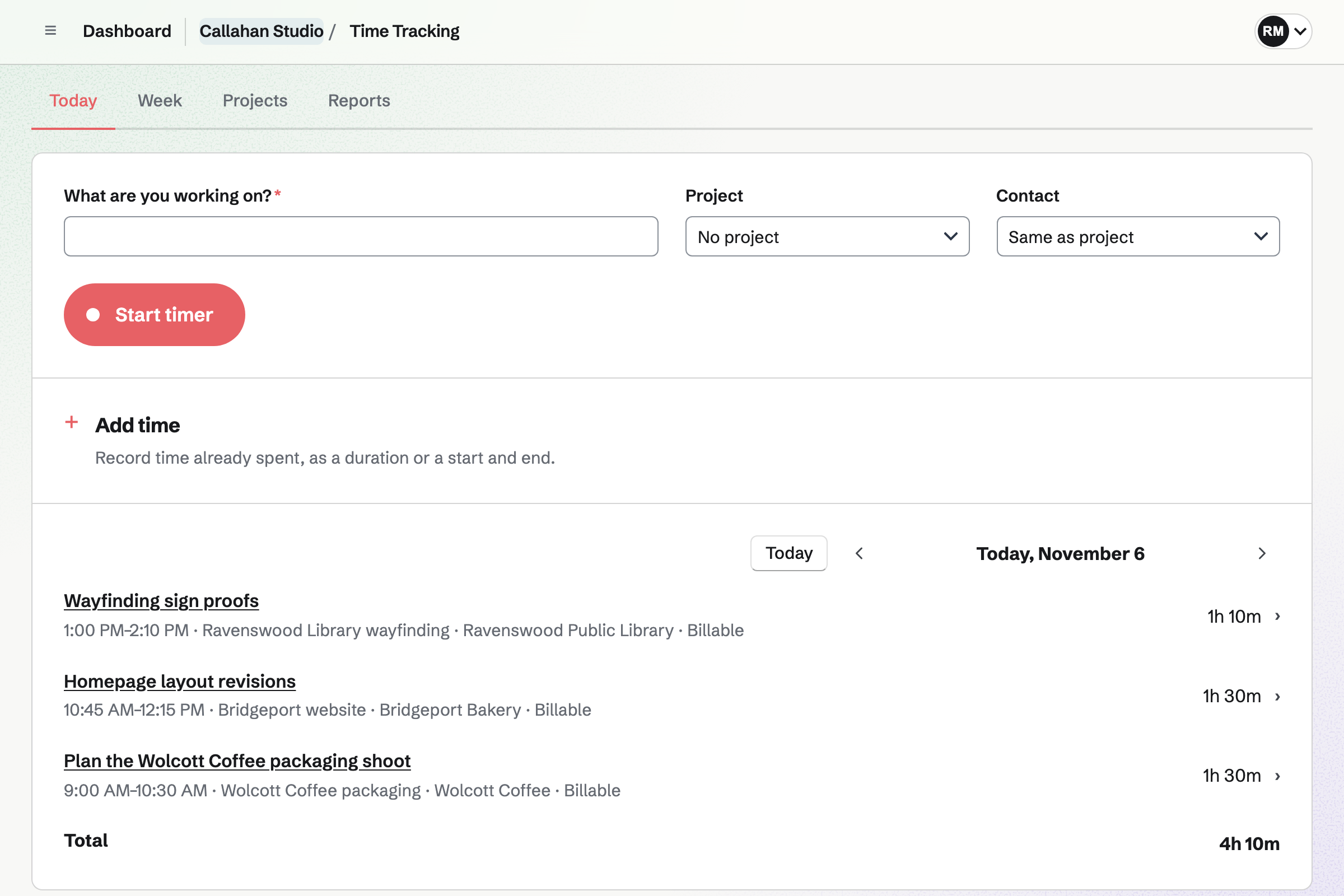
What is the difference between Toggl Track and Magpie?
Toggl Track is a time tracker with a calendar, timesheets, planning and apps on every device. Magpie is one subscription for a small business's software. Its Time Tracking is one area beside proposals, invoices paid online, the books and payroll. Toggl Track does more inside time tracking; Magpie does more with the time once it is tracked.
Does Magpie replace Toggl Track?
Yes, for a business that tracks its own time and bills clients for it. Magpie runs the timer and groups time by project and client. Billable time goes on an invoice the client pays online.
Consider keeping Toggl Track if you track from a calendar, a desktop app or a browser extension. Keep it too for approvals, capacity planning, goals or reminders to track. Toggl Track does each of these better than Magpie does today.
How much does Toggl Track cost?
Toggl Track has a Free plan for up to 3 users. Starter and Premium are priced for each user each month, and Enterprise is quoted. Time Off and Capacity Management are add-ons for each user. The prices are on Toggl Track's pricing page.
How much does Magpie cost?
Magpie has a Free plan and paid plans, each covering every area. Time Tracking has no plan limit, and a team has 3 members on Free. The Team plan is one price for up to 25 people. The prices are on Magpie's pricing page.
Can I bill clients for tracked time on a free plan?
On Magpie, yes. Entries have rates and billing on Free, and Reports totals the billable amounts. Add unbilled time puts them on an invoice. Free has 5 invoices a month. On Toggl Track, billable rates need Starter or above.
Does Magpie have a calendar view for time entries?
No. Today lists the day's entries with their start and end times, and Week totals each project for each day. A calendar to drag entries on is on Magpie's roadmap. Toggl Track's Calendar view shows entries as blocks, and dragging over an empty stretch adds time.
Does Magpie have a weekly timesheet?
Partly. Week shows time by project and day, and selecting a cell opens that day to add an entry. Hours cannot be typed into the grid, and last week cannot be copied. Toggl Track's Timesheet view takes hours typed into each day and copies last week's rows.
Can Magpie track time automatically?
No. Magpie records only the timers people start and the time they add. A Magpie Calendar event can start a timer named after it. Toggl Track's desktop apps record the apps and websites in use. It also makes entries from Google or Outlook events.
Does Magpie have timesheet approvals?
No. Tracked time is not submitted or approved, and there is no lock date. Staff Scheduling approves shift changes and time off. Toggl Track has people submit timesheets for approvers to approve or send back, on Premium and Enterprise.
Does Magpie have capacity planning?
No. Staff Scheduling plans shifts with people's availability and time off. No project work is planned against people's hours. Toggl Track's timeline plans people across projects by week, month or quarter.
Does Magpie have a phone or desktop app for time tracking?
Time Tracking works in a phone's or a computer's browser, and the running timer carries between them. The Magpie app tracks time on a phone. It is not yet in the App Store or Google Play. There is no desktop app or browser extension for time. Toggl Track has apps for iPhone, iPad, Android, Windows and Mac, and browser extensions.
Can I add more than one tag to an entry in Magpie?
No. A Magpie entry has one tag, and Reports totals time by tag. Several tags on one entry are on Magpie's roadmap. Toggl Track gives one entry as many tags as it needs.
Can I set a different hourly rate for each person?
No. A Magpie entry's rate comes from its project, its Contact or the Invoicing default. A team admin can change it on the entry. No rate depends on who did the work. Toggl Track sets rates for each member, project, task and member on a project.
Can I see the profit on each project?
Partly. Accounting's Profit by project shows each project's income from invoices and its costs from expenses and bills. A person's time has no cost rate, so it is not counted as a cost. Toggl Track's Profitability report counts each person's hourly cost, on Premium.
Can I invoice the time my whole team tracked?
Not yet in Magpie. Add unbilled time lists only the invoicing admin's own entries. Toggl Track makes an invoice from a report filtered to the client, with everyone's time in it.
Can Toggl Track clients pay an invoice online?
No. Toggl Track's help describes downloading the invoice as a PDF or sending it to QuickBooks. With the team's Stripe account connected, Magpie's invoice email has Pay online. The payment is recorded on the invoice.
Does Toggl Track have proposals or accounting?
No. Toggl Track has no proposals, and it sends invoices to QuickBooks for the books. Magpie's Proposals turn an accepted offer into a Time Tracking project. Accounting records each invoice and expense, and Payroll reads each person's hours.
Can a manager correct a teammate's time in Magpie?
No. Each person adds and changes only their own entries, and team admins see everyone's time in Reports. Toggl Track lets admins add, move and change anyone's entries, on Premium and Enterprise.
Can I import my Toggl Track time into Magpie?
No. Magpie has no import of entries, projects or tags. Time is added in Magpie, or through the API on Pro. Importing time is on Magpie's roadmap. Toggl Track imports entries, projects, clients and tags from CSV files.
How do I move from Toggl Track to Magpie?
Add your projects and tags in Time Tracking, and link each project to its client in Contacts. Set the project's rate and billing, then start tracking in Magpie. Earlier time stays in your Toggl Track account, so download its reports before you stop paying for it.
Can I use Toggl Track and Magpie together?
Yes. A team can track time in Toggl Track and send proposals, invoices and the books from Magpie. Toggl Track's time does not reach Magpie by itself, so each invoice's lines are added by hand.
Can I use time tracking from an AI app?
Partly in Magpie. The assistant and connected AI apps search your own entries and start and stop the timer. They cannot add past time or read the team's reports. Toggl Track's MCP server starts, logs and edits time and runs reports, on every plan.
What is included in Magpie's Free plan?
Time Tracking with rates, billing and reports, and Invoicing with 5 invoices a month. Proposals with 5 a month, 100 contacts, Expenses and Accounting are included. So are Payroll for 2 employees, booking pages and a team of 3.