Carrd compared with Magpie

Carrd vs Magpie: an in-depth comparison

Carrd and Magpie both let you make a website and a page of links, and both publish without paying. They are built around different things.

  1. Carrd is a builder for one-page sites: profiles, landing pages, forms and portfolios, made from templates. It is built for someone who wants one page that does one job, and for people who make many such pages.
  2. Magpie is one subscription for a small business's software, and Websites is one part of it. Beside the website it includes a Link-In-Bio List, a shop, booking pages, invoicing, a newsletter, email at your domain and more. It is built for someone whose website is one part of running the business.
Create account
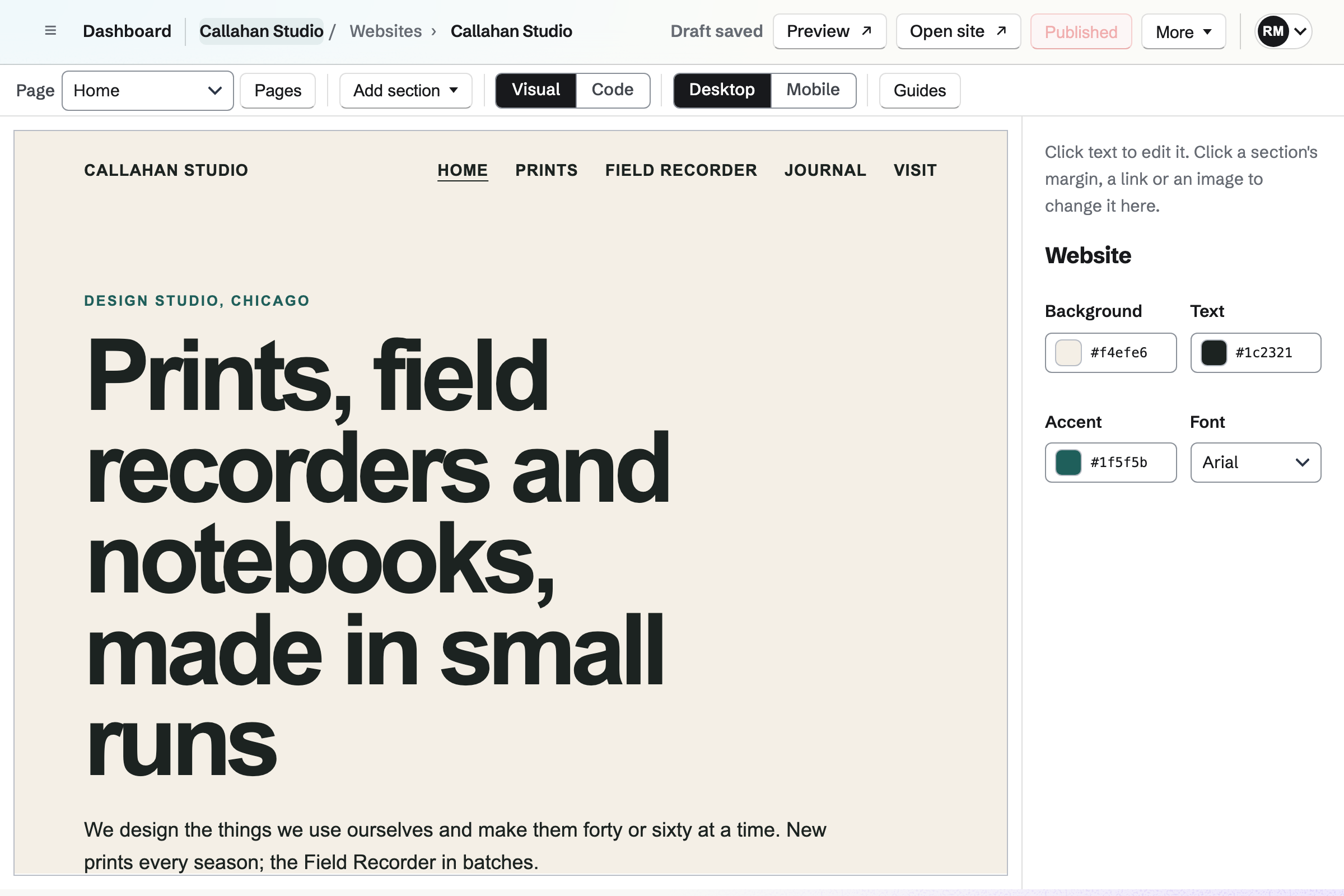
Callahan Studio’s website in the Website Builder: its Home page in Visual mode, a hero for prints, field recorders and notebooks under the site’s header and pages, with the page’s colours and font beside it.

How is Magpie different?

1. The website comes with the rest of the business

One Magpie subscription includes the areas a small business would otherwise buy one at a time:

  • Websites, with a blog, a portfolio, a shop and a files website for anything built elsewhere
  • Link-In-Bio List for a page of links and social icons
  • Store for selling online, with a cart and checkout in the website's own look
  • Forms, Newsletter and Helpdesk for the messages and sign-ups a website collects
  • Meetings and Appointments for booking pages, and Invoicing for invoices paid online
  • Mail for email addresses at your domain, and DNS for the domain's records

Everything is in one account with one bill. Carrd makes the site and leaves bookings, a mailing list and email to other services.

2. The Free plan publishes at your own domain

Magpie's Free plan includes 1 website, published at a Magpie address or at your own domain with a certificate. Magpie adds nothing of its own to a website's pages on any plan. A paid plan includes 20 websites. Both plans' prices are on Magpie's pricing page.

3. A website of pages, kept as drafts and versions

An editor website has up to 50 pages, each at its own address. Changes stay drafts until you publish them, all pages at once. The last 50 publishes are kept, and any can be restored. You can download the whole website as files on every plan. You can also host a site built elsewhere, from its files or a Git repository.

Comparing Magpie and Carrd

Carrd does more inside one page; Magpie does more around it. Every line in the tables below was checked against Carrd's own pages, linked from each row, and against Magpie's code and Help.

Platform

WhatCarrdMagpie
Website builderBuild a page on a live preview and publish it Yes Yes
Ready-made templatesStart from a design someone made More than 300 One Starter design
Several pagesPages of their own, with a menu Sections act as pages Yes
Link-in-bio pageA profile page of links and social icons Yes Yes
AnimationsParts of the page move as they appear Yes No
Forms in the pageContact and sign-up forms inside the site Pro Standard and above At your own domain
PaymentsTake a payment on the site Pro Plus Yes
Online shopProduct pages, a cart and checkout No Yes
Your own domainThe site at an address you own Pro Standard and above Yes
DNS hosting and emailThe domain's records and mailboxes in the same place No Yes
Drafts and version historyPublish when ready; go back to an earlier version Not documented Yes
Password protectionThe site only for people with the password Pro Plus No
Download the siteThe site's files as a ZIP Pro Plus Yes
Your own files and GitHost a site built elsewhere No Yes
Hand a site to a clientMove a site to someone else's account Pro Lite and above No
Visitor analyticsVisits counted on the site Pro Standard and above Shop pages and link lists
No product name on the siteNo badge or link to the builder Pro plans Yes
AI helpBuild or change the site by asking No Yes
Booking pages, invoicing and a newsletterThe rest of the business in the same account No Yes

Good to know: Where Magpie says No or Partly, the line under the row says what Magpie does instead. Each gap has an item on Magpie's roadmap, and the line changes on the day it ships.

Getting started

Carrd starts a site from more than 300 templates or a blank page, and publishes up to three sites on its free plan. Magpie starts every website from the same Starter design and publishes on the Free plan.

WhatCarrdMagpie
Start a site from a ready-made template or a blank page Source Magpie: Every editor website starts from the same Starter design, with a header, navigation and footer, and is changed section by section. A JSON document or a page of HTML, such as one an AI tool wrote, can start a website already written. Yes Partly
Build and publish a site without paying Source Yes Yes
Have my site work on phones without extra work, and check it at phone width Source Yes Yes
Make a profile page with my picture, my links and my social icons, for my social bios Source Yes Yes

Good to know: A Magpie website can also start from a page of HTML or a JSON document, such as one an AI tool wrote. A Link-In-Bio List has 15 palettes and other styles of its own.

Building a site

Carrd adds elements one at a time, with animations, music, and backgrounds of video or pictures. It gives more ways to style a page without code, and does it better than we do today. Magpie builds a page from sections with fixed layouts.

WhatCarrdMagpie
Add, move, copy and delete the parts of a page on a live preview Source Yes Yes
Give my site several pages, or sections that act as pages, with a menu, a header and a footer Source Yes Yes
Choose my site's colours, fonts and background, including a picture, a gradient or a video behind it Source Magpie: The editor's Website panel sets the background, text colour, accent colour and font of every page, from the usual fonts or the team's Brand Kits, and a selected section takes its own background colour. A picture, a gradient or a video behind the page or a section takes CSS in Code. Yes Partly
Put things side by side in columns Source Yes Yes
Make parts of the page move as they appear Source Magpie: Sections appear without movement. An animation has to be written in the page's CSS in Code. Yes No
Play my videos and music on the site Source Magpie: A Video section plays a video from Screen Recorder, where video files are uploaded, or from YouTube, Vimeo or Loom. No section plays music; an audio player can be pasted into the page in Code. Yes Partly
Show a gallery or a slideshow of my pictures Source Yes Yes
Add my own HTML, CSS and JavaScript, or another service's widget, to the page Source Yes Yes
Fill in the page's text from the link a visitor opened, such as their name, or from today's date Source Magpie: A page shows what was written. Personalising it takes a script in Code, which runs at the team's own domain. Yes No

Good to know: Code in Magpie's editor shows each page's HTML and the Layout every page shares, on every plan. Scripts and embeds run once the website is at your own domain.

Forms and payments

Carrd puts contact, sign-up and payment forms inside the page, and sends answers to email services, Zapier or a web address. Magpie's Forms and Newsletter give code to paste into the website's Code. The form shows inside the page once the website is at your own domain.

WhatCarrdMagpie
Put a contact form on my site and get the messages by email Source Magpie: Forms builds a contact form with its own public page and emails its creator each response, and Form settings gives its code to paste into the website's Code. The form then shows inside the page once the website is at the team's own domain; at the Magpie address the website links to it instead. A form written in Code itself has nowhere to send its answers. Yes Partly
Collect email signups on my site into my mailing list Source Magpie: The Newsletter keeps its own subscribers and sends the emails itself. Newsletter settings gives the signup form's code to paste into the website's Code, where it shows once the website is at the team's own domain; at the Magpie address the website links to the signup page instead. Nothing sends signups to another email service. Yes Partly
Send my form's answers to Zapier, Make, Airtable or my own web address as they arrive Source Yes Yes
Take a payment on my site, for a product, a fee or a donation Source Yes Yes
Run a shop on my site, with product pages, a cart and checkout Source Carrd: A payment is one Stripe Checkout per form, or another service's buy button. The documentation describes no product pages or cart. No Yes

Good to know: A Magpie form emails you each response, and a webhook sends it to Zapier, Make or a web address on every plan. Paid forms take 4%, and Store sales take 4%.

Publishing and domains

Both publish at a free address and at your own domain with a secure address. Carrd adds redirects and a site password on Pro Plus. Magpie keeps drafts and versions, hosts the domain's DNS and serves sites built elsewhere.

WhatCarrdMagpie
Publish my site at a free address, and choose when changes go live Source Yes Yes
Show my site at my own domain, with a secure address Source Yes Yes
Keep my domain's DNS and email in the same place as my site Source Carrd: A domain is registered and managed at another company, such as Cloudflare, Namecheap or Porkbun, where the records Carrd lists are added by hand. No Yes
Go back to an earlier published version of my site Source Carrd: The documentation has no page about earlier versions; its troubleshooting page mentions saving a site as an offline draft. Not stated Yes
Send old addresses on my site to a new page or another site, so old links keep working Source Magpie: When a page's address changes, the old address sends visitors to the new one until another page takes it. There is no list of redirects of your own, to another site or from an old site's addresses. Yes Partly
Keep my site for people who have the password Source Magpie: A published website is open to everyone. Turning off Published takes it offline for every visitor. Yes No
Download my site's files to keep or to host elsewhere Source Yes Yes
Host a site I made elsewhere, from its files or from a Git repository Source Carrd: Sites are made in Carrd's builder, and a downloaded site cannot be uploaded back. No Yes

Good to know: When Magpie hosts your domain's DNS, it adds the website's records itself. Mail, on a paid plan, gives email addresses at the same domain.

Managing sites and working together

Both let other people edit a site with you. Carrd hands a finished site to a client's account, clones sites and saves custom templates. Magpie keeps a website in the team that made it.

WhatCarrdMagpie
Keep the product's name off my site Source Yes Yes
Run many sites from one account Source Yes Yes
Let other people edit my site with me Source Yes Yes
Hand a finished site over to a client's own account Source Magpie: A website stays in the team it was made in and cannot move to another team. The client can join that team, or the website can be downloaded as files and uploaded to a files website in theirs, which loses the editor. Yes No
Copy a site, or save my own design as a template, to start new sites from it Source Magpie: A section can be duplicated, but a whole website cannot be copied, and there are no website templates of your own. Downloading the files and uploading them gives a files website without the editor. Yes No
Build and change my site from my phone Source Carrd: The builder opens in a phone's browser, but its help calls the mobile builder unfinished and recommends a desktop. Partly Yes
Build or change my site by asking an AI assistant Source Carrd: The pricing page and documentation describe no AI help; a site is built element by element in the builder. No Yes

Good to know: Magpie's editor works in a phone's browser, and the assistant can create, change and publish a website, asking before it publishes.

Analytics

Carrd Analytics counts a site's views on Pro Standard and above. It also connects Google Analytics, Plausible and ad pixels from the site's settings. Magpie counts views of a website's Shop pages and of a Link-In-Bio List.

WhatCarrdMagpie
See how many people visit my site Source Magpie: A Link-In-Bio List counts its page views and the clicks on each link, as totals. When a website shows the team's Store, Store reports count views of its Shop, product and collection pages each day. The website's other pages show no visit counts. Yes Partly
Connect Google Analytics, Plausible or another analytics tool to my site Source Magpie: A tracking snippet pasted into the Layout's head in Code runs once the website is at the team's own domain, on every page but the Shop's. There is no setting that adds one, and a Link-In-Bio List loads none. Yes Partly
Add the Meta, TikTok or LinkedIn pixel to measure my ads Source Magpie: A pixel's code pasted into the Layout's head in Code runs once the website is at the team's own domain. There is no setting that adds one. Yes Partly

Good to know: A tracking snippet or a pixel pasted into the Layout's head in Code runs once the website is at your own domain.

Price comparison

How Carrd charges

Carrd has a free plan for up to three sites, and three paid plans: Pro Lite, Pro Standard and Pro Plus. Each is billed by the year, in sizes by the number of sites. Pro Lite removes the Made with Carrd badge and adds share images, site icons and QR codes. Pro Standard adds your own domain, forms, embeds and analytics. Pro Plus adds payments, redirects, a site password and downloads. Prices are on Carrd's pricing page.

How Magpie charges

Magpie charges by plan, Free or a paid plan, for everything in the account. The plan sets how many websites, subscribers and team members you have, not which areas you can use. Your own domain is on every plan. Magpie takes 4% of Store sales and 4% of paid forms. Prices are on Magpie's pricing page.

On top of the planCarrdMagpie
Free planUp to three sites, with the Made with Carrd badge1 website, with no Magpie name on its pages
Your own domainPro Standard and aboveEvery plan
Number of sitesSold in sizes, from 3 up to 1,0001 on Free, 20 on a paid plan, for each team
Forms on the sitePro Standard and above, inside the pageEvery plan, inside the page at your own domain
Taking paymentsPro Plus, through Stripe CheckoutEvery plan, through your own Stripe account, for 4% of Store sales
Downloading the sitePro PlusEvery plan
Email at your domainNot offeredIncluded on a paid plan
Booking pages, invoicing and a newsletterNot offeredIncluded: the Newsletter has 250 subscribers on Free, 5,000 on a paid plan
People who can editShared with other Carrd users3 in a free team, 25 on the Team plan

When to choose Magpie or Carrd

  • Want a website of several pages beside a shop, bookings, invoices and email at your domain, published at your own domain on the Free plan? Go with Magpie.
  • Want one page with more than 300 templates to start from, animations, and payment forms inside the page? Carrd is the right choice.

Recommendations by kind of business

For a landing page or a personal profile
Carrd. More than 300 templates, animations and backgrounds of video or pictures give one page more looks than Magpie's Starter design. On Pro Standard, a contact or sign-up form goes inside the page.
For a designer who makes sites for clients
Carrd. Custom templates reuse one design across many sites, and a finished site transfers to the client's own account. Magpie keeps a website in the team that made it.
For a small business with a shop or bookings
Magpie. Store sells with a cart and checkout on the website, and booking pages, invoices and a newsletter are in the same team. Carrd takes one payment per form through Stripe Checkout.
For a link in a social bio
Either. Carrd's Profile templates and Magpie's Link-In-Bio List both make a page of links and social icons. Magpie shows it at your own domain on the Free plan; Carrd gives more ways to design it. Choose by which of the two matters more.
For a site with several pages
Magpie. An editor website has real pages, each at its own address, with a blog and a portfolio. Changes stay drafts until you publish, and earlier versions can be restored.
For a developer, or a site built elsewhere
Magpie. A files website serves uploaded files or builds from a Git repository on each push, with versions. Carrd's sites are made in its builder, and a downloaded site cannot go back in.

Frequently asked questions

What is the difference between Carrd and Magpie?

Carrd is a builder for one-page sites, made from templates, with forms, payments and analytics on its Pro plans. Magpie is one subscription for a small business's software. Its Websites area makes sites of several pages, beside a shop, bookings, invoicing, a newsletter and email. Carrd does more inside one page; Magpie does more around it.

Does Magpie replace Carrd?

Yes, for a business whose site is a few pages, a shop or a page of links. Magpie publishes at your own domain on the Free plan and keeps drafts and versions. It adds the booking, invoicing and email the business would buy elsewhere.

Consider keeping Carrd if you want a template to start from, or animations and video backgrounds without code. Keep it too if you hand finished sites to clients. Carrd does each of these better than Magpie does today.

How much does Carrd cost?

Carrd has a free plan for up to three sites, and three paid plans: Pro Lite, Pro Standard and Pro Plus. Each is billed by the year, in sizes by the number of sites. Your own domain needs Pro Standard, and payments need Pro Plus. The prices are on Carrd's pricing page.

How much does Magpie cost?

Magpie has a Free plan and paid plans, each covering every area. Free includes 1 website at your own domain, a Link-In-Bio List and a team of 3. A paid plan includes 20 websites and email at your domain. Magpie takes 4% of Store sales. The prices are on Magpie's pricing page.

Does Magpie have templates like Carrd's?

No. Every Magpie website starts from the same Starter design, changed section by section. A page of HTML or a JSON document, such as one an AI tool wrote, can start a website already designed. More designs to choose from are on Magpie's roadmap. Carrd has more than 300 templates.

Can I add animations to a Magpie website?

No. Sections appear without movement, and an animation has to be written in the page's CSS in Code. Animations are on Magpie's roadmap. Carrd sets an animation on each element from its panel.

Can I put a contact form or a sign-up form inside my Magpie website?

Yes, once the website is at your own domain. Form settings and Newsletter settings each give code to paste into the website's Code. Visitors then answer the form or subscribe inside the page. At the Magpie address the website runs no embeds, so it links to the form's own page instead. Carrd puts both inside the page on Pro Standard and above.

Can Magpie send form answers to Zapier or a webhook?

Yes. A webhook in Forms sends each new response to Zapier, Make or your own web address as it arrives, on every plan. Each request is signed, and a failed one is tried again over about two days. Carrd's custom forms on Pro Plus send them to Zapier, Make, Airtable or a web address.

Can I password-protect a Magpie website?

No. A published website is open to everyone, and turning off Published takes it offline for every visitor. A private website is on Magpie's roadmap. Carrd's Pro Plus puts a whole site behind a username and password.

Can I hand a Magpie website over to a client?

No. A website stays in the team it was made in. The client can join that team. Or you can download the website and upload it to a files website in theirs, without the editor. Handing over a website is on Magpie's roadmap. Carrd transfers a site to another account on Pro Lite and above.

Can I copy a website or save it as a template in Magpie?

No. A section can be duplicated, but a whole website cannot be copied yet. Copying a website is on Magpie's roadmap. Carrd clones sites and saves custom templates on Pro Lite and above.

Does Carrd have an online shop?

No. A Carrd form can take one Stripe Checkout payment on Pro Plus, and a widget can add another service's buy button. Its documentation describes no product pages or cart. Magpie's Store adds a Shop page, product pages, a Cart and checkout to a website.

Can a Carrd site have more than one page?

A Carrd site is one page. Named sections stand in for pages, opened from buttons and links. An editor website in Magpie has up to 50 pages, each at its own address, with navigation that lists them.

Can I use my own domain on Magpie's Free plan?

Yes. A team admin connects a domain or subdomain on every plan, with a TXT record and an ALIAS or CNAME record. Magpie gets the certificate, and the Magpie address forwards to the domain. On Carrd, your own domain needs Pro Standard or above.

Does Magpie put its name on my website?

No. Magpie adds nothing to a website's pages on any plan. A Link-In-Bio List ends with a link to Magpie. Carrd's free sites show a Made with Carrd badge, which every Pro plan removes.

Can I see how many people visit my Magpie website?

Partly. Store reports count views of a website's Shop, product and collection pages, and a Link-In-Bio List counts its views and clicks. The website's other pages show no counts unless you paste a tracking snippet into the Layout's head. Visitor counts for every page are on Magpie's roadmap. Carrd Analytics counts views on Pro Standard and above.

Can I make a link-in-bio page in Magpie?

Yes. A Link-In-Bio List is a profile page with a picture, a name, links, headings and icons for up to 14 social profiles. It has 15 palettes and other styles, on every plan, and shows at your own domain. Carrd makes the same kind of page from its Profile templates.

Can I go back to an earlier version of my site?

In Magpie, yes. Each publish keeps a version, and History lists the last 50, each with Restore. Carrd's documentation does not describe earlier versions of a site.

Can I build or change my Magpie website with AI?

Yes. The assistant creates, changes, publishes and moves a team's website to Trash, and asks before it publishes or removes one. On a website of several pages, its changes reach only the home page. A page of HTML or a JSON document from any AI tool can also start a website. Carrd's pages describe no AI help.

Can I edit my site on my phone?

In Magpie, yes. The editor works in a phone's browser: you can change pages, sections, text, links and pictures, and publish. Carrd's builder opens in a phone's browser, and its help recommends a desktop.

Can I use Carrd and Magpie together?

Yes. A Carrd site can link to a Magpie booking page, a Magpie form, the Newsletter's sign-up page, a Store product or an invoice. Magpie's DNS can host the domain the Carrd site uses, and Mail, on a paid plan, can give email addresses at it.

How do I move my site from Carrd to Magpie?

On Pro Plus, Carrd downloads a ZIP of the site's HTML, CSS, JavaScript and images. Upload it to a Magpie files website, which serves it as it is; its Carrd forms will not work there. Or make the site again in Magpie's editor, starting from its page of HTML. Then point your domain at Magpie with two DNS records.

What is included in Magpie's Free plan?

1 website, published at a Magpie address or at your own domain, with 50 pages, drafts and 50 kept versions. A Link-In-Bio List, the shop, booking pages, Invoicing, the Newsletter with 250 subscribers, Forms and a team of 3. A paid plan adds email at your domain and raises the limits.
If a line on this page is wrong, tell us and we will correct it.

Carrd changes, and so does Magpie. If a line is out of date about either product, email support@magpie.diy with the page that shows it. We check the line against that page, change it, and give it the new date. That goes for Carrd's own team as much as for anyone who uses it.

Make a website on Magpie's Free plan.

Create a Magpie account, then make your first website.

Create account