Microsoft Word compared with Magpie

Microsoft Word vs Magpie: an in-depth comparison

Microsoft Word and Magpie both write formatted documents with page layout, comments and people working together. They come with different things around them.

  1. Microsoft Word is the word processor of Microsoft 365, on Windows, Mac, phones and the web. It is built for anyone who writes documents, from a student to a large company.
  2. Magpie is one subscription for a small business's software, and Documents is one area of it. Beside the writing it includes invoicing, booking pages, email at your domain, a shop and the rest of the areas a business runs on. It is built for someone whose documents are one part of running the business.
Create account
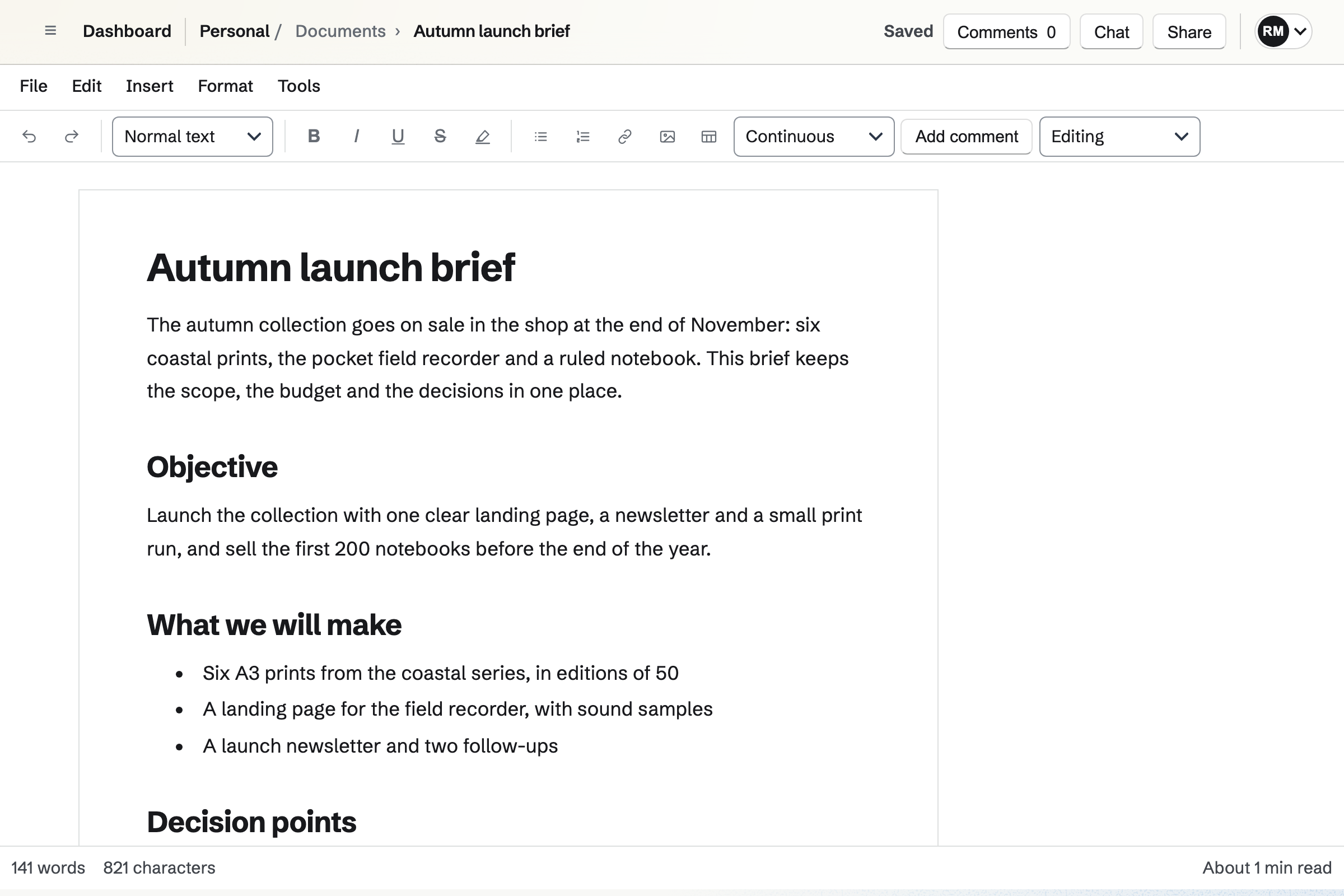
Robin Mazur’s Autumn launch brief open in the Documents editor, with the File, Edit, Insert and Format menus, the formatting toolbar, and the brief’s objective, what it will make and its decision points.

How is Magpie different?

1. The documents come with the rest of the business

One Magpie subscription includes the areas a small business would otherwise buy one at a time:

  • Documents, Notes, Spreadsheets and Presentations for the team's writing
  • E-Signatures and Proposals for the documents a client signs
  • Meetings and Appointments for booking pages, and Calendar for the team's events
  • Invoicing, Store and paid Forms, with payment through your own Stripe account
  • Mail for email at your domain, Team chat and Video Chat for talking it through
  • Kanban Boards, To-dos, Contacts, Helpdesk, Websites and the other areas, in the same team

Everything is in one account with one bill.

2. Every part of a Document works in the browser

Page setup, headers and footers, footnotes, citations and cross-references all work in the browser. So do mail merge and the accessibility check. Nothing needs an app installed. A Document saves as you write, and Download PDF keeps its page layout.

3. A team pays one price

The Team plan is one price for up to 25 people, and members do not pay. A team on the Free plan has places for 3 members and 10 guests. Magpie's prices are on its pricing page.

Comparing Magpie and Microsoft Word

Microsoft Word does more inside a document; Magpie does more around it. Every line in the tables below was checked against Microsoft's own pages, linked from each row, and against Magpie's code and Help.

Platform

WhatMicrosoft WordMagpie
Formatted documentsHeadings, lists, tables, pictures and page layout Yes Yes
Writing togetherSeveral people in one document at once Yes Yes
CommentsComments on selected text, with replies Yes Yes
Track changesEvery edit recorded, then accepted or rejected Yes Suggestions
Version historyGo back to an earlier version In OneDrive Saved versions
Footnotes, citations and cross-referencesNumbered notes, sources in APA, MLA or Chicago, and links to figures Yes Yes
Accessibility checkA list of the document's accessibility problems Yes Yes
Charts, shapes and diagramsCharts, shapes, icons and SmartArt in the page Yes No
Mail mergeA letter for each person on a list Desktop app One copy at a time
Labels and envelopesAddress labels and envelopes to print Desktop app No
AI writing helpDraft, rewrite and summarise with AI Microsoft 365 plans On Dashboard
Link anyone can openA link that opens the document without an account Yes Yes
SignaturesSend a document for signature Work accounts From a PDF
Desktop appAn app for Windows and Mac Yes No
Phone appsApps for iPhone and Android Yes In the browser
OfflineWrite with no connection Desktop app No
SpreadsheetsA grid of cells with formulas Excel Yes
Invoices and paymentsInvoices, a shop and forms paid by card No Yes
Free planWrite documents without paying Word for the web Yes

Good to know: Where Magpie says No or Partly, the line under the row says what Magpie does instead. Each gap has an item on Magpie's roadmap, and the line changes on the day it ships.

Creating and writing

Both start from a blank page or a starter, with lists, tables and pictures. Word adds fonts and colours for any words, shapes, SmartArt and charts. It does these better than we do today.

WhatMicrosoft WordMagpie
Start a document from a blank page or a ready-made template Source Yes Yes
Save my own document as a template to start new ones from Source Magpie: New document offers only Magpie's starters; File, then Duplicate copies one of the team's Documents to start from. Yes Partly
Change the font, size and colour of words, and make them bold or italic Source Magpie: Selected words can be bold, italic, underlined, struck through, highlighted, raised or lowered, and paragraphs aligned; a font, size or colour comes only from a custom paragraph style, never for a few words on their own. Yes Partly
Change how every heading or paragraph of one kind looks, in one place Source Magpie: Format, then Custom styles saves a paragraph style with a font, size, weight, colour and space after, and changing it changes every paragraph that uses it; Normal text and the built-in headings keep Magpie's look. Yes Partly
Add bulleted and numbered lists and tables Source Yes Yes
Put pictures in a document, from my computer or a stock library, and wrap text around them Source Magpie: Image opens the image picker for Your images or an upload; a picture is resized by its corner, set left, centre or right, or beside the text, with a caption and alt text. There is no stock library or web search for pictures. Yes Partly
Add shapes, icons and ready-made diagrams such as a process or an org chart Source Magpie: A Document holds text, tables and pictures; a diagram is drawn elsewhere, such as on an Idea Board or in Design, and added as a picture. Yes No
Put a chart in a document and keep it up to date with its figures Source Magpie: Spreadsheets has no charts yet, so a Document shows pictures and its own tables, not a chart linked to its figures. Yes No
Write a mathematical equation that prints as mathematics Source Magpie: Insert, then Equation stores LaTeX with a description for screen readers, but the page, the PDF and exports show the LaTeX itself, not the typeset equation. Yes Partly
Show code in a document with its spacing and colours Source Microsoft Word: Word has no code block of its own; a Microsoft Q&A answer suggests pasting code from an editor as HTML, or an add-in. No Yes

Good to know: Format, then Code block keeps code's spacing and colours it for about twenty languages. The colours stay in the PDF and in Word export.

Proofing, language and reading

Word checks grammar as you type, takes dictation and reads a document aloud. Magpie uses the browser's spelling check. Both check a document for accessibility problems.

WhatMicrosoft WordMagpie
Have spelling and grammar checked as I write Source Magpie: The editor turns on the browser's own spelling check, which underlines misspelled words; Magpie has no grammar suggestions of its own. Yes Partly
Type a document by speaking Source Magpie: Documents has no voice typing of its own; text is typed or pasted into the editor. Yes No
Make a translated copy of a document Source Magpie: Documents has no Translate command; asked on Dashboard, the assistant reads a Document and writes a translated copy as a new Document, in plain text without its headings, tables or pictures. Yes Partly
Listen to a document read aloud Source Magpie: Documents has no reading aloud of its own. Yes No
Check a document for accessibility problems Source Yes Yes

Good to know: Magpie's Accessibility check lists missing alt text, skipped heading levels, tables without headers and broken references. Each problem has Go to item.

Pages and layout

Both set the paper, margins and columns, with headers, footers and page numbers. Both build a table of contents, footnotes, citations and cross-references. Word adds a different first page, a navigation pane and watermarks.

WhatMicrosoft WordMagpie
Set the margins, page size, orientation and columns Source Yes Yes
Add headers, footers and page numbers, and leave them off the first page Source Magpie: Page setup adds header and footer text and page numbers, with the number they start at; the same header and footer show on every page, with no different first page or section. Yes Partly
Build a table of contents from the headings Source Yes Yes
See the headings beside the page and jump to one Source Magpie: A table of contents inserted in the document links to each heading; nothing lists the headings beside the page. Yes No
Add footnotes and endnotes Source Yes Yes
Cite sources and add a bibliography Source Yes Yes
Number figures and tables, and refer to them elsewhere in the text Source Yes Yes
Put a watermark such as Draft or Confidential behind every page Source Magpie: A Document has no watermark; its PDF download can be given one in PDF Editor. Yes Partly

Good to know: Magpie numbers endnotes as well as footnotes. Word and OpenDocument exports keep both as real notes.

Sharing and working together

Both share a document with named people or by a link that needs no account. In both, several people write in one document at once. Word tracks every change as it is typed, compares two versions and locks a file with a password.

WhatMicrosoft WordMagpie
Share a document with named people to view, review or edit Source Yes Yes
Share a link anyone can open without an account Source Yes Yes
Several people writing in one document at the same time Source Yes Yes
Comment on selected text, reply and resolve Source Yes Yes
Mention someone in a comment so they are told Source Microsoft Word: An @mention, which notifies the person, is offered only to enterprise users working in a document saved to the cloud. Partly Yes
Give someone a task from a comment Source Magpie: A comment can mention someone, but nothing in a Document assigns work; a To-do is made in To-dos. Yes No
Track every change people make, and accept or reject them one by one or all at once Source Magpie: In Suggesting, someone who can review selects text and types a replacement, which an editor accepts or rejects; typing is not tracked as it happens, and there is no Accept all. Word tracked changes arrive as suggestions. Yes Partly
See the differences between two versions of a document Source Magpie: Two Documents downloaded as PDFs are compared in PDF Editor, which lists the words removed and added on each page; nothing compares two Documents or two versions in Documents itself. Yes Partly
Go back to an earlier version of a document Source Magpie: Version history keeps the versions someone names and saves, and Restore puts one back as a new change; the states between saved versions cannot be opened. Yes Partly
Lock a document with a password Source Magpie: A Document opens only for the people it is shared with, and Can review limits someone to comments and suggestions; a password goes on its PDF download in PDF tools, not on the Document or a DOCX export. Yes Partly
Stop the people I share with from downloading a document Source Microsoft Word: Block download is offered only on work or school accounts, and only when the link does not allow editing.Magpie: Everyone who can open a Document can print it, download its PDF and export it. Partly No
Send a document for signature Source Magpie: E-Signatures sends a PDF with fields, a signing order, reminders and a certificate of completion; a Document is downloaded as a PDF and uploaded there first. Yes Partly

Good to know: @ and a handle in a comment tells that person on every Magpie plan. Word offers @mentions to enterprise users with the file in the cloud.

Saving and files

Both save as you go, open Word files and save PDFs. Word also opens a PDF as a document to edit.

WhatMicrosoft WordMagpie
Have my work saved as I go Source Yes Yes
Save a document as a PDF or another file type Source Yes Yes
Keep working on the Word files people send me Source Yes Yes
Open a PDF and edit it as a document Source Magpie: PDF Editor reads the text on scanned pages and adds text, highlights and pages to a PDF; a PDF does not become a Document. Yes Partly

Good to know: A Word file imports with its comments as comments and its tracked changes as suggestions. Export clean DOCX leaves both out.

Mail merge

Word's mail merge fills letters, emails, envelopes and labels from a list, in the desktop app. Magpie fills one copy of a Document at a time.

WhatMicrosoft WordMagpie
Make a personalised letter or email for each person on a list Source Magpie: Tools, then Mail merge makes one copy of a Document with its placeholders filled from values typed in as JSON, one copy at a time; Outreach sends each person on a list their own email with merge fields. Yes Partly
Print address labels and envelopes Source Magpie: Documents has no label or envelope layout; addresses are typed into a Document or a table and printed on plain paper. Yes No

Good to know: Outreach sends each person on a list their own email. Merge fields fill in their first name and other details.

Copilot

Copilot drafts, rewrites and summarises inside the document, on Microsoft 365 plans. Magpie's assistant works from Dashboard: it reads, summarises and creates Documents when asked.

WhatMicrosoft WordMagpie
Have AI draft or rewrite text in the document Source Magpie: The assistant on Dashboard creates a Document from a description, adds suggested changes, or replaces its whole text when asked; the editor has no writing help for a selection. Yes Partly
Ask questions about a document and get a summary Source Yes Yes

Good to know: The assistant adds suggested changes to a Document, which an editor accepts or rejects. It searches every Document in Personal and your teams.

Apps, devices and plans

Word has apps for Windows, Mac, iPhone and Android, and the desktop app works offline. Magpie's Documents works in a browser, on a computer or a phone, and needs a connection.

WhatMicrosoft WordMagpie
Write and share documents in a browser at no cost Source Yes Yes
Do the whole job in a browser, with no app to install Source Microsoft Word: Word for the web leaves some work to the desktop app, such as the Navigation pane, comparing versions and creating or changing styles, and offers Open in Desktop for it; Word's own help adds that the browser cannot run a mail merge or add a watermark. Partly Yes
Use the app on my computer Source Magpie: Magpie runs in the browser, on a computer or a phone; there is no app for Mac or Windows. Yes No
Read and edit documents on a phone Source Yes Yes
Work on documents with no connection Source Magpie: Documents needs a connection; when a save fails, the page bar says Save failed and the text stays in the editor. Yes No

Good to know: Word for the web leaves some work to the desktop app, such as mail merge and watermarks. Everything in Magpie's Documents works in the browser.

Price comparison

How Microsoft Word charges

Word for the web is free with a Microsoft account. The desktop and phone apps come with a Microsoft 365 plan, paid monthly or yearly: Personal for one person, Family for up to six, and Premium. Office Home 2024 is a one-time purchase for a PC or Mac. Copilot is in the apps on every Microsoft 365 plan. On Family, only the subscription owner uses it. Microsoft also sells business plans, which were not checked for this page. Prices are on Microsoft's pricing page.

How Magpie charges

Magpie charges by plan, Free or a paid plan, for everything in the account. Personal is on Free or Pro, and a team on Free or the Team plan, one price for up to 25 people. The plan sets limits such as storage, guests and websites, not which areas you can use. Prices are on Magpie's pricing page.

On top of the planMicrosoft WordMagpie
Writing documentsFree in the browser with a Microsoft accountIncluded on every plan, Free too
The desktop appMicrosoft 365 Personal, Family or Premium, or Office Home 2024Not offered; Magpie works in the browser
People on one planOne on Personal, up to six on FamilyUp to 25 on the Team plan
Storage5 GB free, 1 TB on Personal, 2 TB shared on Family and Premium5 GB on Free, 100 GB on Pro, 1 TB for a team on the Team plan
AI in documentsCopilot on Microsoft 365 plans; Advanced Copilot on PremiumThe assistant on Dashboard
SignatureseSignature on a work account, set up by an adminE-Signatures, from a PDF
Invoices, a shop and paid formsNot offeredIncluded; Magpie takes 4% of Store sales and 4% of paid forms

When to choose Magpie or Microsoft Word

  • Want documents with footnotes, citations and an accessibility check in the browser, beside invoices, bookings, email and a shop, for one team price? Go with Magpie.
  • Want a desktop app that works offline, with tracked changes, mail merge, labels, charts and Copilot in the page? Microsoft Word is the right choice.

Recommendations by kind of business

For a long report, a thesis or a book
Microsoft Word. Word has a navigation pane, a different first page, typeset equations and charts linked to Excel. Its desktop app keeps working with no connection.
For an office that writes to a mailing list
Microsoft Word. Word's mail merge fills letters, envelopes and labels from an Excel sheet or Outlook contacts. Magpie fills one copy at a time and prints no labels.
For a service business: a consultant, a coach, an agency
Magpie. Proposals, E-Signatures, booking pages and invoices paid online are in the same team as the documents. Microsoft 365's home plans include none of these.
For a small team that wants one bill
Magpie. The Team plan is one price for up to 25 people, with every area included. Documents, email, a shop and bookings come on the same bill.
For technical writing with code in it
Magpie. A code block keeps its spacing and colours its code, in the PDF and in Word export. Word has no code block of its own.
For a team that writes and reviews together
Either. Both write in one document at once, with comments and a link anyone can open. Word tracks every change and works offline. Magpie adds the rest of the business. Choose by whether the document or the work around it matters more.

Frequently asked questions

What is the difference between Microsoft Word and Magpie?

Microsoft Word is a word processor, part of Microsoft 365, with apps for computers and phones. Magpie is one subscription for a small business's software. Its Documents area works in the browser, beside invoicing, booking pages, email and a shop. Word does more inside a document; Magpie does more around it.

Does Magpie replace Microsoft Word?

Yes, for a team that writes letters, reports and proposals in the browser. Magpie has page layout, footnotes, citations, comments, suggestions and writing together. It opens Word files and exports them again.

Consider keeping Word if you need a desktop app that works offline, or tracked changes recorded as you type. Keep it for mail merge to a list, labels, charts and SmartArt, or Copilot in the page. Word does each of these better than Magpie does today.

How much does Microsoft Word cost?

Word for the web is free with a Microsoft account, with 5 GB of storage. The apps come with Microsoft 365 Personal, Family or Premium, paid monthly or yearly. Office Home 2024 is a one-time purchase. The prices are on Microsoft's pricing page.

How much does Magpie cost?

Magpie has a Free plan and paid plans, each covering every area. Personal is on Free or Pro. A team is on Free or the Team plan, one price for up to 25 people. Magpie takes 4% of Store sales and 4% of paid forms. The prices are on Magpie's pricing page.

Can I open Word files in Magpie?

Yes. Import takes a .docx file of up to 25 MB as a new Document, with its pictures. Word comments become comments, and tracked changes become suggestions. File exports the Document as DOCX again, or as ODT, Markdown, HTML or plain text.

Does Magpie have track changes?

Partly. In Suggesting, someone who can review selects text and types a replacement. An editor accepts or rejects each suggestion. Typing is not tracked as it happens, and there is no Accept all. Word records every edit and accepts or rejects them one by one or all at once.

Does Magpie have a desktop app?

No. Magpie works in the browser, on a computer or a phone. Nothing needs installing. A desktop app is on Magpie's roadmap. Word has desktop apps for Windows and Mac with Microsoft 365 or Office Home 2024.

Can I use Magpie Documents offline?

No. Documents needs a connection. When a save fails, the page bar says Save failed and the text stays in the editor. Offline editing is on Magpie's roadmap. Word's desktop app keeps working offline and saves the changes when the connection is back.

Does Magpie have mail merge?

Partly. Tools, then Mail merge makes one copy of a Document with its placeholders filled in. You type the values for each copy. Outreach sends each person on a list their own email with merge fields. Word's mail merge fills letters, emails, envelopes and labels from a whole list.

Can Magpie print address labels and envelopes?

No. Documents has no label or envelope layout. Addresses can go in a Document or a table and print on plain paper. Labels and envelopes are on Magpie's roadmap. Word sets up a vendor's label sheet, or a custom one, in its desktop app.

Can I add charts, shapes or SmartArt to a Magpie document?

No. A Document holds text, tables and pictures. Spreadsheets has no charts yet. A diagram drawn on an Idea Board goes in as a picture. Both are on Magpie's roadmap. Word adds charts, shapes, icons and SmartArt from its Insert tab.

Can I change the font and colour of a few words in Magpie?

Partly. Selected words can be bold, italic, underlined, struck through or highlighted. A font, size or colour comes from a custom paragraph style, for a whole paragraph. Fonts and colours for single words are on Magpie's roadmap. Word sets them for any words you select.

Does Magpie have AI writing help like Copilot?

Partly. The assistant on Dashboard creates a Document from a description and adds suggested changes. It also summarises a Document and answers questions about it. The editor has no writing help for a selection. Copilot drafts, rewrites and summarises inside Word, on Microsoft 365 plans.

Does Magpie check spelling and grammar?

Partly. The editor turns on the browser's own spelling check, which underlines misspelled words. Magpie has no grammar suggestions of its own. Word's Editor checks spelling, grammar and some style as you type.

Can several people write in a Magpie document at once?

Yes, since 3 November 2026. Everyone who can edit a Document writes in it at the same time. Each person's typing appears for the others about a second later, with their cursor and name. Changes to the same paragraph are merged, so both people's words are kept.

Can I share a Magpie document with someone who has no account?

Yes. Turn on Anyone with the link, and the link opens the Document without signing in. It can let people read, or edit when set to Can edit. A signed-out editor is named Visitor in the document. Word's Anyone links can also have an end date and a password; Magpie's cannot.

Does Magpie have footnotes, citations and a table of contents?

Yes. Insert has Footnote, Endnote, Citation, Bibliography, Cross-reference and Table of contents. Citations print in APA, MLA or Chicago author-date. Footnotes and endnotes stay real notes in Word export.

Does Magpie keep every version of a document?

No. Version history keeps the versions someone names and saves. Restore puts one back as a new change. The states between saved versions cannot be opened. Automatic history is on Magpie's roadmap. Word keeps earlier versions of a file in OneDrive or SharePoint.

Can I send a Magpie document for signature?

Yes, as a PDF. Download PDF from the Document, then upload it to E-Signatures. It places fields, sets a signing order, sends reminders and adds a certificate of completion. Word sends a document for signature on a work account set up for eSignature.

Does Magpie have an app for my phone?

No. Documents reads and edits in a phone's browser, where the page fits the screen. The Magpie app reads and edits Documents too, but it is not yet in the App Store or Google Play. Word has apps for iPhone, iPad and Android.

Does Microsoft Word show code with its colours?

No. Word has no code block of its own. Microsoft's Q&A suggests pasting code from an editor, or an add-in. Magpie's Code block keeps code's spacing and colours it for about twenty languages. The colours stay in the PDF and in Word export.

Does Word for the web do everything the desktop app does?

No. Microsoft's Help lists work Word for the web leaves to the desktop app. Among that work are the navigation pane, comparing versions and changing styles. So are mail merge and watermarks. Everything in Magpie's Documents works in the browser.

Can I use Microsoft Word and Magpie together?

Yes. A team can keep writing in Word while Magpie runs its bookings, invoices, email and shop. Word files import into Magpie as Documents and export back as Word files.

How do I move from Microsoft Word to Magpie?

Save each document as a Word file (.docx). Then select Import on Magpie's Documents page and choose the file. A new Document opens with its headings, tables, pictures, comments and suggestions where the file has them.

What is included in Magpie's Free plan?

Documents, Notes, Spreadsheets, Kanban Boards, To-dos, Forms, Calendar, booking pages, Invoicing and most other areas. It has a team of 3, 10 guests and 5 GB of storage. Mail is not on the Free plan: email at your domain needs Pro or the Team plan.
If a line on this page is wrong, tell us and we will correct it.

Microsoft Word changes, and so does Magpie. If a line is out of date about either product, email support@magpie.diy with the page that shows it. We check the line against that page, change it, and give it the new date. That goes for Microsoft's own team as much as for anyone who uses Word.

Write your next Document on Magpie's Free plan.

Create a Magpie account, then import a Word file or start a new Document.

Create account