Mailchimp compared with Magpie

Mailchimp vs Magpie: an in-depth comparison

Mailchimp and Magpie both send a small business's email to a list of subscribers. Both have a signup page and a free plan. They are built around different things.

  1. Mailchimp is an email marketing service with signup forms, automations, landing pages, social posts and ads around it. It is built for a business that sells through its list: a shop with a connected store, a brand sending offers, a marketer testing every email.
  2. Magpie is one subscription for a small business's software, and the Newsletter is one part of it. Beside it are Store, Supporters, Outreach, Websites and the other areas a business runs on. It is built for someone whose newsletter is one part of running the business.
Create account
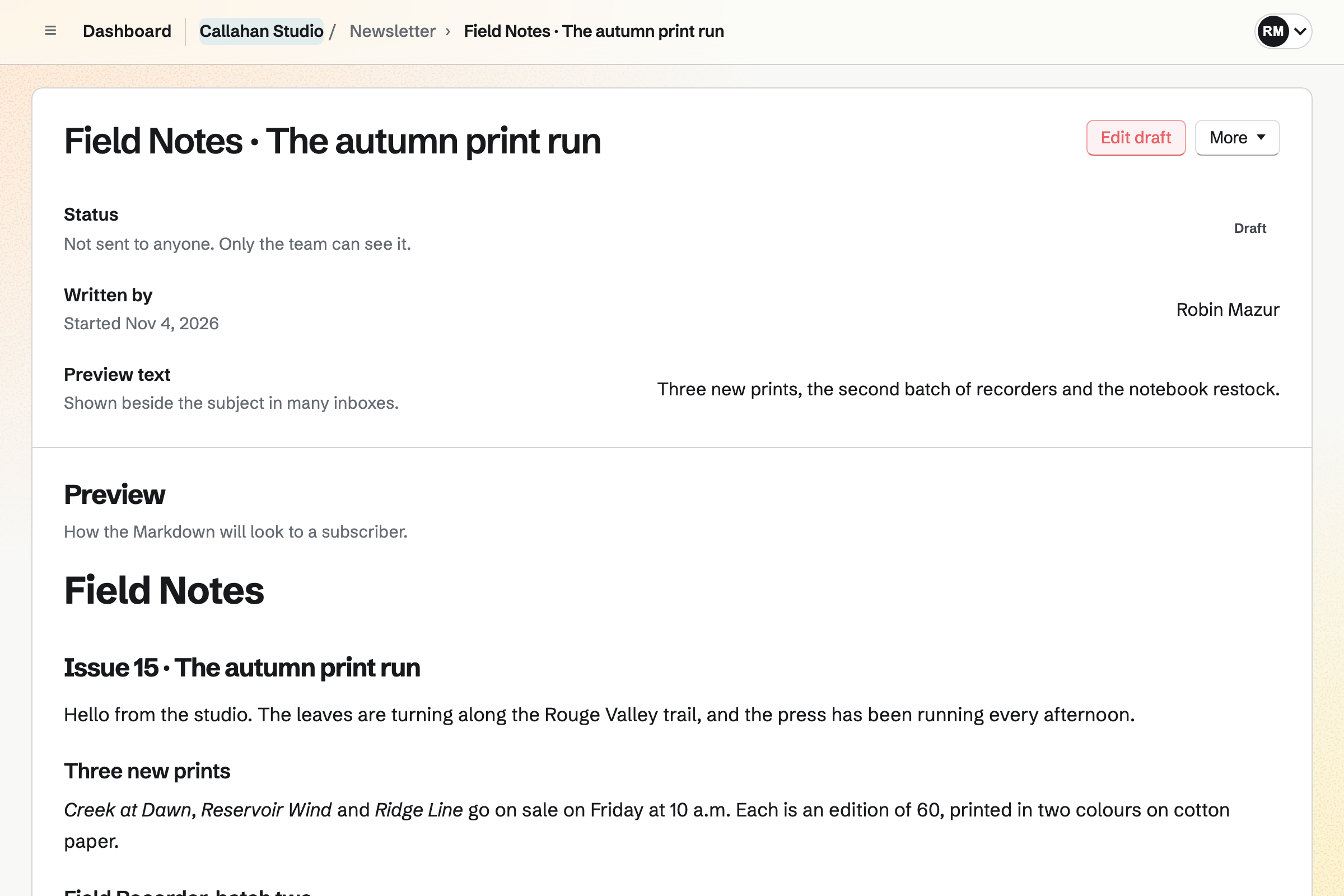
Callahan Studio’s draft of the next Field Notes issue, not sent to anyone yet: who started it, its preview text, and the email as a subscriber will see it, announcing three new prints.

How is Magpie different?

1. The newsletter comes with the rest of the business

One Magpie subscription includes the areas a small business would otherwise buy one at a time:

  • Newsletter for email to subscribers, with a signup page and a web copy of each email
  • Store for selling online, which adds buyers to the Newsletter when they tick the box
  • Supporters for paid posts, and Courses for lessons sold at a school of your own
  • Outreach for sales email from your own mailbox, and Social Media for posts
  • Websites, Forms, Helpdesk, Mail, Invoicing and the other areas, in the same team

Everything is in one account with one bill. Mailchimp connects to stores, websites and customer lists made by other companies, such as Shopify, WooCommerce and Salesforce.

2. Every plan schedules and takes your own design

On the Free plan, an email can be scheduled and sent in your own HTML. A test goes to up to 10 addresses. Its text can come from a Document, with its headings, tables and pictures. Mailchimp schedules from Essentials, and sends coded templates on Standard and Premium.

3. A team shares one plan

Everyone in a Magpie team signs in with their own account and writes the team's emails. A free team has 3 members, and the Team plan is one price for up to 25. Members do not pay. Mailchimp's plans include 1 user on Free, 3 on Essentials and 5 on Standard.

Comparing Magpie and Mailchimp

Mailchimp does more with each email; Magpie does more around it. Every line in the tables below was checked against Mailchimp's own pages, linked from each row, and against Magpie's code and Help.

Platform

WhatMailchimpMagpie
Email newslettersWrite an email and send it to a list Yes Yes
Signup pageA page of its own to share Yes Yes
Signup forms on your websiteEmbedded forms and pop-ups Yes Embedded, no pop-up
Email builderDrag in pictures, buttons and products Yes Markdown and HTML
Automated emailsWelcome series, journeys and follow-ups Yes Store emails only
Opens and clicksWho opened each email and what they clicked Yes Delivery counts
A/B testsTry versions of an email on part of the list Essentials and above No
Tags and segmentsSend an email to some subscribers only Yes No
Landing pagesPages that collect signups or sell an offer Yes Websites, no signup
Social media postsPost and schedule from the same place Yes No Facebook
AdsAds that bring visitors back Standard and above No
Text messagesMarketing texts to subscribers Paid add-on No
Transactional emailAnother app's receipts and password emails Paid add-on No
SurveysQuestions sent to subscribers Yes Forms
Online shopProducts, a cart and checkout Connects to Shopify and others Yes
Paid subscriptionsReaders pay for what you write No Supporters
Sales email from your mailboxA series of emails to people you hope to win No Outreach, paid plans
Replies with your teamAnswer replies together Yes Helpdesk
Send from your own domainEmail from an address at your domain Yes No
Phone appsWrite and check emails on a phone Yes In the browser
Free planEmail a small list without paying Yes Yes

Good to know: Where Magpie says No or Partly, the line under the row says what Magpie does instead. Each gap has an item on Magpie's roadmap, and the line changes on the day it ships.

Audience and signup forms

Both import a list, share a signup page, put a signup form inside your website and confirm each new address. Mailchimp adds pop-ups, signup fields, tags and segments. They do it better than we do today.

WhatMailchimpMagpie
Bring my mailing list over from another service Source Yes Yes
Get a signup form I can share, made for me Source Yes Yes
Put a signup form inside my own website Source Yes Yes
Show visitors a pop-up that asks them to subscribe Source Magpie: Nothing pops up on a website. The signup form shows inside a page of your website, or visitors subscribe on the signup page. Yes No
Have new subscribers confirm their address before they get email Source Yes Yes
Ask for a name, a birthday or other details when someone subscribes Source Magpie: The signup page asks only for an email address. An import can bring each person's name, and Store checkout records the buyer's name. Yes No
See everything about one subscriber on their own page Source Magpie: A subscriber is a row with their address, name, status, where they came from and when they joined. A Store customer's page shows their orders, spending, tags, notes and whether they agreed to marketing email, and Contacts keeps a person's history, but neither is joined to the subscriber. Yes Partly
Tag subscribers and send an email to only some of them Source Magpie: A Newsletter email goes to every active subscriber, and subscribers have no tags. Store saves customer segments by spending, products bought, tags or marketing consent, to list, export or give a discount to, but no email can be sent to one. Outreach, on Pro or the Team plan, can add everyone with a Contacts tag to a campaign sent from your own Mail address. Yes Partly
Let subscribers choose which topics they hear about Source Magpie: Every active subscriber gets every email, and readers cannot choose topics. Personal and each team have one newsletter. Yes No
Keep separate lists for different brands or businesses Source Magpie: Personal and each team have one newsletter with its own list, so a second list needs another team. An account can make as many teams as it likes. Yes Partly
Send subscribers a survey and use their answers Source Magpie: Forms builds a survey with its own address to put in an email, and shows the answers. The answers are not linked to subscribers and cannot choose who gets an email. Yes Partly
See which customers are likely to buy again, and what each is worth Source Magpie: Store filters customers by what they spent, how many orders they placed, what they bought and how long since their last order, and saves the filter as a segment. Nothing predicts who will buy again. Yes Partly

Good to know: Magpie keeps where an imported list came from and how people agreed. A hard bounce or a spam complaint stops the address being added again.

Email content and sending

Mailchimp lays out an email from blocks and templates, and greets each reader by name. Magpie's email is written in Markdown or taken from a Document, with its look in your own HTML.

WhatMailchimpMagpie
Lay out an email by dragging in pictures, buttons and other blocks Source Magpie: An email's text is written in Markdown or taken from a Document, which keeps its headings, lists, tables and pictures. Its look comes from Design HTML, pasted in or written by an outside chatbot through Use a chatbot. There are no blocks to drag, and no buttons or columns without writing HTML. Yes Partly
Start an email from a ready-made design, or from one I saved Source Magpie: Each email starts with the Newsletter's usual look. Export JSON saves an earlier email's design, and Import JSON, on The design only, puts it into a new email; Documents also has a Newsletter outline to write in. There is no gallery of ready-made designs and no list of saved designs to choose from. Yes Partly
Design an email in my own HTML Source Yes Yes
Greet each subscriber by name in the email Source Magpie: Every subscriber gets the same text. Outreach fills in each person's name in campaign emails, but Newsletter has no such fields. Yes No
Show different parts of one email to different subscribers Source Magpie: Every subscriber gets the whole email. Yes No
Write an email and send it to my whole list Source Yes Yes
Schedule an email to go out later Source Yes Yes
Have AI write or rewrite my email's text Source Magpie: Use a chatbot gives instructions to paste into any outside chatbot, and Import JSON takes its answer as the design, or the design and the text. Nothing in Newsletter writes text itself, and the assistant only finds newsletters and their emails. Yes Partly
Be told while I type if my subject line is too long or looks like spam Source Magpie: The subject is checked only for being there and no longer than 255 characters. Yes No
Keep my pictures in one library to use in emails Source Yes Yes
Send emails without the email service's name on them Source Magpie: Every Newsletter email ends with a line saying it was delivered by Magpie, on every plan. Yes No
Send from an address at my own domain Source Magpie: Newsletter email comes from Magpie's sending address with your From name, and replies go to your Reply-to address. Yes No
Keep a web page for each email, and a page of past emails Source Yes Yes
Read and answer replies to my emails with my team Source Yes Yes
Email people I hope to win as customers, from my own mailbox Source Mailchimp: Mailchimp sends only to people who gave permission; its acceptable use policy forbids bought, rented, third-party and publicly available lists. No Yes

Good to know: Use a chatbot gives instructions for any outside chatbot to write the email's design. Import JSON takes its answer, and Magpie sends nothing to the chatbot itself.

Automations

Mailchimp sends welcome series, follow-ups and journeys that branch on what each person does. Magpie's Newsletter sends each email by hand; Store sends its own reminders.

WhatMailchimpMagpie
Send a welcome series, or follow-up emails after a purchase, automatically Source Magpie: A Newsletter signup gets only the email that confirms the address. Store sends a buyer the order's own emails and, if you choose, asks for a review a set number of days after the order ships, and Supporters sends each new supporter a welcome email. Nothing sends a series of emails after someone subscribes or buys. Yes Partly
Build journeys that branch, wait and tag people by what they do Source Magpie: Magpie has no rules that tag, email or move a subscriber when they do something. Outreach campaigns send their steps a set number of days apart and stop when someone replies. Yes No
Remind shoppers who left without paying Source Yes Yes
Email shoppers when a sold-out product is back Source Yes Yes
Email my new blog posts to subscribers automatically Source Magpie: Every Newsletter email is written and sent by hand. An editor website's blog and a files website built from Markdown each publish a feed of their posts, but nothing emails new posts to subscribers. Yes No
Send my own app's receipts and password emails through the same service Source Magpie: Magpie sends its own areas' emails, such as Store receipts and booking confirmations, but has no API or SMTP service that sends another app's email. Yes No
Send marketing text messages to my subscribers Source Magpie: Newsletter sends email only, and no Magpie area sends marketing text messages. Yes No

Good to know: Store sends one checkout reminder after an unpaid checkout expires, and one email when a sold-out product is back. Outreach sends a series of steps from your Mail address.

Reports and testing

Mailchimp reports opens, clicks and sales for each email, and tests versions on part of the list. Magpie counts delivered, failed and skipped copies.

WhatMailchimpMagpie
See who opened each email and which links they clicked Source Magpie: A Newsletter email shows how many copies were delivered, failed and skipped, with no opens or clicks. Outreach, on Pro or the Team plan, counts replies and, with Click tracking on, lists the links each person followed. Yes Partly
Test versions of an email and send the better one to the rest Source Magpie: Each email has one subject and one text, and goes to every active subscriber at once. Yes No
Have each subscriber get the email at a good time for them Source Magpie: A scheduled email goes to every subscriber at one time, in the time zone shown under the field. Yes No
See how much I sold from each email Source Magpie: Store's Sales by source shows orders and sales from links that carry campaign tags, such as utm_source=newsletter, which you add to the email's links yourself. An email's own page shows no sales. Yes Partly
See how my list grows and where new subscribers come from Source Magpie: The Newsletter page shows active subscribers, emails sent and copies delivered, and each subscriber's row says where they came from. There is no count over time or by source. Yes Partly

Good to know: Store's Sales by source counts orders from links tagged for the email, such as utm_source=newsletter. You add the tag to the email's links yourself.

Landing pages, social and ads

Mailchimp makes landing pages, posts to Facebook, Instagram and X, and runs ads. Magpie has Websites and Social Media, and no ads.

WhatMailchimpMagpie
Make a landing page that collects signups or sells an offer Source Magpie: Websites builds pages from sections and starters at a Magpie address or your own domain, and can show your Store's products, but has no newsletter signup section. The Newsletter's signup form goes into pages of other websites by pasting its code. Yes Partly
Post and schedule to social media from the same place Source Magpie: Social Media publishes and schedules to Bluesky, Mastodon and LinkedIn, and prepares X and Instagram posts for a person to post; it does not post to Facebook. Share to Social Media starts a post from a sent email. Yes Partly
Run ads that bring my website's visitors back Source Magpie: Magpie does not make or buy ads. Yes No
See my scheduled emails and posts together on a calendar Source Magpie: Calendar shows Social Media posts when a team turns that on, and Social Media has its own calendar, but scheduled Newsletter emails are listed only on the Newsletter page. Yes Partly

Good to know: Share to Social Media makes a post from a sent email, with its subject and the address of its web copy.

Ecommerce

Mailchimp connects to stores such as Shopify and WooCommerce and shows their products in an email. Magpie's Store and Newsletter are in the same team.

WhatMailchimpMagpie
Add customers to my list when they buy Source Yes Yes
Show my products and a discount code in an email Source Magpie: A product's address or buy link can go in an email as a link, and a discount code as text. No block shows a product's picture and price, and nothing recommends products to each reader. Yes Partly
Charge readers a subscription for my newsletter Source Mailchimp: Mailchimp's feature and pricing pages offer no paid subscriptions: every email goes free to the audience.Magpie: Supporters charges paid tiers monthly, or yearly where you add a yearly price, through your own Stripe account and keeps posts for paying supporters. Those posts are not emailed, and Newsletter email goes free to every subscriber. No Partly

Good to know: A buyer who ticks the box at Store checkout joins the Newsletter when the order is paid. Magpie takes 4% of Store sales.

Plans, team and support

Mailchimp has larger lists, more roles, phone support on Premium and apps for phones. Magpie's plans include more emails on Free and one price for a team.

WhatMailchimpMagpie
Email a small list for free Source Yes Yes
Email tens of thousands of subscribers Source Magpie: Pro and the Team plan allow 5,000 subscribers and 50,000 emails a month. Yes Partly
Give teammates their own logins, each with what they may do Source Magpie: A team has 3 members on Free and 25 on the Team plan, each with their own account. Admins change the newsletter's settings and see subscribers, and members who can edit write and send email. With the team's Member access set to View only, members see the emails and their delivery counts without writing, but that applies to every member at once; an admin can also limit a member to some areas. No role writes an email without being able to send it. Yes Partly
Sign in through my company's identity provider Source Magpie: People sign in with their own Magpie account; there is no SAML single sign-on through a company's identity provider. Yes No
Write, send and check emails from my phone Source Yes Yes
Connect the other apps my business uses Source Magpie: Magpie's REST API, on Pro, reaches the newsletter, its emails and its subscribers, and apps such as Claude or ChatGPT connect through Connected apps. There is no Zapier app and no ready-made connection to Shopify or another store. Yes Partly
Talk to someone by phone when I need help Source Magpie: Support is a written conversation with the Magpie team in Chat, opened from the account menu or the end of any Help article, or the Contact form for someone who cannot sign in. There is no phone line. Yes No

Good to know: Free has 250 subscribers and 1,000 emails a month. Pro and the Team plan have 5,000 subscribers and 50,000 emails a month.

Price comparison

How Mailchimp charges

Mailchimp charges by plan, Free, Essentials, Standard or Premium, and by how many contacts you have. The plan sets the emails a month, the users and the audiences: Free has 250 contacts and 500 emails a month. Standard and Premium add journeys with splits, send time optimization and ads. Text messages and transactional email are paid add-ons. Prices are on Mailchimp's pricing page, which shows first-year offers.

How Magpie charges

Magpie charges by plan, Free or a paid plan, for everything in the account. The Newsletter is on every plan; the plan sets how many subscribers and emails a month you have. Pro is for Personal, and the Team plan is one price for a team. Mail and Outreach need a paid plan. Magpie takes 4% of Store sales and 4% of Supporters payments. Prices are on Magpie's pricing page.

On top of the planMailchimpMagpie
What the price depends onThe plan and the number of contactsThe plan
Subscribers250 on Free; up to 50,000 on Essentials and 100,000 on Standard; more on Premium250 on Free, 5,000 on a paid plan
Emails a month500 on Free; 10 times the contacts on Essentials, 12 times on Standard1,000 on Free, 50,000 on a paid plan
People who sign in1 on Free, 3 on Essentials, 5 on Standard, no limit on Premium3 in a free team, 25 on the Team plan
Separate lists1 audience on Free, 3 on Essentials, 5 on Standard, no limit on PremiumOne newsletter in Personal and in each team
The service's name on emailsOn Free onlyOn every plan
SchedulingEssentials and aboveEvery plan
Text messagesA paid add-on, after an applicationNot offered
Transactional emailAn add-on to Standard and Premium, in blocks of 25,000 emailsNot offered
Phone supportPremiumWritten support in Chat
A shop, paid posts and sales emailConnected from other servicesIncluded: Store, Supporters and, on a paid plan, Outreach

When to choose Magpie or Mailchimp

  • Want your newsletter beside your shop, paid posts, sales email and the rest of the business, with scheduling and your own design on the Free plan? Go with Magpie.
  • Want welcome series, journeys, A/B tests, open and click reports and pop-up forms, for a list of any size? Mailchimp is the right choice.

Recommendations by kind of business

For a shop on Shopify or WooCommerce
Mailchimp. Mailchimp brings buyers in as they buy, reminds those who left a cart and shows products in an email. Its reports show the sales each email made.
For a business that grows through automated email
Mailchimp. Welcome series, follow-ups and journeys that branch on what each person does are what Mailchimp is built around. Magpie's Newsletter sends each email by hand.
For a list of more than 5,000 people
Mailchimp. Standard goes up to 100,000 contacts, and Premium beyond. Magpie's paid plans have 5,000 subscribers.
For a shop that sells with Store
Magpie. Buyers join the Newsletter at checkout, and Store sends checkout reminders and back-in-stock emails itself. The shop and the list are in the same team, on one bill.
For a writer with paying readers
Magpie. Supporters charges monthly or yearly tiers through your own Stripe account and keeps posts for those who pay. Mailchimp sends every email free to the audience.
For a business that emails people it hopes to win
Magpie. Outreach sends a series of emails from your own Mail address and stops for each person who replies. Mailchimp sends only to people who gave permission.
For a small business sending a monthly update
Either. Both send a monthly email to 250 people for free. Mailchimp's Free plan sends 500 emails a month, with no scheduling; Magpie's sends 1,000 and schedules. Choose by whether you want email marketing alone or the rest of the business with it.

Frequently asked questions

What is the difference between Mailchimp and Magpie?

Mailchimp is an email marketing service with automations, A/B tests, reports, landing pages, social posts and ads. Magpie is one subscription for a small business's software. Its Newsletter is one area beside Store, Supporters, Outreach, Social Media and a website. Mailchimp does more with each email; Magpie does more around it.

Does Magpie replace Mailchimp?

Yes, for a business that sends the same email to a list of up to 5,000 people. Magpie imports the list, shares a signup page, schedules each email and keeps a web copy of it.

Consider keeping Mailchimp if you use welcome series or journeys, open and click reports, or A/B tests. Keep it too if you segment your list, use pop-up forms or send from your own domain. Mailchimp does each of these better than Magpie does today.

How much does Mailchimp cost?

Mailchimp has four plans: Free, Essentials, Standard and Premium, priced by the number of contacts. Free has 250 contacts and 500 emails a month, with Mailchimp's name on each email. Text messages and transactional email are paid add-ons. The prices are on Mailchimp's pricing page.

How much does Magpie cost?

Magpie has a Free plan and paid plans, each covering every area. Free has 250 subscribers and 1,000 emails a month; Pro and the Team plan have 5,000 subscribers and 50,000 emails. The Team plan is one price for up to 25 people. The prices are on Magpie's pricing page.

Does Magpie send a welcome series or automated emails?

No. A new Newsletter subscriber gets only the email that confirms the address. Every other email is sent by hand. Store sends checkout reminders and back-in-stock emails, and Supporters welcomes each new supporter. Email series are on Magpie's roadmap. Mailchimp's flows and journeys send them by themselves.

Does Magpie show who opened an email and what they clicked?

No, not for the Newsletter. An email's page shows how many copies were delivered, failed and skipped. Outreach, on a paid plan, lists the links each person followed when Click tracking is on. Mailchimp reports opens, clicks, unsubscribes and revenue for each email.

Does Magpie have A/B testing?

No. Each Newsletter email has one subject and one text, and goes to every active subscriber at once. Mailchimp tests up to 3 versions on part of the list and can send the winner to the rest.

Does Magpie have a drag-and-drop email builder?

No. An email's text is written in Markdown or taken from a Document, with its headings, lists, tables and pictures. Its look comes from your own HTML, or from a design an outside chatbot writes. Mailchimp's builder lays out an email from blocks such as images, buttons and products.

Can I put a Magpie signup form on my website?

Yes, inside a page. Newsletter settings gives the signup form's code to paste into a page of your website. Visitors subscribe there and confirm their address by email. Magpie has no pop-up form. Mailchimp has embedded forms and pop-ups on every plan.

Can I tag subscribers or email only some of them?

No. A Newsletter email goes to every active subscriber, and subscribers have no tags. Store saves customer segments to list or export. Outreach can add everyone with a Contacts tag to a campaign. Mailchimp tags contacts and sends to segments on every plan.

Can Magpie send my newsletter from my own domain?

No. Newsletter email comes from Magpie's sending address with your From name, and replies go to your Reply-to address. Sending from your own domain is on Magpie's roadmap. Mailchimp sends from your domain once its records are added.

Does Magpie put its name on my emails?

Yes. Every Newsletter email ends with a line saying it was delivered by Magpie, on every plan. Mailchimp's name is on emails sent on its Free plan only.

Can I schedule an email on a free plan?

On Magpie, yes: Schedule is on every plan, and Cancel email stops it before delivery begins. Mailchimp's Free plan sends straight away, and scheduling comes with Essentials and above.

Does Mailchimp have paid newsletter subscriptions?

No. Mailchimp's feature and pricing pages offer no paid subscriptions, and every email goes free to the audience. Magpie's Supporters charges monthly or yearly tiers and keeps posts for those who pay, though those posts are not emailed.

Can I use Mailchimp to email people I hope to win as customers?

No. Mailchimp's acceptable use policy allows only people who gave permission, and forbids bought or publicly available lists. Magpie's Outreach, on a paid plan, sends a series of emails from your own Mail address. It stops for each person who replies.

Can my team answer replies to my emails?

Yes, in both. Mailchimp's Inbox gathers replies for the team to answer and label. In Magpie, the Reply-to address can be a Helpdesk inbox. Each reply becomes a conversation a teammate takes and answers.

Can I bring my Mailchimp list to Magpie?

Yes. Export the audience from Mailchimp and import the file in Newsletter's Subscribers, up to 5 MB. Rows Mailchimp marks as unsubscribed, bounced or removed are left out. Imported addresses become active without confirming, so you say where the list came from and how people agreed.

How do I move from Mailchimp to Magpie?

Start a newsletter and import your list. Paste your email design into Design HTML, with {content} where the text goes. Then put the Newsletter's signup form, or a link to its signup page, where your Mailchimp forms were. Automations, tags and past reports do not come across, so keep Mailchimp until you no longer need them.

Can I use Mailchimp and Magpie together?

Yes. Mailchimp can send your marketing email while Magpie runs your shop, bookings, invoices and website. Store exports its customers as a CSV file, which Mailchimp imports. Magpie has no ready-made connection to Mailchimp.

How many subscribers can I have on Magpie?

250 on the Free plan and 5,000 on Pro or the Team plan, with 1,000 and 50,000 emails a month. Mailchimp's Standard plan goes up to 100,000 contacts, and Premium beyond.

Does Magpie have a phone app for the Newsletter?

The Newsletter works in a phone's browser, where emails are written, tested, sent or scheduled. The Magpie app writes and sends emails too, and is not yet in the App Store or Google Play. Mailchimp has apps for iPhone and Android.

Does Magpie send text messages?

No. The Newsletter sends email only, and no Magpie area sends marketing texts. Mailchimp sells text messages as a paid add-on in some countries.

What is included in Magpie's Free plan?

The Newsletter with 250 subscribers and 1,000 emails a month, scheduling and your own HTML. Store, booking pages, Invoicing, 1 website, Forms and a team of 3. Mail and Outreach need Pro or the Team plan.
If a line on this page is wrong, tell us and we will correct it.

Mailchimp changes, and so does Magpie. If a line is out of date about either product, email support@magpie.diy with the page that shows it. We check the line against that page, change it, and give it the new date. That goes for Mailchimp's own team as much as for anyone who uses it.

Start a newsletter on Magpie's Free plan.

Create a Magpie account, then start your newsletter and import your list.

Create account