Linktree compared with Magpie

Linktree vs Magpie: an in-depth comparison

Linktree and Magpie both give you one page of links for the address a social profile allows. They are built around different things.

  1. Linktree is a link-in-bio page with apps for iPhone and Android. Links can carry pictures, play video and music, collect sign-ups and sell. It is built for a creator, such as a musician or an influencer.
  2. Magpie is one subscription for a small business's software, and the Link-In-Bio List is one part of it. Beside the list it includes a shop, booking pages, a newsletter, forms, a website and more. It is built for someone whose links lead to the rest of the business.
Create account
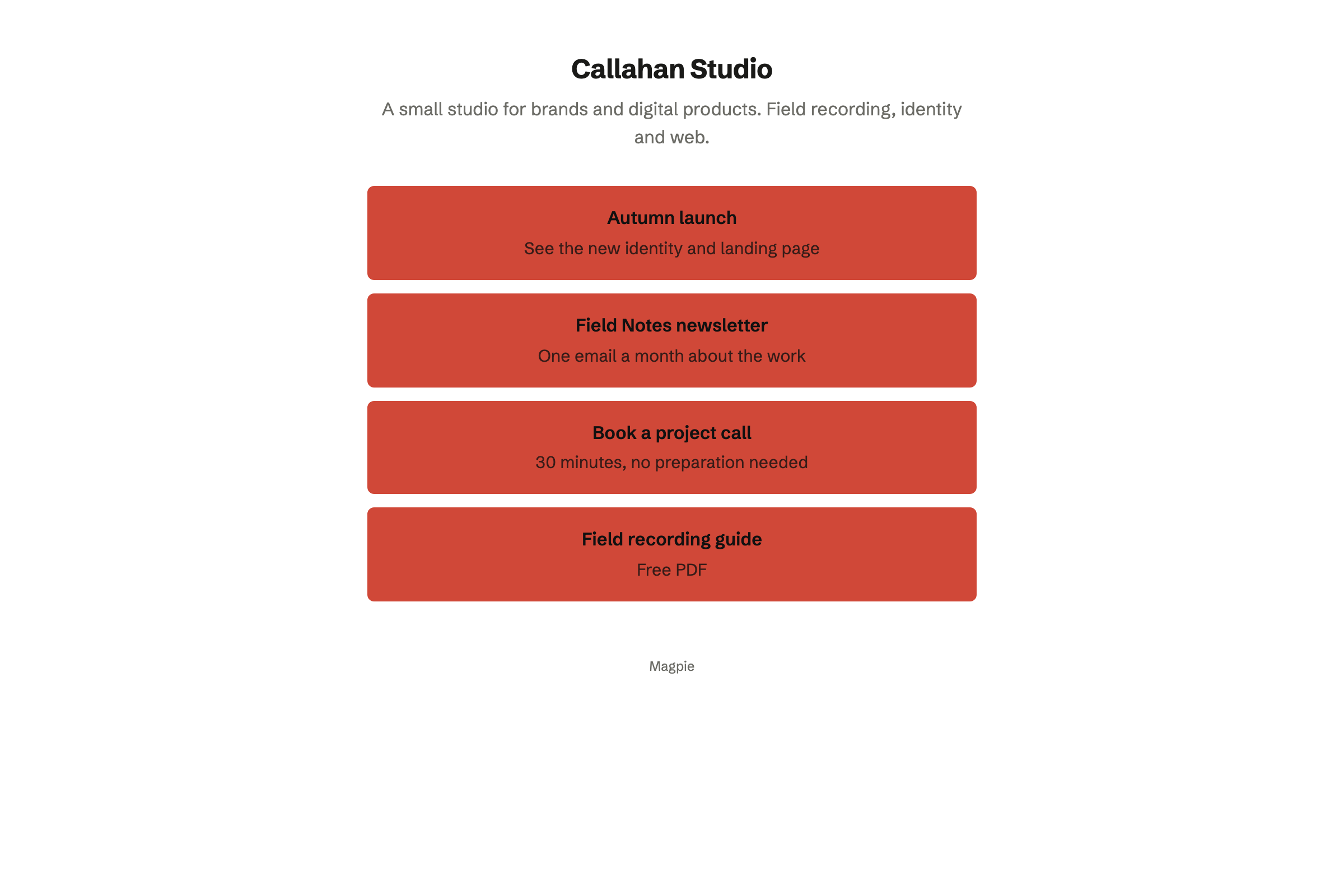
Callahan Studio’s published Link-In-Bio List: its name, a short bio and four links, to the autumn launch, the Field Notes newsletter, a project call and a free field recording guide.

How is Magpie different?

1. The links lead to the rest of the business

One Magpie subscription includes the areas a link page usually points to:

  • Store for products and downloads, with a button on the list that opens it
  • Supporters for monthly or yearly support and paid posts, and Courses for lessons at a school of your own
  • Meetings and Appointments for booking pages
  • Newsletter for email to subscribers, and Forms for sign-ups and surveys
  • Websites, QR Codes, Social Media, Helpdesk, Invoicing and the other areas, in the same team

Everything is in one account with one bill. Linktree puts selling, bookings and courses on the page itself, some through partners such as Kajabi and Shopify.

2. The page shows at your own domain

A team admin connects a domain such as links.example.com, on every plan. Magpie gets the certificate, and the Magpie address forwards to the domain. When Magpie hosts the domain's DNS, it adds the records itself. Linktree keeps every page at linktr.ee.

3. Every part of the list is on the Free plan

Every palette, layout, typeface and button style is on Free. So are the QR code, the analytics and the custom domain. No list shows ads. The Free plan also includes Store, booking pages and the Newsletter. A paid plan raises limits such as subscribers and team members.

Comparing Magpie and Linktree

Linktree does more on the page itself; Magpie does more behind it. Every line in the tables below was checked against Linktree's own pages, linked from each row, and against Magpie's code and Help.

Platform

WhatLinktreeMagpie
Link-in-bio pageOne page of links at one address Yes Yes
Phone appBuild and change the page on a phone Yes In the browser
Pictures on linksThumbnails, icons and large featured links Yes No
Scheduled linksA link appears and hides at set times Starter and above No
Video and music on the pageYouTube, Spotify and others play in place Yes No
Newest posts and videosA feed that updates by itself Pro and above No
Locked links and pagesA code, a password, an age check or a sign-up Starter and above No
Sign-ups and formsCollect addresses, answers and votes Yes Linked pages
Messages from visitorsVisitors write, and you answer from an inbox Yes Helpdesk, linked
AI chatbot for visitorsAnswers visitors' questions on the page Yes No
Views and clicksCounts for the page and each link Yes Yes
Insights over timeDates, charts, sources, countries and devices Yes Totals only
Google Analytics and Meta PixelSend visits to your own tracking Pro and above No
Short linksA short address that counts where clicks came from Yes No
QR codeA code for the page, in your colours Yes Yes
Your own domainThe page at an address you own No Yes
Selling downloadseBooks, templates and other files Pro and above Store
Products on the pagePictures and prices on the page itself Yes No
BookingVisitors book a session, free or paid Yes Yes
CoursesLessons sold to students Yes Yes
Tips and supportVisitors pay what they want, once or monthly Yes Yes
Instagram auto-replyA link sent by message to people who comment Yes No
Social media schedulingPosts to your accounts at set times Premium Partly
Media kitYour audience and results for brands Yes No
Hide the product's logoNo product name in the page's footer Pro and above No
No adsVisitors see no adverts Paid plans Yes
AI apps change the pageClaude, ChatGPT and others edit links Premium Yes

Good to know: Where Magpie says No or Partly, the line under the row says what Magpie does instead. Each gap has an item on Magpie's roadmap, and the line changes on the day it ships.

Getting started

Both give you a page at an address of your own choosing. Linktree's apps build the whole page on a phone. Magpie's list is built in the browser, on a computer or a phone.

WhatLinktreeMagpie
Put all my links on one page at one address for my social profiles Source Yes Yes
Build and change my page from my phone Source Magpie: The website works in a phone's browser: it creates the list, adds, moves and removes blocks, changes the appearance and settings, and shares the page. A link cannot be changed or hidden there once added, except by asking the assistant. The Magpie app does all of it, but it is not yet in the App Store or Google Play. Yes Partly
Add the web page I am looking at to my page without opening the editor Source Magpie: Links are added in the editor or by asking the assistant. The Magpie app's share sheet sends a link to Notes, Bookmarks or Mail, not to the Link-In-Bio List, and the app is not yet in the App Store or Google Play. Yes No

Good to know: Personal and each team have one list. A new list starts unpublished, and Published in Settings opens it to everyone.

Design

Both start from ready-made looks and change colours, fonts and buttons. Linktree also takes a picture or video background and hides its logo on Pro and above.

WhatLinktreeMagpie
Pick a ready-made look, then change its colours, fonts and buttons Source Yes Yes
Use my own picture or video as the page's background Source Magpie: The background is a colour, a fade, a glow or a pattern drawn from the palette and the accent; no picture or video. Yes No
Show my picture, name and a short bio at the top, in the style I choose Source Yes Yes
Keep the product's name and logo off my page Source Magpie: Every Link-In-Bio List ends with a link to Magpie in its footer, with no setting to remove it. QR codes made in Magpie carry no Magpie logo. Yes No
Have AI suggest a better design and choose which changes to keep Source Magpie: The assistant changes the appearance and the profile when asked, but does not look at the page and suggest changes by itself. Yes Partly

Good to know: Each Magpie palette is a contrast-checked pairing of background and text. Every look is on the Free plan. The picture at the top can be a circle, a square or a full-width banner.

Sharing and social media

Both make a QR code and set what shared links show. Linktree adds short links, a wallet card, Instagram auto-reply and a media kit. Magpie shows the page at your own domain.

WhatLinktreeMagpie
Get a QR code for my page, in my colours and with my logo, and count the scans Source Yes Yes
Show my page at my own domain Source Linktree: Linktree does not support custom domains; every page stays at linktr.ee, and Redirect is offered as a way to send visitors to an own website. No Yes
Choose what search results and shared links show for my page Source Yes Yes
Make short links that count the clicks from each place I share them Source Magpie: Clicks are counted for each link on the page, not for each place the page was shared. A dynamic code in QR Codes redirects and counts scans, but there are no short links. Yes No
Share my page from a card in my phone's wallet, or a card I hand out Source Magpie: The page's address and QR code are shared from Settings; there is no wallet card. Yes No
Send a link by Instagram message to people who comment on my posts Source Magpie: Magpie reads no Instagram comments and sends no messages. Social Media's Offers give a word for people to comment and the message to send each commenter by hand. The offer's page emails each person a link to a file, and a person who opens it is added to Contacts. Yes No
Schedule my posts to my social accounts from the same place Source Magpie: Social Media publishes scheduled posts to Bluesky, Mastodon and LinkedIn by itself. For X and Instagram it reminds the team and opens X or Instagram with the post filled in, to post by hand; TikTok, Facebook, Pinterest and YouTube are not offered. Yes Partly
Show brands my audience and results in a media kit Source Magpie: Nothing gathers the page's numbers into something to send to a brand. Yes No

Good to know: QR Codes makes a code for the list with your colours and logo, as SVG, PNG or PDF. A dynamic code counts its scans.

Growing an audience

Linktree collects sign-ups, form answers and messages on the page itself. It sends contacts to Mailchimp, Klaviyo and others. Magpie's Newsletter, Forms and Helpdesk each have a page of their own that the list links to.

WhatLinktreeMagpie
Collect email addresses and phone numbers from visitors Source Magpie: The Newsletter's signup page and Forms collect addresses, and the list can link to either with a link block. Their code can be pasted into another website, but nothing is collected on the list itself, and its Magpie page buttons reach only the Store, Supporters and Website. Yes Partly
Put a contact form, a survey or a poll on my page Source Magpie: Forms builds forms and polls with a public page, emails the creator each response and exports a CSV, and the list can link to a Form. The form does not show on the list itself. Yes Partly
Let visitors send me messages, and reply from an inbox Source Magpie: A link on the list can open a Helpdesk inbox's contact page, where visitors write; the team answers from the Helpdesk inbox, and the visitor reads and replies on their conversation page. Messages are not written on the list itself. Yes Partly
Have an AI chatbot answer visitors' questions on my page Source Magpie: The page has no chat; the assistant works for the team, not for visitors. Yes No
Send the contacts I collect to Mailchimp, Klaviyo, Kit or Google Sheets Source Magpie: The Newsletter area keeps and emails its own subscribers, and its list and Forms responses download as CSV files. Nothing sends them to another email tool or a Google Sheet. Yes Partly
See everyone who signed up, bought or booked in one list Source Magpie: Subscribers are in the Newsletter area, buyers in Store's customers, answers in Forms and people in Contacts: separate lists. Yes Partly

Good to know: The Newsletter keeps its own subscribers and sends them email. Its subscribers and every Form's responses download as CSV files.

Insights

Both count page views and clicks on each link. Linktree adds dates, charts, sources, countries, devices and tracking pixels. They do it better than we do today.

WhatLinktreeMagpie
See how many people viewed my page and clicked each link Source Yes Yes
See views and clicks over time for dates I choose, and download them Source Magpie: The counts are running totals since the page, or each link, was made: no dates, no chart and no download. Yes No
See where my visitors came from, and their countries and devices Source Magpie: Only counts are kept, by design: nothing about a visitor, so no sources, places or devices. Yes No
Send my page's visits to Google Analytics or a Meta Pixel, and tag my links for campaigns Source Magpie: The page loads no analytics or advertising code and adds nothing to the links' addresses. Yes No

Good to know: Magpie keeps counts only and records nothing about a visitor. Visits from your own team are not counted.

Earning

Linktree sells downloads, products, bookings and courses from the page itself. Magpie sells them in Store, Meetings, Appointments and Courses, with a button or a link on the list.

WhatLinktreeMagpie
Sell eBooks, templates and other downloads to my visitors Source Yes Yes
Show my products with their pictures and prices on the page itself Source Magpie: The Store button is a single button to the Store; no product, picture or price shows on the list. Yes No
Let visitors book a session, free or paid, from my page Source Yes Yes
Sell an online course from my page Source Yes Yes
Take tips or ongoing support from visitors Source Yes Yes
Earn commission by recommending other brands' products Source Magpie: A link can hold an affiliate address of one's own, but there is no catalogue of offers and no earnings to see. Yes No

Good to know: Store sells downloads with several files, download limits and licence keys. Magpie takes 4% of each sale, and buyers pay through your own Stripe account.

Plans, teams and AI

Both run several pages from one sign-in and let other people help. Some Free Linktree pages show visitors an ad in a test; no Magpie list shows ads.

WhatLinktreeMagpie
Keep my page free of ads Source Linktree: Paid plans never show ads. In a limited test, some Free pages show visitors a short ad after they choose a link. Partly Yes
Run several link pages from one login Source Yes Yes
Let other people help run my page Source Yes Yes
Change my page by asking an AI assistant, or from Claude or ChatGPT Source Yes Yes

Good to know: A team's list is edited by its members on every plan. Connected apps lets Claude or ChatGPT change it with the assistant's tools.

Price comparison

How Linktree charges

Linktree charges by plan: Free, Starter, Pro and Premium. The plan sets what the page can do. Starter adds scheduled links and a lock on the whole page, Pro adds selling, hiding the logo and tracking pixels, and Premium adds visitor rules and AI apps. Selling downloads needs Pro or Premium, where Linktree takes no fee of its own. Prices are on Linktree's pricing page, in your currency.

How Magpie charges

Magpie charges by plan too, Free or a paid plan, for everything in the account. Every part of the Link-In-Bio List is on Free. The plan sets limits such as subscribers and team members, not which areas you can use. Magpie takes 4% of Store sales, 4% of Supporters payments and 4% of Appointments payments. Prices are on Magpie's pricing page.

On top of the planLinktreeMagpie
Selling downloadsPro or Premium, with no Linktree fee4% of each Store sale, on every plan
Tips and ongoing supportA service fee that depends on the plan4% in Store, 4% in Supporters
Paid bookingsPro or Premium4% of each Appointments payment, on every plan
Card feesCharged by StripeStripe's fees, through your own Stripe account
Insights history28 days on Free, 90 on Starter, 365 on Pro, all on PremiumTotals since each link was added, on every plan
Hiding the logoPro or PremiumNot available
Your own domainNot offeredEvery plan
Ads on the pageSome Free pages, in a testNone on any plan
Shop, booking pages and newsletterOn the page, with partners for someIncluded

When to choose Magpie or Linktree

  • Want your links beside a shop, booking pages, a newsletter and a website, at your own domain, with every part of the list on the Free plan? Go with Magpie.
  • Want links with pictures, video and music that play on the page, detailed insights and an app to change it all on your phone? Linktree is the right choice.

Recommendations by kind of business

For a creator or an influencer
Linktree. Featured links, embedded videos, Instagram auto-reply and a media kit are made for growing a following. Magpie's links are buttons with text, and its counts are totals.
For a musician
Linktree. Spotify and YouTube play on the page, and the newest upload shows by itself. On Magpie, a link to a song opens it on its own site.
For a shop or a maker
Magpie. Store sells products and downloads, with a button on the list that opens it. The same team has the newsletter, a website and the stock count.
For a coach, a consultant or a therapist
Magpie. The list links to booking pages, a contact page, Forms and a course school, all in one team. An Appointments service takes its price or a deposit by card when someone books.
For a business with its own domain
Magpie. The list shows at links.example.com or your main domain, with a certificate. Linktree keeps every page at linktr.ee.
For a writer or a podcaster
Either. Linktree shows your newest posts from a feed and locks links for subscribers. Magpie adds a Newsletter, Supporters and a website in the same account. Choose by whether the page or what it leads to matters more.

Frequently asked questions

What is the difference between Linktree and Magpie?

Linktree is a link-in-bio page that does a lot on the page itself: pictures, embedded media, sign-ups, insights and selling. Magpie is one subscription for a small business's software. Its Link-In-Bio List is one area beside a shop, booking pages, a newsletter and a website. Linktree does more on the page; Magpie does more behind it.

Does Magpie replace Linktree?

Yes, for a business whose links lead to its shop, bookings, newsletter and website. Magpie gives you the list, a QR code and your own domain on the Free plan. The places the links lead are in the same account.

Consider keeping Linktree if your links need pictures, or if video or music should play on the page. Keep it too if you read insights by date and source, or use Instagram auto-reply or the phone app. Linktree does each of these better than Magpie does today.

How much does Linktree cost?

Linktree has four plans: Free, Starter, Pro and Premium. Starter adds scheduled links and a lock on the whole page; Pro adds selling, hiding the logo and tracking pixels; Premium adds visitor rules and AI apps. The prices are on Linktree's pricing page.

How much does Magpie cost?

Magpie has a Free plan and paid plans, each covering every area. Every part of the Link-In-Bio List is on Free. A paid plan raises limits such as newsletter subscribers and team members. Magpie takes 4% of Store sales and 4% of Supporters payments. The prices are on Magpie's pricing page.

Can I use my own domain for my link page?

Yes, on Magpie, on every plan. A team admin connects a domain such as links.example.com, and Magpie gets its certificate. The Magpie address then forwards to the domain. Linktree does not offer custom domains; every page stays at linktr.ee.

Can I add pictures or icons to my links in Magpie?

No. A Magpie link is a button with its title, an optional description and, if you choose, its own colour. Pictures on links are on Magpie's roadmap. Linktree adds a thumbnail or an icon to any link and shows a link as a large featured card.

Can I edit a link after adding it in Magpie?

Partly. On the website, the assistant changes a link's title and address and hides or shows it. The Links page itself can only remove a link and add it again, which starts its count from 0. The Magpie app edits and hides links, but it is not yet in the App Store or Google Play.

Does Magpie have an app for my link page?

Not yet in the App Store or Google Play. The list works in a phone's browser: you add, move and remove links, change the look and share the page. Linktree has apps for iPhone and Android.

Can I schedule a link in Magpie?

No. A link shows until it is hidden or removed. Scheduled links are on Magpie's roadmap. Linktree shows and hides a link at the times you set, on Starter and above.

Can videos or music play on my Magpie page?

No. A link to a video or a song opens it on its own site. Nothing on the list updates from another site. Linktree plays YouTube, Spotify and others on the page and shows your newest posts from a feed.

Does Magpie show where my visitors come from?

No. Magpie counts page views and each link's clicks, and records nothing about a visitor. There are no dates, sources, countries or devices, and no Google Analytics or Meta Pixel. Linktree shows all of these, with how far back depending on the plan.

Can I collect email addresses on a Magpie link page?

Not on the list itself. A link on the list opens the Newsletter's signup page or a Form, which collect addresses and answers. Linktree collects sign-ups, form answers and poll votes on the page.

Can I sell from a Magpie link page?

Yes, through Store. The list's Store button opens your shop, where you sell products and downloads with licence keys. Magpie takes 4% of each sale. Products and their prices do not show on the list itself, which Linktree's product links do.

Does Linktree have its own domain or a website?

No custom domain: Linktree keeps every page at linktr.ee and offers Redirect to send visitors elsewhere for a set time. Magpie shows the list at your own domain. Websites makes a full website in the same team.

Does Linktree show ads on my page?

Not on a paid plan. In a limited test, some Free pages show visitors a short ad after they choose a link. No Magpie list shows ads, on any plan.

Does Magpie have Instagram auto-reply?

No. Magpie reads no Instagram comments and sends no messages. Social Media's Offers give a word for people to comment, and you send each commenter the offer's link yourself. The offer's page then emails them a file. Sending that message by itself is on Magpie's roadmap. Linktree's Instagram auto-reply sends a link by message, on every plan.

Can I take bookings from my link page?

Yes, in both. Magpie's Meetings and Appointments have booking pages the list links to, with confirmation emails and reminders. An Appointments service can take its price or a deposit by card when someone books; Meetings takes no payment. Linktree's Bookings checks a Google Calendar and takes paid sessions on Pro and above.

Can I sell a course from my link page?

Yes, in both. Magpie's Courses sells modules and lessons at a school of your own, and the list links to it. Lessons can have quizzes, live sessions and certificates. Linktree's Course link builds a course with Kajabi, with paid courses on Pro and above.

Can I use Linktree and Magpie together?

Yes. A Linktree link can open a Magpie booking page, a Store product, a Form, a Helpdesk contact page or the Newsletter's signup page. You can keep Linktree's page and move only what it leads to.

How do I move from Linktree to Magpie?

Create your list and add each link. Or write the whole list as a JSON document and paste it into Import JSON. Copy the prompt under the paste box has a chatbot write the document for you. Then publish the list and put its address in each social profile's bio.

What is included in Magpie's Free plan?

The whole Link-In-Bio List, with its QR code, analytics and your own domain. Store, booking pages, Invoicing, a website, the Newsletter with 250 subscribers, Forms and a team of 3. A paid plan raises the limits and adds email at your domain.
If a line on this page is wrong, tell us and we will correct it.

Linktree changes, and so does Magpie. If a line is out of date about either product, email support@magpie.diy with the page that shows it. We check the line against that page, change it, and give it the new date. That goes for Linktree's own team as much as for anyone who uses it.

Make a link page on Magpie's Free plan.

Create a Magpie account, then create your Link-In-Bio List.

Create account