Substack compared with Magpie

Substack vs Magpie: an in-depth comparison

Substack and Magpie both email a writer's posts to subscribers and keep a web copy. Both let readers pay. They are built around different things.

  1. Substack is a publishing platform for newsletters, podcasts and video, with paid subscriptions and an app for readers. Readers comment, chat and follow Notes on Substack. It is built for someone whose writing is the business.
  2. Magpie is one subscription for a small business's software, and the Newsletter is one part of it. Beside it are Supporters, Podcast, Store and the other areas a business runs on. It is built for someone whose newsletter is one part of running the business.
Create account
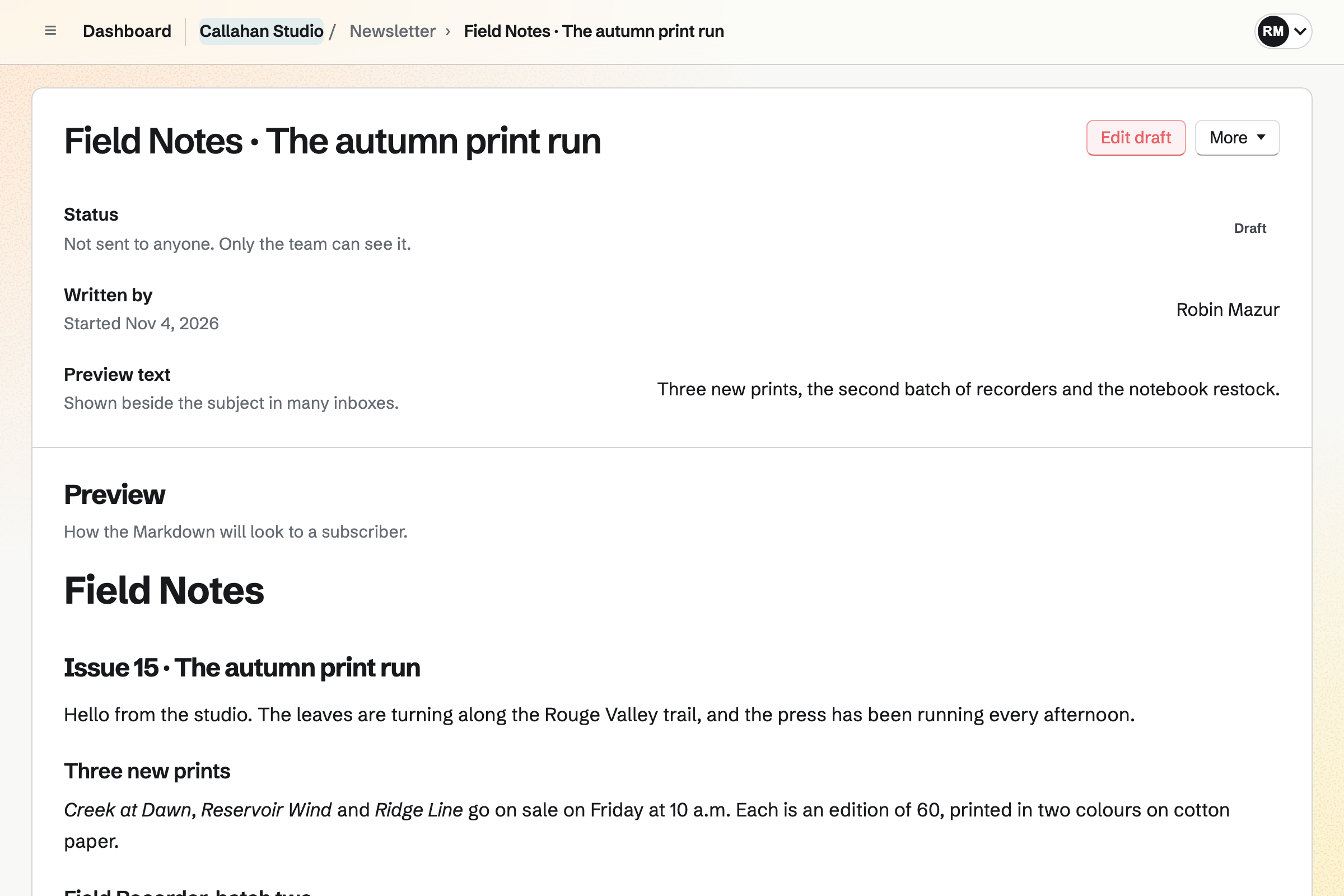
Callahan Studio’s draft of the next Field Notes issue, not sent to anyone yet: who started it, its preview text, and the email as a subscriber will see it, announcing three new prints.

How is Magpie different?

1. The newsletter comes with the rest of the business

One Magpie subscription includes the areas a writer's business would otherwise buy one at a time:

  • Newsletter for email to subscribers, with a signup page and a web copy of each email
  • Supporters for free and paid tiers, monthly or yearly, and the posts kept for them
  • Podcast for a show with its own feed, recorded with guests in the browser
  • Store for products and downloads, and Courses for lessons at a school of your own
  • Meetings, Invoicing, Websites, Mail, Social Media and the other areas, in the same team

Everything is in one account with one bill. Substack covers writing, podcasts, video, paid subscriptions and its reader community. Its features page lists no shop.

2. One Stripe account takes every payment

Supporters, Store, paid Forms and paid appointments pay into your team's own Stripe account. Stripe pays the balance to your bank. Supporters › Payments lists each payment with its fees and refunds. A buyer who ticks the box at Store checkout joins the Newsletter.

3. The fee on paid tiers is 4%

Magpie takes 4% of each Supporters payment, and Stripe's processing fee comes on top. Substack keeps 10% of paid subscription revenue, with card fees on top. Substack charges no monthly fee for any number of subscribers; Magpie's plans set the Newsletter's limits.

Comparing Magpie and Substack

Substack does more for the writer's readers; Magpie does more around the writing. Every line in the tables below was checked against Substack's own pages, linked from each row, and against Magpie's code and Help.

Platform

WhatSubstackMagpie
Posts emailed and kept on the webWrite once; it goes to inboxes and a public page Yes Yes
SchedulingSend a post at a set time Yes Yes
Your own email designYour HTML or CSS around every email Yes Yes
Video, polls and embeds in a postMore than text and pictures Yes Supporters posts only
Paid subscriptionsReaders pay for posts kept for them Yes Supporters, not emailed
Yearly billingReaders pay once a year Yes Yes
Trials, discounts and giftsA lower first price, or a subscription bought for someone Yes No
Group subscriptionsOne company pays for many readers Yes No
Welcome and follow-up emailsSent by themselves when someone subscribes Yes Supporters welcome only
Segments and sectionsEmail some readers, or run several newsletters Yes No
Opens and clicksWho opened each email and what they clicked Yes Delivery counts
Headline testsTry two subjects and send the better one Yes No
Podcast hostingA show with an RSS feed for podcast apps Yes Yes
Private podcast feedPaid episodes in paying readers' own podcast app Yes No
Live videoGo live with subscribers, with chat Yes No
CommentsReaders reply under a post Yes No
Chat for subscribersA group chat open to readers or paying readers Yes Partly
Short posts between issuesA feed of short updates readers follow Notes Social Media instead
Discovery and referralsNew readers through other writers and your readers Yes No
Phone app for readersRead, listen and get notified on a phone Yes In the browser
Import past postsBring posts from WordPress, Ghost and others Yes No
Your own domainThe publication at your domain One-time fee No
RSS feed of postsFollow the publication in a feed reader Yes No
Shop for products and downloadsSell things beside the writing No Store
Free for any number of subscribersA free list with no limit Yes 250 on Free, 5,000 paid
Fee on paid subscriptionsWhat comes off each reader's payment 10% 4%

Good to know: Where Magpie says No or Partly, the line under the row says what Magpie does instead. Each gap has an item on Magpie's roadmap, and the line changes on the day it ships.

Writing and publishing

Both write a post once and keep a web copy of it. Substack's editor adds video, polls, embeds and headline tests. They do it better than we do today.

WhatSubstackMagpie
Start a newsletter with a name, a description and a web address Source Yes Yes
Write a post once and have it emailed and kept on the web Source Yes Yes
Format a post with headings, lists, code, footnotes and pictures Source Yes Yes
Publish a video, or put a poll or an embedded clip in a post Source Magpie: A Supporters post can show a Screen Recorder video and a Form as a poll. A Newsletter email holds text and pictures only, with no video, poll or embed. Yes Partly
Schedule a post to go out later Source Yes Yes
Try two headlines and send the one more people open Source Magpie: Each email has one subject and goes to every active subscriber at once. Yes No

Good to know: A Magpie email can take its text from a Document, with its tables and pictures. A test goes to up to 10 addresses first.

Newsletter and email

Substack sends welcome and drip emails, writes to chosen segments and counts opens and clicks. Magpie's Newsletter sends each email by hand to every active subscriber.

WhatSubstackMagpie
Send new subscribers a welcome email automatically Source Magpie: A Newsletter signup gets only the email that confirms the address. Supporters sends each new supporter a welcome email with the welcome message from its settings. Yes Partly
Send a series of emails after someone subscribes, upgrades or leaves Source Magpie: Outreach, on Pro or the Team plan, sends a series of emails from your own Mail address to people you add, and stops when they reply; nothing starts a series when someone subscribes, pays or leaves. Yes Partly
Email only paid subscribers, or another group of readers Source Magpie: A Newsletter email goes to every active subscriber. Outreach, on Pro or the Team plan, can add everyone with a Contacts tag to a campaign sent from your own Mail address. Yes Partly
Run several newsletters in one place, and let readers choose which they get Source Magpie: Personal and each team have one newsletter, so a second newsletter needs another team, with a subscriber list of its own. An account can make as many teams as it likes. Yes No
Give my emails my own look Source Yes Yes
See who opened each email and which links they clicked Source Magpie: A Newsletter email shows how many copies were delivered, failed and skipped, with no opens or clicks. Outreach, on Pro or the Team plan, counts each campaign's sends and replies and, with Click tracking on, lists the links each person followed; it never records opens. Yes Partly
Let readers unsubscribe in one click Source Yes Yes

Good to know: Design HTML puts your own design around every email, with {content} where the text goes. Every email carries the one-click unsubscribe header that mail programs show.

Podcasting and video

Both host a podcast with an RSS feed for Apple Podcasts and Spotify. Substack adds paid feeds, transcripts, narration and live video.

WhatSubstackMagpie
Host a podcast and list it in Apple Podcasts and Spotify Source Yes Yes
Record an episode in the browser or on a phone Source Yes Yes
Give paying subscribers a private feed of paid episodes Source Magpie: A Podcast's feed is public while the podcast is on; there is no feed for paying supporters only. Yes No
Show a transcript with each episode Source Magpie: An episode has a title, a description and its audio, with no transcript. Yes No
Let readers listen to a written post read aloud Source Substack: The features page offers AI narration of posts in six voices, or a voiceover you record; its FAQ says narration is offered only to some writers.Magpie: Newsletter emails and web copies are text and pictures only, with no audio version. Partly No
Go live on video with my subscribers, with chat and a recording Source Magpie: Webinars runs live video with chat, Q&A and a replay, but Webinars is not open to members yet. Yes No

Good to know: Magpie's Recorder records you with invited guests in the browser, a phone's included. The episode's clips can be trimmed, split and joined before it is published.

Audience growth and discovery

Both import a list, share posts to social media and put a signup form on your own website. Substack adds recommendations between writers and referral rewards. It is free for any number of subscribers.

WhatSubstackMagpie
Bring my mailing list over from another service Source Yes Yes
Bring my past posts over from WordPress, Ghost, Medium or another platform Source Magpie: Only subscribers can be imported; past issues cannot, so Past emails starts empty. Yes No
Put a subscribe form on my own website Source Yes Yes
Get new readers from other writers recommending my newsletter Source Magpie: There is no directory of newsletters and no way to recommend another one; new readers come from the signup page address you share. Yes No
Reward readers who bring in new subscribers Source Magpie: Newsletter has no referral links or rewards. Yes No
Share a post to social media Source Yes Yes
Email as many subscribers as I like without paying Source Magpie: Free allows 250 subscribers and 1,000 emails a month; Pro and the Team plan allow 5,000 subscribers and 50,000 emails a month. Yes Partly

Good to know: Newsletter imports a Substack export as it comes, up to 5 MB. It records where the list came from and leaves out rows marked unsubscribed or bounced.

Notes, community and chat

Substack has comments, a chat for each publication, Notes and apps for readers. Magpie's Message Boards are separate from the Newsletter, and readers use their mail program.

WhatSubstackMagpie
Let readers comment on posts and talk to each other Source Magpie: Web copies and Supporters posts have no comments. A public Message Board lets anyone signed in to Magpie post and comment, apart from the newsletter. Yes No
Run a group chat or community for my subscribers Source Magpie: A public Message Board takes posts, comments and votes from anyone signed in to Magpie, but no board or chat can be kept for subscribers or paying supporters; Chat is for the team's members and guests. Yes Partly
Post short updates that readers follow between issues Source Magpie: Newsletter has no feed of short posts. Social Media publishes short posts to Bluesky, Mastodon and LinkedIn instead. Yes No
Let readers read, listen and be notified in a phone app Source Magpie: Subscribers read each email in their mail program or on its web copy. There is no app for readers; the Magpie app, not yet in the App Store or Google Play, is for members. Yes No

Good to know: Magpie's Social Media publishes short posts to Bluesky, Mastodon and LinkedIn. It prepares them for X and Instagram.

Monetization and payments

Both charge readers monthly or yearly through the writer's own Stripe account and keep posts for those who pay. Substack adds trials, gifts, group subscriptions and importing paid subscribers.

WhatSubstackMagpie
Charge readers a subscription and email paid posts only to them Source Magpie: Supporters charges paid tiers monthly, or yearly where you add a yearly price, through your own Stripe account, and a post can be kept for paying supporters, who read it on the Supporters page while others see its title and excerpt. Supporters posts are not emailed, and Newsletter email goes free to every subscriber. Yes Partly
Let readers pay yearly as well as monthly Source Yes Yes
Offer a higher-priced tier for the most committed readers Source Yes Yes
Win paid readers with a free trial or a discounted price Source Magpie: A paid tier has a monthly price, and a yearly one if you add it, with no trial or discount code; an admin can give complimentary access instead. Yes No
Let someone buy a subscription as a gift Source Magpie: An admin can give anyone complimentary access to a tier, with an end date if wanted, but a reader cannot buy it for someone else. Yes Partly
Sell one subscription to a whole company or group Source Magpie: Each supporter joins and pays for themselves. Yes No
Keep more than 90% of what paying readers pay, before card fees Source Substack: Substack keeps 10% of paid subscription revenue, and card fees come off as well. No Yes
Get paid into my own bank account through Stripe Source Yes Yes
Move my paying subscribers over from another platform Source Magpie: Supporters cannot be imported; each paying supporter joins again through the Supporters page and Stripe's checkout. Yes No
Earn from sponsors who appear in my newsletter Source Substack: Substack arranges sponsored campaigns with brands for a select group of its best-known writers; brands apply through a form.Magpie: Newsletter has no way to find sponsors or sell a place in an email. Partly No
Sell products and downloads to my readers, and add buyers to my list Source Substack: Substack's ways to earn are subscriptions, gifts, group plans, pledges and sponsorships; it has no shop for products or downloads. No Yes

Good to know: Supporters can have several paid tiers, and a post can be kept for chosen tiers. Free allows 3 paid tiers and 200 posts; a paid plan has no limit.

Analytics and team

Substack charts subscribers, traffic, retention and revenue, and names co-authors on posts. Magpie counts subscribers and deliveries, and totals Supporters payments.

WhatSubstackMagpie
See how my list grows and where new subscribers come from Source Magpie: The Newsletter page shows active subscribers, emails sent and copies delivered, and each subscriber shows where they came from: the signup page, an import, Store checkout, a webinar or a course. There is no chart over time and no count of visits. Yes Partly
See my recurring revenue and how many paying readers leave Source Magpie: Supporters Payments totals what was received and refunded, and the page can show what paid tiers add up to each month; there is no report of cancellations over time. Yes Partly
Write with other people, each named on their posts Source Magpie: Everyone who can edit in the team writes and sends, team admins manage settings and subscribers, and a guest can be given Newsletter to write from outside the team. The email's page names who wrote it, but the email and its web copy carry no byline. Yes Partly

Good to know: Each Magpie subscriber shows where they came from: the signup page, an import, Store checkout or a course.

Design, domain and distribution

Substack's site takes your colours, fonts and layout, at your own domain, with an RSS feed. Magpie's signup page and web copies show inside Magpie's own top bar and footer.

WhatSubstackMagpie
Give my publication's site my own colours, fonts, logo and layout Source Magpie: The signup page and web copies show the newsletter's name and description inside Magpie's own top bar and footer; only each email takes a design of its own. Yes Partly
Show my publication at my own domain Source Magpie: The newsletter lives at Magpie's address, under /newsletter/. Websites, Store and link pages can use a domain of your own, but Newsletter cannot. Yes No
Let people follow the publication in a feed reader Source Magpie: Web copies have no RSS feed; only Podcast publishes one. Yes No
Take my posts and subscribers with me at any time Source Magpie: Subscribers exports the whole list as CSV, and a draft exports as JSON, but a sent email cannot be downloaded. Yes Partly

Good to know: Subscribers exports the whole list as a CSV file at any time. A draft exports as JSON.

Price comparison

How Substack charges

Substack is free to start, with no monthly fee and no limit on subscribers. When readers pay, Substack keeps 10% of paid subscription revenue, and card fees come off as well. A custom domain is a one-time fee for each publication. The details are on Substack's going-paid page.

How Magpie charges

Magpie charges by plan, Free or a paid plan, for every area in the account. The plan sets the Newsletter's subscribers and emails a month, not which areas you can use. Magpie takes 4% of Supporters payments and 4% of Store sales. Stripe's fees come on top. Prices are on Magpie's pricing page.

On top of the planSubstackMagpie
What the price depends onNothing until readers payThe plan
SubscribersNo limit250 on Free, 5,000 on a paid plan
Fee on paid subscriptions10% of revenue4% on Supporters
Card feesStripe's fees, through your own Stripe accountStripe's fees, through your own Stripe account
Your own domainA one-time fee for each publicationNot offered for the Newsletter
Podcast hostingFree1 podcast with 10 episodes on Free, 5 podcasts on a paid plan
Shop for products and downloadsNot offered4% of each Store sale
People who write with youAdmins, contributors and guest writers3 in a free team, 25 on the Team plan

When to choose Magpie or Substack

  • Want your newsletter and paid posts beside a shop, a podcast, booking pages and invoices, paid into one Stripe account? Go with Magpie.
  • Want paid posts emailed to readers, with comments, chat, a reader app and recommendations, free for any size of list? Substack is the right choice.

Recommendations by kind of business

For a writer building a paid readership
Substack. Paid posts go to readers' inboxes, with trials and gifts. Recommendations, referrals and the reader app bring new subscribers that Magpie cannot.
For a podcaster or a video maker
Substack. Paid episodes go to a private feed, and live video has chat and a saved recording. Magpie hosts a public podcast, with no private feed or live video today.
For a business that sends a newsletter
Magpie. The Newsletter is in the same team as the shop, booking pages, invoices and website. Buyers can join it at Store checkout.
For a creator who sells products or downloads
Magpie. Store sells products and files beside the Supporters page, through the same Stripe account. Substack's features page lists no shop.
For a coach, a teacher or a consultant
Magpie. Paid posts sit beside booking pages, Courses, invoices and a newsletter in one account. Readers can book a call from a Meetings page, or pay for one as they book it in Appointments.
For a writer with a free newsletter
Either. Both send each post to subscribers and keep a web copy. Substack has no subscriber limit and adds comments and discovery. Magpie's Free plan has 250 subscribers and schedules each email. Choose by your list's size and whether you want the rest of the business.

Frequently asked questions

What is the difference between Substack and Magpie?

Substack is a publishing platform for writers, with paid subscriptions, comments, chat and a reader app. Magpie is one subscription for a small business's software. Its Newsletter is one area beside Supporters, Podcast, Store and a website. Substack does more for readers; Magpie does more around the writing.

Does Magpie replace Substack?

Yes, for a business whose newsletter goes free to a list of up to 5,000 people. Magpie imports your Substack list, schedules each email and keeps a web copy of it.

Consider keeping Substack if your paid posts go to readers' inboxes. Keep it if readers comment, chat or read in its app, or if recommendations bring you subscribers. Keep it too if your list is larger than 5,000. Substack does each of these better than Magpie does today.

How much does Substack cost?

Substack is free to start, with no monthly fee and no limit on subscribers. When readers pay, Substack keeps 10% of paid subscription revenue, and card fees come off as well. A custom domain is a one-time fee for each publication. The details are on Substack's going-paid page.

How much does Magpie cost?

Magpie has a Free plan and paid plans, each covering every area. Free has 250 Newsletter subscribers and 1,000 emails a month; a paid plan has 5,000 subscribers and 50,000 emails. Magpie takes 4% of Supporters payments, and Stripe's fees come on top. The prices are on Magpie's pricing page.

Can readers pay for my writing on Magpie?

Yes, in Supporters. Readers join a free tier, or a paid tier monthly or yearly, through your own Stripe account. A post can be kept for paying supporters, and others see its title and excerpt. Magpie takes 4% of each payment.

Does Magpie email paid posts to subscribers?

No. A Supporters post is read on the Supporters page, and nothing emails it out. Newsletter email goes free to every active subscriber. Emailing paid posts is on Magpie's roadmap. Substack sends each paid post to paying readers' inboxes.

Does Magpie have yearly subscriptions, free trials or discounts?

Yearly prices, yes; trials and discounts, no. A paid Supporters tier can offer a yearly price beside its monthly one, and each supporter chooses when they join. There is no free trial or discount code. You can give someone complimentary access to any tier, with an end date. Substack has monthly and yearly plans, a founding tier, free trials, coupons and gifts.

Can readers comment on my posts in Magpie?

No. Newsletter web copies and Supporters posts have no comments. A public Message Board takes posts and comments from anyone signed in to Magpie. It is separate from the newsletter. Substack has threaded comments with moderation on every post.

Does Magpie have a chat for subscribers?

No. No Magpie chat or board can be kept for subscribers or paying supporters. Team chat is for the team's members and guests. Substack gives each publication a chat for all readers, paying readers or founding members.

Does Magpie have anything like Substack Notes?

No. The Newsletter has no feed of short posts. Social Media publishes short posts to Bluesky, Mastodon and LinkedIn instead. Substack's Notes are short posts with likes, restacks and replies, in a feed readers follow.

Will new readers find my newsletter on Magpie?

No. Magpie has no directory of newsletters, no recommendations between writers and no referral rewards. New subscribers come from the signup page address you share. Substack shows recommended publications to each new subscriber, and rewards readers who refer others.

Does Magpie have an app for readers?

No. Subscribers read each email in their mail program or on its web copy. The Magpie app is for members and is not yet in the App Store or Google Play. Substack has iPhone and Android apps for readers, with a feed and notifications.

Can I host a podcast on Magpie?

Yes. Podcast hosts MP3 episodes with a public page and an RSS feed, and Podcast Settings shows the steps to add it to Apple Podcasts and Spotify. The Recorder records you with guests in a browser. Free has 1 podcast with 10 episodes; a paid plan has 5 podcasts. Episodes are not emailed to Newsletter subscribers, as Substack's are.

Can I give paying subscribers a private podcast feed on Magpie?

No. A Podcast's RSS feed is public while the podcast is on. There is no feed for supporters only, and no transcript on an episode. Substack gives paying subscribers a private feed for their own podcast app.

Can I go live on video with my readers on Magpie?

No. Webinars runs live video with chat and a replay. It is not open to members yet. Substack's live streams have chat, a saved recording and RTMP for outside streaming software.

Can my Magpie newsletter use my own domain?

No. The signup page and web copies are at Magpie's address, under /newsletter/. Websites, Store and link pages can use your own domain, but the Newsletter cannot yet. Substack connects a custom domain for a one-time fee.

Does Magpie show who opened an email and what they clicked?

No, not for the Newsletter. An email's page shows how many copies were delivered, failed and skipped. Outreach, on a paid plan, lists the links each person followed when Click tracking is on. Substack shows opens and clicks for each post.

Can I put a signup form on my website?

Yes. Newsletter settings gives the signup form's code to paste into a page of your website. Visitors subscribe there and confirm their address by email. A Store home page can also show a Newsletter sign-up section. Substack has an embeddable subscribe widget.

Does Substack have a shop?

No. Substack's ways to earn are subscriptions, gifts, group plans, pledges and sponsorships. Its features page lists no shop for products or downloads. Magpie's Store sells both through your own Stripe account. A box at checkout adds the buyer to the Newsletter.

Can I use Substack and Magpie together?

Yes. Substack can carry your writing while Magpie runs your shop, booking pages, invoices and website. A Magpie website or booking page can link to your publication. Store exports its customers as a CSV file. Substack imports a CSV of subscribers who agreed to hear from you.

How do I move from Substack to Magpie?

Start a newsletter, then import your Substack subscriber export in Subscribers. Past posts cannot be imported, so Past emails starts empty. Paying subscribers cannot be imported either: each one joins again through Supporters and Stripe's checkout. Keep Substack until your readers have moved.

How many subscribers can I have on Magpie?

250 on the Free plan and 5,000 on Pro or the Team plan, with 1,000 and 50,000 emails a month. Personal and each team have one newsletter. Substack has no limit on subscribers.

What is included in Magpie's Free plan?

The Newsletter with 250 subscribers and 1,000 emails a month, scheduling and your own email design. Supporters with 3 paid tiers, a podcast, Store, booking pages, Invoicing, 1 website and a team of 3. A paid plan raises the limits.
If a line on this page is wrong, tell us and we will correct it.

Substack changes, and so does Magpie. If a line is out of date about either product, email support@magpie.diy with the page that shows it. We check the line against that page, change it, and give it the new date. That goes for Substack's own team as much as for anyone who uses it.

Start a newsletter on Magpie's Free plan.

Create a Magpie account, then start your newsletter and import your list.

Create account