Thinkific compared with Magpie

Thinkific vs Magpie: an in-depth comparison

Thinkific and Magpie both let a teacher sell online courses, coaching and downloads from a school of their own. They are built around different things.

  1. Thinkific is a platform for selling courses, digital downloads, coaching and communities. It is built for a creator or a company whose school is the business. Communities, a student app, group orders and AI that drafts a course come with it.
  2. Magpie is one subscription for a small business's software, and Courses is one part of it. Beside the school it includes Coaching, Store, Supporters, Invoicing, booking pages and the rest. It is built for someone whose teaching is one part of running the business.
Create account
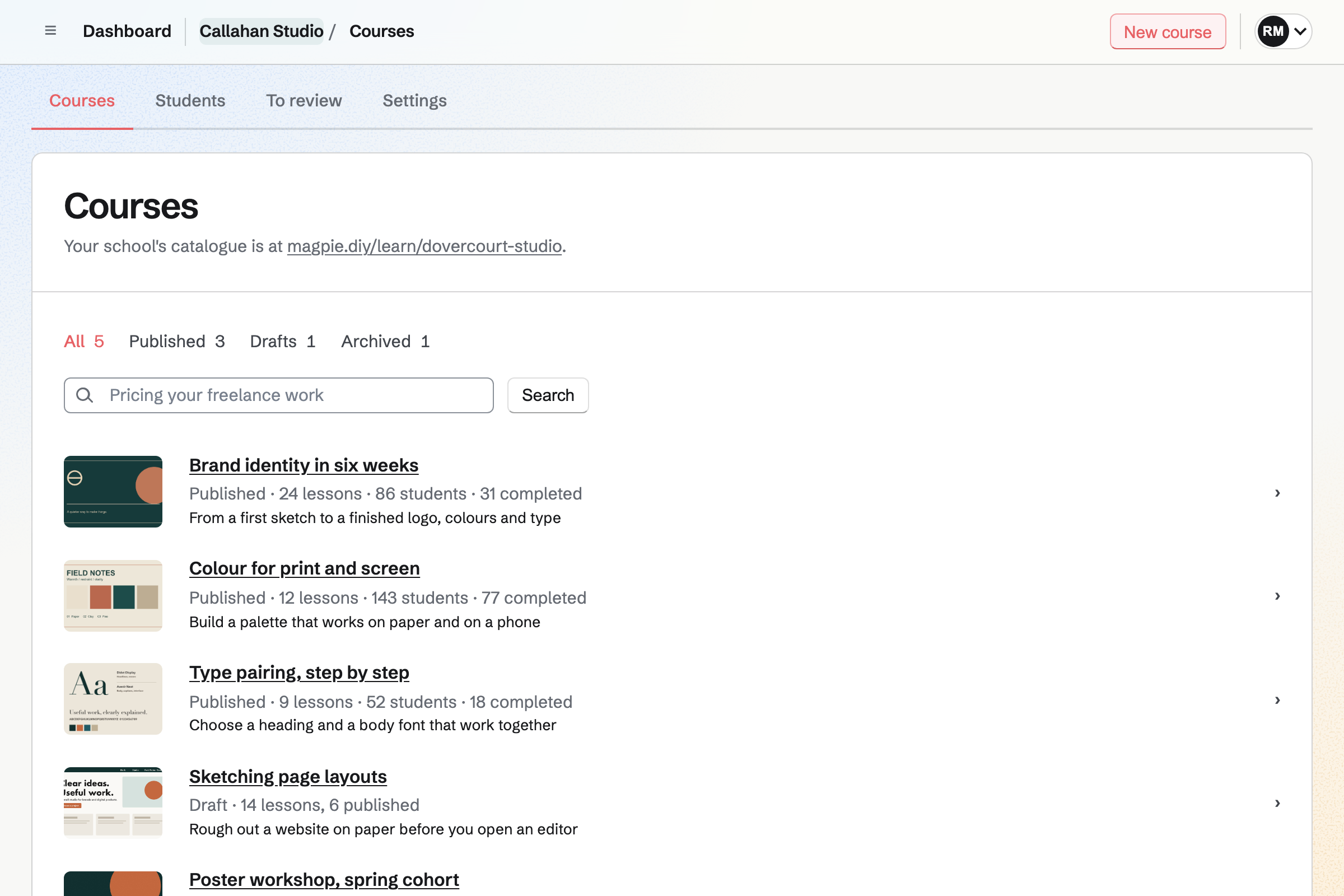
Courses list for a fictional design studio: published courses, each with its cover, lessons, students and completions, a draft, and the address of the school's catalogue.

How is Magpie different?

1. The courses come with the rest of the business

One Magpie subscription includes the areas a small business would otherwise buy one at a time:

  • Courses, with quizzes, assignments, cohorts, live sessions and certificates at a school of your own
  • Coaching for programs, sessions, habits and check-ins, in each client's Client Portal
  • Store for courses, downloads and physical products, and Supporters for paid posts
  • Meetings, Appointments and Invoicing for booked time and invoices paid online
  • Newsletter, Websites, Mail, Contacts, Helpdesk and the other areas, in the same team

Everything is in one account with one bill. Thinkific has no booking page of its own and links coaching sessions to Calendly or another booking service.

2. The Free plan publishes a course

Magpie's Free plan publishes 1 course for up to 50 students, and a paid plan has no limit on either. Certificates, cohorts, assignments and imports from a CSV file are on every plan. Thinkific starts with a 30-day trial, and a school needs a paid plan after it.

3. Cohorts and live sessions are part of the course

A Magpie course can run in cohorts, each with its own dates, seats, enrolment window and waiting list. A live session is a lesson on Zoom or a Video Chat call, with calendar invitations, reminders and attendance. Thinkific sorts students into groups, and suggests copying the course for each new run.

Comparing Magpie and Thinkific

Thinkific does more for a community and for selling to companies; Magpie does more around the course. Every line in the tables below was checked against Thinkific's own pages, linked from each row, and against Magpie's code and Help.

Platform

WhatThinkificMagpie
Online coursesChapters of lessons, quizzes and certificates Yes Yes
Cohorts and live sessionsA group that starts together, with live lessons Partly Yes
Learning pathsSeveral courses in an order, each opening after the last Plus No
SCORM importBring in a course package with its tracking Plus No
CoachingSell one-to-one or group sessions Yes Yes
Session bookingClients book from your free times Calendly or a link Yes
WebinarsRegistrations for a live session Zoom or another service No
Digital downloadsFiles people buy and download Yes Yes
Free downloads for an email addressA lead magnet that builds a list Yes Partly
CommunitiesSpaces, direct messages, mentions and events Yes Partly
Site builder at your own domainPages built without code Yes Yes
Members-only pagesParts of the site for signed-in members Yes No
Email sequencesA series of emails to new leads and buyers Yes Partly
Payment plans and subscriptionsInstalments, or billing with a free trial Yes Partly
Order bumps and upsellsAn add-on at checkout or after paying Yes Partly
AffiliatesCommission on sales others send you Yes No
Group ordersA company buys seats and hands them out Grow and up No
PayPalBuyers pay with PayPal Grow and up No
Prices in the buyer's currencyShown in their currency at checkout Yes No
Sales tax handled for youTax worked out, collected and paid US and Canada Stripe Tax
Your brand onlyNo platform name on the school or its emails Grow and up Partly
Student phone appCourses and communities on iPhone and Android Yes No
AI teaching assistantAnswers students from your course Plus No
Free plan that sellsPublish and sell without a monthly fee No Yes

Good to know: Where Magpie says No or Partly, the line under the row says what Magpie does instead. Each gap has an item on Magpie's roadmap, and the line changes on the day it ships.

Building courses

Both build a course of lessons with video, quizzes, assignments, certificates and lesson discussions, opened on a schedule. Thinkific adds learning paths, exams and SCORM imports on Plus. Magpie adds cohorts with their own dates and seats.

WhatThinkificMagpie
Build an online course of chapters and lessons with video, audio, text, PDFs and downloads, and sell it from its own page Source Yes Yes
Open course chapters on a date, or a number of days after each student enrols Source Yes Yes
Make students finish lessons in order and watch most of each video before going on Source Yes Yes
Test students with quizzes that mark themselves, and exams with a pass mark and limited attempts Source Yes Yes
Have students hand in work for me to approve or send back Source Yes Yes
Give students a certificate when they complete a course Source Yes Yes
Let students discuss each lesson underneath it Source Yes Yes
Teach a live session inside a course Source Yes Yes
Run a course for a group that starts on a date and moves through it together Source Thinkific: Groups sort students into cohorts for reports and share links, cohort reports compare students by start date, and a drip schedule by calendar date moves everyone together. The pricing page lists live cohorts on every plan as Zoom sessions, bookable calendars and attendance tracking, but there is no cohort with its own dates and seats: Thinkific suggests copying the course for each new run. Partly Yes
Put several courses in an order, each opening when the one before is finished Source Magpie: A Store bundle can sell several self-paced courses together at one price, in no order; nothing keeps one course closed until another is finished. Yes No
Limit how long each student keeps access to a course Source Yes Yes
Enrol students myself, one at a time or from a spreadsheet Source Yes Yes
Bring my existing course material in quickly, from a batch of files or SCORM packages Source Magpie: Courses makes a whole course's outline and text from pasted JSON, such as one an AI chatbot wrote, but videos and files are added lesson by lesson, and it takes no SCORM package. Yes Partly
See each student's progress and where students stop watching Source Yes Yes

Good to know: A Magpie lesson can require 90% of its video to be watched before it counts. A course can have up to 20 instructors.

Digital downloads, coaching and webinars

Both sell downloads and coaching. Thinkific gives a download or a webinar away for an email address. Magpie gives a file away only through Social Media's offers. Magpie books coaching sessions from your own free times.

WhatThinkificMagpie
Sell files people download, such as ebooks, templates and audio Source Yes Yes
Give a download or a webinar away free in return for an email address Source Magpie: Every Store price must be above zero, so Store cannot give a file away. Social Media's offers can: a person types their email address on the offer's page, with no account, and Magpie emails them a link to one PDF or ZIP file. An offer is made for a social post, its file is not a Store product, and nothing gives a webinar away. Yes Partly
Sell one-to-one coaching sessions that buyers then book Source Yes Yes
Let clients pick a session time from my free hours, without another scheduling tool Source Thinkific: Thinkific's pricing page lists bookable calendars with live cohorts and coaching on every plan, but its help centre describes no booking page of its own: a coaching product or a lesson links to Calendly, Google Calendar, Zoom Scheduler or another booking service, or an App Store app adds a calendar to the course player. Partly Yes
Run a webinar people register for, listed beside their courses Source Thinkific: A coaching and webinars product takes registrations, free or paid, and each learner's Learner Hub lists the webinars they registered for. Thinkific does not host the session: it happens in Zoom or another video service.Magpie: Webinars takes registrations, sends reminders and runs the webinar live with chat, Q&A, polls and breakout rooms, with a replay afterwards, but Webinars is open only to site administrators. A Form can take registrations, paid if you like, without reminders. Partly No

Good to know: A Magpie Coaching program holds goals, habits, check-ins and its sessions. The client books each session in their Client Portal, and Free coaches 3 clients.

Communities

Thinkific's communities have private spaces, direct messages, mentions, a weekly digest and events with reminders. They do it better than we do today.

WhatThinkificMagpie
Run a community for my students, with spaces only some members can enter Source Magpie: Message Boards hold posts, comments, replies and votes. A private board is open only to the team's members and to guests given Message Boards, and on a public board anyone signed in to Magpie can post. A board cannot be limited to some of the team's members, and buying a course opens no board. Yes Partly
Let students message me and each other privately, starting from their profiles Source Magpie: Chat's direct messages reach anyone by their handle, and someone who shares no team with you gets a message request first. Nothing shows students the others in their course or community, so they find each other only by handle. Yes Partly
Mention a member so they are told, and tell members about replies and new posts Source Magpie: Message Boards send no notifications: an @handle in a post is plain text, and nobody is told of a reply or a new post, on the website, by email or in the app. Yes No
Send members a weekly email of what is new in the community Source Magpie: Message Boards send no emails. Yes No
Hold live events for my community, with a reminder for the people coming Source Magpie: Calendar events can be public or for the team, collect RSVPs up to a capacity and send invitations by email or link. Nothing reminds people before an event starts, and an event is not part of a board. Yes Partly

Good to know: Each Magpie course has a discussion of its own. Students comment and reply under each lesson, and instructors approve, pin, hide or answer comments.

Site and marketing

Both build a school's pages without code, at your own domain. Thinkific adds sign-up sections, members-only pages, mass email and an automated sales sequence.

WhatThinkificMagpie
Build my school's site and sales pages without code Source Yes Yes
Show my site at my own domain Source Yes Yes
Show my school and its emails under my own brand, without the platform's name Source Magpie: A course school has its own name, logo, colours and fonts and shows its catalogue and course pages at your domain, but lessons, sign-in and buying stay at Magpie's address and its emails go out as the school via Magpie. Yes Partly
Collect email addresses with a sign-up form on my pages Source Magpie: Newsletter has its own signup page with double opt-in, and Newsletter settings gives the signup form's code to paste into a page of another website. Store checkout can add buyers to the Newsletter. A course school and a Magpie editor website have no sign-up section. Yes Partly
Keep some pages of my site for signed-in members Source Magpie: A website's pages are public once published, and nothing keeps one for people who signed in or paid. Supporters posts can be kept for paying supporters. Yes No
Email my students, or only those in one course or group Source Magpie: Courses emails the chosen students of one course, narrowed by cohort, progress or how they joined, and sends announcements; nothing emails every student of the school at once. Yes Partly
Send a series of emails automatically to new leads and buyers Source Magpie: Outreach, on Pro or the Team plan, sends a series of emails from your own mailbox to people you add by hand or by tag, and stops when they reply; nothing starts a series when someone subscribes or buys, and Newsletter sends one email at a time. Yes Partly
Measure my ads with Google Analytics and the Meta Pixel Source Magpie: Store reports count visits and show sales by source, from UTM tags or the website that linked, and Store has no setting for Google Analytics or an ad pixel. An analytics tag pasted into a website's layout runs on its pages at your own domain, but not on its shop's pages. Yes Partly

Good to know: A Magpie school has its own name, logo, colours and fonts. Courses emails the chosen students of a course, narrowed by cohort, progress or how they joined.

Selling and payments

Both take cards and wallets, discount codes, bundles and checkout reminders. Thinkific adds PayPal, order bumps, gifting, group orders, affiliates and prices in the buyer's currency.

WhatThinkificMagpie
Take cards, wallets and pay-later at checkout Source Yes Yes
Let buyers pay with PayPal Source Magpie: Store takes payments only through Stripe, as cards, wallets and the methods your Stripe account offers; there is no PayPal connection. Yes No
Let buyers pay in instalments Source Magpie: A course price in Store can be bought in a set number of monthly payments, with access from the first. Other Store products are paid in full at checkout. Yes Partly
Charge a monthly or yearly subscription, with a free trial Source Magpie: Supporters charges its paid tiers monthly or yearly, and recurring invoices from an accepted proposal charge a client's card every month, quarter or year; neither has a free trial, and Store sells nothing by subscription. Yes Partly
Give discount codes Source Yes Yes
Sell several products together at one price Source Yes Yes
Offer an add-on at checkout, or another product just after someone buys Source Magpie: A Store product's Goes with list shows other products on its page and in the Cart; nothing is offered at checkout or after paying. Yes Partly
Let buyers give a course as a gift Source Magpie: Store sells gift cards that the buyer emails to someone, on a date if they like, to spend in your Store; a particular product cannot be bought for someone else. Yes Partly
Email people who started checkout and did not pay Source Yes Yes
Let a company buy seats for its people and hand them out Source Magpie: A course sells one at a time, with a limit of one per order, and nothing gives a buyer seats to hand out; you add a company's people yourself in Students. Yes No
Bill a company by invoice, and enrol its people once it pays Source Magpie: Invoicing sends invoices to pay online, and Store's wholesale customers can pay an order by invoice, which marks the order paid. A course is not sold through wholesale and paying an invoice enrols nobody, so its people are added in Students by hand. Yes Partly
Pay people a commission on the sales they send me Source Magpie: Store has no affiliates. A partner can be given a discount code, or a link with UTM tags that Sales by source counts, but nothing works out or pays a commission. Yes No
Share each sale automatically with a co-instructor Source Thinkific: A revenue partner is given a share of the sales of chosen courses, communities or bundles, which Thinkific works out; you pay them yourself. Start allows 1 partner, Grow 3, Expand 10 and Plus no limit.Magpie: Courses names instructors and teaching assistants, but no sale is split: every Store payment goes to the team's own Stripe account. Supporters crews, which divide each supporter's payment between several teams by shares, are open only to site administrators. Partly No
Show buyers the price in their own currency Source Magpie: A Store has one currency, chosen when it is set up, and every buyer pays in it. Yes No
Have sales tax and VAT worked out, collected and paid for me Source Thinkific: In the US and Canada, Thinkific works out, collects and pays sales tax itself under its own tax number, for a 0.5% fee on taxed sales. In the UK, the EU and Switzerland it works out VAT if you turn it on, and you file and pay it.Magpie: Store can turn on Stripe Tax, which works out and charges the tax at checkout in your own Stripe account; registering, filing and paying it stay with you. Partly Partly
Retry failed subscription payments and tell the buyer, so I keep them Source Magpie: Supporters' payments are charged by Stripe, which retries a failed payment by your Stripe settings while the supporter keeps access, and Magpie sends no reminder of its own to update the card. A recurring invoice whose saved card is declined is emailed to the client with a Pay link and a link to update the card, but the charge is not retried. Yes Partly
Start selling without a monthly fee Source Thinkific: There is no free plan: after a 30-day trial, Start has a monthly fee, lower when paid yearly, and Grow and Expand cost more. Thinkific Payments charges 2.9% of each sale, and Stripe or PayPal add a gateway fee that depends on the plan. No Yes

Good to know: Magpie's checkout is Stripe's, in your own Stripe account, with every payment method you turn on there. A course price can be paid in 2 to 12 monthly payments.

Reports, team and connections

Both give the team its own sign-ins and have an API and webhooks. Thinkific adds an App Store, Zapier, recurring revenue reports, and custom roles and single sign-on on Plus.

WhatThinkificMagpie
See revenue, recurring revenue and cancellations over time Source Magpie: Store reports show sales, refunds, Stripe fees, margins, stock, buyers and visits for any dates, with CSV exports, and Supporters lists each payment with totals; nothing shows recurring revenue or cancellations over time. Yes Partly
Give my team their own logins Source Yes Yes
Choose exactly what each team member may do, such as answer students but not change prices Source Magpie: A team member is an admin or a member, a member can be limited to some areas, the team's members can be made view only, and a guest uses only the areas given; only Store gives permissions one at a time, such as seeing orders, refunding or managing products. Yes Partly
Let students sign in with the account they already have on my website Source Magpie: Everyone signs in with a Magpie account, by password, emailed link or code, passkey, or Apple, Google, LinkedIn or GitHub. Another website's sign-in cannot be used. Yes No
Connect other software through an API or webhooks Source Yes Yes
Connect the tools I already use, from an app store or through Zapier Source Magpie: Integrations connects Google Calendar, Zoom, Slack and text reminders to Meetings. There is no app store and no Zapier app: other tools connect only through the API and webhooks. Yes Partly

Good to know: A Magpie team member is an admin, a member, view only, or a guest limited to chosen areas. Webhooks and the API are on Pro.

AI

Both connect to Claude and ChatGPT; Thinkific's MCP is in beta on Plus. Thinkific drafts a course outline and sales pages, and its Thinker assistant answers students on Plus.

WhatThinkificMagpie
Have AI draft a course outline, quiz questions and a sales page Source Magpie: The assistant on Dashboard writes a Store product's description and a website's home page, but not a course. Courses gives a prompt to copy into a chatbot of your own and imports the whole course it writes, quiz questions included. Yes Partly
Have an AI assistant answer students' questions from my course material Source Magpie: The assistant answers only the person using it, in their own account; nothing answers students or customers from your material by itself. Yes No
Look up my sales and customers from Claude or ChatGPT Source Thinkific: Thinkific MCP, in beta on Plus only, lets Claude and ChatGPT search courses, check enrolments and look up learner profiles. Partly Yes

Good to know: Courses gives you a prompt to copy into a chatbot of your own. It imports the whole course the chatbot writes, quiz questions included.

Phone apps

Thinkific's app for iPhone and Android opens courses, communities and downloads. A branded app under your own name is an add-on. Magpie's students take courses in a browser.

WhatThinkificMagpie
Let students take my courses and join my community in a phone app Source Magpie: Students take courses at the school's address in a browser. The Magpie app, not yet in the App Store or Google Play, has no Courses screens. Yes No
Publish an app under my own name in the App Store and Google Play Source Magpie: Customers use Magpie's website; there is no app under your own name, and the Magpie app is not yet in the App Store or Google Play. Yes No

Good to know: A Magpie school works in a phone's browser, at your school's address. The Magpie app is not yet in the App Store or Google Play.

Price comparison

How Thinkific charges

Thinkific charges by plan, Start, Grow, Expand or Plus, billed monthly or yearly, after a 30-day trial and with no free plan. Every plan has unlimited courses. The plan sets your admins, communities and revenue partners. It also opens PayPal, group orders and your own branding. Thinkific Payments charges 2.9% of each sale. Through Stripe or PayPal, a gateway fee depends on the plan. Prices are on Thinkific's pricing page.

How Magpie charges

Magpie charges by plan too, Free or a paid plan, for everything in the account: courses, coaching, the shop, invoicing and the rest. The plan sets how many courses, students, clients and team members you have, not which areas you can use. Magpie takes 4% of Store sales, courses included, and 4% of Supporters payments. It takes 4% of payments for appointments. Prices are on Magpie's pricing page.

On top of the planThinkificMagpie
Free planA 30-day trial, then a paid plan1 published course and 50 students on Free
Fee on salesThrough Stripe or PayPal, a gateway fee that depends on the plan4% of Store sales
Card feesThinkific Payments: 2.9% of each saleStripe's fees, through your own Stripe account
Sales tax collected and paid0.5% of taxed sales, in the US and CanadaStripe Tax works it out; filing stays with you
People who can run it2 admins on Start, 6 on Grow, 15 on Expand3 in a free team, 25 on the Team plan
Communities1 on Start, 3 on Grow, 10 on Expand, no limit on PlusA discussion in every course
Student imports from a spreadsheetGrow and upEvery plan
Branded phone appA monthly add-on on any planNone
Booking pages and invoicingCalendly or another booking page; invoicing on Grow and upIncluded

When to choose Magpie or Thinkific

  • Want your courses beside coaching, a shop, invoices and booking pages, with cohorts, one price for the team and a Free plan? Go with Magpie.
  • Want a busy student community, a phone app, group orders for companies and affiliates, all built around selling your courses? Thinkific is the right choice.

Recommendations by kind of business

For a creator with a community
Thinkific. Students meet in spaces with direct messages, mentions, a weekly digest and events. They do it on the web and in the app. Magpie's course discussions sit under the lessons, with no spaces or events of their own.
For training sold to companies
Thinkific. A company buys seats in one checkout or pays an invoice, and its people are enrolled. Learning paths, SCORM imports, custom roles and single sign-on are on Plus, which Magpie does not offer.
For a teacher running cohorts
Magpie. Each cohort has its own dates, seats and waiting list, with live sessions, attendance and assignments you review. Thinkific sorts students into groups and suggests a copy of the course for each run.
For a coach with one-to-one clients
Magpie. Coaching runs the program, sessions, habits and check-ins, and clients book from your own free times. Thinkific links each session to Calendly or another booking page.
For a business that sells courses beside products or services
Magpie. Store sells the course, the downloads and physical products in one Cart. Invoicing, Meetings and Appointments are in the same team.
For someone starting out
Either. Magpie's Free plan publishes 1 course for up to 50 students and takes 4% of each sale. Thinkific's 30-day trial includes AI that drafts the course outline. Choose by whether you want to start free or start with help writing.

Frequently asked questions

What is the difference between Thinkific and Magpie?

Thinkific is a platform for selling courses, downloads, coaching and communities, with a student app and tools for selling to companies. Magpie is one subscription for a small business's software. Its Courses is one area beside Coaching, Store, Invoicing, booking pages and the rest. Thinkific does more for a community and for companies; Magpie does more around the course.

Does Magpie replace Thinkific?

Yes, for a teacher or coach whose courses are one part of the business. Magpie's Courses has quizzes, assignments, cohorts, live sessions and certificates. Coaching, Store, Supporters and Invoicing are in the same team.

Consider keeping Thinkific if your students meet in its communities or learn in its app. Keep it too if companies buy seats for their people, or you sell through affiliates and PayPal. Thinkific does each of these better than Magpie does today.

How much does Thinkific cost?

Thinkific has Start, Grow, Expand and Plus plans, billed monthly or yearly, with a 30-day trial and no free plan. Thinkific Payments charges 2.9% of each sale, and sales tax it collects in the US and Canada costs 0.5% of taxed sales. A branded phone app is a monthly add-on. The prices are on Thinkific's pricing page.

How much does Magpie cost?

Magpie has a Free plan and paid plans, each covering every area. Free publishes 1 course for up to 50 students, and a paid plan has no limit on either. Magpie takes 4% of Store sales, courses included. The prices are on Magpie's pricing page.

Does Magpie have learning paths?

No. A Store bundle sells several courses together at one price, but in no order. Learning paths are on Magpie's roadmap. Thinkific's learning paths, on Plus, keep each course closed until the one before is complete.

Does Magpie have a student app?

No. Students take courses at the school's address in a browser, on a computer or a phone. The Magpie app has no Courses screens, and it is not yet in the App Store or Google Play. Thinkific's iPhone and Android app opens courses, communities, downloads and events.

Does Magpie have a community for students?

Partly. Each course has a discussion where students comment and reply under lessons. Message Boards are for the team and its guests, and they send no notifications or digests. Thinkific's communities have private spaces, direct messages, mentions, a weekly digest and events.

Does Magpie have affiliates?

No. A partner can be given a Store discount code or a link with UTM tags. Store reports count the sales it sends. Nothing works out or pays a commission. Thinkific tracks each affiliate's commission on every plan, and you pay them yourself.

Can a company buy course seats for its people on Magpie?

No. A course sells one at a time, and you add a company's people yourself in Students. Paying a Magpie invoice enrols nobody. Thinkific's group orders, on Grow and up, sell seats in one checkout for a seat manager to hand out.

Can I give away a free download for an email address?

Partly. Every Store price is above zero, so Store cannot give a file away. Social Media's offers can: a person types their email address on the offer's page, and Magpie emails them a link to one PDF or ZIP file. Free products in Store are on Magpie's roadmap. Thinkific gives a download or a webinar away as a lead magnet.

Does Magpie take PayPal?

No. Store takes payment through Stripe: cards, wallets and the methods your Stripe account offers. PayPal is on Magpie's roadmap. Thinkific connects PayPal on Grow and up.

Does Magpie handle sales tax for me?

Partly. Store can turn on Stripe Tax in your own Stripe account, which works out and charges the tax at checkout. Registering, filing and paying it stay with you. Thinkific collects and pays sales tax in the US and Canada, for 0.5% of taxed sales. In the UK and the EU it works out VAT for you to file.

Does Magpie have an AI assistant that answers students?

No. Magpie's assistant answers only the person using it, in their own account. Thinkific's Thinker, on Plus, answers students from the courses you choose, in the tone you set.

Does Thinkific have a free plan?

No. Thinkific starts with a 30-day trial, and a paid plan follows it. Magpie's Free plan publishes 1 course for up to 50 students, and runs a Store and a website.

Does Thinkific have cohorts?

Partly. Thinkific sorts students into groups for reports, and a drip schedule by date moves them together. It suggests copying the course for each new run. A Magpie course runs cohorts with their own dates, seats, enrolment window and waiting list.

Does Thinkific have booking pages?

Not of its own. A Thinkific coaching product links to Calendly, Google Calendar or another booking service. Magpie's Meetings and Appointments give clients a page to pick a time from your hours and connected calendar.

Can I run webinars on either?

Partly on Thinkific, which takes registrations and runs the session in Zoom or another service. Magpie has no webinar registration with reminders today. A live session in a Magpie course meets on Zoom or a Video Chat call. Its students get invitations and reminders, and attendance is kept.

Can students pay in instalments or by subscription?

In instalments, yes on both. A Magpie course price can be paid in 2 to 12 monthly payments, with access from the first. Thinkific also sells courses and communities by monthly or yearly subscription with a free trial. Magpie's Supporters bills its tiers monthly or yearly, with no trial.

Does Magpie have coaching?

Yes. A Coaching program holds goals, habits, check-ins and the sessions it includes. A client applies or joins from the program's page and pays its first invoice. They book each session from your free times, in their Client Portal.

Can I use Thinkific and Magpie together?

Yes. Thinkific can run your courses and community while Magpie runs your coaching, invoices, shop or email. A Thinkific coaching product can link to a Magpie booking page. A Thinkific page can link to a Form or a Store product.

How do I move my courses from Thinkific to Magpie?

Make the outline in Courses, or paste it in as JSON written by an assistant with Copy the prompt. Upload each video again, then add students by pasting them or from a CSV file. A paid course is sold through Store once your Stripe account is connected. Keep Thinkific until every student has moved.

Can my team work in it with me?

Yes. A free Magpie team has 3 people and the Team plan 25, as admins, members, view-only members or guests. A course can have up to 20 instructors. Thinkific has 2 admins on Start, 6 on Grow and 15 on Expand, and custom roles on Plus.

Can an AI app work with my school?

On both, from Claude or ChatGPT. Thinkific's MCP, in beta on Plus, searches courses, checks enrolments and looks up learners. Magpie's Connected apps read and change your records when you allow it. Thinkific's AI also drafts a course outline and sales pages, which Magpie's assistant does not.

What is included in Magpie's Free plan?

1 published course for up to 50 students, and Coaching for 3 clients. Store, Supporters, a website, the Newsletter with 250 subscribers, booking pages, Invoicing and a team of 3. A paid plan raises the limits and adds Mail.
If a line on this page is wrong, tell us and we will correct it.

Thinkific changes, and so does Magpie. If a line is out of date about either product, email support@magpie.diy with the page that shows it. We check the line against that page, change it, and give it the new date. That goes for Thinkific's own team as much as for anyone who uses it.

Publish a course on Magpie's Free plan.

Create a Magpie account, then make your first course.

Create account