Whereby compared with Magpie

Whereby vs Magpie: an in-depth comparison

Whereby and Magpie both hold video calls in the browser, with nothing to install. Whereby is built around the room; Magpie puts the call beside the rest of the business.

  1. Whereby is a video meeting service whose calls run in the browser. Each meeting happens in a room whose link stays the same. Guests join from it without an account. Paid plans put your logo in the room. It is built for anyone who meets clients or a team on video.
  2. Magpie is one subscription for a small business's software, and Video Chat is one part of it. Beside the calls it includes Team chat, booking pages, invoicing, coaching, hiring and email at your domain. It is built for someone whose calls are one part of running the business.
Create account
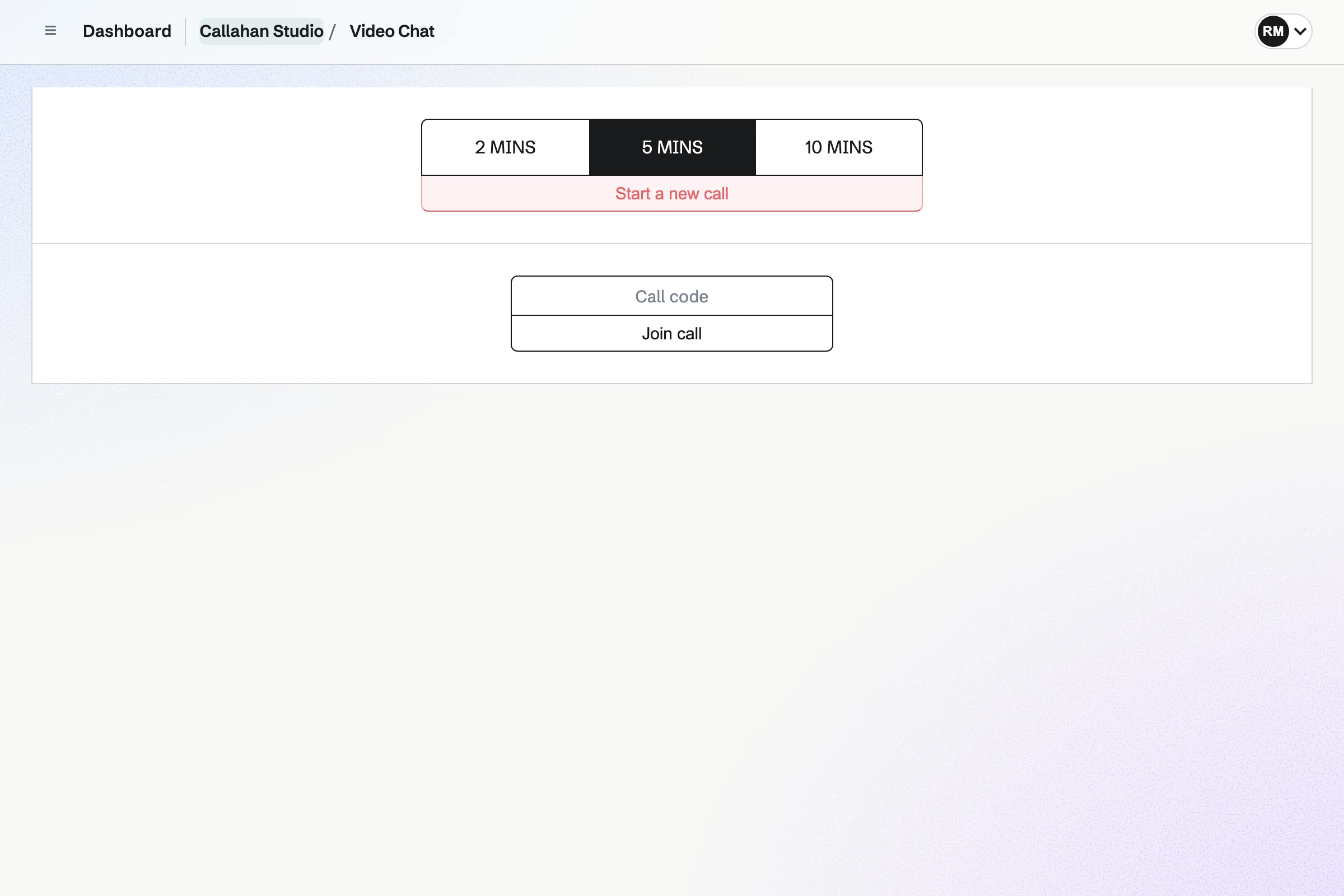
Video Chat in Callahan Studio: call lengths of 2, 5 and 10 minutes with 5 chosen and Start a new call, and a call-code field to join a call.

How is Magpie different?

1. Calls come with the rest of the business

One Magpie subscription includes the areas a small business would otherwise buy one at a time:

  • Video Chat for calls, and Team chat and Walkie Talkie for talking between them
  • Meetings and Appointments for booking pages, with a Zoom or Google Meet link on each booking
  • Coaching, Courses and Hiring, which each make the call their sessions and interviews need
  • Invoicing for billing clients, and Mail for email at your domain
  • Documents, Idea Boards, Screen Recorder and the other areas, in the same team

Everything is in one account with one bill. Whereby holds the call, and leaves bookings, client records and invoices to other software.

2. A team pays one price

The Team plan is one price for up to 25 people, with every area included. Whereby's Pro plan is for one host. Its Business plan is priced per host, with at least three.

3. The call is made by the work it is for

Scheduling a Hiring interview, a Courses live session or a Coaching session makes its Video Chat call. Each call takes up to 6 people at a set time, on Pro and Team plans. A candidate joins from a private link without an account. A student or a coaching client joins without signing in.

Comparing Magpie and Whereby

Whereby does more inside the room; Magpie does more around it. Every line in the tables below was checked against Whereby's own pages, linked from each row, and against Magpie's code and Help.

Platform

WhatWherebyMagpie
Video calls in the browserStart a call and send a link, with nothing to install Yes Yes
A room that keeps its linkThe same address for every meeting Yes No
Group callsSeveral people on one call Yes Scheduled calls only
Calls with no time limitA call that runs as long as it needs Pro and Business No
Joining without an accountGuests join from the link Yes Guests of scheduled calls
Screen sharingShow your screen during a call Yes Yes
Chat, reactions and breakout groupsRun a group call with structure Yes No
Backgrounds and noise reductionBlur the background and filter noise Yes No
Your logo in the roomThe call room in your own look Pro and Business No
RecordingKeep a call to watch later Pro and Business No
Transcripts and captionsA written record of what was said Whereby Embedded No
Calls inside your own siteVideo calls through an API Whereby Embedded No
Phone appStart and join calls from an app iOS In the browser
Whiteboard in the callWork on a board together Miro, inside the room Idea Boards, in another tab
Team chatChannels and direct messages between calls Starts calls from Slack Yes
Booking pagesClients choose a time with you No Yes
Interview callsA call made from the candidate's record No Yes
CoachingClients, sessions and goals No Yes
InvoicingBill a client and get paid online No Yes
Security certificationAn independent audit of security ISO 27001 No

Good to know: Where Magpie says No or Partly, the line under the row says what Magpie does instead. Each gap has an item on Magpie's roadmap, and the line changes on the day it ships.

Rooms, inviting and joining

Whereby gives every host a room whose link never changes. Guests join it without an account. Magpie's Video Chat makes a new code for each call, and both people sign in. Whereby does standing rooms better than we do today.

WhatWherebyMagpie
Keep a call link of my own that never changes, for people to use again and again Source Magpie: Every Video Chat call has a new four-letter code, and a code expires within two hours, so each call needs a new link. Yes No
Start a call now and send people a link to join Source Yes Yes
Join a call in the browser, on a computer or a phone, with nothing to install Source Yes Yes
Let a client or anyone else join from the link, without an account Source Magpie: Both people in a Video Chat call must be signed in to Magpie. Only the scheduled calls that Hiring, Courses and Coaching make let a guest join from a private link without signing in: a candidate for an interview, who needs no account, or a student or a coaching client, who need not sign in to join. Pro and Team plans. Yes Partly
Schedule a call for later and send the invitation Source Magpie: A Video Chat call starts when you start it. Calls for a set time are made only by Hiring for an interview, Courses for a live session and Coaching for a session. A Calendar event can be sent as an invitation with a call link typed into its Location, and a Meetings booking gets a Zoom or Google Meet link. Yes Partly
Keep several standing rooms, including ones anyone in my team can host Source Magpie: Video Chat keeps no rooms: each call has its own code. The scheduled calls that Hiring, Courses and Coaching make open at their set time to whoever is invited, with nobody needed to host, but they cannot be made by hand. Yes No
Let someone join by phone when they cannot use the internet Source Whereby: Dialling in by phone is offered only in Whereby Embedded, the product for developers, and only in the United States. Whereby Meetings has no dial-in.Magpie: Video Chat is joined only over the internet, in a browser. Partly No
Start and join calls from an app on my phone Source Magpie: Video Chat works in a phone's browser. The Magpie app has Video Chat too: start a call, join one with a code or a link, and join scheduled calls you are invited to, but the app is built and not yet in the App Store or Google Play. Yes Partly
Use the call in my own language Source Magpie: Video Chat follows your Magpie language: English, French, Spanish or German. Yes Partly
Start a call from a team chat conversation Source Magpie: A Video Chat call gives a code and an invite link that you paste into Chat yourself; Chat has no button to start a call. Yes No

Good to know: A Video Chat call starts at once, with a four-letter code and a Copy invite link. The other person joins from either, on a computer or a phone.

Video and audio

Whereby rooms take up to 100 people on Pro and 200 on Business, with no time limit. They blur backgrounds, filter noise and switch to sound only. A Video Chat call is for two people and has a set length.

WhatWherebyMagpie
Hold a call with a large group Source Magpie: A Video Chat call is for two people, and nobody else can join once both are in. A scheduled call takes up to 6 people, but only Hiring interviews, Courses live sessions and Coaching sessions make one, on Pro and Team plans. Yes Partly
Hold a call for as long as it needs, an hour or more Source Magpie: A Video Chat call lasts 2 or 5 minutes on the free plan and 2, 5 or 10 minutes with Pro or the Team plan, then ends. A Hiring interview or a Courses live session call runs up to 60 minutes, and a Coaching session's call its length plus 15 minutes, up to 120 minutes, on Pro and Team plans. Yes Partly
Blur or replace the background behind me on camera Source Magpie: The camera is sent as the browser gives it. Yes No
Have background noise filtered out of my microphone Source Magpie: Video Chat uses the browser's ordinary microphone settings and filters no noise itself. Yes No
Join with sound only when my connection is weak Source Magpie: You can turn your own camera off during a call, but the other people's video still comes through. Yes Partly
Keep seeing the people in a call while I work in another tab or app Source Magpie: The call shows only in its own tab. Yes No
Join one call from several laptops in the same room without echo Source Magpie: Each person in a Video Chat call joins from their own device, and nothing handles several devices in one room. Yes No

Good to know: A Video Chat call lasts 2 or 5 minutes on the free plan, or 2, 5 or 10 minutes on a paid plan. A scheduled call takes up to 6 people.

Interaction and collaboration

Both share a screen during a call. Whereby also chats and splits a group into smaller ones, and opens Miro or YouTube inside the room. They do each of these better than we do today.

WhatWherebyMagpie
Share my screen during a call Source Yes Yes
Send messages, links and files to the people in a call Source Magpie: A Video Chat call has no messages. Links and files go through Chat, in another tab. Yes No
Raise a hand or react with an emoji during a call Source Magpie: A Video Chat call has buttons for the microphone, the camera, sharing a screen and ending the call, and no reactions. Webinars has reactions and raised hands, but is open only to site administrators. Yes No
Split a group call into smaller groups and bring everyone back Source Magpie: Video Chat has no group calls to split. Webinars has breakout rooms, but is open only to site administrators. Yes No
Work together on a whiteboard or a shared document inside the call Source Magpie: An Idea Board is a canvas of notes, to-dos, links, images and arrows that a team works on together, but it opens beside a call in another tab, not inside it. Yes Partly
Watch a video together during a call Source Magpie: A Video Chat call carries voice and video only. Yes No
See live captions of what is said Source Whereby: Whereby Meetings has no captions of its own, and its help points to Chrome's Live Caption instead. Live captions are sold only in Whereby Embedded, the product for developers.Magpie: Video Chat shows no captions. Partly No

Good to know: An Idea Board is a canvas of notes, to-dos, links and images. The team works on it together, beside a call in another tab.

Meeting controls

Whereby's room owner locks the room, lets in the people who knock, and mutes or removes anyone. In a Video Chat call, the code lets in one other person and no more.

WhatWherebyMagpie
Keep a room private and let in only the people I choose Source Magpie: A call code lets in one other person and no more, and both are signed in; a scheduled call admits only the people invited to it. Nobody waits to be let in. Yes Partly
Mute people, turn off their cameras or remove them, and end the call for everyone Source Magpie: Either person can end a two-person Video Chat call for both with End call. Nobody can mute someone else, turn off their camera or remove them. Yes Partly
Show a timer everyone in the call can see Source Magpie: Every Video Chat call shows a clock of the time it has left, but there is no timer to set for a talk or an exercise. Yes Partly

Good to know: Either person ends a Video Chat call for both with End call. The clock on the call shows the time it has left.

Customization and embedding

Whereby's paid plans put your logo and backgrounds in the room. Business adds a waiting room and a subdomain with your company's name. Every Magpie call has Magpie's own look.

WhatWherebyMagpie
Show my logo, colours and background in my call room and where guests wait Source Magpie: Every Video Chat call has Magpie's own look, and its link is a Magpie address with a random code. Yes No
Put video calls inside my own website or app Source Magpie: Video Chat calls open only on Magpie's own pages, and Magpie's API cannot make a call for another site. Yes No

Good to know: A scheduled Video Chat call sends each person an email invitation with a link of their own.

Recording, transcription and streaming

Whereby's Pro and Business hosts record a meeting to their own computer. Transcripts, captions and streaming are sold in Whereby Embedded, the product for developers. Magpie's Video Chat keeps nothing from a call.

WhatWherebyMagpie
Record a call to watch again or share with people who missed it Source Magpie: A Video Chat call is not recorded. Meeting Notes, open only to site administrators, keeps a call's sound to make a transcript, not a recording to watch. Yes No
Get a written transcript of a call Source Whereby: Whereby Meetings makes no transcript. Whereby Embedded, the product for developers, transcribes calls as they happen and transcribes recordings, each priced by the minute.Magpie: Video Chat makes no transcript. Meeting Notes, being built and open only to site administrators, transcribes a scheduled Video Chat call into a meeting note; it counts as no for now. Partly No
Stream a call live to YouTube or another site Source Whereby: Live streaming over RTMP is offered only in Whereby Embedded, the product for developers.Magpie: Neither Video Chat nor Webinars streams to another site, and Webinars is open only to site administrators. Partly No

Good to know: Screen Recorder records your screen and camera to share as a link. The free plan makes 1 recording a week of up to 3 minutes. A paid plan records up to 30 minutes.

Security, privacy and accounts

Both encrypt calls and have a data processing agreement. Whereby keeps account data in Ireland and is ISO 27001 certified. Magpie holds no certification and has no choice of where data is kept.

WhatWherebyMagpie
Keep my calls encrypted Source Yes Yes
Keep my account and call data in Europe Source Magpie: Magpie's hosting may be in the United States or Europe, and there is no choice of where data is kept. Yes No
See an independent security certification before trusting it with clients Source Magpie: Magpie's security page describes its practices and says it may seek SOC 2 or ISO 27001 later; it holds neither now. Yes No
Have a data processing agreement for my clients' personal data Source Yes Yes
Meet clients about their health under a HIPAA agreement Source Whereby: HIPAA compliance is a paid add-on to Whereby Embedded, the product for developers; Whereby's features page lists it for Embedded only.Magpie: Magpie signs no HIPAA business associate agreement. Partly No
Put my team on one account, with admins who add people and manage billing Source Yes Yes

Good to know: Every Video Chat call goes straight between the browsers over WebRTC, which encrypts it. A relay server, when one is needed, passes the stream on without reading it.

Beyond the call

Whereby is a meeting room, with no booking page, client records or invoices. Magpie makes the call from the work around it: an interview or a coaching session, with the invoice in the same team.

WhatWherebyMagpie
Let clients book a time with me and get the call link automatically Source Whereby: Whereby has no booking page: you send your room's link yourself or add it to a calendar event.Magpie: Your meeting page takes bookings, and each booking gets a Google Meet or Zoom link once one is connected. A client who books a session in Coaching gets a Magpie Video Chat call, on Pro and Team plans, but a Meetings booking cannot. No Partly
Schedule a job interview call from the candidate's record Source Whereby: Whereby has no hiring tools; an interview happens in an ordinary room. No Yes
Coach clients with sessions on video, goals and a page of their own Source Whereby: Whereby is a video meeting room only, offered to coaches and teachers among others; it keeps no client records, goals or bookings. No Yes
Bill a client for a session and get paid online Source Whereby: Whereby takes no payments from your clients. No Yes

Good to know: Meetings adds a Zoom or Google Meet link to each booking. A Coaching session can be held on Video Chat, on Pro and Team plans.

Price comparison

How Whereby charges

Whereby charges by plan: Free, then Pro and Business. Free has one room, 4 people and meetings of up to 30 minutes. Pro is for one host, with three rooms and no time limit. Business is priced per host, with at least three, and has a 14-day trial. Paying yearly takes 17% off. Whereby Embedded, for developers, is priced by participant minute. Prices are on Whereby's pricing page.

How Magpie charges

Magpie charges by plan, Free or a paid plan, for everything in the account. Video Chat is on every plan; a paid plan adds the longest call length and scheduled calls. The Team plan is one price for up to 25 people, not a price per host. Prices are on Magpie's pricing page.

On top of the planWherebyMagpie
How a team paysPer host, per month; at least three hosts on BusinessOne Team plan for up to 25 people
Calls on the free planUp to 30 minutes, for up to 4 people, in one room2 or 5 minutes, for two people
Calls on a paid planNo time limit; 100 people on Pro, 200 on Business2, 5 or 10 minutes for two; scheduled calls of up to 6 people from Hiring, Courses and Coaching
RoomsOne on Free, three on Pro, as many as you need on BusinessA new code for each call
RecordingPro and Business, saved on the host's computerNot available
Your logo in the roomPro and Business; a waiting room and subdomain on BusinessNot available
Transcripts, captions, streaming and dial-inWhereby Embedded, priced by participant minuteNot available
Booking pages and invoicingNot offeredIncluded

When to choose Magpie or Whereby

  • Want your calls beside your bookings, invoices, coaching, hiring and email, for one price for the whole team? Go with Magpie.
  • Want a room with its own link and your logo, with group calls and recording? Whereby is the right choice.

Recommendations by kind of business

For someone who meets clients in a room of their own
Whereby. A Whereby room keeps the same link, shows your logo and lets clients in when they knock. Calls on Pro and Business have no time limit. A Video Chat call has a new code each time and a set length.
For a team that meets in groups
Whereby. Whereby's Business rooms take 200 people, with breakout groups and shared rooms anyone can host. Magpie's scheduled calls take up to 6 people, and only Hiring, Courses and Coaching make them.
For a developer who wants calls in their own site
Whereby. Whereby Embedded puts calls inside your own site or app through an API. Magpie's calls open only on Magpie's own pages.
For a coach
Magpie. A Coaching session on Video Chat makes its own call, and the client joins without signing in. The bookings, goals, journal and invoices are in the same team.
For a small business that hires
Magpie. Scheduling an interview in Hiring finds a time the interviewers are free. It makes the Video Chat call too. The candidate joins from a private link, without an account.
For a teacher with a small class
Either. A Courses live session makes a call for up to 6 people. The lessons and each student's progress are beside it. Whereby holds the class in a room with screen sharing, breakout groups and YouTube. Choose by whether you need the course around the class or more inside it.

Frequently asked questions

What is the difference between Whereby and Magpie?

Whereby is a video meeting service built around rooms that keep their link. Guests join them in a browser. Magpie is one subscription for a small business's software. Its Video Chat is one area beside Team chat, booking pages, invoicing, coaching, hiring and email. Whereby does more inside the room; Magpie does more around it.

Does Magpie replace Whereby?

No, for a business that meets clients in a standing room or holds group calls. Magpie replaces it for short calls between two people. It also makes the calls for its own interviews, coaching sessions and live lessons.

Consider keeping Whereby if you want a room whose link never changes, with your logo in it. Keep it too if you record calls or hold long calls. Whereby does each of these better than Magpie does today.

How much does Whereby cost?

Whereby has a Free plan and Pro and Business plans. Free has one room for up to 4 people, with meetings of up to 30 minutes. Pro is for one host; Business is priced per host, with at least three. Paying yearly takes 17% off. The prices are on Whereby's pricing page.

How much does Magpie cost?

Magpie has a Free plan and paid plans, each covering every area. Video Chat is on the Free plan, with calls of 2 or 5 minutes. The Team plan is one price for up to 25 people, not a price per host. The prices are on Magpie's pricing page.

Does Magpie have a meeting room with a link that never changes?

No. Every Video Chat call has a new four-letter code, and a code expires within two hours. A standing room is on Magpie's roadmap. Every Whereby meeting happens in a room whose address stays the same.

How long can a Magpie video call last?

A Video Chat call lasts 2 or 5 minutes on the free plan, or 2, 5 or 10 minutes on a paid plan. Scheduled calls from Hiring, Courses and Coaching run longer, on Pro and Team plans. A Coaching session's call lasts up to 120 minutes. Longer calls are on Magpie's roadmap. Whereby's Free meetings end after 30 minutes, and Pro and Business have no time limit.

Can more than two people join a Magpie video call?

Only a scheduled call, which takes up to 6 people on Pro and Team plans. Hiring interviews, Courses live sessions and Coaching sessions make one. A call you start in Video Chat is for two people. Group calls are on Magpie's roadmap. Whereby rooms take 4 people on Free, 100 on Pro and 200 on Business.

Can clients join a Magpie call without an account?

Partly. Both people in a Video Chat call you start must be signed in to Magpie. A Hiring candidate joins a scheduled call from a private link, without an account. A Courses student or a Coaching client has an account but joins without signing in. Whereby's guests join any room from its link, with no account.

Can I share my screen in a Magpie call?

Yes, from a browser on a computer. Share screen shows everyone in the call a screen, a window or a tab in place of your camera. A phone's browser and the Magpie app cannot share a screen. Anyone in a Whereby room can share their screen from a computer, on every plan.

Can I record a Magpie call?

No. A Video Chat call is not recorded, and nothing is kept after it ends. Recording calls is on Magpie's roadmap. Whereby's Pro and Business hosts record a meeting in Chrome, saved on their own computer.

Can I put my logo on a Magpie call?

No. Every Video Chat call has Magpie's own look, at a Magpie address. Your own branding is on Magpie's roadmap. Whereby's Pro and Business plans put your logo and backgrounds in the room. Business adds a waiting room.

Can I blur my background in a Magpie call?

No. The camera is sent as the browser gives it. A camera background is on Magpie's roadmap. Whereby blurs the background or replaces it with a picture, on every plan.

Does Magpie have breakout rooms, reactions or chat in a call?

No. A Video Chat call has buttons for the microphone, the camera, sharing a screen and ending the call. Links and files go through Team chat, in another tab. Each of these is on Magpie's roadmap. Whereby has chat, emoji reactions, a raised hand and breakout groups.

Can I choose who gets into a Magpie call?

Partly. A call code lets in one other person and no more, and both are signed in. A scheduled call admits only the people invited to it. Nobody waits to be let in, and host controls are on Magpie's roadmap. A Whereby room owner locks the room and lets in each person who knocks.

Does Magpie have a phone app for calls?

Not yet. Video Chat works in the browser on a computer or a phone. The Magpie app starts and joins calls, but it is not yet in the App Store or Google Play. Whereby has an iOS app; on Android it runs in Chrome.

Does Whereby make transcripts or captions?

Not in Whereby Meetings. Its help points to Chrome's Live Caption instead. Whereby Embedded, the product for developers, sells transcription and live captions. Magpie's Video Chat makes no transcript or captions today, and both are on Magpie's roadmap.

Does Whereby have booking pages?

No. You send your room's link yourself. The Google Calendar add-on puts it into an event. Magpie's Meetings and Appointments are included in every plan. Meetings adds a Zoom or Google Meet link to each booking.

Does Whereby send invoices?

No. Whereby takes no payments from your clients. Magpie's Invoicing sends an invoice the client pays online by card, in the same team as the calls.

Are Magpie video calls encrypted?

Yes. Every Video Chat call goes straight between the browsers over WebRTC, which encrypts the sound and picture. A relay server, when one is needed, passes the stream on without reading it. Whereby's small rooms are encrypted end to end. Its group rooms are decrypted and encrypted again at Whereby's video servers.

Is Magpie certified for security like Whereby?

No. Magpie's security page describes its practices, and Magpie holds no SOC 2 or ISO 27001 certification today. An independent audit is on Magpie's roadmap. Whereby Meetings is ISO 27001 certified, and keeps account data in Ireland.

Can I use Whereby and Magpie together?

Yes. Type your Whereby room's link into a Calendar event's Location and send the event as an invitation. You can paste the link into Team chat or an email from Mail too. A business can keep Whereby for its standing room and use Magpie for the rest.

How do I move from Whereby to Magpie?

Start calls in Video Chat, and choose Video Chat for Coaching sessions and Hiring interviews. Whereby saves recordings on the host's computer, so they stay with you. Keep your Whereby room while you need a standing link or a group call.

What is included in Magpie's Free plan?

A team of 3, with Video Chat calls of 2 or 5 minutes and Team chat. It also includes booking pages, Invoicing, Screen Recorder, Store, a website and the Newsletter. Scheduled calls need Pro or the Team plan, and Mail needs a paid plan too.
If a line on this page is wrong, tell us and we will correct it.

Whereby changes, and so does Magpie. If a line is out of date about either product, email support@magpie.diy with the page that shows it. We check the line against that page, change it, and give it the new date. That goes for Whereby's own team as much as for anyone who uses it.

Put your calls beside the rest of the business.

Create a Magpie account, then start a call in Video Chat.

Create account