Todoist compared with Magpie

Todoist vs Magpie: an in-depth comparison

Todoist and Magpie both keep a list of what to do, with Today, Upcoming, repeats and shared lists. They are built around different things.

  1. Todoist is a task manager for the web, phones, tablets, watches and computers. It is built for someone who organises work and life in projects, with sections, labels and filters. Tasks can be added from almost anywhere.
  2. Magpie is one subscription for a small business's software, and To-dos is one part of it. Beside the list it includes Calendar, Kanban Boards, Contacts, Notes, Time Tracking and more. It is built for someone whose tasks come from the rest of the business.
Create account
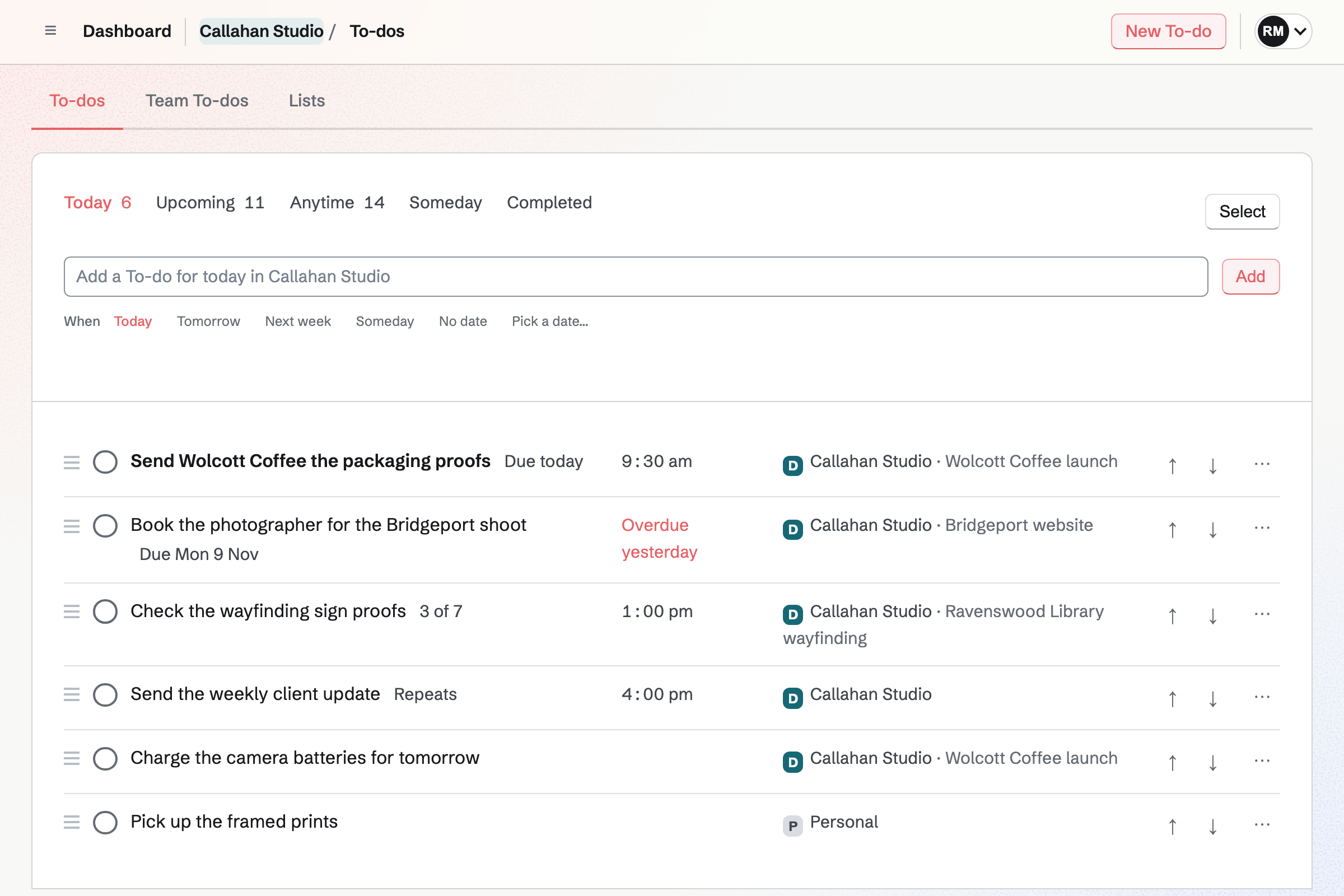
Robin Mazur’s To-dos for today in Callahan Studio and Personal: six To-dos with their times, Deadlines, Lists and a checklist, one carried over from the working day before.

How is Magpie different?

1. To-dos come with the rest of the business

One Magpie subscription includes the areas a small business would otherwise buy one at a time:

  • To-dos, with Today, Upcoming, Lists, Deadlines, reminders and repeats
  • Calendar, which shows each scheduled To-do and Deadline beside your events and meetings
  • Kanban Boards for work that moves through stages, with To-dos on a card
  • Time Tracking, with a timer started from a To-do
  • Contacts, Notes, Team chat, Meetings, Invoicing and the other areas, in the same team

Everything is in one account with one bill.

2. Every part of To-dos is on the Free plan

To-dos has no plan limit. Lists, sharing, Deadlines, reminders, repeats and the assistant are all part of Free. There is no limit on the number of Lists. A paid plan raises the limits on team members, guests and connected apps.

3. A To-do links to the work it is for

A To-do can be started from a contact, a Kanban card, a Note or a Business Planner milestone. Its page links back. A card's To-dos tick off on the board and on Team To-dos. Today gathers To-dos from Personal and every team, each with its team's name.

Comparing Magpie and Todoist

Todoist does more inside the task list; Magpie does more around it. Every line in the tables below was checked against Todoist's own pages, linked from each row, and against Magpie's code and Help.

Platform

WhatTodoistMagpie
Today and UpcomingWhat is due today, and the days ahead Yes Yes
Dates typed in plain wordsTomorrow at 4pm, every Thursday Yes Yes
Projects with sectionsTasks grouped by goal, then by stage Yes Lists, no sections
Sub-tasksA task broken into smaller tasks Yes Checklist steps
Labels and saved filtersYour own views across projects Yes Tags only
Deadlines and remindersA due day apart from the planned day, and an alert Deadlines on Pro and Business Yes
Board layoutTasks as cards in columns Yes Kanban Boards, separate
Calendar layoutTasks on a week or month, dragged to a day Pro and Business Partly
Shared projectsPeople add, assign and complete tasks Yes Yes
Comments and files on a taskDiscuss a task and attach what it needs Yes No
Activity historyWho changed what, and when Yes No
AI helpFind, add and break down tasks in plain words Yes Yes
Phone, tablet and watch appsTasks on every device Yes In the browser
Desktop apps and offline useAn app on the computer that works with no connection Yes No
Add tasks from other appsEmail, the browser, Slack and Siri Yes No
Time trackingA timer on each task Other companies' apps Yes
Calendar, boards, notes and chatThe rest of the work in the same account No Yes
Every part on a free planThe whole task list without paying Beginner, with limits Yes

Good to know: Where Magpie says No or Partly, the line under the row says what Magpie does instead. Each gap has an item on Magpie's roadmap, and the line changes on the day it ships.

Adding tasks

Both add a task from one typed line and read dates in plain words. Todoist also reads the project, label, priority and person, and adds tasks from email, the browser, Slack and Siri. They do it better than we do today.

WhatTodoistMagpie
Add a task by typing it in one line Source Yes Yes
Type a date and time in plain words, such as tomorrow at 4pm Source Yes Yes
Put a task in a project and give it a label, a priority, a person, a reminder and a deadline as I type it Source Magpie: Only a day, a time or a repeat is read from the title. The List, tags, priority, assignee, reminder and Deadline are set afterwards on the To-do's page, or the To-do is added on a List's page to go into that List. Yes Partly
Collect new tasks in an inbox and sort them later Source Magpie: A To-do added with no date and outside a List waits in Anytime. On Team To-dos those come first, before a group for each List; on To-dos they are mixed with the rest. There is no list of its own for new To-dos still to be sorted, and old links to an Inbox open Anytime. Yes Partly
Paste a list and get a task for each line Source Magpie: The add field takes one title at a time. A whole List can be made by pasting a JSON document, which an assistant can write from a plain list. Yes No
Add a task from anywhere on my computer with a keyboard shortcut Source Magpie: To-dos are added inside Magpie: on the To-dos pages, and on Dashboard with + New To-do or the T key. Nothing adds one from outside the Magpie tab or app. Yes No
Forward an email to make a task Source Magpie: Mail cannot make a To-do, and To-dos has no address to send one to. Yes No
Save the web page or the Gmail message I am looking at as a task, with a link back to it Source Magpie: Nothing saves a web page or an email as a To-do. Magpie's browser extension, not yet in the browsers' stores, is only for Password Vault, and the Magpie app's share sheet, not yet in the App Store or Google Play, saves a link or text as a Note or a Bookmark, not as a To-do. Yes No
Turn a chat message into a task Source Magpie: A Chat message cannot become a To-do. The records a To-do can be started from, and link back to, are a contact, a Kanban card, a Note and a Business Planner milestone. Yes No
Add a task or hear my list by asking Siri Source Magpie: The assistant, on Dashboard, takes written requests to add or change To-dos. The Magpie app, not yet in the App Store or Google Play, has no Siri or Shortcuts actions. Yes No

Good to know: The line under Magpie's add field shows the day, time or repeat it understood before the To-do is added. On Dashboard, the T key opens the same field.

Planning and reminders

Both have Today, Upcoming, repeats, deadlines and reminders. Todoist has more repeat patterns and location reminders, and shows calendar events beside tasks.

WhatTodoistMagpie
See everything due today across all my projects Source Yes Yes
See the coming days and move tasks to another day Source Yes Yes
Repeat a task on any schedule, or a set time after I last did it Source Magpie: A To-do repeats every day, every weekday, weekly on its weekday, every two weeks, monthly on its date or yearly, or every few days, weeks or months when the title says so; the assistant can choose several weekdays. Nothing repeats a set time after it was done, on a day such as the last weekday of the month, or until an end date. Yes Partly
Give a task a deadline apart from the day I plan to work on it Source Yes Yes
Be reminded at a set time, on my phone or by email Source Yes Yes
Be reminded when I arrive at or leave a place Source Magpie: Reminders are at a time only, and a To-do has no place. Yes No
See my Google or Outlook calendar events beside my tasks Source Magpie: Calendar's Agenda, Day and Month views show scheduled To-dos and deadlines with Magpie events, meetings and Google Calendar events. The To-dos pages themselves show no events, and an Outlook calendar cannot be connected. Yes Partly
See my dated tasks in Google Calendar or Outlook Source Magpie: Calendar events can be added to Google Calendar, but To-dos and deadlines are not. They show only on Magpie's own Calendar. Yes No

Good to know: Today lists To-dos planned for today or earlier, and those with a Deadline in the next 7 days. It gathers them from Personal and every team.

Projects and organising

Todoist has projects with sections, sub-tasks, four priorities, labels and saved filters. Magpie has Lists, a checklist on each To-do, two priorities and tags, and no saved views.

WhatTodoistMagpie
Keep the tasks for each goal or part of life in a project of its own Source Yes Yes
Group projects under a parent project or in folders Source Magpie: Personal and each team keep their own To-dos and Lists, and To-dos shows all of them with each one's team. Inside Personal or a team, Lists cannot be nested or put in folders. Yes Partly
Split a project into sections Source Magpie: A List's To-dos are one list in the order you set, with no sections inside it. Yes No
Break a task into sub-tasks, each with its own date and person Source Magpie: A To-do's page has a checklist of steps, ticked off in place, and Make it a To-do turns a step into a To-do of its own. A step has no date, person or reminder, and a To-do cannot sit under another To-do. Yes Partly
Mark how urgent each task is, and see the most urgent first Source Magpie: A To-do's Priority is Normal or Important, set on its page, in an import or by the assistant, and an Important To-do is marked in the list. There are no further levels, and no list is sorted by priority. Yes Partly
Label tasks across projects and see every task with a label Source Magpie: A To-do can have tags, shared across Personal or the team. No page lists the To-dos with a tag; the assistant can find them by tag. Yes Partly
Save my own views of tasks, such as urgent ones due today in one project Source Magpie: To-dos has fixed views, Today, Upcoming, Anytime, Someday and Completed, and each List's page. None can be narrowed by tag, priority or person, and no view can be saved. The assistant finds To-dos by any of these when asked. Yes No
Write notes and links on a task Source Yes Yes
Start a project from a template, or save one of mine to use again Source Magpie: There are no ready-made Lists, and a List or a To-do cannot be copied or saved as a template. A List can be built again by importing the same JSON document. Yes No
Select several tasks and change them together Source Yes Yes

Good to know: Select takes up to 100 To-dos at once to complete, plan, move to a List or delete. There is no limit on Lists on any plan.

List, board and calendar layouts

Todoist shows any project as a list, a board or a calendar. Magpie shows a List as a list; boards are in Kanban Boards and the calendar is Calendar.

WhatTodoistMagpie
See a project as a board, with a column for each section Source Magpie: A List is shown only as a list. Work that moves through stages goes on a Kanban board, a separate area, and a card can carry To-dos that show on Team To-dos and tick off in both places. Yes Partly
See tasks on a week or month calendar and drag them to another day Source Magpie: Calendar's Agenda, Day and Month views show scheduled To-dos on their When date and deadlines on their Deadline date, and selecting one opens it. There is no week view, and only events, not To-dos, can be dragged to another time. Yes Partly
Say how long a task will take, and set the time aside on my calendar Source Magpie: A To-do has a day and a time but no length. Calendar's Day view shows one with a time as half an hour at that time, and it cannot be stretched or dragged. Calendar events have a length and are dragged to another hour in Day view. Yes No

Good to know: A Kanban card can carry To-dos. They show on Team To-dos and tick off in both places.

Shared projects and teams

Both share a project or a List and give each task to one person. Todoist adds comments, files, a People tab and an activity log. They do it better than we do today.

WhatTodoistMagpie
Share a project with people, who can add, assign and complete its tasks Source Yes Yes
Give a task to one person in a shared project Source Yes Yes
Discuss a task in comments, and mention people so they are told Source Magpie: A To-do has notes and a checklist, which anyone who can change it edits, but no comments or mentions. Talking about it happens elsewhere, such as in Chat. Yes No
Attach files and photos to a task Source Magpie: A To-do's notes and checklist hold text and links only; a file or a picture cannot be attached. Yes No
Keep the team's work in a workspace of its own, apart from my personal tasks Source Magpie: Personal and each team keep their own To-dos and Lists, with admins, members, View only access and guests, and the team pays once for everyone. A team has places for 3 members while it is free and 25 on the Team plan. Yes Partly
Keep a team project to some people in the team Source Magpie: Every member of a team sees all of its Lists. A guest sees only the Lists shared with them, but a List cannot be kept from other members. Yes Partly
See what each person in the team has to do, and who is behind Source Magpie: Team To-dos lists every To-do in the team with who has it, and the assistant finds one person's To-dos when asked. No page shows one person's To-dos or counts each person's overdue ones. Yes Partly
See who added, changed or completed each task, and when Source Magpie: A To-do's page shows no history of its changes. A team's Audit log records changes to its members, guests and settings, not to To-dos. Yes No

Good to know: Share on a List gives Can edit or Can view. Someone outside the team joins as a guest who sees only that List: 10 guests on Free, 100 on a paid plan.

Progress and history

Both list finished tasks and reopen them. Todoist adds daily and weekly goals, streaks and charts; Magpie adds a timer on each To-do.

WhatTodoistMagpie
Look back at the tasks I have finished Source Yes Yes
Set a goal for the tasks I finish each day, and see my streaks and progress Source Magpie: Completed lists finished To-dos, but no counts, goals, streaks or charts are kept. Yes No
Track the time spent on a task Source Todoist: Todoist has no timer of its own. Its integrations directory has a Time Tracking category of other companies' apps. No Yes

Good to know: Start timer on a To-do's page starts a Time Tracking timer with its title. The time entry links back to the To-do.

Todoist Assist and AI

Both find tasks from a plain request and break a task into steps. Todoist's Ramble also takes tasks by voice, and Extract tasks reads pictures and files.

WhatTodoistMagpie
Ask in plain words for the tasks I want to see Source Yes Yes
Have AI break a task into steps, or suggest the tasks for a goal Source Yes Yes
Speak my tasks and have them added for me Source Magpie: To-dos and the assistant take typed text only. Magpie has no voice input for them. Yes No
Turn a block of text, a photo or a document into tasks Source Magpie: Text pasted into the assistant can be turned into To-dos when asked. The assistant takes no pictures or files. Yes Partly
Use my tasks from Claude, ChatGPT or another AI app Source Yes Yes

Good to know: The assistant works on every Magpie plan. Connected apps such as Claude or ChatGPT use To-dos through MCP: 2 on Free, 10 on Pro.

Apps, sync and integrations

Todoist has apps for phones, tablets, watches and computers that work offline, with widgets and keyboard keys. Magpie's To-dos is used in the browser, on a computer or a phone.

WhatTodoistMagpie
Use it on my phone and tablet Source Magpie: To-dos works in a phone's or a tablet's browser. The Magpie app for iPhone, iPad and Android has To-dos with Today, Upcoming, Anytime, Someday and Completed, Lists, sharing and reminders, but it is built and not yet in the App Store or Google Play. Yes Partly
Use it as an app on my Mac, Windows or Linux computer Source Magpie: On a computer, To-dos is used on the website in a browser. There is no desktop app. Yes No
See today's tasks and tick them off from my phone's home screen or lock screen Source Magpie: Magpie has no widgets and no watch app. Dashboard shows today's To-dos once it is open, on the website; the Magpie app, not yet in the App Store or Google Play, has none either. Yes No
Keep working with no connection Source Magpie: To-dos needs a connection. The Magpie app, not yet in the App Store or Google Play, keeps a copy of a To-do being written until it is saved, but saves no changes offline. Yes No
Work through my tasks with the keyboard Source Magpie: Only Dashboard's T key, which adds a To-do, and Search work from the keyboard here. The To-dos pages have no keys of their own. Yes No
Search my tasks, their descriptions and comments, and my projects and labels Source Magpie: Search finds open and completed To-dos by their title, in Personal and every team. It does not find Lists or tags, or words in a To-do's notes or checklist; the assistant finds To-dos by words in their notes too. Yes Partly
Connect my tasks to the other apps I use Source Magpie: The version 1 API has To-dos routes for an API key, which needs Pro, and connected apps use To-dos through MCP. There are no ready-made connections from To-dos to Slack, Outlook or automation services. Yes Partly
Bring my tasks in from a spreadsheet or another app Source Magpie: A List and its To-dos are imported from a JSON document, with dates, deadlines, tags and checklists, and Copy the prompt gives an assistant the format. Nothing reads a CSV file or another app's export. Yes Partly
Have my tasks backed up, and download them Source Magpie: To-dos are not backed up for you to download, and no List can be exported. Yes No
Use every part of my task list without paying Source Todoist: Beginner is free with 5 personal projects, 5 people in each, 3 filters, 5 MB files and a week of activity history, and without the calendar layout, deadlines, durations, reminders of your own or backups. Pro and Business are paid plans billed yearly, with Business priced per member. Partly Yes

Good to know: The Magpie app has To-dos with Lists, sharing and reminders. It is not yet in the App Store or Google Play.

Price comparison

How Todoist charges

Todoist charges by plan: Beginner is free, then Pro, and Business priced per member, billed monthly or yearly. The plan sets what the list can do. Beginner has 5 personal projects, a week of activity history and 5 MB files. It leaves out deadlines, the calendar layout, durations and backups. Business adds a team of up to 1,000 members and guests. Prices are on Todoist's pricing page.

How Magpie charges

Magpie charges by plan too, Free or a paid plan, for everything in the account. To-dos has no plan limit: Lists, sharing, Deadlines, reminders, repeats and the assistant are on Free. The plan sets how many team members, guests and connected apps you have. The Team plan is one price for up to 25 people. Prices are on Magpie's pricing page.

On top of the planTodoistMagpie
Projects or Lists5 on Beginner, 300 on Pro, 300 a member on BusinessNo limit on any plan
Deadlines and reminders of your ownPro and BusinessEvery plan
Calendar layout and durationsPro and BusinessCalendar shows To-dos on every plan; no durations
Files on a task5 MB on Beginner, 100 MB on Pro and BusinessNot available
Activity history1 week on Beginner, all of it on Pro and BusinessNot available
BackupsPro and BusinessNot available
AI helpRamble limited on Beginner; Task Assist and Email Assist on Pro and BusinessThe assistant on every plan
How a team paysBusiness, per member3 in a free team, 25 on the Team plan at one price
Calendar, Kanban Boards, Notes and Time TrackingNot offeredIncluded

When to choose Magpie or Todoist

  • Want your To-dos beside your calendar, Kanban boards, contacts and timer, with Deadlines and reminders on the Free plan and one price for a team? Go with Magpie.
  • Want a task manager on every phone, computer and watch, with sections, sub-tasks, comments, filters and tasks added from anywhere? Todoist is the right choice.

Recommendations by kind of business

For someone who runs their life from a task list
Todoist. Apps on every device, widgets, offline use and keyboard keys keep the list at hand. Quick Add reads the project, label, priority and person from one typed line.
For a team that plans projects in detail
Todoist. Sections, sub-tasks with their own dates, comments with files and an activity log hold a project's work together. Magpie's To-dos has none of these today.
For a small business whose tasks come from clients and cards
Magpie. A To-do starts from a contact, a Kanban card or a Note and links back. Calendar shows it beside the day's meetings, and its timer logs the time.
For a small team that pays per member today
Magpie. The Team plan is one price for up to 25 people, with every area included. Todoist's Business plan is priced per member.
For one person with a simple list
Either. Both add To-dos in plain words, with Today, Upcoming, repeats and reminders. Choose by whether you want apps on every device or the rest of the business beside the list.

Frequently asked questions

What is the difference between Todoist and Magpie?

Todoist is a task manager with apps for every device, built around projects, sections, labels and filters. Magpie is one subscription for a small business's software. Its To-dos is one area beside Calendar, Kanban Boards, Contacts, Notes and Time Tracking. Todoist does more inside the task list; Magpie does more around it.

Does Magpie replace Todoist?

Yes, for a small business whose tasks come from its clients, its boards and its notes. Magpie has Today, Upcoming, Lists, Deadlines, reminders, repeats and shared Lists, all on the Free plan.

Consider keeping Todoist if you split projects into sections and sub-tasks, or discuss tasks in comments with files. Keep it too if you add tasks from email, Slack or Siri, or need a desktop app offline. Todoist does each of these better than Magpie does today.

How much does Todoist cost?

Todoist has three plans: Beginner, which is free, Pro, and Business, priced per member. Each paid plan is billed monthly or yearly. Beginner has 5 personal projects and leaves out deadlines, the calendar layout and backups. The prices are on Todoist's pricing page.

How much does Magpie cost?

Magpie has a Free plan and paid plans, each covering every area. To-dos has no plan limit, so Lists, Deadlines, reminders and sharing are on Free. A free team has 3 people, and the Team plan is one price for up to 25. The prices are on Magpie's pricing page.

Does Magpie have sections and sub-tasks?

No. A List's To-dos are one list in the order you set, with no sections. A To-do has a checklist of steps. Make it a To-do turns a step into a To-do of its own. A step has no date, person or reminder. Sections and sub-tasks are on Magpie's roadmap.

Can I comment on a To-do or attach a file?

No. A To-do has notes in Markdown and a checklist, which anyone who can change it edits. It has no comments or mentions, and a file cannot be attached. Todoist has comments with mentions, files and voice notes on every plan. Both are on Magpie's roadmap.

Does Magpie have labels and filters?

Partly. A To-do can have tags, shared across Personal or the team. No page lists the To-dos with a tag. There are no saved filters; the assistant finds To-dos by tag, priority, person or words when asked. Todoist's filters combine dates, priorities, projects, labels and people in a saved view.

Does Magpie have priority levels?

A To-do is Normal or Important, and an Important To-do is marked in the list. There are no further levels, and no list is sorted by priority. Todoist has four priorities and shows higher ones near the top of Today and Upcoming.

Does Magpie have a board view for To-dos?

No. A List is shown only as a list. Work that moves through stages goes on a Kanban board. A card can carry To-dos that tick off in both places. Todoist shows any project as a board on every plan.

Can I see my To-dos on a calendar?

Yes, in Calendar. Its Agenda, Day and Month views show each To-do and Deadline on its date, beside your events. A To-do cannot be dragged to another day there, and there is no week view. Todoist's calendar layout drags tasks between days on Pro and Business.

Does Magpie have a phone app for To-dos?

To-dos works in a phone's or a tablet's browser. The Magpie app has To-dos with Today, Upcoming, Lists, sharing and reminders. It is not yet in the App Store or Google Play. Todoist has apps for iPhone, iPad, Android, Apple Watch and Wear OS.

Does Magpie have a desktop app or work offline?

No. On a computer, To-dos is used in a browser, and it needs a connection. Todoist has apps for Mac, Windows and Linux, and its apps add and complete tasks offline. Both are on Magpie's roadmap.

Can I add a To-do by email, from the browser or by voice?

No. To-dos are added on the To-dos pages, on Dashboard with the T key, or by asking the assistant in writing. Todoist adds tasks from a forwarded email, its browser extension, Slack and Siri. Its Ramble listens to you speak. Adding To-dos from other places is on Magpie's roadmap.

Does Magpie read dates typed in plain words?

Yes. The end of a To-do's title is read as a day, a time or a repeat. Tomorrow, next Monday at 9am and every Thursday all work. The line under the field shows what was understood before it is added. The words are read in English.

Does Todoist have time tracking?

No. Todoist has no timer of its own; its integrations directory lists other companies' time tracking apps. In Magpie, Start timer on a To-do's page starts a Time Tracking timer. The time entry links back to the To-do.

Does Todoist have deadlines on the free plan?

No. Deadlines need Pro or Business, as do reminders of your own and the calendar layout. Magpie's To-dos has When and a separate Deadline on every plan. A reminder can go at the Deadline or a day before.

Can I share a List with someone outside my team?

Yes. Share on a List invites a person by handle or email with Can edit or Can view. They join as a guest who sees only that List. Someone with no Magpie account gets a free one. Free has places for 10 guests and a paid plan for 100.

Does Magpie have AI for To-dos?

Yes, on every plan. The assistant on Dashboard finds To-dos by date, priority, person, List, tag or words. It adds steps to a To-do's checklist and makes a List for a goal. It takes typed text only, with no voice, pictures or files.

Does Magpie show goals and streaks for finished To-dos?

No. Completed lists finished To-dos, the most recent first, and a completed To-do can be reopened. No counts, goals, streaks or charts are kept. Todoist's Productivity view tracks daily and weekly goals, streaks and Karma on every plan.

Can I see who changed a To-do?

No. A To-do's page shows no history of its changes. A team's Audit log records changes to its members, guests and settings, not to To-dos. Todoist's activity log keeps a week on Beginner and all of it on Pro and Business. An activity log is on Magpie's roadmap.

Can I use Todoist and Magpie together?

Yes, side by side; they do not connect to each other. You can keep a personal list in Todoist. Magpie's To-dos then holds the work that starts from a contact, a Kanban card or a Note. Each To-do then links back to the record it came from.

How do I move from Todoist to Magpie?

Export each Todoist project as a CSV file. Magpie imports a List from a JSON document, with dates, Deadlines, tags and checklists. Copy the prompt gives an AI app the format to write it in. Magpie cannot read the CSV file itself, so the AI app turns it into that document first. Magpie's import has no place for comments or files.

What is included in Magpie's Free plan?

Every part of To-dos, with no limit on Lists. Calendar with 100 events, 1 Kanban board, Notes, booking pages, Invoicing, Store, a website and Forms. A free team has 3 people, and Lists can be shared with 10 guests. A paid plan adds Mail and raises the limits.
If a line on this page is wrong, tell us and we will correct it.

Todoist changes, and so does Magpie. If a line is out of date about either product, email support@magpie.diy with the page that shows it. We check the line against that page, change it, and give it the new date. That goes for Todoist's own team as much as for anyone who uses it.

Keep your To-dos beside the rest of the business.

Create a Magpie account, then add your first To-do.

Create account