Podia compared with Magpie

Podia vs Magpie: an in-depth comparison

Podia and Magpie both let a creator sell courses, downloads, coaching and memberships from a website of their own. Both send email to a list. They are built around different things.

  1. Podia is a platform for selling digital products: courses, downloads, coaching, events and a community. It is built for a creator who sells what they know. Email, a website, a blog and chat on the site come with it.
  2. Magpie is one subscription for a small business's software, and Courses is one part of it. Beside the school it includes Coaching, Store, Supporters, Invoicing, booking pages and the rest. It is built for someone whose teaching is one part of running the business.
Create account
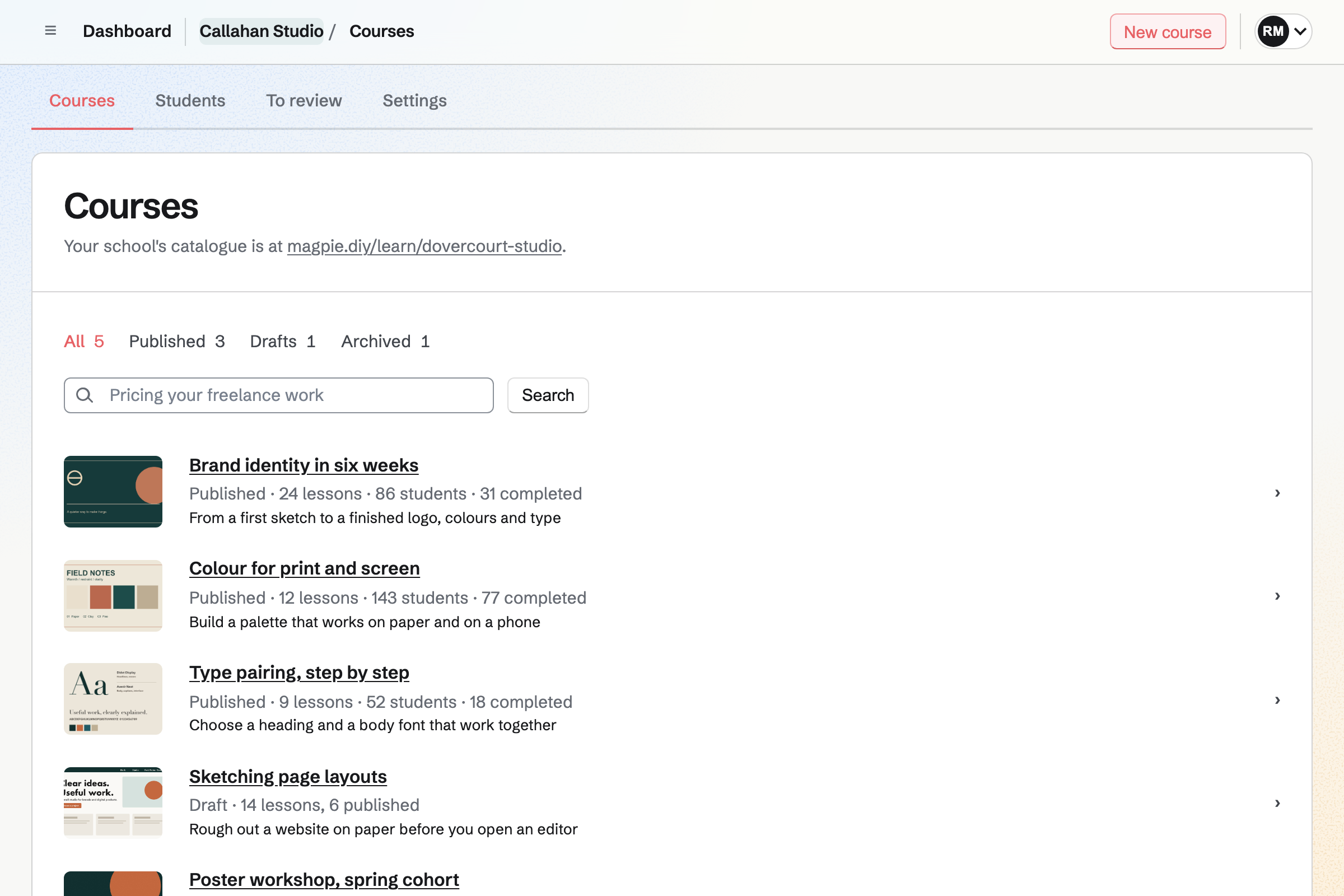
Courses list for a fictional design studio: published courses, each with its cover, lessons, students and completions, a draft, and the address of the school's catalogue.

How is Magpie different?

1. The courses come with the rest of the business

One Magpie subscription includes the areas a small business would otherwise buy one at a time:

  • Courses, with quizzes, assignments, cohorts, live sessions and certificates at a school of your own
  • Coaching for programs, sessions and check-ins, with sessions booked from your free times in Meetings
  • Store for courses, downloads and physical products, and Supporters for paid posts
  • Invoicing, Appointments and Client Portal for the work you do for clients
  • Newsletter, Websites, Mail, Contacts, Helpdesk and the other areas, in the same team

Everything is in one account with one bill. Podia covers digital products and their marketing, and leaves session booking to Calendly or another scheduling service.

2. The Free plan publishes a course

Magpie's Free plan publishes 1 course for up to 50 students, and a paid plan has no limit on either. Free also coaches 3 clients and runs a Store. Podia starts with a 14-day trial, and a site needs a paid plan after it.

3. A team pays one price

A free team has 3 people, and the Team plan 25. Each can be an admin, a member, view only, or a guest who uses only the areas you give them. Podia's Mover plan has no assistants, Shaker has 1 and Earthquaker no limit. Each assistant sees everything but billing.

Comparing Magpie and Podia

Podia does more to build a community and an email list; Magpie does more around the course. Every line in the tables below was checked against Podia's own pages, linked from each row, and against Magpie's code and Help.

Platform

WhatPodiaMagpie
Online coursesLessons with video, quizzes and certificates Yes Yes
CohortsA group that starts together, with its own dates and seats Start dates Yes
CommunitySpaces of posts for customers and members Yes Partly
Member chatGroup chats and private messages between members Yes Team chat guests
MembershipsFree and paid plans that open content Yes Supporters
Digital downloadsFiles people buy and download Yes Yes
Free download for an email addressA file that builds the list Yes Partly
CoachingSell coaching and run each client's sessions Yes Yes
Session bookingClients book from your free times Calendly or another service Yes
Online eventsRegistration, reminders and replays Yes Partly
Email newsletterOne-off emails to your list Yes Yes
Email sequencesA series sent when someone joins or buys Yes Partly
Website and blogPages and posts at your own domain Yes Yes
Live chat on the siteA chat bubble for visitors Yes No
Physical productsStock, shipping rates and returns Addresses only Yes
Subscriptions and payment plansMonthly or yearly billing, and instalments Yes Partly
AffiliatesCommission on sales others send you Shaker and Earthquaker No
Built-in AI assistantDrafts and answers about your sales Yes Partly
Team sign-insPeople who help you run it Shaker and Earthquaker Yes
Moving over for youProducts and customers moved by the platform's team Yes No
Free plan that sellsPublish and sell without a monthly fee No Yes

Good to know: Where Magpie says No or Partly, the line under the row says what Magpie does instead. Each gap has an item on Magpie's roadmap, and the line changes on the day it ships.

Community and plans

Podia puts every customer in a community, with spaces, a home feed, chat and alerts each member chooses. They do it better than we do today. Magpie's paid content is in Supporters, and its Message Boards are private to a team or public.

WhatPodiaMagpie
Run a community for my customers, with spaces by topic or kept for the people on a plan or who bought a product Source Magpie: Each course has a discussion for its students, of lesson comments, posts and announcements. Message Boards are private to a team or public, and nothing opens a board or a discussion to the people who bought a Store product or joined a Supporters tier. Yes Partly
Give members a home page that shows what is new across the community Source Magpie: Message Boards lists the boards, and each board lists only its own posts, by Hot, New or Top; nothing gathers what is new across them. Yes No
Let members chat with me and with each other, in group chats and private messages Source Magpie: Chat has channels, threads and direct messages for a team's members, and a team admin can let someone from outside into one channel as a guest, by handle or by a link for up to 25 people; there is no chat for a whole community of customers. Yes Partly
Tell members about new posts and replies, as often as each of them chooses Source Magpie: Message Boards send no notifications, on the website, by email or in the app. Yes No
Sell a membership in plans, free or paid, each opening its own spaces and products Source Magpie: Supporters has a free tier and paid tiers, charged monthly or yearly, that open the posts written for them, and a tier can include courses; no tier opens Store products or a Message Board. Magpie takes 4% of each payment. Yes Partly
Let members pay yearly as well as monthly Source Yes Yes

Good to know: A Supporters tier can include courses, so a supporter on that tier opens them without paying again. Each course also has a Discussion page for its students.

Online courses

Both build a course of lessons with video, quizzes, certificates, lesson comments and sections that open on a date. Magpie adds cohorts with their own dates and seats, and assignments an instructor reviews.

WhatPodiaMagpie
Make an online course of sections and lessons with video, audio, text, files and embeds, and sell it from its own page Source Yes Yes
Open course sections on a date, or a number of days after each student enrols Source Yes Yes
Keep a section closed until students finish the lessons before it and pass its quiz Source Yes Yes
Check what students learned with quizzes that have a pass mark Source Yes Yes
Give students a certificate when they complete a course Source Yes Yes
Let students ask questions in comments under each lesson Source Yes Yes
Run a course for a group that starts on the same day and moves through it together Source Podia: A start date lets people buy now and opens the course to all of them on that day; for the next group you set a new start date. There are no separate groups, each with its own dates and seats. Partly Yes
Limit how many students can enrol, or how long each keeps access Source Yes Yes
Give students a course myself, one at a time or from a spreadsheet Source Yes Yes
See each student's progress through a course, and their quiz answers Source Yes Yes

Good to know: A Magpie course is sold as a Store product, with its orders, gift cards and refunds. Its price can be paid in 2 to 12 monthly payments.

Digital downloads

Both sell files to download and bundles of products. Podia also gives a download away for an email address. In Magpie, only Social Media's offers do that, with one file for each offer.

WhatPodiaMagpie
Sell files people download, such as ebooks, templates and audio Source Yes Yes
Give a download away free in return for an email address Source Magpie: Every Store price must be above zero, so Store cannot give a file away. Social Media's offers can: a person types their email address on the offer's page, with no account, and Magpie emails them a link to one PDF or ZIP file. An offer is made for a social post, and its file is not a Store product. Yes Partly
Sell several products together at one price Source Yes Yes

Good to know: A Store download holds up to 50 files, with download limits and licence keys. Buyers get an email when you add a new version.

Coaching

Podia sells coaching from a page and sends the buyer to Calendly, Acuity or another scheduling service to book. Magpie's Coaching takes the client from joining to each booked session.

WhatPodiaMagpie
Sell coaching from a page of its own, and let clients book their sessions Source Podia: A coaching product has a sales page and takes payment, then shows a booking link from Calendly, Acuity, SavvyCal or another scheduling tool; booking, confirmations and reminders happen in that tool. Partly Yes
Sell a set number of sessions that the client books over time Source Podia: One purchase opens the booking link as often as the buyer likes, which Podia's help suggests for selling a package, but Podia does not count bookings, and extra bookings are cancelled by hand in the scheduling tool. Partly Yes

Good to know: A Coaching program can include a set number of sessions. Once they are used, Add sessions sends an invoice for more. Free coaches 3 clients at a time.

Events

Podia runs online and in-person events, free or paid, with reminders and replays. Magpie's Webinars is built but not yet open to members, and a Calendar event takes free RSVPs only.

WhatPodiaMagpie
Run an online event people register for, with reminders and the joining link shown only to them Source Magpie: A Calendar event takes free RSVPs from Magpie accounts up to a capacity, but its location shows to whoever may see its details, not only to people going, and nobody is reminded. Webinars, with registration, reminders and replays, is open only to site administrators. Yes Partly
Sell places at an event, online or in person Source Magpie: A paid Form can charge for a place, but it is not tied to a Calendar event and does not stop when the event is full; Calendar RSVPs are free. Yes Partly
Share an event's recording afterwards, and keep selling it Source Magpie: Store sells a recording as a video file that buyers download, not one they watch online; Webinars, which keeps replays for the people registered, is open only to site administrators. Yes Partly

Good to know: A Magpie cohort has live sessions on Zoom or a Video Chat call. Its students get invitations and reminders.

Email

Podia sends broadcasts and campaigns to segments, from your own domain. Each email shows its opens, clicks and sales. They do it better than we do today. Magpie's Newsletter sends each email to every subscriber.

WhatPodiaMagpie
Send a one-off email to my whole list Source Yes Yes
Email only the people with a tag, or who bought a product Source Magpie: A Newsletter email goes to every active subscriber. Outreach, on Pro or the Team plan, emails everyone with a Contacts tag from your own mailbox, and Store lists the buyers of one product as a segment but does not email them. Yes Partly
Send a series of emails automatically when someone joins my list, buys or finishes a lesson Source Magpie: Outreach sends a series of emails to the people you add and stops when they reply; Newsletter sends one email at a time, and nothing starts a series when someone subscribes or buys. Yes Partly
Collect email addresses with a sign-up form on my pages or on another site Source Magpie: Newsletter has its own signup page with double opt-in, and Newsletter settings gives the signup form's code to paste into a page of another website, where visitors subscribe with the same confirmation email. Store checkout can add buyers to the Newsletter. A Magpie editor website has no sign-up section. Yes Partly
See who opened each email, what they clicked and what it sold Source Magpie: A Newsletter email shows copies delivered, failed and skipped, with no opens, clicks or sales; Outreach counts clicks and replies, and Store's Sales by source counts sales from links you tag yourself. Yes Partly
Send my emails from an address at my own domain Source Magpie: Newsletter email comes from Magpie's sending address, with your newsletter's From name and reply-to address; Mail and Outreach already send from your own domain. Yes Partly
Keep an email list of thousands of subscribers on my plan Source Podia: Mover includes 100 email subscribers, Shaker 500 and Earthquaker 1,000; the page says you can add more at any time or move to the next plan, but gives no price for extra subscribers. Partly Yes
Email people who started checkout and did not pay Source Yes Yes

Good to know: The Newsletter has 250 subscribers on Free and 5,000 on a paid plan. Podia's plans include 100, 500 or 1,000. Store emails one reminder when a checkout expires unpaid.

Website and blog

Both build pages from sections at your own domain, with a blog. Podia has ten themes, embeds from more than 1,900 services, and sends a blog post to your list.

WhatPodiaMagpie
Build my site's pages without code Source Yes Yes
Start my site from one of several ready-made designs Source Magpie: Every editor website starts from the same starter, and you change its colours, fonts and sections from there; a Store's own pages have a choice of ready-made designs. Yes Partly
Show my site at my own domain Source Yes Yes
Write a blog on my site, schedule its posts and email them to subscribers Source Magpie: Add blog gives an editor website a Blog page whose posts are written with pictures and videos and kept as drafts, published or scheduled, each at its own address and in the sitemap. A post is not sent to subscribers; a Newsletter email is written separately. Yes Partly
Embed videos, forms and widgets from other services in my pages Source Magpie: A Video section plays YouTube, Vimeo and Loom videos. A form, a map or another service's widget is pasted into a page's Code and works once the website is at the team's own domain. Yes Partly
Show my site and marketing emails without the platform's name Source Magpie: Websites and Store show only your own name, but every Newsletter email ends with a line saying it was delivered by Magpie. Yes Partly
Show the pages and emails my customers see in their language Source Magpie: Language for customers sets the words Magpie adds to your Store, booking pages, Forms and Client Portals, and the emails they send, in English, French, Spanish or German. Yes Partly

Good to know: Every Magpie editor website has a Code view of each page, on every plan. A website, a Store and a link page can each have a domain of their own.

Chat

Podia puts a chat bubble on every page of the site, with an inbox for the conversations. Magpie has no live chat for a website.

WhatPodiaMagpie
Chat with visitors on my site from a chat bubble Source Magpie: Helpdesk takes email and a contact page; nothing puts a live chat on a member's own website. Yes No

Good to know: Magpie's Helpdesk turns email and a contact page into conversations. Each is assigned to a teammate, with notes only the team sees.

Online store and payments

Both take cards and wallets through Stripe, with a cart, discount codes, sales tax and instalments. Podia adds PayPal, subscriptions with a trial and upsells after checkout. Magpie adds physical products and pay what you want.

WhatPodiaMagpie
Take cards, Apple Pay, Google Pay and local ways to pay, with a cart for several products Source Yes Yes
Let buyers pay with PayPal Source Magpie: Store takes payment through Stripe only; with PayPal turned on in your Stripe account, Stripe's page offers it where Stripe supports it. Yes Partly
Let buyers pay in instalments Source Magpie: A course price in Store can be bought in monthly payments, and Coaching takes its price in 2 to 24 monthly instalments; other Store products are paid in full. Yes Partly
Charge a monthly or yearly subscription for a product, with a free trial Source Magpie: Supporters charges its paid tiers monthly or yearly, and Coaching can be paid monthly until it ends; neither has a free trial, and Store sells nothing by subscription. Yes Partly
Give discount codes Source Yes Yes
Offer another product just after someone buys Source Magpie: A Store product's Goes with list shows other products on its page and in the Cart; nothing is offered after paying. Yes Partly
Have sales tax and VAT worked out and charged at checkout Source Yes Yes
Sell physical products, with shipping and stock Source Podia: Podia is built for digital products: it can collect buyers' addresses for you to export and ship yourself, with no shipping rates or stock, and a sign-up limit stands in for stock. Partly Yes
Let buyers choose what they pay Source Podia: There is no pay-what-you-want price; the help suggests a donation link from another service, or a coupon for each lower price. No Yes
Take sign-ups or pre-orders before a product launches Source Magpie: A Store product can go live with no stock, shown as sold out with an offer to email shoppers when it can be bought, and an item can take pre-orders with an expected ship date. A course taught in cohorts takes a waiting list before its next cohort opens. Nothing shows a product as coming soon. Yes Partly

Good to know: Magpie takes 4% of each Store sale. Buyers pay through your own Stripe account, and Stripe's card fees apply too.

Analytics and affiliates

Both report sales with CSV exports. Podia follows recurring revenue and failed payments, and pays affiliates a commission on the sales they send.

WhatPodiaMagpie
See my sales and revenue in reports, and export them Source Yes Yes
See recurring revenue, failed payments and cancellations Source Magpie: The Supporters overview shows how many people support you and how many pay, what the paid tiers bring in a month, and how many joined and ended in the last 30 days; nothing lists failed payments or follows these figures over time, and Store sells nothing by subscription. Yes Partly
Pay people a commission on the sales they send me Source Magpie: Store has discount codes, and Sales by source counts links with UTM tags, but nothing works out or pays a commission. Yes No

Good to know: Store reports show sales, refunds, Stripe fees, margins, stock and visits for any dates. A weekly summary email can send them to you.

Podia Agent and AI tools

Both connect to Claude and ChatGPT. Podia Agent drafts courses, emails, pages and posts, and waits for your approval. Magpie's assistant does not draft a course.

WhatPodiaMagpie
Have a built-in AI assistant draft courses, emails, pages and posts, and answer questions about my sales Source Magpie: The assistant on Dashboard answers questions about Store sales and customers, makes Store discounts, writes a product's description, builds and changes a website, and writes board posts and Documents, asking you to confirm changes; it does not draft a course, and an email it writes is a Document that you then send from Newsletter. Yes Partly
Run my business from Claude, ChatGPT or another AI app Source Yes Yes

Good to know: Magpie's Connected apps let an AI app read your records, and change them when you turn on Allow changes.

Integrations and team

Podia connects to Zapier and to email services such as Mailchimp and Kit, and moves your products over for you. Magpie gives each team its own sign-ins and limits what each person sees.

WhatPodiaMagpie
Connect Zapier and the email tools I already use, such as Mailchimp or Kit Source Magpie: Pro has an API key for the REST API and signed webhooks, and Store has its own API and webhooks; there is no Zapier app and no ready connection to an email service. Yes Partly
Measure my ads with Google Analytics and the Meta or Pinterest pixel Source Magpie: Store reports count visits and sales by source, from UTM tags or the site that linked, and Store gives Google and Meta product feed addresses; an analytics tag pasted into a website's layout runs on its pages at your own domain, but not on the Store's pages. Yes Partly
Give my team their own logins Source Podia: Assistants have their own logins with full access apart from billing, and what each one sees cannot be limited; Mover has no assistants, Shaker 1 and Earthquaker no limit. Partly Yes
Have my products and customers moved over for me from another platform Source Magpie: You bring things in yourself: Store products from a CSV or JSON file, contacts from a file and Newsletter subscribers from a list; nobody at Magpie moves them for you. Yes No

Good to know: Pro has an API key for the REST API and signed webhooks. Store products come in from a CSV or JSON file, and students from a CSV file.

Price comparison

How Podia charges

Podia charges by plan, Mover, Shaker or Earthquaker, billed monthly or yearly. It has a 14-day trial and no free plan. The plan sets your email subscribers, products, videos, spaces and assistants. Shaker and Earthquaker add affiliates, upsells, PayPal and Zapier. Mover takes 5% of each sale; Shaker and Earthquaker take no Podia fee. Prices are on Podia's pricing page.

How Magpie charges

Magpie charges by plan too, Free or a paid plan, for everything in the account: courses, coaching, the shop, invoicing and the rest. The plan sets how many courses, students, clients and team members you have, not which areas you can use. Magpie takes 4% of Store sales, courses included, and 4% of Supporters payments. It takes 4% of payments for appointments. Prices are on Magpie's pricing page.

On top of the planPodiaMagpie
Free planA 14-day trial, then a paid plan1 published course and 50 students on Free
Fee on sales5% on Mover; none on Shaker and Earthquaker4% of Store sales and 4% of Supporters payments
Card feesCharged by Stripe or PayPalStripe's fees, through your own Stripe account
Email subscribers100, 500 or 1,000 by plan250 on Free, 5,000 on a paid plan
Products you can sell50 on Mover, 150 on Shaker, no limit on EarthquakerNo limit on Store products
People who help you run itNone on Mover, 1 on Shaker, no limit on Earthquaker3 in a free team, 25 on the Team plan
Affiliates, upsells and ZapierShaker and EarthquakerNot offered
Moving your products overDone by Podia's team: up to 50 or 150 productsImported yourself from a file

When to choose Magpie or Podia

  • Want your courses beside coaching with booked sessions, a shop for physical products, invoices and one price for the team, with a Free plan? Go with Magpie.
  • Want a community, email campaigns, free downloads that build your list and chat on your site, all built around selling digital products? Podia is the right choice.

Recommendations by kind of business

For a creator building a paid community
Podia. Spaces, a home feed, group chats and alerts are in one place, kept for the plans members pay for. Magpie's Supporters sells paid posts, and nothing opens a Message Board to paying customers.
For a creator who grows a list by email
Podia. A free download takes an email address, and campaigns follow up when someone joins, buys or finishes a lesson. Magpie's Newsletter sends one email at a time to every subscriber.
For a coach with one-to-one clients
Magpie. Coaching runs the program, its sessions, habits and check-ins, and clients book from your free times. Podia sells the coaching and links to a scheduling service for the booking.
For a teacher running cohorts
Magpie. Each cohort has its own dates, seats, waiting list and live sessions. Podia gives a course one start date at a time.
For a business that sells courses beside products or services
Magpie. Store sells the course, the downloads and physical products in one Cart. Invoicing, Meetings and Appointments are in the same team.
For someone selling one course and a few downloads
Either. Both sell a course and files from your own domain, with quizzes, certificates and discount codes. Choose by whether a community and email campaigns or a Free plan and the rest of the business matter more.

Frequently asked questions

What is the difference between Podia and Magpie?

Podia is a platform for selling digital products: courses, downloads, coaching, events and a community, with email and a website. Magpie is one subscription for a small business's software. Its Courses is one area beside Coaching, Store, Invoicing, booking pages and the rest. Podia does more for the community and the list; Magpie does more around the course.

Does Magpie replace Podia?

Yes, for a teacher or coach whose courses are one part of the business. Magpie's Courses has quizzes, assignments, cohorts, live sessions and certificates. Coaching, Store, Supporters and Invoicing are in the same team.

Consider keeping Podia if your customers meet in a community. Keep it if you grow your list with free downloads and email campaigns. Keep it too for chat on your site or affiliates. Podia does each of these better than Magpie does today.

How much does Podia cost?

Podia has three plans, Mover, Shaker and Earthquaker, billed monthly or yearly, with a 14-day trial and no free plan. Mover takes 5% of each sale, and the other two take no Podia fee. Stripe or PayPal charge their card fees on top. The prices are on Podia's pricing page.

How much does Magpie cost?

Magpie has a Free plan and paid plans, each covering every area. Free publishes 1 course for up to 50 students, and a paid plan has no limit on either. Magpie takes 4% of Store sales, courses included. The prices are on Magpie's pricing page.

Does Magpie have a community for my customers?

No, not one people join by buying. Message Boards are private to a team or public to anyone. Nothing keeps one for the buyers of a product. Each course has a Discussion page for its students. Podia puts every customer in a community, with spaces kept for chosen plans or products.

Does Magpie have email automations or sequences?

No. Nothing starts a series of emails when someone subscribes, buys or finishes a lesson. Outreach, on Pro or the Team plan, sends a series from your own mailbox to people you add. It stops when they reply. Podia's campaigns start from each of these and send each email a set number of days later.

Can I give away a free download for an email address?

Partly. Every Store price is above zero, so Store cannot give a file away. Social Media's offers can: a person types their email address on the offer's page, and Magpie emails them a link to one PDF or ZIP file. Free products in Store are on Magpie's roadmap. Podia emails the file and adds the person to your subscribers, with no checkout.

Can I see who opened my emails in Magpie?

No. A Newsletter email shows the copies delivered, failed and skipped, with no opens, clicks or sales. Open and click counts are on Magpie's roadmap. Podia shows each email's opens, clicks and the sales it brought in.

Does Magpie have live chat for my website?

No. Helpdesk takes email and a contact page, and nothing puts a chat bubble on a website. Live chat is on Magpie's roadmap. Podia's chat goes on every page of the site, with an inbox for every conversation.

Does Magpie have affiliates?

No. A partner can be given a Store discount code or a link with UTM tags. Store reports count the sales it sends. Nothing works out or pays a commission. Podia's affiliates, on Shaker and Earthquaker, earn a percentage or an amount on each sale.

Does Magpie have webinars or online events?

No, not yet. Magpie's Webinars is built but not yet open to members. A Calendar event takes free RSVPs up to a capacity and sends no reminders. Podia's events are free or paid, send reminders, and keep a replay for the people registered.

Can members pay yearly?

Yes, on both. A Podia plan is charged monthly or yearly. A paid Magpie Supporters tier can offer a yearly price beside its monthly one, and supporters choose monthly or yearly when they join.

Does Podia book coaching sessions?

Partly. A Podia coaching product takes payment, then shows a booking link from Calendly, Acuity, SavvyCal or another scheduling service. Booking and reminders happen in that service. Magpie's Coaching lets each client book from your free times in Meetings, and counts the sessions they have left.

Does Magpie run cohorts?

Yes. A course can run in cohorts, each with its own dates, seats, enrolment window, waiting list and live session times. Podia gives a course a start date, and the next group gets a new one.

Can students pay for a course in instalments?

Yes, on both. A Magpie course price can be paid in 2 to 12 monthly payments through Store. Podia's payment plans charge 2 or more monthly instalments through Stripe, for products and events.

Does Podia sell physical products?

Partly. Podia can collect buyers' addresses for you to export and ship yourself, with no shipping rates or stock. Magpie's Store sells physical products with variants, stock, shipping zones and returns.

Does Podia have a free plan?

No. Podia starts with a 14-day trial, and a paid plan follows it. Magpie's Free plan publishes 1 course for up to 50 students, and runs a Store and a website.

Can I use Podia and Magpie together?

Yes. Podia can run your courses, community and email while Magpie runs your coaching, invoices or shop. A Podia page can link to a Magpie booking page, a Form or a Store product.

How do I move from Podia to Magpie?

Make each course's outline in Courses, or paste it in as JSON written by an assistant with Copy the prompt. Upload each video again, then add students by pasting them or from a CSV file. Store products come in from a CSV or JSON file. Keep Podia until every student has moved.

Can my team work in it with me?

Yes. A free Magpie team has 3 people and the Team plan 25, as admins, members, view-only members or guests. A course can have up to 20 instructors. Podia has no assistants on Mover, 1 on Shaker and no limit on Earthquaker.

Can an AI app run my business?

On both, from Claude, ChatGPT or Cursor. Magpie's Connected apps read your records, and change them when you turn on Allow changes. Podia Agent also drafts courses and emails inside Podia, which Magpie's assistant does not.

What is included in Magpie's Free plan?

1 published course for up to 50 students, and Coaching for 3 clients. Store, Supporters, a website, the Newsletter with 250 subscribers, booking pages, Invoicing and a team of 3. A paid plan raises the limits and adds Mail.
If a line on this page is wrong, tell us and we will correct it.

Podia changes, and so does Magpie. If a line is out of date about either product, email support@magpie.diy with the page that shows it. We check the line against that page, change it, and give it the new date. That goes for Podia's own team as much as for anyone who uses it.

Publish a course on Magpie's Free plan.

Create a Magpie account, then make your first course.

Create account