Upcoach compared with Magpie

Upcoach vs Magpie: an in-depth comparison

Upcoach and Magpie both let a coach build a program once and run it again. Both release content over time, book sessions and sell programs from a page of their own. They are built around different things.

  1. Upcoach is a platform for group and one-to-one coaching programs, with lessons, worksheets, check-ins, channels and live calls. It is built for a coach or a company running cohorts, challenges and masterminds. The group learns together.
  2. Magpie is one subscription for a small business's software, and Coaching is one part of it. Beside each client's coaching it includes Invoicing, Accounting, booking pages, a website, email and the rest. It is built for a coach whose practice is a business, alone or with other coaches.
Create account
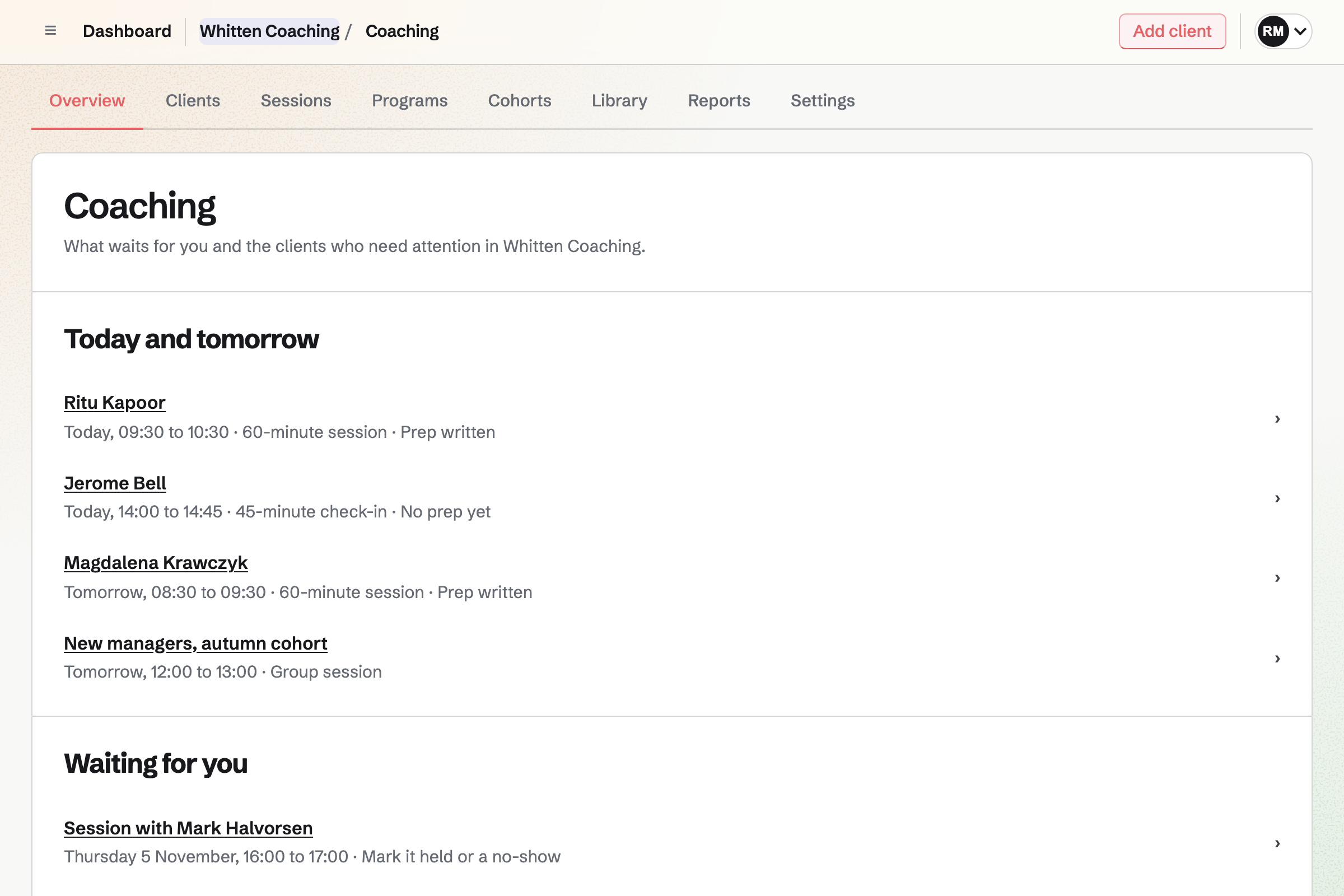
Coaching overview for a fictional coaching practice: four sessions today and tomorrow, each with whether the client wrote their prep, then a session waiting to be marked held.

How is Magpie different?

1. Coaching comes with the rest of the business

One Magpie subscription includes the areas a coaching business would otherwise buy one at a time:

  • Coaching for programs, cohorts, sessions, goals, habits and check-ins, in each client's Client Portal
  • Invoicing for invoices with tax, and Accounting for the books they go into
  • E-Signatures for agreements, and Forms for applications and intake questions
  • Meetings for a free first call anyone can book, and Courses for lessons sold at a school of your own
  • Websites, Mail, Newsletter, Contacts and the other areas, in the same team

Everything is in one account with one bill. Upcoach's pages describe no invoices, no mailboxes and no website beyond its sales pages.

2. Coaching follows each client between sessions

Each client's coaching holds the goals you agree and the habits they work on. Check-ins arrive on a schedule, and each rating or number answer is charted over time. Each session has private notes and a recap the client sees. The Coaching overview names each client who needs attention, with the reason.

3. A team pays one price, and the Free plan takes clients

A team's members share Coaching at one price, with no charge per seat. The Team plan has up to 25 people. Coaching invoices carry no Magpie fee. The Free plan coaches 3 clients at a time and takes their payments.

Comparing Magpie and Upcoach

Upcoach does more for a group learning together; Magpie does more around each client and the business. Every line in the tables below was checked against Upcoach's own pages, linked from each row, and against Magpie's code and Help.

Platform

WhatUpcoachMagpie
Programs run for each groupBuilt once, copied for the next cohort Yes Yes
Ready-made program typesA challenge, a mastermind or a group program to start from Yes No
Content released over timeEach part opens on a date or when earlier work is done Yes Yes
Lessons with videoLessons participants mark complete Yes Yes
Worksheets and assessmentsRatings, rankings, a wheel or a signature Yes Partly
Check-ins charted over timeThe same questions answered again and again Yes Yes
Group channels and a feedDiscussion, announcements, comments and mentions Yes Partly
Answers shared with the groupParticipants read and comment on each other's answers Yes No
Smaller groups inside a programPods or cohorts, each with its own calls Yes Yes
Repeating group callsA weekly series that people say they will attend Yes Partly
One-to-one session bookingClients book from your free times Yes Yes
A public page for a first callAnyone books without joining a program Partly Yes
Calendar connectionBusy times kept free, sessions added Google, Outlook Google only
Sponsors who follow progressThe employer paying for a client sees progress Yes Yes
A role for one programA facilitator runs one program and nothing else Pro and above Partly
Sales page and checkoutA buyer pays and is enrolled at once Yes Yes
Discount codes and bundlesA code off a program, or several programs in one purchase Yes No
Invoices with taxAn invoice to a client or their employer No Yes
Agreements signed onlineA signature with a record of when it was made Partly Yes
AI summaries and impact reportsOpen answers summed up, and a report for whoever paid Yes No
Claude and ChatGPTAn AI app builds and runs programs Yes Partly
Your own logo, colours and domainParticipants see your brand Pro and above Partly
Phone app for participantsAn app in the App Store and Google Play Yes No
A whole websitePages of your own, beyond the sales pages Partly Yes
Email at your domainMailboxes at the business's own domain No Paid plans
Free plan that takes clientsPaying clients before you pay 14-day trial Yes
No platform fee on paymentsOnly the card fee comes off Scale and Enterprise Yes

Good to know: Where Magpie says No or Partly, the line under the row says what Magpie does instead. Each gap has an item on Magpie's roadmap, and the line changes on the day it ships.

Programs and program types

Both build a program once and start the next group on a copy of it. Upcoach starts a program from a ready-made type, such as a twelve-week group program or a five-day challenge. They do this better than we do today.

WhatUpcoachMagpie
Build a program once, in sections and modules, and run it for each client or group Source Yes Yes
Start a group program, cohort course, mastermind, challenge or bootcamp from a ready-made structure Source Magpie: Client Portal starters are ones you build yourself. Coaching offers two ready-made programs, for a new team leader's first 12 weeks and for a career change, both for one-to-one coaching; a program you build yourself can then run for a cohort. Yes No
Publish a program and invite people by email or with a link they join from Source Yes Yes
Open each part of a program on a date, so the whole group stays on the same week Source Yes Yes
Keep a module locked until the modules before it are done Source Yes Yes
Welcome new participants with first steps: a video, an intake worksheet, an RSVP or booking a first call Source Magpie: Coaching's invitation carries your welcome message, and a program can give an intake exercise on its first day, which waits under To do now in the client's portal, and send a message that day; with an agreement, the client sees only that until they sign it. Nothing shows a new client a welcome screen of first steps to work through. Yes Partly

Good to know: A Magpie program's schedule releases exercises, resources and messages. Each opens on a day, at a stage or around a session.

Accountability activities and content

Both give lessons, check-ins and a library of activities reused across programs. Upcoach adds group task lists, scored assignments, more question formats and embeds from other services.

WhatUpcoachMagpie
Teach with lessons of video, text and files that participants mark complete Source Yes Yes
Give participants a worksheet or assessment, with ratings, rankings, a wheel or a signature Source Magpie: Coaching gives a client an exercise from the library: a wheel of areas of their life rated from 0 to 10, or one of the team's Forms, with text, choice, rating and scale questions. The answers stay with their coaching and can be compared with an earlier time. There is no ranking or signature question, and a Form that asks for a file cannot be an exercise. Yes Partly
Ask the same questions again and again, and see each person's numbers as a trend Source Yes Yes
Give a group a checklist of actions and see who has done each one Source Magpie: A Coaching program gives every client on it, and every member of a cohort, the same actions to tick off, and a cohort's Members shows how many actions each member has done, side by side. Nothing lists who has done each action. Yes Partly
Have participants hand in work for me to approve or send back, with a score Source Magpie: A Courses assignment takes text or files, and an instructor approves it or asks for changes with feedback, and sees which are late; there is no score. A Client Portal plan's steps record no review. Yes Partly
Keep my activities in one library and reuse them in every program, changed in one place Source Yes Yes
Share folders of files and links with participants, released over time, and see who opened them Source Yes Yes
Put a booking widget, a form, a whiteboard or a video from another service inside a page Source Magpie: A Client Portal shows only what Magpie holds: plans, files, meetings, projects, proposals, invoices and documents to sign. Yes No

Good to know: A Magpie resource's page lists who has it, when they opened it and whether they marked it done.

Community and messages

Upcoach is built around a group talking together: channels, a feed, shared answers and recorded messages. They do this better than we do today. Magpie gives each client a private conversation, and each cohort one conversation.

WhatUpcoachMagpie
Talk with a program's group in channels, with threads, files and mentions Source Magpie: A team admin can let clients into one Team chat channel as guests, where they post, react, reply in threads, add images and mention each other by @handle. Other files attach only in the Magpie app, which is not yet in the app stores. Yes Partly
Post announcements to a program's feed, where participants comment and react Source Magpie: A Coaching cohort's conversation can be announcements from you or open to every member, and members are emailed when someone writes; it is one list of text messages, with no comments under a post, reactions, pictures or files. A Message Board has comments and votes, but a private board is read by the team and by every guest given Message Boards, so it cannot be kept to one group of clients. Yes Partly
Let participants see each other's answers and comment on them Source Magpie: Each Coaching client's check-ins and exercises are read only by them and their coaches, even in a cohort, whose members share a conversation and group sessions. A Form's answers are seen only by the form's team. Yes No
Split a large group into smaller pods, each with its own channel, calls and content Source Yes Yes
Send a short voice, video or screen recording in a conversation Source Magpie: Screen Recorder records your screen and camera and shares the recording by link, and Walkie Talkie sends voice messages; neither posts into a Team chat conversation, and Team chat's voice notes are only in the Magpie app, which is not yet in the app stores. Yes Partly
Message a client privately, beside their coaching Source Yes Yes

Good to know: A Magpie client's conversation holds files, and Send later sends a message at a time you choose.

Events and scheduling

Both book one-to-one sessions from your free times, with packages, reminders and cancelling up to a cut-off. Upcoach repeats group calls as a series with RSVPs and connects Outlook calendars.

WhatUpcoachMagpie
Schedule a program's group calls as a weekly series that participants say they will attend Source Magpie: A Coaching cohort's group session invites every member, in Video Chat for up to 6 people, you included, or at a Zoom, Google Meet or other link, and records afterwards who attended; it does not repeat, and members do not say whether they will come. A Calendar event repeats every week and takes RSVPs up to a capacity, but it is not a group session of the cohort. Yes Partly
Remind participants before each group call Source Magpie: Courses emails each student a calendar invitation and reminders a day and an hour before each live session. A Calendar event sends no reminder, and Coaching reminds a client of their own sessions but not of a cohort's group sessions. Yes Partly
Let clients book one-to-one sessions from my free times Source Yes Yes
Let anyone book a first call from a public page, without joining anything Source Upcoach: Booking is a session package inside a program, shown to the program's members or a sub-group, so a prospect has to join a program first. Partly Yes
Give each client a set number of sessions to book, with a weekly limit, and see how many are left Source Yes Yes
Keep sessions in step with my Google or Outlook calendar, and check it for conflicts Source Magpie: Google Calendar connects both ways and its busy times are kept free. An Outlook calendar gets each meeting only as a downloaded .ics file, and its busy times are not read. Yes Partly
Let clients move or cancel a session themselves, up to a cut-off Source Yes Yes
Remind clients before each booked session Source Yes Yes
Give participants the recording of a past call to watch, and see who watched it Source Yes Yes
Mark who attended each session and ask participants to rate it Source Magpie: Coaching has you mark each one-to-one session held or a no-show, then asks the client to rate it on four questions from 0 to 10. A cohort's group session records who attended, but its members are not asked to rate it. Yes Partly
Keep private notes for each session, and be reminded to write them Source Yes Yes

Good to know: Magpie's Meetings page is public. Anyone books a first call with a name and an email address, without joining a program.

Participants, roles and team

Both keep private notes on each participant and show the program as a client sees it. Both give a sponsor a view of progress. Upcoach sets roles program by program.

WhatUpcoachMagpie
Give each client a private space that other clients cannot see Source Yes Yes
Keep private notes on each participant Source Yes Yes
See the program as a participant sees it Source Yes Yes
Add other coaches and facilitators to help run programs Source Yes Yes
Let a facilitator run one program without changing anything else Source Magpie: An admin chooses which areas each member can open, and Member access makes members Can edit or View only across the team; nothing limits a member to one client or one program. Yes Partly
Give the company paying for a client a read-only view of their progress Source Yes Yes

Good to know: A Magpie team pays one price, and its members do not pay. A team has up to 3 on Free and 25 on the Team plan.

Selling programs

Both sell a program from its own page and start the buyer's coaching once they pay. Upcoach adds a choice of prices, discount codes and bundles of programs.

WhatUpcoachMagpie
Sell a program from its own page, and enrol each buyer as soon as they pay Source Yes Yes
Let buyers choose between paying once, in instalments or every month Source Magpie: A Coaching program is paid in full, in 2 to 24 monthly instalments or monthly until coaching ends, but each program has one of these, so the buyer does not choose. Store charges once at checkout, and Supporters charges every month for a tier. Yes Partly
Give a discount code for a program at checkout Source Magpie: A Coaching program's page charges its one price, with no code to enter. Store's discount codes apply only to Store products. Yes No
Sell several programs together in one purchase Source Magpie: A Coaching program's page sells one program. Store's bundles sell several Store products at one price, but no Store product gives access to a coaching program. Yes No
See how many people visit a sales page, how many buy and where they came from Source Yes Yes
See every payment and refund in one list Source Yes Yes
Invoice a client or their employer, with tax and a PDF Source Upcoach: Its payments are offers bought at checkout through Stripe; none of its Payments and Checkout help articles sends an invoice. No Yes
Have a client sign an agreement, with a record of when they signed Source Upcoach: A worksheet can have a signature question, and its program types include accountability contracts; its pages describe no signing record. Partly Yes

Good to know: Magpie charges for coaching with Invoicing invoices, with tax and a PDF. They are paid through your team's Stripe account, with no Magpie fee.

Progress, reports and AI

Both show how far each person has got and who has gone quiet. Upcoach adds AI summaries of open answers and impact reports for whoever paid. They do this better than we do today.

WhatUpcoachMagpie
See how far each participant has got, section by section, and where people drop off Source Yes Yes
See which participants have gone quiet or fallen behind Source Yes Yes
Have AI sum up what participants wrote in their open answers Source Magpie: A Form's Summary lists each question's answers and charts choices and ratings, but nothing sums up written answers. Yes No
Share a report of what a program achieved with whoever paid for it, naming no one Source Magpie: Nothing reports on a whole program. Coaching emails a sponsor a monthly count of sessions held and goals and reviews shared for one client, never what they say. Yes No
Have Claude or ChatGPT build a program, run it and report on progress Source Magpie: Connected apps let Claude, ChatGPT or Cursor read and change many areas through MCP, 2 apps on Free and 10 on Pro, but they can only count Client Portals and coaching clients, not read or change them. Yes Partly

Good to know: Magpie's Coaching overview names each client who needs attention, with the reason. A Monday summary email names them too.

Brand, apps and account

Upcoach has a phone app, and its own logo, colours and domain from Pro. Magpie adds a whole website and email at your domain.

WhatUpcoachMagpie
Show participants my own name, logo and colours Source Magpie: A Client Portal shows its own name, logo and one of eight accent colours, on its sign-in page too, inside Magpie's bar and footer. Yes Partly
Run my programs at my own domain Source Magpie: A Client Portal is at a Magpie address. Websites and Store can use your own domain, but a Client Portal cannot. Yes No
Keep hours of program video, with storage to match Source Yes Yes
Let participants take part from an app on their phone Source Magpie: The Magpie app for iPhone, iPad and Android, with Client Portal in it, is built but not yet in the App Store or Google Play; clients use the website. Yes No
Publish the app under my own name in the app stores Source Upcoach: A branded app in the App Store and Google Play is priced on request on Scale and included on Enterprise.Magpie: Clients use Magpie's own app or the website. Partly No
Connect it to my other apps through Zapier or an API Source Upcoach: Its help centre describes only the MCP connection for AI apps; no current page of its own describes Zapier or an API.Magpie: The version 1 API, on Pro, reaches bookings, Contacts, invoices, Coaching, Client Portal and the other areas the Magpie app uses. Signed webhooks report bookings, Meeting types, proposals, Courses enrolments and Forms responses. Magpie has no Zapier app. Not stated Partly
Build my whole coaching website, not only sales pages Source Upcoach: Its landing page builder makes a checkout page for each offer; its pages describe no website builder. Partly Yes
Have email at my own domain Source Upcoach: Its custom domain serves program pages only; its pages offer no mailboxes. No Yes

Good to know: A Magpie team has 5 GB of storage while it is free and 1 TB on the Team plan. Every area that stores files shares it.

Price comparison

How Upcoach charges

Upcoach charges by plan: Starter, Pro, Business and Scale, with Enterprise on request, billed monthly or yearly after a 14-day free trial. There is no free plan. The plan sets the active participants, team seats and storage, from 25 participants and 1 seat on Starter. It also sets the fee on sales: 4% on Starter, 2% on Pro, 1% on Business and none on Scale. Branding, your own domain and program roles start on Pro. Prices are on Upcoach's pricing page.

How Magpie charges

Magpie charges by plan, Free or a paid plan, for everything in the account. That covers Coaching, invoicing, booking pages, a website and the rest. The plan sets how many clients, websites and team members you have, not which areas you can use. Coaching invoices carry no Magpie fee. Magpie takes 4% of Store sales. Prices are on Magpie's pricing page.

On top of the planUpcoachMagpie
Taking paying clients without a planA 14-day free trial3 clients at a time on Free
Fee on program sales4% on Starter, 2% on Pro, 1% on Business, none on ScaleNone on coaching invoices
Card feesStripe's, charged separatelyStripe's, through your own Stripe account
Participants25 on Starter, 100 on Pro, 250 on Business, 500 on ScaleNo limit on Pro and the Team plan
Another coachA seat: 1 on Starter to 10 on Scale, more on Business and ScaleA member of your team; 25 on the Team plan
Storage100 GB on Starter to 1 TB on Scale5 GB for a free team, 1 TB on the Team plan
Your own domainPro and aboveIncluded for a website; program pages stay at Magpie's address
Invoicing, a website and emailNot offeredIncluded; email at your domain on a paid plan

When to choose Magpie or Upcoach

  • Want goals, habits and check-ins beside invoices, books, a website and email, and a Free plan that takes clients? Go with Magpie.
  • Want a group program with channels, shared answers, ready-made program types and a phone app? Upcoach is the right choice.

Recommendations by kind of business

For a coach running cohorts, challenges or masterminds
Upcoach. Channels, a feed and shared answers let the group learn from each other. A ready-made program type builds a cohort's sections, live sessions and channels in one step.
For a company running coaching for its staff
Upcoach. Impact reports and AI summaries of open answers report to whoever paid, naming no one. Roles keep each facilitator to one program, and a branded app is on request on Scale.
For a one-to-one coach whose practice is a business
Magpie. Each client's coaching holds their goals, habits and check-ins. Invoices with tax go into the books in Accounting. The website and email at your domain are in the same team.
For an executive coach paid by employers
Magpie. A sponsor follows the coaching from its own portal and pays the invoices. Agreements are signed in E-Signatures, with a record of each signature.
For a coach selling a course beside coaching
Either. Upcoach puts lessons inside each program. Magpie sells them in Courses, at a school of your own, beside Coaching. Choose by whether the group or the rest of the business matters more.

Frequently asked questions

What is the difference between Upcoach and Magpie?

Upcoach is a platform for group and one-to-one coaching programs, with lessons, worksheets, channels and live calls. Magpie is one subscription for a small business's software. Its Coaching is one area beside Invoicing, Accounting, booking pages, a website and email. Upcoach does more for a group learning together; Magpie does more around each client and the business.

Does Magpie replace Upcoach?

Yes, for a coach whose programs are mostly one-to-one or small cohorts. Magpie runs programs on a schedule, books sessions, has the agreement signed and invoices each payment.

Consider keeping Upcoach if your groups talk in channels and a feed, or read each other's answers. Keep it if you start programs from ready-made types or need a phone app. Keep it too for AI summaries and impact reports. Upcoach does each of these better than Magpie does today.

How much does Upcoach cost?

Upcoach has Starter, Pro, Business and Scale plans, and Enterprise on request, billed monthly or yearly. There is a 14-day free trial and no free plan. The fee on sales is 4% on Starter, 2% on Pro, 1% on Business and none on Scale. The prices are on Upcoach's pricing page.

How much does Magpie cost?

Magpie has a Free plan and paid plans, each covering every area. Free coaches 3 clients at a time; Pro and the Team plan have no limit. The Team plan is one price for up to 25 people. Coaching invoices carry no Magpie fee. The prices are on Magpie's pricing page.

Does Magpie have ready-made program types?

No. Coaching has two starter programs, for a new team leader and for a career change, both one-to-one. A program you build yourself can then run for a cohort. More starters are on Magpie's roadmap. Upcoach builds a group program, a challenge or a bootcamp from a ready-made type on every plan.

Does Magpie have group channels or a community feed?

Partly. A Coaching cohort has one conversation, open to every member or kept to your announcements. It has no comments under a post, reactions or files. A team admin can also let clients into one Team chat channel as guests, with threads and mentions. Upcoach gives a program several channels and a feed, with threads, mentions and files.

Can participants see each other's answers in Magpie?

No. Each client's check-ins and exercises are read only by them and their coaches, even in a cohort. Shared answers are on Magpie's roadmap. Upcoach can open a worksheet or check-in to the group, who then comment and react.

Does Magpie repeat group calls?

No. A cohort's group session invites every member and records who attended. Each one is scheduled on its own, and members do not say whether they will come. A Calendar event repeats every week and takes RSVPs, but it is not a group session. Repeating group sessions are on Magpie's roadmap. Upcoach repeats an event daily, weekly or monthly, and participants answer Attending or Not attending.

Does Magpie have discount codes or bundles for programs?

No. A Coaching program's page charges its one price, and sells one program. Store's discount codes and bundles apply only to Store products. Both are on Magpie's roadmap. Upcoach's coupons take a percentage or an amount off, and one offer can unlock several programs.

Does Magpie use AI to summarise answers?

No. A Form's Summary lists each question's answers and charts choices and ratings, but nothing sums up written answers. Upcoach's AI Insights summarise open answers question by question. Its impact reports sum up a whole program.

Does Magpie have a phone app for clients?

No. Clients use Coaching in a phone's browser. The Magpie app is built but not yet in the App Store or Google Play. Upcoach has apps for iPhone and Android, and a branded app on request on Scale.

Can I run my programs at my own domain?

Not in Magpie. A Client Portal and a program's page are at a Magpie address. A website made in Websites can use your own domain and link to them. Upcoach connects a subdomain such as coaching.example.com on Pro and above.

Does Upcoach make invoices?

No. Upcoach's payments are offers bought at checkout through Stripe. None of its payment help articles sends an invoice. Magpie's coaching charges are Invoicing invoices with tax and a PDF. They are emailed to a client or their employer and shared in the client's portal.

Can anyone book a free first call?

In Magpie, yes. A Meetings page is public, and a visitor books with a name and an email address. In Upcoach, booking is a session package inside a program, so a prospect joins a program first.

Can an employer follow a client's coaching?

Yes, in both. A Magpie sponsor follows the coaching from its own Client Portal. It sees the dates and sessions held, and the goals and reviews the client shares. Upcoach's Reporting Sponsor reads a program's reports, and a Program Sponsor also reads participants' answers.

Can Claude or ChatGPT run my coaching?

In Upcoach, yes: an AI app connected through MCP builds programs, posts messages and writes progress summaries. In Magpie, connected apps reach many areas. They can only count coaching clients, not read or change them. Reaching Client Portal from connected apps is on Magpie's roadmap.

Can other coaches work with me?

Yes, in both. A Magpie team's members share Coaching at one price, with no charge per seat. Upcoach gives each plan a number of seats, from 1 on Starter to 10 on Scale. It also sets roles program by program; Magpie sets which areas each member opens.

Can I use Upcoach and Magpie together?

Yes. Upcoach can run your group programs. Magpie can run your invoices, books, website and email. A Magpie website can link to your Upcoach sales pages. Invoicing can bill an employer for a program.

How do I move from Upcoach to Magpie?

Make a program in Coaching for each Upcoach program, with its schedule, sessions and price. Add each client with Add client, on a program or in a cohort. Starting their coaching sends them an invitation to their portal. Keep your Upcoach plan until your current groups finish.

What is included in Magpie's Free plan?

Coaching for 3 clients at a time, with their payments. Booking pages, Invoicing, Accounting, a website, Courses, the Newsletter with 250 subscribers, Store and a team of 3. A paid plan raises the limits and adds Mail.
If a line on this page is wrong, tell us and we will correct it.

Upcoach changes, and so does Magpie. If a line is out of date about either product, email support@magpie.diy with the page that shows it. We check the line against that page, change it, and give it the new date. That goes for Upcoach's own team as much as for anyone who uses it.

Coach your first clients on Magpie's Free plan.

Create a Magpie account, then add a client in Coaching.

Create account