Riverside compared with Magpie

Riverside vs Magpie: an in-depth comparison

Riverside and Magpie both record a podcast with guests in other places, each person on their own track. Riverside is built around the recording and its video; Magpie puts an audio podcast beside the rest of the business.

  1. Riverside is a recording studio in the browser, with an editor, AI tools, podcast hosting, live streaming and webinars. It is built for podcasters and video creators who record with guests. Each episode then becomes clips, posts and video.
  2. Magpie is one subscription for a small business's software, and Podcast is one part of it. Beside the podcast it includes Screen Recorder, the Newsletter, Social Media, a website, booking pages, invoicing and more. It is built for someone whose podcast is one part of running the business.
Create account
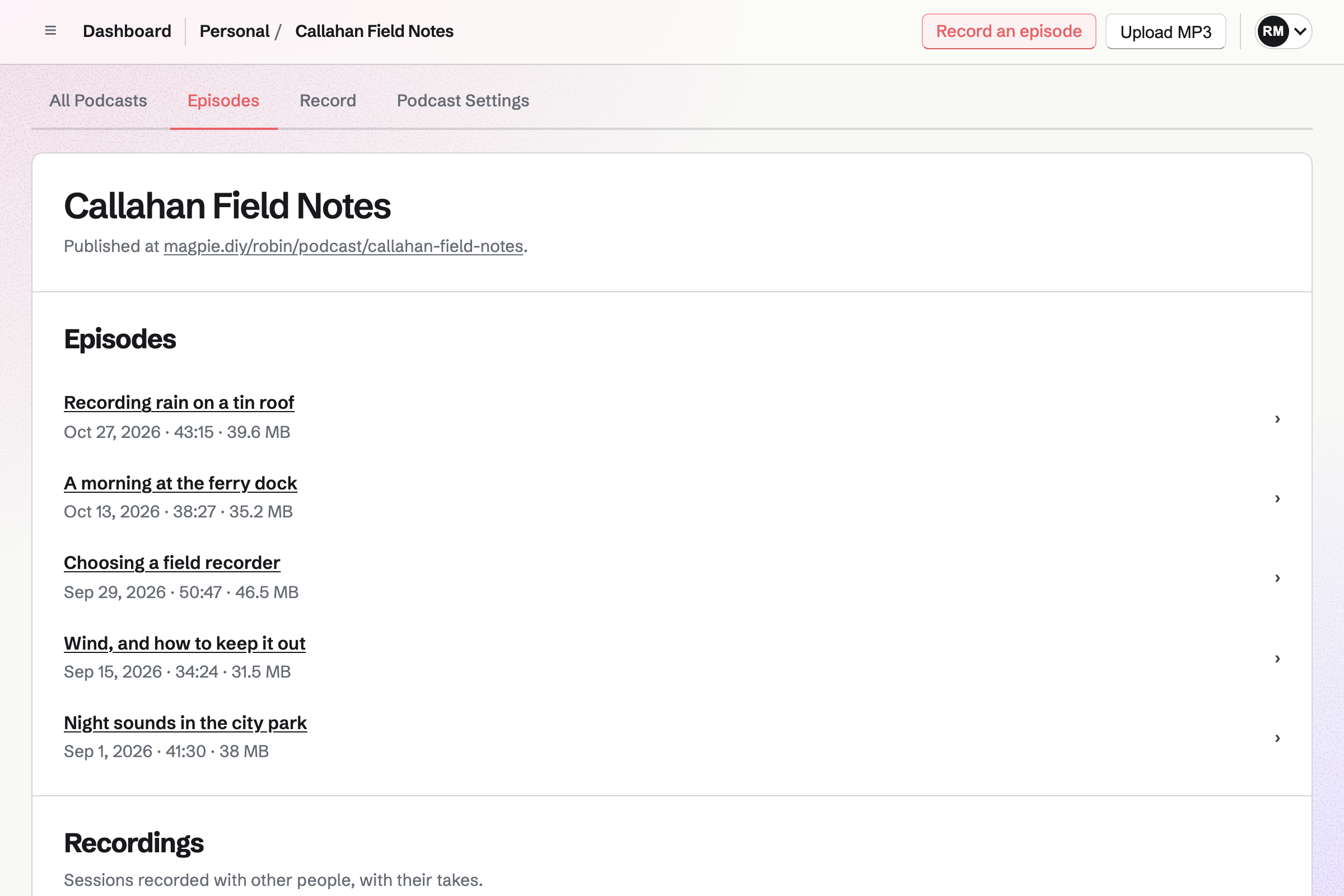
The podcast page for Callahan Field Notes: Record an episode and Upload MP3, the address the show is published at, and five published episodes, each with its date, length and file size.

How is Magpie different?

1. The podcast comes with the rest of the business

One Magpie subscription includes the areas a small business would otherwise buy one at a time:

  • Podcast, the area this page is about, for recording, editing and hosting with an RSS feed
  • Screen Recorder for videos of your screen, with a teleprompter
  • Newsletter for email to subscribers, and Social Media for posts about each episode
  • Websites, Supporters and Courses for the rest of what you publish
  • Meetings, Appointments, Invoicing, Store, Mail and the other areas, in the same team

Everything is in one account with one bill. Riverside covers recording, editing, hosting and promoting the show, and leaves the rest of the business to other software.

2. Recording and hosting are on the Free plan

Recording with guests and recording alone are on every plan, with no monthly hours. A take runs up to 6 hours. Each person's WAV track downloads after the take. The Free plan hosts 1 podcast with up to 10 episodes, with its public page and RSS feed.

3. The whole team works on the podcast

A podcast belongs to Personal or a team. Everyone who can edit in the team works on its episodes and drafts, with no seat to add. The Team plan is one price for up to 25 people. A podcast can move to another team, and its feed address stays the same.

Comparing Magpie and Riverside

Riverside does more with the recording itself, above all with video and AI; Magpie does more around the podcast. Every line in the tables below was checked against Riverside's own pages, linked from each row, and against Magpie's code and Help.

Platform

WhatRiversideMagpie
Remote recording with guestsGuests join from a link and record together Yes Yes
A track for each personEach voice recorded on its own device and downloaded apart Yes Yes
Video podcastsEach person's camera recorded on its own track Yes No
Screen sharing while recordingA shared screen kept as its own track Yes No
Recording on a phoneRecord or join a session from a phone Yes In the browser
Desktop appRecord in an app instead of a browser Mac app No
EditorCut, trim and arrange the episode Yes Partly
Edit by transcriptDelete words to cut them from the recording Yes No
Transcripts and captionsWritten automatically from what was said Yes No
AI clips and show notesShort clips and episode notes made from the recording Yes No
Podcast hosting and RSS feedThe show hosted and sent to Apple Podcasts and Spotify Pro and above Yes
Hosting on a free planA published show without paying No Yes
Video episodesVideo in the feed and on YouTube Yes No
Listener statsHow many people listen to each episode Yes Yes
A web page for the showEpisodes to play on a public page Yes Yes
NewsletterEmail to a list of subscribers Grow and above Yes
Social media postsSchedule posts about each episode Grow and above Partly
Live streamingStream the recording to YouTube and other platforms Grow and above No
WebinarsRegistration pages, reminders, Q and A and polls Webinar and Business No
APIConnect your own software Business Paid plans
Single sign-onSign in through the company's identity provider Business No
Booking, invoicing and a websiteThe rest of the business in the same account No Yes

Good to know: Where Magpie says No or Partly, the line under the row says what Magpie does instead. Each gap has an item on Magpie's roadmap, and the line changes on the day it ships.

Recording

Both record each person on their own device and upload while you talk. A weak connection does not spoil the audio. Riverside also records each camera in up to 4K, shares screens and records people in the same room. They do it better than we do today.

WhatRiversideMagpie
Invite guests in other places to record with you from a link, with nothing to install Source Yes Yes
Record each person on their own device so a weak connection does not spoil the audio Source Yes Yes
Download each person's track separately to edit elsewhere Source Yes Yes
Record a video podcast, with each person's camera on its own track Source Magpie: A recording session records each person's microphone only. Screen Recorder records your own screen and camera, alone, outside a session. Yes No
Record an episode on your own Source Yes Yes
Record conversations with guests without paying Source Riverside: Free includes 2 hours of multitrack recording, once, at up to 720p and with a Riverside watermark. Recording on one track is unlimited. Partly Yes
Record or join a recording from a phone Source Yes Yes
Schedule a recording ahead and have guests sent the invitation by email Source Magpie: A recording session is made when it is needed, and the host copies its invite link and sends it themselves. The link works for later takes until it is replaced, for 14 days after the session is made. Yes No
Keep guests in a waiting room until you let them in Source Magpie: Anyone signed in who opens the invite link joins at once, until the session is full. The owner can remove someone and replace the link. Yes No
Read your questions or a script on screen while recording Source Magpie: Screen Recorder has a teleprompter for recording alone. The Podcast recording room has no script or teleprompter. Yes Partly
Have a producer run the recording without being recorded Source Magpie: The owner can make a guest a co-host, who starts, pauses and stops takes, and pass host to them. Everyone in a session joins with a microphone and is recorded. Yes Partly
Share your screen during a recording, kept as its own track Source Magpie: A recording session has no screen sharing. Screen Recorder records one person's screen outside a session. Yes No
Mark moments while recording, to find them when editing Source Magpie: Markers are not available in the recording room at the moment. Takes recorded while they were keep their markers in review. Yes No
Play intros, music or video clips into the recording Source Magpie: The Soundboard is not available in the recording room at the moment. Takes recorded while it was keep its sounds as a separate track in review. Yes No
Let a guest record their answers on their own time from a link Source Magpie: Guests record only in a live session with the host. Yes No
Record guests in the same room, each on their own microphone or camera Source Magpie: Each person records from their own browser, on a computer or a phone, one person to a device. Yes No

Good to know: Each Magpie take shows whose audio is arriving while it records. Audio a browser saved during a dropped connection uploads when the connection returns.

Editing

Both cut and trim the episode on a timeline and change one speaker's volume. Riverside also edits by transcript, removes filler words and cleans up noise and echo.

WhatRiversideMagpie
Cut, trim and split the recording on a timeline Source Magpie: The episode's timeline cuts out a selected stretch, silences or bleeps it, and trims a clip's ends; Undo takes any edit back, and nothing changes the recordings. The website cannot split a clip: Split here is in the Magpie app, which is not yet in the App Store or Google Play. Yes Partly
Edit the episode by editing its transcript Source Magpie: Episodes are edited on the waveform timeline only; Podcast makes no transcript. Yes No
Have filler words and long pauses taken out for you Source Magpie: Every cut is selected and made by hand on the timeline. Yes No
Clean up the sound: background noise, echo and uneven voices Source Magpie: While recording, the browser's own echo cancellation and noise suppression are on unless the person turns them off. Afterwards, the combined recording raises or lowers each person's track to match the others, sets it to the usual podcast loudness and limits the loudest moments; nothing removes noise or echo from a finished recording. Yes Partly
Change one speaker's volume Source Yes Yes
Edit audio or video recorded somewhere else Source Magpie: Upload MP3 publishes an MP3 made elsewhere, up to 500 MB, as it is. On the website the timeline edits only audio recorded in Magpie; only the REST API can save an audio file into a draft as a take. Yes Partly
Edit an episode on a phone Source Yes Yes
Work on episodes with the rest of your team Source Riverside: Pro, Grow and Webinar add an editor seat as a paid add-on. Editing together, comments and custom roles are on Business. Partly Yes
Share a draft for others to watch or listen to and comment on Source Magpie: Team members who can edit open the draft episode. There are no comments on it and no review link for anyone else. Yes No

Good to know: Magpie's edits never change the recordings: Undo takes any edit back, and a cut can be put back. Silence or Bleep covers a name that should not be heard.

AI tools

Riverside transcribes every recording and makes clips, captions, show notes and translations from it. Magpie writes nothing from a recording today.

WhatRiversideMagpie
Get a transcript of every recording Source Magpie: Podcast makes no transcript. Walkie Talkie transcribes its voice messages, and a Screen Recorder share page shows a Document you write as its transcript. Yes No
Turn the best moments of an episode into short clips for social media Source Magpie: Episode video turns a whole published episode into one landscape video over the podcast artwork. Nothing cuts a short clip from it. Yes No
Show captions on videos and download them as subtitles Source Magpie: An episode video has the audio, the artwork and the images you place; it has no captions. Yes No
Have the title, description, chapters and show notes written from the recording Source Magpie: An episode's title and description are typed by hand, and the feed has no chapters. Yes No
Translate an episode into other languages, in your own voice Source Magpie: Magpie does not translate or dub episodes. Yes No
Fix a word you said by typing the correction Source Magpie: A wrong word can be cut out, silenced or bleeped, not replaced. Yes No
Ask AI to edit the episode, cut its clips and write its posts Source Magpie: The assistant, and apps connected to Magpie, find podcasts and episodes by title, description and status. They cannot edit, clip or publish an episode. Yes Partly
Make a video of an AI likeness of yourself reading a script Source Magpie: Magpie makes no AI likeness of a person. Yes No

Good to know: The assistant, and apps connected to Magpie, find podcasts and episodes by title, description and status.

Hosting and publishing

Both host the show with an RSS feed that you submit to Apple Podcasts and Spotify once. Both count listeners for each episode. Riverside adds video episodes, scheduling, listeners' countries and apps, an embed player and import from another host.

WhatRiversideMagpie
Host the podcast and its RSS feed Source Yes Yes
List the show in Apple Podcasts and Spotify Source Yes Yes
Host a podcast without paying Source Riverside: Hosting starts on Pro, which hosts one show; the Free plan has no hosting. No Yes
Run more than one show Source Yes Yes
Publish video episodes to Apple Podcasts, Spotify and YouTube Source Magpie: Episodes are MP3 audio, and the feed carries only audio. An episode video downloads as an MP4 to upload elsewhere yourself. Yes No
Put your logo, pictures, text and music on the episode video Source Magpie: Episode video places images over the artwork at the times you set, and an image can change how strongly it shows while one person talks. It adds no text, titles or music, and does not apply the logo and colours kept in a design system's Brand section. Yes Partly
Schedule an episode to come out at a time you choose Source Magpie: Publish episode adds the episode to the feed at once; there is no time to choose. Yes No
See how many people listen to each episode Source Yes Yes
Move an existing podcast over from another host Source Magpie: A podcast starts empty. Each old episode would be uploaded as an MP3 by hand and dated the day it was uploaded. Yes No
Put an episode's player on your own website Source Magpie: Episodes play on the podcast's public page. There is no player to put on another site. Yes No
Publish a private podcast that only chosen listeners can hear Source Magpie: A podcast is either on, with a public page and feed, or off and not published. Yes No

Good to know: A Magpie podcast's feed address stays the same through renames and moves between teams. Podcast Settings lists what Apple Podcasts and Spotify need, marks each as done, and gives the steps for each app.

Website, newsletter and social

Both give the show a public page, a newsletter and posts about each episode. Riverside drafts the newsletter and the posts from the recording and posts to more networks.

WhatRiversideMagpie
Give the show a web page where people can listen Source Yes Yes
Send your audience a newsletter Source Yes Yes
Schedule posts about each episode to social media Source Magpie: Share episode starts a Social Media post with the episode's name and address, scheduled or posted at once. Magpie publishes to Bluesky, Mastodon and LinkedIn; X and Instagram are posted by hand, and no video is posted. Yes Partly

Good to know: Share episode starts a Social Media post with the episode's name and address. Magpie publishes to Bluesky, Mastodon and LinkedIn.

Live streaming and webinars

Riverside streams a session live to several platforms and hosts webinars people register for. Magpie has neither open to members today.

WhatRiversideMagpie
Stream the recording live to YouTube and other platforms Source Magpie: Recording sessions are not streamed, and no one can watch or listen live. Yes No
Host a webinar people register for Source Magpie: Webinars is built but not open to members yet. Yes No

Good to know: A Magpie recording session has a live conversation from the moment people join, before the take starts. Nobody outside the session hears it.

Apps and Business

Riverside's Business plan adds an API, single sign-on and SOC 2 Type II compliance. Riverside also has a Mac app. Magpie has an API on its paid plans and runs in the browser.

WhatRiversideMagpie
Record in a desktop app instead of a browser Source Magpie: Magpie runs in a browser, on a computer or a phone; there is no desktop app. The Magpie app for iPhone, iPad and Android is not yet in the App Store or Google Play. Yes No
Connect your own software to the podcast Source Yes Yes
Sign in through the company's identity provider Source Magpie: People sign in with an email address and a password, an emailed link or code, a passkey, or Apple, Google, LinkedIn or GitHub. There is no company single sign-on. Yes No
See an independent security audit before trusting it with recordings Source Magpie: Magpie has no independent security audit. Yes No

Good to know: Magpie's REST API lists and starts podcasts, manages drafts and recordings, and publishes episodes. It needs an API key, on a paid plan.

Price comparison

How Riverside charges

Riverside charges by plan: Free, Pro, Grow, Webinar and Business. Free records 2 hours of multitrack recording, once, at 720p with a watermark, and has no hosting. Pro adds 4K, hosting for one show and audio enhancement. Grow adds video hosting, the newsletter, social scheduling and live streaming. Business adds team editing, single sign-on and the API. Prices are on Riverside's pricing page.

How Magpie charges

Magpie charges by plan, Free or a paid plan, for everything in the account. Podcast follows the plan of Personal or the team that owns the podcast. Free has 1 podcast with 10 episodes in 5 GB; Pro has 5 podcasts in 100 GB. Recording is on every plan, with no monthly hours. Prices are on Magpie's pricing page.

On top of the planRiversideMagpie
Recording with guests without paying2 hours of multitrack recording, once, at 720p with a watermarkEvery plan, with no monthly hours
Separate track downloads15 hours a month on Pro, 20 on Grow, 25 on Webinar, no limit on BusinessEvery take, on every plan
Video recording720p on Free; up to 4K on paid plansNot available; audio only
Podcast hosting1 show on Pro, 2 on Grow, 3 on Webinar; none on Free1 podcast on Free, 5 on Pro
People who edit episodesEditor seats are a paid add-on on Pro, Grow and WebinarEveryone who can edit in the team, up to 25 on the Team plan
Newsletter and social postsGrow and aboveNewsletter and Social Media included: 250 subscribers on Free, 5,000 on a paid plan
Live streamingGrow and aboveNot available
WebinarsWebinar plan, up to 100 registrants; Business up to 10,000Not available
AI translationUses AI creditsNot available
API and single sign-onBusinessAPI on a paid plan; no single sign-on
Booking pages, invoicing and a websiteNot offeredIncluded

When to choose Magpie or Riverside

  • Want to record and host an audio podcast on the Free plan, with the whole team working on it and the rest of the business in one subscription? Go with Magpie.
  • Want a video podcast in up to 4K, edited by its transcript, with AI clips, show notes and live streaming? Riverside is the right choice.

Recommendations by kind of business

For a video podcast
Riverside. Riverside records every camera on its own track and publishes video to YouTube, Spotify and Apple Podcasts. Magpie records audio only.
For a creator who posts clips every week
Riverside. Magic Clips cuts captioned clips from each episode, and the content planner schedules posts to six networks. Magpie makes no clips and posts no video.
For a larger company's podcast
Riverside. Business has single sign-on, a producer who is not recorded and private podcasts. Riverside states SOC 2 Type II and ISO 27001 compliance for it. Magpie has none of these.
For a coach, a consultant or a small business with a show
Magpie. The podcast is in the same team as the booking pages, invoices, newsletter and website. Guests record from a link, and the show is hosted with its feed on every plan.
For a small team that makes an audio show together
Magpie. Everyone who can edit in the team works on the episodes, with no editor seats to buy. Each person's WAV track downloads after every take.
For a solo show
Either. Both record alone and cut the episode on a timeline. Riverside edits by transcript and removes filler words; Magpie hosts the show on its Free plan. Choose by whether the AI editing or free hosting matters more.

Frequently asked questions

What is the difference between Riverside and Magpie?

Riverside is a recording studio in the browser, with video, AI editing, hosting, live streaming and webinars. Magpie is one subscription for a small business's software. Its Podcast records, edits and hosts an audio show beside the Newsletter, Social Media, a website and the rest. Riverside does more with the recording; Magpie does more around it.

Does Magpie replace Riverside?

Yes, for an audio podcast recorded with a few guests and hosted with its own feed. Magpie records each person on their own track and cuts the episode on a timeline. Its feed reaches Apple Podcasts and Spotify.

Consider keeping Riverside if you record video, edit by transcript or want AI clips and show notes. Keep it too if you stream live, or want to see which countries and apps your listeners use. Riverside does each of these better than Magpie does today.

How much does Riverside cost?

Riverside has five plans: Free, Pro, Grow, Webinar and Business. Free records 2 hours of multitrack recording, once, at 720p with a watermark, and has no hosting. Hosting starts on Pro, and the newsletter, social scheduling and live streaming on Grow. Separate track downloads are capped each month below Business. The prices are on Riverside's pricing page.

How much does Magpie cost?

Magpie has a Free plan and paid plans, each covering every area. Podcast's Free plan has 1 podcast with 10 episodes in 5 GB. Pro has 5 podcasts, with as many episodes as 100 GB holds. Recording is on every plan, with no monthly hours. The prices are on Magpie's pricing page.

Can Magpie record a video podcast?

No. A Magpie recording session records each person's microphone only. Screen Recorder records your own screen and camera, alone, outside a session. Video recording is on Magpie's roadmap. Riverside records every camera on its own track, in up to 4K on paid plans.

Does Magpie make transcripts of a podcast?

No. Podcast makes no transcript and the episode video has no captions. Transcripts are on Magpie's roadmap. Riverside transcribes recordings in over 100 languages, labelled by speaker, and downloads them as TXT or SRT.

Can I edit an episode by its transcript in Magpie?

No. Episodes are edited on the waveform timeline, and every cut is chosen by hand. Magpie does not remove filler words for you. Riverside cuts the words you delete from the transcript, and its AI removes filler words and silences.

Does Magpie make clips for social media?

No. Episode video turns a whole published episode into one landscape video over the podcast artwork, with images you place. Nothing cuts a short clip from it. Riverside's Magic Clips makes captioned clips in vertical, square or wide shapes, on every plan.

Does Magpie write show notes or chapters?

No. An episode's title and description are typed by hand, and the feed has no chapters. Riverside's AI Show Notes writes titles, a description, chapters and key points from the transcript, on Pro and above.

Do guests need an account to record in Magpie?

Yes. A guest opens the invite link and signs in to Magpie. An email address with no account gets a free one. Nothing is installed, on a computer or a phone. Riverside's guests join from a link with no account.

How many people can record together in Magpie?

A Magpie recording session holds 6 people by default, the host included. Each person records from their own browser. Riverside records up to 10 people together, the host and 9 guests.

Can I download each person's track from Magpie?

Yes. After a take, each person's WAV and an aligned WAV download from the review page. Every aligned track also downloads as one ZIP. There is no monthly limit. Riverside caps separate track downloads each month on Pro, Grow and Webinar.

Does Magpie record uncompressed WAV audio?

Not in a browser. A browser records compressed audio, as browsers do, and Magpie records it on each person's device. Riverside records uncompressed 48kHz WAV where the equipment allows. The Magpie app records WAV on iPhone and iPad. It is not yet in the App Store or Google Play.

Can I record a podcast on my phone with Magpie?

Yes, in the phone's browser. Podcast records solo, and joins or hosts a session from the same invite link. Keep the page open and the screen unlocked while recording. Riverside has iPhone, iPad and Android apps that record in up to 4K.

Does Magpie host podcasts on the Free plan?

Yes. The Free plan hosts 1 podcast with up to 10 episodes, with its public page and RSS feed. You submit the feed to Apple Podcasts or Spotify once, and new episodes reach them. Riverside's hosting starts on Pro.

Can I see how many people listen in Magpie?

Yes. Each podcast's Downloads tab counts the listeners who get its episodes through the feed, each once a day. It shows the last 30 days, all time, and each episode. It does not show countries or apps. Riverside shows streams per episode, the top countries and the listening apps.

Can I schedule an episode in Magpie?

No. Publish episode adds the episode to the feed at once. Scheduling is on Magpie's roadmap. Riverside schedules an episode to the feed at the time you choose, on Pro and above.

Can I live stream from Magpie?

No. A Magpie recording session is not streamed, and nobody outside it can listen live. Magpie has no webinars open to members today. Riverside streams to several platforms at once from Grow, and hosts webinars on its Webinar plan.

Does Riverside have invoicing or booking pages?

No. Riverside covers recording, editing, hosting and promoting a show. Magpie includes Meetings, Appointments and Invoicing in every plan, in the same team as Podcast.

Can I use Riverside and Magpie together?

Yes. An episode made in Riverside or any other editor publishes in Magpie with Upload MP3. The file can be up to 500 MB. Magpie then hosts it with the podcast's page and feed. You can keep Riverside for recording and use Magpie for the rest of the business.

How do I move my podcast from Riverside to Magpie?

Start a podcast in Magpie, then upload each episode as an MP3. Magpie does not import a show from its feed, so each episode is dated the day it was uploaded. Submit the new feed address to Apple Podcasts and Spotify. Importing a show is on Magpie's roadmap; Riverside imports one by its feed and redirects the old feed.

What is included in Magpie's Free plan?

Podcast with 1 podcast of up to 10 episodes, recording with guests and solo, and 5 GB of storage. Booking pages, Invoicing, Store, a website, the Newsletter with 250 subscribers and a team of 3. A paid plan adds more podcasts, more storage and the API.
If a line on this page is wrong, tell us and we will correct it.

Riverside changes, and so does Magpie. If a line is out of date about either product, email support@magpie.diy with the page that shows it. We check the line against that page, change it, and give it the new date. That goes for Riverside's own team as much as for anyone who uses it.

Record and host a podcast on Magpie's Free plan.

Create a Magpie account, then start a podcast in Podcast.

Create account