GitHub compared with Magpie

GitHub vs Magpie: an in-depth comparison

GitHub and Magpie both host Git repositories, track issues and publish a website on each push. GitHub is built around the code. Magpie is built around the business the code is written for.

  1. GitHub is a platform for writing, reviewing, testing and shipping code, with issues and Pages beside it. It is built for software teams and open-source projects. They review each change in a pull request and run checks on every push.
  2. Magpie is one subscription for a small business's software. Git Repositories and Issues are two of its areas. Beside them it includes websites, Time Tracking, Invoicing, a Client Portal, Team chat and the rest. It is built for a small team whose code is one part of running the business.
Create account
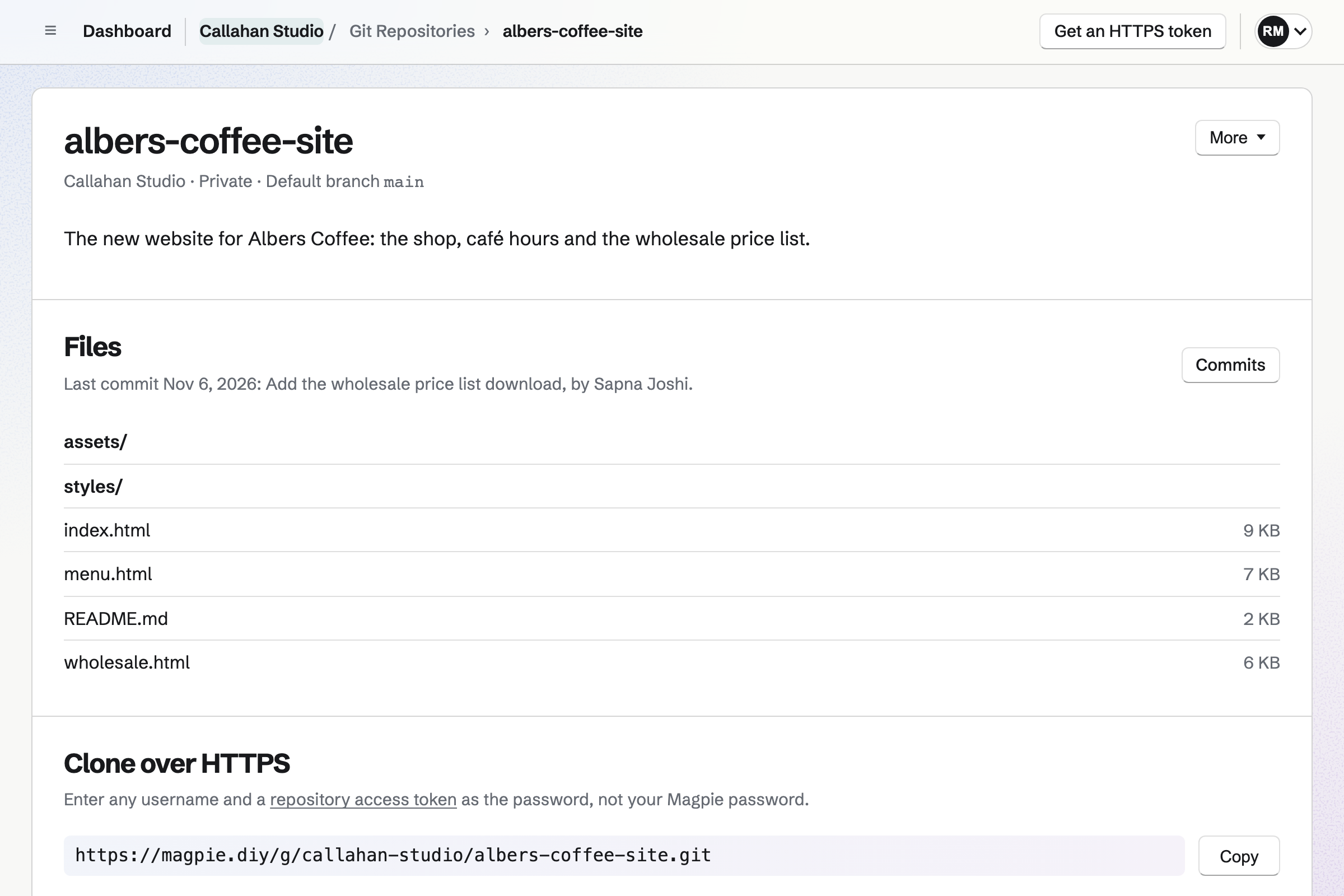
Callahan Studio’s private albers-coffee-site repository, with its folders and files, the last commit and its HTTPS clone address.

How is Magpie different?

1. The code comes with the rest of the business

One Magpie subscription includes the areas a small business would otherwise buy one at a time:

  • Git Repositories for private and public repositories, cloned and pushed over HTTPS or SSH
  • Issues, with a board, projects, milestones, cycles, triage and automation rules
  • Websites, with an editor website or a files website built from a repository on each push
  • Time Tracking, Invoicing and a Client Portal for the client the work is for
  • Team chat, Documents, Mail, Meetings, Store and the other areas, in the same team

Everything is in one account with one bill. GitHub covers code, review, builds, security and planning. Invoices, bookings and email are left to other software.

2. Bug reports, time and client updates are in one tracker

A public issue form takes a bug report from anyone, with no account. Each report waits in Triage. Start timer on an issue records the time spent, and that time can go on an invoice. A Client Portal shows a client each shared project's status and target date. It does not show the issues or comments.

3. A website builds from a private repository on the Free plan

A files website takes its files from a repository in the team. Each push makes the site again, and a failed build keeps the live site. The repository can stay private. Magpie's Free plan includes 1 website. It is published at a Magpie address or at your own domain.

Comparing Magpie and GitHub

GitHub does more with the code itself; Magpie does more around it. Every line in the tables below was checked against GitHub's own pages, linked from each row, and against Magpie's code and Help.

Platform

WhatGitHubMagpie
Git hostingPrivate and public repositories, cloned and pushed with Git Yes Yes
Code on the websiteFiles, history, branches and each commit's changed lines Yes Default branch, no line changes
Pull requests and code reviewPropose a change, review it and merge it Yes No
Build and test jobsChecks and deploys run on every push Actions No
PackagesLibraries and container images for others to install Yes No
Coding in the browserA ready-made development setup online Codespaces No
Security alertsVulnerable libraries, committed keys and code flaws Yes No
AI for codeWrite, explain and review code Copilot Reads repositories
Issue trackingIssues with labels, sub-issues and dependencies Yes Yes
Boards, sprints and milestonesPlan the work and follow its progress Yes Yes
Website from a repositoryA site published on each push Pages Yes
Website editorBuild pages on screen without code No Yes
Community forumQuestions and discussion for a project Discussions Message Boards
Phone appFollow the work on a phone GitHub Mobile In the browser
Time tracking and invoicingRecord time on an issue and bill for it No Yes
Client viewShow a client how their project is going Read access to the repository Client Portal
Single sign-onSign in through a company identity provider Enterprise No

Good to know: Where Magpie says No or Partly, the line under the row says what Magpie does instead. Each gap has an item on Magpie's roadmap, and the line changes on the day it ships.

Repositories and code

Both host private and public repositories that Git clones and pushes. GitHub shows every branch, each commit's changed lines and who last changed each line. It also edits files in the browser. They do it better than we do today.

WhatGitHubMagpie
Create a repository with a README, a .gitignore and a license Source Yes Yes
Clone, pull and push with Git from my computer Source Yes Yes
Keep a repository private, or make it public Source Yes Yes
Read a repository's files and commit history on the website Source Yes Yes
Work on a branch, and see and choose branches on the website Source Magpie: Git pushes any branch to a Magpie repository, but the website shows only the default branch and cannot create or delete one. The Magpie app lets you choose a branch to read, but it is not yet in the App Store or Google Play. Yes Partly
See what a commit changed, line by line Source Magpie: A commit is listed with its message, author, date and short ID; nothing shows the lines it changed. People read the changes with Git on their computer. Yes No
See who last changed each line of a file Source Magpie: A file shows its contents and the last commit that touched the file as a whole, not each line's. Yes No
Change a file on the website and commit it Source Magpie: Files are read-only on the website; only the description and visibility change there. Changes arrive by pushing with Git. Yes No
Search the code across my repositories Source Magpie: Git Repositories searches repository names and descriptions; Search and the assistant do not search inside the code, though the assistant can read a file you name. Yes No
Give one person read or write access to a repository Source Magpie: On the website, access follows the team: its members, and a guest given the whole of Git Repositories, read and push, or only read, every repository in the team, as the team's Member access says. Sharing one repository with one person, read-only or read and write, by handle or email address, is in the Magpie app, which is not yet in the App Store or Google Play. Yes Partly
Rename a repository or change its default branch Source Magpie: A repository's name and default branch cannot be changed after it is created. A new repository with the right name, pushed again, is the way round it. Yes No
Keep large files such as videos and design files in a repository Source Magpie: Git Large File Storage is not supported; a repository holds only what ordinary Git pushes. Yes No
Publish a release with notes and files to download Source Magpie: Tags can be pushed, but a repository has no releases page, release notes or attached downloads. Store sells files when a download should be paid for. Yes No
Keep a project's documentation pages beside its code Source Magpie: Markdown files in a repository, the README included, show as formatted documents on its page and its public page. There is no separate wiki to edit on the website; longer guides go in Documents. Yes Partly

Good to know: A new Magpie repository can start with a README, a .gitignore and a license. A public repository can be read and cloned by anyone without signing in.

Reviewing changes

GitHub reviews each change in a pull request, with forks, required approvals and protected branches. Magpie has none of these yet; changes are merged with Git on a computer and pushed.

WhatGitHubMagpie
Propose a change on a branch, discuss it and merge it Source Magpie: There are no pull requests. Members merge with Git on their computer and push; Issues can link to a GitHub pull request but does not review one. Yes No
Copy someone else's repository to change it, and offer the change back Source Magpie: A public repository can be cloned and pushed to a new repository, but the copy is not connected to the original and cannot offer a change back. Yes No
Require an approved review before a change is merged Source Magpie: There is no review step, so nothing can be required before a change reaches the default branch. Yes No
Stop anyone deleting or force-pushing over the main branch Source Magpie: Anyone with write access can push, force-push or delete any branch. The push check reads branch rules, but nothing in Magpie lets a member set one. Yes No

Good to know: In Magpie, access to a team's repositories follows the team's Member access setting. A team that gives members view access lets them read and clone, not push.

Building and shipping

GitHub runs build, test and deploy jobs with Actions, hosts packages and offers Codespaces. Magpie runs nothing on a push except a website build.

WhatGitHubMagpie
Run build and test jobs on every push Source Magpie: There is no job runner. A push can rebuild a website made from the repository, and nothing else runs. Yes No
Tell another app when code is pushed Source Magpie: A push only rebuilds a website made from the repository. Webhooks exist for Issues, not for repositories. Yes No
Publish packages and container images for others to install Source Magpie: Magpie holds Git repositories only; packages are published to another registry. Yes No
Write and run code in a ready-made setup in the browser Source Magpie: Code is written and run on your own computer and pushed to Magpie. Yes No

Good to know: A Magpie files website made from a repository builds on each push to its branch. Build now makes it at once, and each build keeps a log.

Security

GitHub warns about vulnerable libraries, committed keys and flaws in the code. Magpie does not scan a repository.

WhatGitHubMagpie
Be warned when a library my code uses has a known security hole Source Magpie: Magpie does not read a repository's dependencies or warn about them. Yes No
Be warned when a password or key is committed Source Magpie: Pushes are not checked for keys or passwords. Yes No
Find security flaws and coding errors in my code Source Magpie: Magpie does not analyse the code in a repository. Yes No

Good to know: An HTTPS token in Magpie is shown once and can read, write or both. It works for every repository your account can open.

GitHub Issues

Both track issues with labels, sub-issues, dependencies, mentions, attachments and an API. GitHub assigns up to 10 people and links pull requests that close an issue when merged. Magpie adds a public report form and timers.

WhatGitHubMagpie
Write down a bug or a piece of work as an issue Source Yes Yes
Sort issues by kind or area with labels Source Yes Yes
Assign an issue to several people Source Magpie: An issue has one assignee, any member who can use Issues. A User custom field can name someone else. Yes Partly
Break an issue into sub-issues Source Yes Yes
Mark an issue as blocked by another Source Yes Yes
Start a new issue from a ready-made outline that asks for the details we need Source Magpie: A public issue form gives outsiders instructions and asks for a title, a description and an optional email address. A member's new issue has no starter, and no form can ask questions of its own. Yes Partly
Mention a teammate and follow the issues I care about Source Yes Yes
Attach screenshots and files to an issue Source Yes Yes
Find issues with search and filters, and keep a view I use often Source Yes Yes
See the code changes for an issue, and close it when the fix is merged Source Magpie: An issue in a project linked to a GitHub repository lists GitHub pull requests and commits added by hand, and suggests a branch name. Commits pushed to Magpie's own repositories are not linked to issues and close nothing. Yes Partly
Create and change issues from another app Source Yes Yes
Let customers report a bug without an account Source GitHub: Its help says opening an issue needs at least the Read role on the repository; none of its pages says whether someone without an account can report one. Not stated Yes
Track the time spent on an issue Source GitHub: Issues carry assignees, labels, types, milestones and relationships; nothing records time spent. No Yes

Good to know: Issues imports a GitHub repository's issues from a JSON file saved with GitHub CLI. It keeps each issue's number, title, body, labels, first assignee and dates.

Projects and planning

Both put issues on a board, in sprints and under milestones, with custom fields and automation. GitHub draws a roadmap timeline and progress charts; Magpie lists them as counts.

WhatGitHubMagpie
Move issues across a board from to do to done Source Yes Yes
Add fields of our own to issues Source Yes Yes
Plan work in sprints Source Yes Yes
Group issues under a milestone with a due date Source Yes Yes
See projects and issues on a timeline Source Magpie: Roadmap lists projects that have a start or target date, earliest first, with their status and progress. It is a list, not bars on a timeline, and issues are not on it. Yes Partly
See charts of how the work is going Source Magpie: Projects, milestones and cycles show counts of completed, in progress and remaining issues; nothing draws them as a chart or over time. Yes Partly
Have issues change by themselves when something happens Source Yes Yes
Show a client how their project is going Source GitHub: A client given the Read role on the repository can view and discuss the whole project, its issues and comments included. Partly Yes

Good to know: A Magpie cycle is one week, two weeks or a custom length. Unfinished issues move to the next cycle in one step.

GitHub Pages

Both publish a site from a repository on each push, at your own domain with HTTPS. GitHub builds Jekyll and any other generator through Actions. Magpie also builds websites on screen, with a shop.

WhatGitHubMagpie
Publish a website from a repository on every push Source Yes Yes
Write pages in Markdown and wrap them in layouts Source Yes Yes
Publish a site built with Hugo, Jekyll or another generator Source Magpie: Magpie builds its own Markdown and Twig format. A Jekyll or Hugo site has to be built on your computer and its output pushed, which is published as it is. Yes Partly
Show the site at my own domain over HTTPS Source Yes Yes
Show a site only to people I choose Source Magpie: A published website is open to anyone; turning off Published takes it offline for everyone. Yes No
Start a site from a ready-made design Source Magpie: An editor website starts from one starter design, whose colours, font and sections then change. There is no choice of designs to start from. Yes Partly
Build a website on screen without writing code Source GitHub: Pages publishes the files in a repository, built by Jekyll or a workflow; pages are written as files. No Yes
Sell from my website Source GitHub: Pages may not host an online business, an e-commerce shop or a site mainly for transactions, or collect card numbers. No Yes

Good to know: Magpie builds Markdown pages with front matter into Twig layouts, with a sitemap and a feed. A repository without a content folder is published as it is.

Community, apps and AI

GitHub has Discussions, GitHub Mobile, Copilot, single sign-on and an audit log. Magpie has Message Boards and the assistant, and works in a phone's browser. Its audit log records changes to a team's members, guests and API keys.

WhatGitHubMagpie
Hold a community forum for a project, with questions marked answered Source Magpie: A Message Board, private to a team or public, has posts, comments, replies and votes. It is not tied to a repository, and a reply cannot be marked as the answer. Yes Partly
Follow and change the work from my phone Source Yes Yes
Have AI write code, explain it and review a change Source Magpie: The assistant reads a repository's branches, recent commits, file tree, README and a file you name, and answers questions about them. It does not write code, commit or review changes. Yes Partly
Sign in through a company identity provider Source Magpie: People sign in with a password and two-factor code, a passkey, or a Google, Apple, LinkedIn or GitHub account. Yes No
See who in the team did what, and when Source Magpie: A team's admins see an audit log of who changed its members, the areas each can use, invitations, guests, API keys pinned to it, its Stripe account, owner and archiving, with the IP address, kept 12 months and exported as CSV. Pushes, repository changes and sign-ins are not in it; each issue and Kanban board keeps its own activity. Yes Partly

Good to know: The assistant reads a repository's branches, recent commits, file tree, README and a file you name. People can sign in to Magpie with a GitHub account.

Price comparison

How GitHub charges

GitHub has a Free plan and charges paid plans per user, per month: Team and Enterprise for organizations, and Pro for one person. Free includes unlimited public and private repositories and 2,000 Actions minutes a month. Team adds required reviewers, private wikis and more minutes; Enterprise adds single sign-on. Copilot, Secret Protection and Code Security are priced on their own. Prices are on GitHub's pricing page.

How Magpie charges

Magpie charges by plan, Free or a paid plan, for everything in the account. Git Repositories and Issues are on every plan, the Free plan included. A team's plan is one price for the whole team, not a price per person. Prices are on Magpie's pricing page.

On top of the planGitHubMagpie
How a team paysPer user, per monthOne price for the team: 3 people free, 25 on the Team plan
Private repositoriesUnlimited on every planIncluded on every plan
Build minutes2,000 a month on Free, 3,000 on Team, 50,000 on EnterpriseNot offered
Package storage500 MB private on Free, 2 GB on TeamNot offered
Large filesGit LFS, up to 2 GB a file on Free and ProNot supported
Security scanning of private codeSecret Protection and Code Security, paid add-onsNot offered
AI for codeCopilot Free with limits; paid Copilot plansThe assistant reads repositories, included
Website from a private repositoryNeeds a paid plan; the site is public1 website on Free, 20 on a paid plan
Time tracking, invoicing and a client portalNot offeredIncluded

When to choose Magpie or GitHub

  • Want your repositories and issues beside time tracking, invoices, a client portal and your website, for one price for the whole team? Go with Magpie.
  • Want every change reviewed in a pull request, tested on each push and checked for security holes, with Copilot beside you? GitHub is the right choice.

Recommendations by kind of business

For a software team that reviews every change
GitHub. Pull requests, required reviews, protected branches and Actions checks guard the main branch. Magpie has none of these yet.
For an open-source project
GitHub. Anyone can fork the repository, offer a change back and join a Discussion. Magpie's public repositories can be read and cloned, but a copy cannot offer a change back.
For an agency or freelancer building for clients
Magpie. An issue's timer records the time, and that time can go on an invoice. The Client Portal shows the client their project's status. On GitHub, each of these needs other software.
For a small business whose website is in Git
Magpie. A files website builds from a private repository on each push, on the Free plan. GitHub Pages on Free needs a public repository.
For a product team that takes bug reports from customers
Magpie. A public issue form takes reports from people without an account, and each waits in Triage. Automation rules can set a report's status and priority.
For a team planning work in sprints
Either. Both have boards, sprints, milestones, custom fields and automation. Choose GitHub to keep the plan beside code review. Choose Magpie to keep it beside the rest of the business.

Frequently asked questions

What is the difference between GitHub and Magpie?

GitHub is a platform for writing, reviewing, testing and shipping code. It has issues, project boards and Pages beside it. Magpie is one subscription for a small business's software. Its Git Repositories and Issues are two areas beside Websites, Time Tracking, Invoicing and the rest. GitHub does more with the code itself; Magpie does more around it.

Does Magpie replace GitHub?

Yes, for a small team that pushes to private repositories and tracks work as issues. Magpie hosts the repositories, plans the work and publishes a website on each push.

Consider keeping GitHub if you review changes in pull requests or run tests on every push. Keep it if you need security alerts. Keep it too if outside contributors send changes through forks. GitHub does each of these better than Magpie does today.

How much does GitHub cost?

GitHub has a Free plan and paid plans priced per user: Pro for one person, Team and Enterprise for organizations. Free includes unlimited public and private repositories and 2,000 Actions minutes a month. Copilot, Secret Protection and Code Security are priced on their own. The prices are on GitHub's pricing page.

How much does Magpie cost?

Magpie has a Free plan and paid plans, each covering every area. Git Repositories and Issues are on every plan. A free team has places for 3 people. The Team plan has places for 25, at one price for the team. The prices are on Magpie's pricing page.

Does Magpie have pull requests?

No. Members merge with Git on their computer and push the result. Nothing in Magpie reviews a change or requires an approval before a merge. Pull requests are on Magpie's roadmap. GitHub's pull requests hold the change, its discussion and its reviews.

Can I see what a commit changed in Magpie?

No. Commits lists each commit's message, author, date and short ID, without the lines it changed. People read the changes with Git on their computer. GitHub shows every changed line of a commit or a comparison.

Does Magpie show branches other than the main one?

No, not on the website. Git pushes any branch to a Magpie repository, but its page shows only the default branch. The Magpie app can choose a branch to read. It is not yet in the App Store or Google Play. GitHub lets you choose any branch.

Does Magpie run tests or builds on each push?

No. A push to a repository can rebuild a website made from it, and nothing else runs. Build jobs are on Magpie's roadmap. GitHub Actions runs build, test and deploy workflows, with 2,000 minutes a month on Free.

Can I edit a file on Magpie's website?

No. Files are read-only on the website, and changes arrive by pushing with Git. GitHub edits a file in the browser and commits it.

Does Magpie check my code for security problems?

No. Magpie does not read a repository's dependencies, check pushes for keys or scan the code. GitHub's Dependabot warns about vulnerable libraries, and secret scanning is free on public repositories.

Does Magpie support Git LFS?

No. A Magpie repository holds only what ordinary Git pushes. GitHub's Git Large File Storage keeps files of up to 2 GB each on Free and Pro.

Does GitHub have time tracking or invoicing?

No. GitHub's issues carry assignees, labels, types and milestones, and nothing records the time spent. In Magpie, Start timer on an issue records time in Time Tracking. That time can go on an invoice.

Can customers report a bug without an account?

In Magpie, yes. A public issue form takes a title, a description and an optional email address from anyone. Each report becomes an issue and waits in Triage. GitHub's help says opening an issue needs at least the Read role on the repository.

Does Magpie have an AI that writes code?

No. The assistant reads a repository's branches, recent commits, file tree, README and a file you name. It answers questions about them, and does not write code, commit or review changes. GitHub Copilot completes code, opens pull requests for an issue and reviews changes.

Can I publish a website from a repository on Magpie?

Yes. A files website takes its files from a repository in the team. Each push makes the site again. Markdown pages with Twig layouts are built; anything else is published as it is. A Jekyll or Hugo site is built on your computer first. GitHub Pages builds Jekyll itself and other generators through Actions.

Can I use GitHub and Magpie together?

Yes. An Issues project can be linked to a GitHub repository. Its issues then list the GitHub pull requests and commits you add. People can sign in to Magpie with a GitHub account. A team can keep code review on GitHub and plan, bill and publish in Magpie.

How do I move a repository from GitHub to Magpie?

Create a repository in Git Repositories without starter files and copy its clone address. In your clone, add that address as a remote. Push every branch and tag to it. Over HTTPS, Git asks for a password: paste a Magpie token. Over SSH, add your key in Magpie first. Pull requests, wikis and releases stay on GitHub.

Can I bring my GitHub issues into Magpie?

Yes. Save a repository's issues as JSON with GitHub CLI. Upload the file on Import issues, up to 200 issues at a time. The import keeps the number, title, body, labels, first assignee and dates. Comments, attachments and pull requests are not imported.

Does Magpie have a phone app?

Git Repositories and Issues work in a phone's browser, the issue board included. The Magpie app has them too. It is not yet in the App Store or Google Play. GitHub Mobile reviews and merges pull requests and brings notifications.

What is included in Magpie's Free plan?

Git Repositories, Issues, 1 website, Time Tracking, Invoicing, Store, Meetings, Forms and a team of 3. A paid plan raises the limits and adds email at your domain.
If a line on this page is wrong, tell us and we will correct it.

GitHub changes, and so does Magpie. If a line is out of date about either product, email support@magpie.diy with the page that shows it. We check the line against that page, change it, and give it the new date. That goes for GitHub's own team as much as for anyone who uses it.

Put your code beside the rest of the business.

Create a Magpie account, then make your first Git repository.

Create account