Paperbell compared with Magpie

Paperbell vs Magpie: an in-depth comparison

Paperbell and Magpie both let a coach sell sessions, book them and have an agreement signed. Both give each client a portal. They are built around different things.

  1. Paperbell is an all-in-one platform for coaches: a coaching site, packages, booking, contracts, payments and a client portal. It is built for a coach working alone. A new client books, signs and pays for a package in one checkout.
  2. Magpie is one subscription for a small business's software, and Coaching is one part of it. Beside each client's coaching it includes Invoicing, Accounting, booking pages, a website, a newsletter and the rest. It is built for a coach whose practice is a business, alone or with other coaches.
Create account
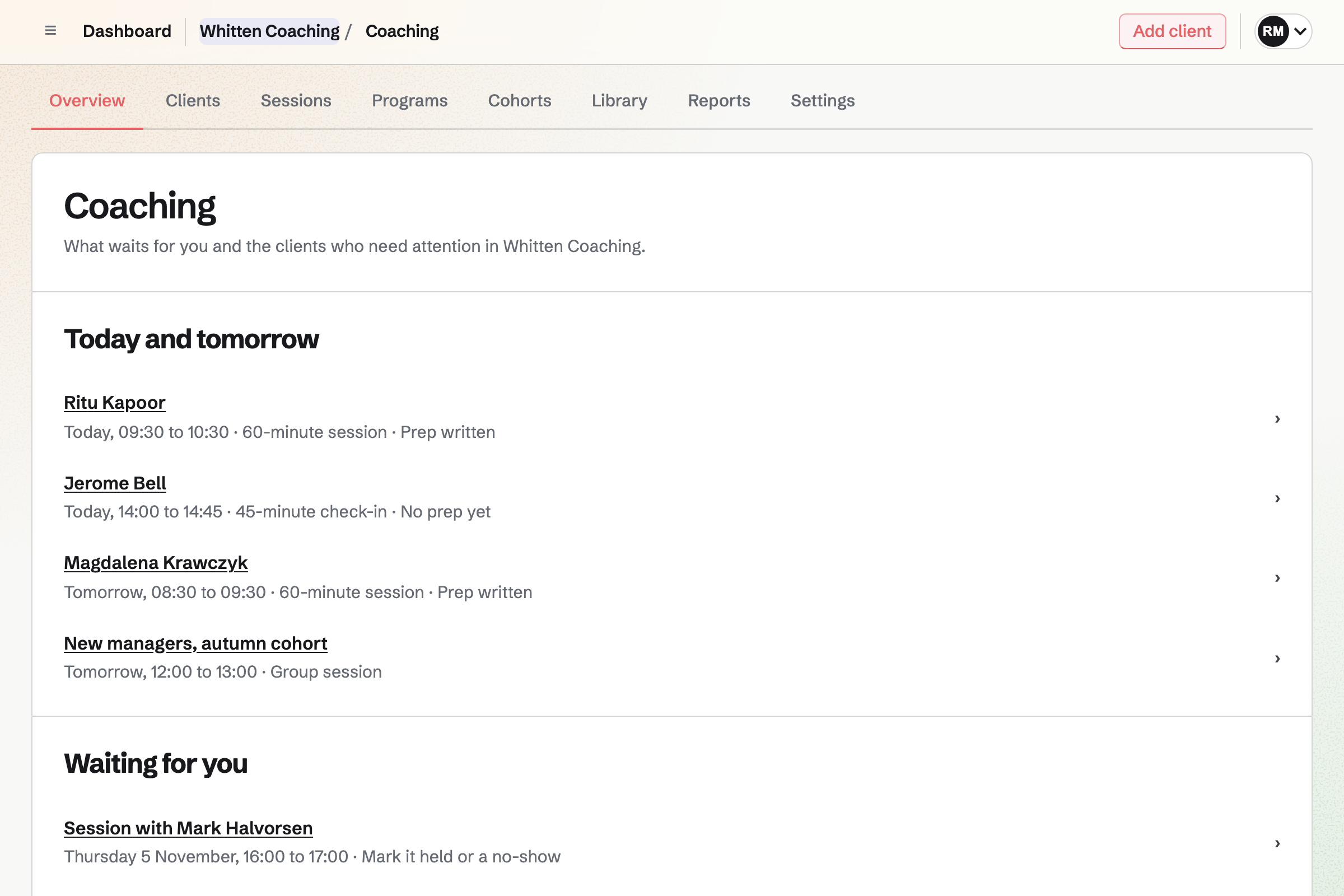
Coaching overview for a fictional coaching practice: four sessions today and tomorrow, each with whether the client wrote their prep, then a session waiting to be marked held.

How is Magpie different?

1. Coaching comes with the rest of the business

One Magpie subscription includes the areas a coaching business would otherwise buy one at a time:

  • Coaching for programs, sessions, goals, habits and check-ins, in each client's Client Portal
  • Invoicing for coaching invoices with tax, and Accounting for the books they go into
  • E-Signatures for agreements, and Forms for applications and intake questions
  • Meetings for a free discovery call, and Courses for lessons sold at a school of your own
  • Websites, Link-In-Bio List, Newsletter, Mail, Contacts and the other areas, in the same team

Everything is in one account with one bill. Paperbell makes no invoices and keeps no books. Its payments reach accounting software through Stripe or PayPal.

2. Coaching is more than the sessions

Each client's coaching holds the goals you agree and the habits they work on. Check-ins arrive on a schedule. Each rating or number answer is charted over time. Each session has a prep page, private notes and a recap the client sees. Needs attention names clients with a low rating or no recent session.

3. A team coaches together, and the Free plan takes clients

A team's members share Coaching at one price. Up to 5 coaches and observers can be named on a client. A sponsor, such as an employer, can pay for a client and see only what the client shares. The Free plan coaches 3 clients at a time and takes their payments.

Comparing Magpie and Paperbell

Paperbell does more to sell a package in one checkout; Magpie does more around each client. Every line in the tables below was checked against Paperbell's own pages, linked from each row, and against Magpie's code and Help.

Platform

WhatPaperbellMagpie
Coaching websiteA site that lists every offer Yes Partly
A page for each offerPeople read about it and buy it Yes Yes
Packages of sessionsPaid once, booked over time Yes Yes
Book, sign and pay in one checkoutThe first session chosen before paying Yes Partly
Payment plans and subscriptionsInstalments, or billing until the client cancels Yes Partly
Discount codesA code for money off an offer Yes No
Card and PayPal paymentsPaid into your own account Yes Card only
Booking from your free timesClients book in their own time zone Yes Yes
Calendar connectionBusy times kept free, sessions added Google, Outlook, iCloud Google only
Booking calendar inside your websiteAn offer's calendar shown on another site Yes No
Text message remindersA text before each session Yes No
Agreements signed onlineThe client signs before coaching starts Yes Yes
Intake forms and surveysQuestions before and after sessions Yes Yes
Client portalSessions, purchases and materials in one place Yes Yes
Content released over timeVideos and files opened on a schedule Yes Yes
Group coachingSessions for everyone who bought a group offer Yes Yes
Goals, habits and check-insProgress tracked between sessions Surveys Yes
Automated emailsYour own emails after a purchase and around sessions Yes Partly
ZapierNew clients and bookings sent to other software Yes No
ICF coaching logHours for a credential, as a CSV file Yes Yes
Invoices with taxAn invoice for each payment No Yes
BookkeepingPayments kept in the business's books Through Stripe or PayPal Yes
Several coaches in one accountOther coaches and an assistant No Yes
A sponsor who paysAn employer or a parent pays for the coaching Partly Yes
Pages in the client's languageButtons and emails translated English only Yes
Phone appAn app for coaches and clients In the browser In the browser
Free plan that takes clientsPaid clients before you pay No Yes
No platform fee on paymentsOnly the card fee comes off Yes Yes

Good to know: Where Magpie says No or Partly, the line under the row says what Magpie does instead. Each gap has an item on Magpie's roadmap, and the line changes on the day it ships.

Website and offer pages

Paperbell gives every account a coaching site that lists each package by itself, with a landing page for each. Magpie gives each Coaching program a page of its own, and a website made in Websites links to it.

WhatPaperbellMagpie
Have a coaching website that lists all my offers, ready without writing code Source Magpie: Websites builds a site from sections with your own colours and fonts, and each Coaching program can have its own public page; nothing lists your programs on your website by itself, so each link is added by hand. Yes Partly
Give each offer its own page where people read about it and buy it Source Yes Yes
Show my coaching site and offers at my own domain Source Magpie: A website made in Websites can use a domain your team owns, at no extra cost, but program pages and the Client Portal stay at Magpie addresses. Yes Partly
Show my logo, colours and fonts to people who buy and to my clients Source Magpie: Websites take your colours, fonts and logo, and a Client Portal shows your logo and an accent colour inside Magpie's bar; a program page shows your name, bio and picture in Magpie's own look. Yes Partly
Link my offers from Instagram, TikTok and my other social profiles Source Yes Yes
Put the booking calendar for an offer inside my existing website Source Magpie: Neither the meeting page nor a program page can be shown inside another website; you link to them instead. Yes No
Collect visitors' email addresses for my mailing list Source Yes Yes
See how many people visit my site and which offers they look at Source Magpie: Link-In-Bio List counts views and clicks, and Store's Reports count visits; Websites and program pages count no visits. Yes Partly

Good to know: A Magpie program page shows the program's description, what it includes, its price and you as the coach. People apply from it, or join and pay.

Packages and online payments

Both sell packages of sessions, payment plans and a free discovery call. Paperbell adds several prices for one offer, discount codes, setup fees and PayPal. They do these better than we do today.

WhatPaperbellMagpie
Sell a package of several sessions and see how many each client has left Source Yes Yes
Offer a free discovery call that anyone can book Source Yes Yes
Sell a single paid session that someone books and pays for at once Source Yes Yes
Let a new client book their first session, sign my agreement and pay in one checkout Source Magpie: Join on a program's page signs the program's agreement and pays the first invoice, and coaching starts once it is paid; the first session is booked afterwards in the portal, and only Apply asks the program's application questions. Yes Partly
Let clients pay for a package in instalments, charged to their card Source Yes Yes
Sell monthly coaching with a set number of sessions each month, billed until the client cancels Source Magpie: Coaching can be billed monthly until it ends, but its sessions included are one total for the whole coaching, not a number each month, and only the coach can stop the payments. Yes Partly
Offer several prices for one offer, such as less for paying in full or a choice of amounts Source Magpie: A program has one price and one way to pay it: in full, in monthly instalments or monthly until coaching ends. A different price for one client is set on their coaching by hand. Yes Partly
Give a discount code for an offer Source Magpie: A program's page charges its one price, with no code to enter. Store's discount codes apply only to Store products. Yes No
Add a one-time setup fee to the first payment Source Magpie: A program charges only its price; a setup fee has to be sent as a separate invoice from Invoicing. Yes Partly
Take payment by card or PayPal into my own account Source Magpie: Coaching invoices are paid by card through your team's own Stripe account, in your Invoicing currency; PayPal is not offered. Yes Partly
Keep the whole price my clients pay, with no fee on top for the platform Source Yes Yes
Sell a digital download, such as a workbook or a recording Source Yes Yes
Have an employer or a parent pay for a client's coaching Source Paperbell: There is no payer of its own: you make a payment package for the payer and give the client a free package, by gift or a 100% code. Partly Yes
Send an invoice with tax on it Source Paperbell: Paperbell makes no invoices and adds no tax or VAT line; clients pay from a package link. No Yes
Keep my business's books where my coaching payments are Source Paperbell: Transactions reach Xero, QuickBooks, Sage, Wave or FreshBooks only by connecting your Stripe or PayPal account to them. Partly Yes

Good to know: Magpie charges for coaching with Invoicing invoices, with tax and a PDF. They are paid through your team's Stripe account, with no Magpie fee. Each payment goes into Accounting's books.

Scheduling, calendars and meeting links

Both let clients book from your free times, in their own time zone, and move or cancel within your notice. Paperbell connects Outlook and iCloud calendars and sends text reminders; Magpie connects Google Calendar only.

WhatPaperbellMagpie
Let clients book their sessions from my free times, in their own time zone Source Yes Yes
Book a session for a client myself, even outside my usual hours Source Yes Yes
Book a series of sessions in one go, such as every week Source Yes Yes
Set how much notice I need, how far ahead people can book and the gap between sessions Source Magpie: Coaching settings hold the shortest notice, how far ahead, how many sessions a client books at once and the late cancellation window, and a session type can change the first two; nothing keeps a gap between sessions. Yes Partly
Offer different hours for different offers Source Magpie: A session type is booked from its coach's hours in Meetings, with its own notice and how far ahead, but not hours of its own. Yes Partly
Let clients move or cancel a session themselves within my notice period Source Yes Yes
Make clients use their sessions within a set time Source Yes Yes
Connect my Google, Outlook or Apple calendar so I am never double-booked Source Magpie: A connected Google Calendar keeps its busy times free and gets each Meetings booking; a Coaching session is added to it only when it meets in Google Meet, and otherwise reaches the coach as an emailed calendar invitation. Outlook and Apple calendars do not connect. Yes Partly
Check more than one calendar for conflicts Source Magpie: Busy times come from your Magpie Calendar and the primary calendar of one connected Google account only. Yes Partly
Add a Zoom or Google Meet link to every session by itself Source Yes Yes
Remind clients before each session by email and text message Source Magpie: Coaching emails the client a reminder the day before each session, which they can turn off; no text message is sent. Yes Partly
Mark a missed session and decide whether it counts Source Paperbell: A missed session is used up and cannot be marked as missed; you add one back to the package by hand, or note it. Partly Yes

Good to know: A Magpie session is marked held or no-show. A no-show counts against the sessions included, and Waive this session stops it counting.

Client management

Both keep each client's sessions, notes, agreements and messages on one page, and both keep an ICF coaching log. Paperbell emails everyone who bought a package at once and totals what each package earned.

WhatPaperbellMagpie
See each client's sessions, purchases, signed agreements and answers in one place Source Yes Yes
Keep private notes on a client and share some notes with them Source Yes Yes
Message one client from the platform Source Yes Yes
Send one message to everyone who bought the same offer Source Magpie: Coaching messages go to one client at a time, and a cohort's conversation reaches its members; Outreach emails everyone with a contact tag on Pro or Team with a Mail domain. Yes Partly
Add an existing client and give them sessions without making them pay Source Yes Yes
Keep a log of my coaching hours for an ICF credential Source Yes Yes
See what each client has spent and what each offer has earned Source Magpie: Accounting's Income by customer totals each client's income between two dates; Coaching's Reports count sessions and hours, and nothing totals what each program earned. Yes Partly

Good to know: A Magpie client's page also holds their goals, actions, habits and check-ins. Messages can be sent later and hold files.

Contract signing, forms and surveys

Both have the client sign an agreement before coaching starts and ask questions before and after sessions. Paperbell's contract is a PDF signed at checkout. Magpie's is an E-Signatures agreement the client and the coach sign.

WhatPaperbellMagpie
Have clients sign my coaching agreement before they start Source Yes Yes
Ask new clients my intake questions when they sign up Source Yes Yes
Ask clients to prepare before a session and give feedback after it Source Yes Yes
Ask clients the same questions again and again and see how their answers change Source Yes Yes

Good to know: Magpie's check-ins open every day or week on their own schedule. Each rating or number answer is charted over time.

Client portal and content delivery

Both give each client a portal for sessions, files and what they bought, opened with a code emailed to them. Both release videos and files over time.

WhatPaperbellMagpie
Give clients one place to book, see what they bought and open their materials, without a password Source Yes Yes
Release videos, worksheets and files to buyers over time, like a simple course Source Yes Yes
Share files privately with one client, and let them send me theirs Source Yes Yes
Let clients see what they paid and change the card they pay with Source Yes Yes

Good to know: A Magpie program's schedule releases resources, exercises and messages. Each opens on a day of the program, at a stage or around a session.

Group coaching and live classes

Both sell a group program with a set number of places, beside each member's one-to-one sessions. Paperbell schedules a group's sessions as a weekly series in one go; Magpie schedules each one on its own.

WhatPaperbellMagpie
Sell a group program or a live class with a set number of places Source Yes Yes
Combine group sessions and one-to-one sessions in one offer Source Yes Yes
Schedule a group's sessions as a weekly series in one go Source Magpie: Schedule group session adds one group session at a time; only one-to-one sessions repeat, up to 12 at once. Calendar events repeat, but a Calendar event is not a group session. Yes No

Good to know: A Magpie cohort takes a group through a program from one start date. Schedule group session invites every member.

Emails, reminders and automation

Paperbell sends your own emails after a purchase and around every session. It reminds clients to book and tells Zapier of each sale. They do this better than we do today.

WhatPaperbellMagpie
Send my own emails automatically after someone buys, and before and after their sessions Source Magpie: A program's schedule posts messages from the lead coach on a day of the program, such as the day coaching starts once someone joins and pays, when a stage starts, or before or after one numbered session, so a message for every session is added once for each, and its text cannot fill in the client's name or the session's link. Messages arrive in the client's portal, and the client is emailed only that their coach wrote, never what. Yes Partly
Remind clients to book the sessions they have left Source Magpie: Needs attention tells the coach when a client has sessions left and none booked; nothing reminds the client. Yes Partly
Send new clients, purchases and bookings to my other apps through Zapier Source Magpie: The version 1 API, on Pro, reaches bookings, Contacts, invoices, Coaching and the other areas the Magpie app uses. Signed webhooks report Meetings bookings, Proposals, Courses enrolments and Forms responses. Magpie has no Zapier app, and no webhook reports a Coaching session, a new coaching client or a payment. Yes Partly

Good to know: A Magpie program's schedule posts messages from the lead coach to the client's portal on set days. The client is emailed that their coach wrote.

Plans, integrations and account

Paperbell is one plan for one coach, in English. Magpie is one subscription for a team, in four languages, with a Free plan that takes clients.

WhatPaperbellMagpie
Take on paying clients before I pay for the software Source Paperbell: A free account builds the site and packages, but the site goes live only on the paid monthly plan, and messages and text reminders are not in the trial. No Yes
Run my practice with other coaches and an assistant in one account Source Paperbell: One account is for one coach, with no extra logins or admins; each coach needs an account of their own, 15% off. No Yes
Show clients the pages and emails in their own language Source Paperbell: Paperbell is in English only; your own text can be in any language, but buttons and checkout stay in English. Partly Yes
Use it, and let my clients use it, on a phone Source Paperbell: There is no app; the site works in a phone's browser and can be added to the home screen.Magpie: The website works in a phone's browser. The Magpie app, with Coaching for coaches and clients, is built but not yet in the App Store or Google Play. Partly Partly

Good to know: Magpie's Free plan coaches 3 clients whose coaching has not ended. Pro and the Team plan have no limit.

Price comparison

How Paperbell charges

Paperbell sells one plan with every feature, billed monthly or yearly, with a 30-day money-back guarantee. A free account builds the site and packages, and the site goes live once the plan is bought. Paperbell takes no fee on payments; only Stripe's or PayPal's fee applies. Your own domain is a paid add-on. Each extra coach needs an account of their own, at 15% off. Prices are on Paperbell's pricing page.

How Magpie charges

Magpie charges by plan, Free or a paid plan, for everything in the account. That covers Coaching, invoicing, booking pages, a website and the rest. The plan sets how many clients, websites and team members you have, not which areas you can use. Coaching invoices carry no Magpie fee. Magpie takes 4% of Store sales. Prices are on Magpie's pricing page.

On top of the planPaperbellMagpie
Taking paying clients without a planNot available; the site goes live with the plan3 clients at a time on Free
Fee on coaching paymentsNoneNone
Card feesStripe's or PayPal's, through your own accountStripe's, through your own Stripe account
Your own domainA paid add-onIncluded for a website; program pages stay at Magpie's address
Another coachAn account of their own, 15% offA member of your team; 25 on the Team plan
Selling downloadsIncluded, with no feeStore, for 4% of each sale
Invoicing and bookkeepingNot offeredIncluded

When to choose Magpie or Paperbell

  • Want goals, habits and check-ins, invoices and books, other coaches in your team, and a Free plan that takes clients? Go with Magpie.
  • Want one checkout where a new client books, signs and pays, with discount codes, text reminders and automated emails? Paperbell is the right choice.

Recommendations by kind of business

For a coach selling packages of sessions alone
Paperbell. A new client books the first session, signs and pays in one checkout. Discount codes, several prices, text reminders and automated emails are on the one plan.
For a coaching practice with several coaches
Magpie. Coaches and an assistant share one team at one price. Up to 5 coaches and observers can be named on a client, and only they open it.
For an executive or business coach paid by employers
Magpie. A sponsor pays the invoices and sees only what the client shares. Invoices carry tax and go into the books in Accounting.
For a coach who tracks progress between sessions
Magpie. Goals, habits and check-ins are charted over time in each client's coaching. Paperbell asks its questions in surveys around sessions.
For a coach whose clients book from Instagram
Either. Paperbell's site is a link in bio that lists every package by itself. Magpie's Link-In-Bio List links to each program page by hand, and adds Courses and a newsletter. Choose by whether the checkout or the rest of the business matters more.

Frequently asked questions

What is the difference between Paperbell and Magpie?

Paperbell is an all-in-one platform for coaches: a coaching site, packages, booking, contracts, payments and a client portal. Magpie is one subscription for a small business's software. Its Coaching is one area beside Invoicing, Accounting, booking pages and a website. Paperbell does more to sell a package; Magpie does more around each client.

Does Magpie replace Paperbell?

Yes, for a coach who wants each client's goals, habits and check-ins beside the sessions. Magpie sells programs, books sessions from your free times and has the agreement signed. It invoices each payment and keeps the books.

Consider keeping Paperbell if new clients book, sign and pay in one checkout. Keep it if you use discount codes, text reminders or automated emails around each session. Keep it too for Zapier, PayPal or Outlook and iCloud calendars. Paperbell does each of these better than Magpie does today.

How much does Paperbell cost?

Paperbell has one plan with every feature, billed monthly or yearly, and a 30-day money-back guarantee. It takes no fee on payments. Your own domain is a paid add-on, and each extra coach needs an account at 15% off. The prices are on Paperbell's pricing page.

How much does Magpie cost?

Magpie has a Free plan and paid plans, each covering every area. Free coaches 3 clients at a time; Pro and the Team plan have no limit. The Team plan is one price for up to 25 people. Coaching invoices carry no Magpie fee. The prices are on Magpie's pricing page.

Can a client book, sign and pay in one go in Magpie?

Partly. Join on a program's page signs the program's agreement and pays the first invoice. Coaching starts once it is paid, and the client books the first session in their portal afterwards. Paperbell takes the booking, the signature and the payment in one checkout.

Does Magpie have discount codes for coaching?

No. A program's page charges its one price. A different price for one client is set on their coaching by hand. Store's discount codes apply only to Store products. Discount codes for Coaching are on Magpie's roadmap. Paperbell's codes take a percentage off a package, with an optional expiry date.

Does Magpie send text message reminders?

No. Coaching emails the client a reminder the day before each session, which they can turn off. Text reminders are on Magpie's roadmap. Paperbell texts clients who opt in, a day or an hour before, in supported countries.

Does Magpie connect to Outlook or iCloud calendars?

No. Magpie connects one Google Calendar, whose busy times are kept free. Outlook and iCloud calendars do not connect yet. Paperbell connects a Google, Outlook or iCloud calendar account.

Can I put a Magpie booking calendar on my website?

No. A meeting page or a program page cannot be shown inside another website; you link to it instead. Showing it on a website is on Magpie's roadmap. Paperbell gives each package a code that puts its booking calendar inside Squarespace, WordPress, Wix and others.

Does Magpie send automated emails to coaching clients?

Partly. A program's schedule posts messages from the lead coach to the client's portal. Each goes on a set day or around a numbered session. The client is emailed that their coach wrote, not what. A message cannot fill in the client's name or the session's link. Paperbell sends your own emails after a purchase and before or after every session.

Does Paperbell make invoices?

No. Paperbell adds no invoice and no tax or VAT line; clients pay from a package link. Magpie's coaching charges are Invoicing invoices with tax and a PDF. They are emailed with a Pay link and shared in the client's portal.

Can several coaches use one Paperbell account?

No. A Paperbell account is for one coach, with no extra logins or admins. Each coach needs an account of their own, at 15% off. In Magpie, a team's members share Coaching at one price. Up to 5 coaches and observers can be named on a client.

Does Magpie have monthly coaching subscriptions?

Partly. Coaching can be billed monthly until it ends, but its sessions are one total, not a number each month. Only the coach can stop the payments. Sessions each month are on Magpie's roadmap. Paperbell's subscription package bills monthly for a number of sessions a month, until the client cancels.

Can an employer pay for a client's coaching?

Yes, in Magpie. A client's coaching can name a sponsor organization as the payer. Its invoices go to the sponsor, who sees only what the client shares. Paperbell has no payer of its own. You sell the payer a package and gift the client a free one.

Do both keep an ICF coaching log?

Yes. Magpie's coaching log in Reports lists each session held, individual or group, with hours and paid or pro bono. It downloads as a CSV file with the ICF's columns. Paperbell's ICF Client Coaching Log lists every paid and pro bono hour and exports a CSV file.

Is there a phone app?

Not from either today. Paperbell works in a phone's browser and can be added to the home screen. Magpie works in a phone's browser too. The Magpie app, with Coaching for coaches and clients, is not yet in the App Store or Google Play.

Can my clients use it in another language?

In Magpie, yes: program pages, the Client Portal and its emails can be in English, French, Spanish or German. Your own text is shown as you wrote it. Paperbell is in English only, and its buttons and checkout stay in English.

Can I use Paperbell and Magpie together?

Yes. Paperbell can sell and book your packages. Magpie can run your books, a website, a newsletter or a team's other work. A Magpie website or Link-In-Bio List can link to your Paperbell packages.

How do I move from Paperbell to Magpie?

Make a program in Coaching for each package, with its sessions, price and agreement. Add each client with Add client, on a program or not, with the price you set or none. Start coaching sends them an invitation to their portal. Keep your Paperbell plan until the clients you have there finish their packages.

What is included in Magpie's Free plan?

Coaching for 3 clients at a time, with their payments. Booking pages, Invoicing, Accounting, a website, Link-In-Bio List, the Newsletter with 250 subscribers, Store and a team of 3. A paid plan raises the limits and adds Mail.
If a line on this page is wrong, tell us and we will correct it.

Paperbell changes, and so does Magpie. If a line is out of date about either product, email support@magpie.diy with the page that shows it. We check the line against that page, change it, and give it the new date. That goes for Paperbell's own team as much as for anyone who uses it.

Coach your first clients on Magpie's Free plan.

Create a Magpie account, then add a client in Coaching.

Create account