Patreon compared with Magpie

Patreon vs Magpie: an in-depth comparison

Patreon and Magpie both give a creator a page where fans join, free or paid, to read posts. They are built around different things.

  1. Patreon is a membership platform for creators, with a shop, newsletters, group chats, podcasts and a phone app for fans. It is built for creators whose members are the business, such as video makers, podcasters and artists.
  2. Magpie is one subscription for a small business's software, and Supporters is one part of it. Beside the paid posts it includes a shop, a newsletter, a podcast, booking pages and a website. It is built for someone whose members are one part of running the business.
Create account
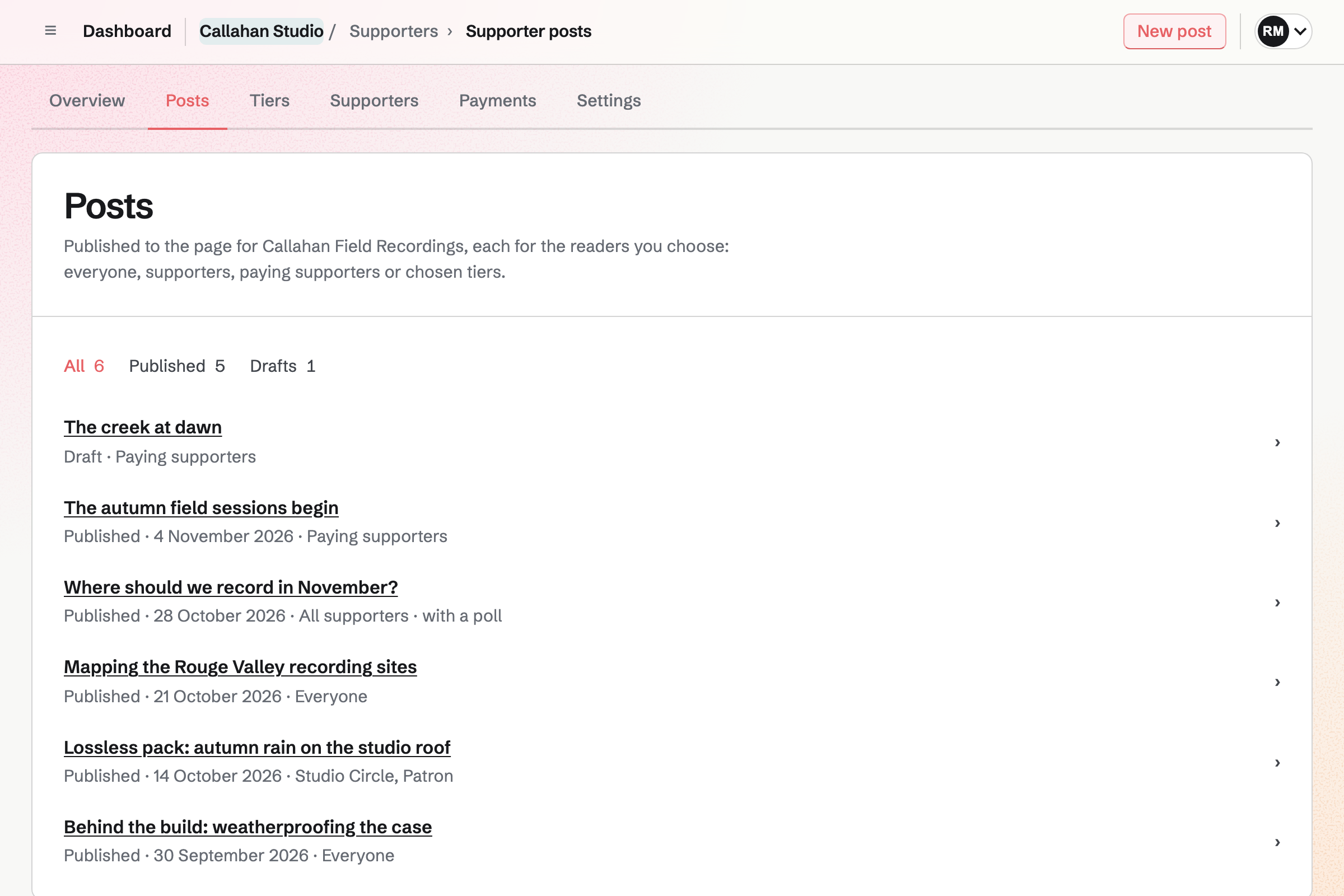
Callahan Studio’s Supporters posts: a draft and five published posts, each with its date and who it is for, from everyone to paying supporters and chosen tiers, one with a poll.

How is Magpie different?

1. Paid posts come with the rest of the business

One Magpie subscription includes the areas a creator would otherwise buy one at a time:

  • Supporters, the area this page is about, for free and paid tiers and the posts kept for them
  • Store for selling downloads and physical products, and Courses for lessons at a school of your own
  • Newsletter for email to subscribers, and Podcast for a show with its own feed
  • Meetings for booking pages, and Invoicing for invoices paid online
  • Websites, Mail, Forms, Contacts, Accounting and the other areas, in the same team

Everything is in one account with one bill. Patreon covers memberships, a shop, posts, newsletters, chats and podcasts. Its pages offer no booking.

2. The payments are in your own Stripe account

Each paid tier is a price in your team's own Stripe account. Each paying supporter is a subscription there. Stripe pays the balance to your bank, and Magpie lists every payment. Store and paid Forms use the same account. Patreon takes the payments itself and pays creators out from the balance it holds.

3. The fee is 4%

Magpie takes 4% of each Supporters payment, and Stripe's processing fee comes on top. Patreon's pricing page shows 10% for new creators, with payment processing, currency conversion and payout fees on top. Patreon's fee also pays for the tax, disputes and fraud checks it handles for you.

Comparing Magpie and Patreon

Patreon does more for the fan and the membership; Magpie does more around it. Every line in the tables below was checked against Patreon's own pages, linked from each row, and against Magpie's code and Help.

Platform

WhatPatreonMagpie
Creator pageA page where fans join and read your posts Yes Yes
Free and paid tiersFans follow for free or pay for more Yes Yes
Yearly membershipsMembers pay once a year Yes Yes
Free trials and discountsA lower first price for new members Yes No
Posts with text, pictures and videoKept for everyone, members or chosen tiers Yes Yes
Audio and files in a postAn audio player or a download inside a post Yes No
Posts emailed to membersEach post goes to the members who can read it Yes No
Email newsletterEmails to free followers Yes Newsletter, with plan limits
Shop for digital productsDownloads and video sold one at a time Yes Store
Physical productsThings you make and ship yourself Not stated Store
Merch made and shipped for youMugs, shirts and stickers sent to members Premium, or a 3% add-on on Pro No
LivestreamsGo live on video with members Yes No
Comments on postsMembers reply under a post Yes No
Group chats for membersChats open to all members or one tier Yes Partly
Podcast hostingA show with an RSS feed for podcast apps Yes Yes
Private podcast feedExclusive episodes in members' own podcast app Yes No
DiscoveryNew fans find you through the platform Yes No
Phone app for fansRead posts and keep up on a phone Yes In the browser
Discord and other connectionsMembers let into Discord; Zapier, WordPress and more Yes No
Booking pagesFans book a call with you No Yes
Your own Stripe accountSubscriptions kept in your payment account No Yes
Sales tax and disputes handledTax, chargebacks and fraud dealt with for you Yes No
Platform feeWhat comes off each member payment 10% for new creators 4%

Good to know: Where Magpie says No or Partly, the line under the row says what Magpie does instead. Each gap has an item on Magpie's roadmap, and the line changes on the day it ships.

Your creator page

Both give you a page where fans join and see your work. Patreon lets you choose its colours and group posts into collections. Magpie's page lists posts newest first.

WhatPatreonMagpie
Publish a page where fans can join me and see my work Source Yes Yes
Give my page my own colours and choose how my posts are laid out Source Magpie: The page shows your cover image, name, description and About section, then the posts newest first, inside Magpie's own top bar and footer. Its colours and layout cannot be changed. Yes Partly
Group posts into series and collections, and put my best work first Source Magpie: Posts are one list, newest first, with no series, collections or pinned post. Yes No

Good to know: A Supporters page has a name, a description, an About section and a cover image. It can be published once it has a tier people can join.

Memberships

Both have a free tier and paid tiers with their own prices and benefits, paid monthly or yearly. Patreon adds free trials, discounts and gifts from fans. They do it better than we do today.

WhatPatreonMagpie
Let fans follow me for free and get my free posts Source Yes Yes
Offer several paid tiers, each with its own price and benefits Source Yes Yes
Keep a post for paying members or for chosen tiers Source Yes Yes
Let members pay yearly as well as monthly Source Yes Yes
Win new members with a free trial or a discounted price Source Magpie: A paid tier has a fixed monthly price, and a yearly one if you offer it, with no trial or discount. An admin can give complimentary access instead. Yes No
Change a tier's price after people have joined Source Patreon: Patreon's help centre lists an article on adjusting tier prices, but its pages refused to load, and the feature and pricing pages do not say.Magpie: A paid tier's monthly price cannot change once it is set, so a different amount needs a new tier. Its yearly price can be changed, for new supporters only; people already paying keep their price. Not stated Partly
Let a fan buy a membership as a gift for someone else Source Magpie: An admin can give anyone complimentary access, with an end date if wanted, but a fan cannot buy it for someone else. Yes Partly
Give chosen fans free access to a paid tier Source Yes Yes
Sell one post, video or collection to anyone, without a membership Source Magpie: Store sells downloadable files, such as a video or an MP3, to anyone. A Supporters post cannot be bought on its own: it opens only through a tier. Yes Partly
Bring my paying members over from another platform Source Patreon: The newsletter page offers a migration specialist to move eligible newsletters' email lists; Patreon's own pages say nothing about moving paying members.Magpie: Supporters cannot be imported. Each paying supporter joins again through the page and Stripe's checkout. Not stated No

Good to know: Give complimentary access opens any Magpie tier to someone for free, with an optional end date. Free allows 3 paid tiers and 200 posts; Pro and the Team plan have no limit.

Shop and merch

Both sell downloads such as pictures, music and video from a shop page. Patreon gives members products free or at a discount, and makes and ships merch for you.

WhatPatreonMagpie
Have a shop page that lists everything I sell Source Yes Yes
Sell downloadable files such as pictures, music and video Source Yes Yes
Give members my products free or at a discount Source Magpie: A Store discount code can be shared in a post kept for supporters, or kept for a saved group of customers, but Store does not know who supports you. Yes Partly
Sell physical products and ship them myself Source Patreon: The shop pages describe digital products only and say nothing about physical products or shipping; the help centre, which would say whether tiers can ship rewards, refused to load. Not stated Yes
Send members merch that is made and shipped for me Source Magpie: Supporters has no merch. Store sells items you make and ship yourself. Yes No

Good to know: Magpie's Store also sells physical products with stock and shipping rates. It takes 4% of each sale, through the same Stripe account as Supporters.

Content and newsletters

Both publish posts with text, pictures and video for chosen readers. Patreon also puts audio and files in a post, emails each post to members and streams live.

WhatPatreonMagpie
Publish posts with text, pictures and video Source Yes Yes
Put audio and files to download in a post Source Magpie: A post holds text, pictures, Screen Recorder videos and a poll. It cannot carry an audio player or a file to download. Yes No
Keep my videos for the members a post is for Source Magpie: A post's video plays only where the post opens, but the video file itself can be opened by anyone who has its address. Yes Partly
Go live on video with my members Source Magpie: Supporters has no live video. Webinars, which runs live video with registration, chat and replays, is closed to members for now. Yes No
Schedule a post to go out later Source Patreon: Patreon's help centre lists an article on setting a post's publish date, but its pages refused to load, and the feature and pricing pages do not say.Magpie: A post is a draft or published; it cannot be set to publish at a later time. Not stated No
Have each post emailed to the members who can read it Source Magpie: Supporters posts are not emailed. Newsletter emails go to every subscriber, with no link to tiers. Yes Partly
Email my free followers, however many there are Source Magpie: Newsletter emails its subscribers. Free allows 250 subscribers and 1,000 emails a month; Pro and the Team plan allow 5,000 subscribers and 50,000 emails. Yes Partly
Bring my email list over from another service Source Yes Yes
Download my members' email addresses Source Magpie: Team admins see a supporter's email address on their page under Supporters, but the Supporters list cannot be downloaded. Newsletter subscribers export as a CSV file. Yes Partly
See who opened my emails and which links they clicked Source Magpie: A Newsletter email shows copies delivered, failed and skipped, but not opens or clicks. Yes Partly

Good to know: A Supporters post is written in the Notes editor and can show a poll from Forms. Readers a post is locked for see its title, cover and excerpt, and the tiers that open it.

Community

Patreon has comments, group chats for chosen tiers, direct messages and polls. Magpie has polls under a post, and Message Boards and Team chat are separate from the page.

WhatPatreonMagpie
Let members comment on my posts Source Magpie: Supporters posts have no comments. A public Message Board is separate from the page. Yes No
Run group chats for members, open to the tiers I choose Source Magpie: A Message Board can be public to anyone with a Magpie account or private to a team, and Chat is for a team's members and guests. Neither can be opened to supporters or to one tier. Yes Partly
Message a member one to one Source Magpie: A supporter's page has Email in its More menu, which opens your own mail program. Chat reaches anyone by their handle, which the page shows when they have one, and a first message to someone outside your teams is a request until they accept it. Supporters cannot message you from your page. Yes Partly
Ask members a question in a poll Source Yes Yes
Let fans book a call with me Source Patreon: Patreon's pricing and feature pages offer no way for fans to book a call or a session. No Yes

Good to know: Magpie's Meetings gives you a booking page where fans choose a time for a call with you. Appointments can take payment or a deposit when someone books.

Growth

Patreon helps fans find you, invites free members to upgrade and connects to Discord. Magpie's supporters come from the address you share.

WhatPatreonMagpie
Have free members invited to upgrade automatically Source Magpie: Nothing invites free supporters to upgrade. A post they cannot read shows its title, excerpt and the tiers that open it. Yes No
Be found by new fans through the platform and other creators' recommendations Source Magpie: There is no directory of Supporters pages and no recommendations. New supporters come from the address you share. Yes No
Turn my posts into short clips for social media Source Magpie: Nothing makes short clips from a post or an episode. Podcast can turn a whole episode into one video. Yes No
See my earnings, retention and members over time Source Magpie: The Supporters overview shows how many support you, how many pay, what they pay each month, and how many joined and ended in the last 30 days. Payments lists each payment with its fees and refunds and totals them, and each supporter's page has a history. There are no charts over time and no lifetime value. Yes Partly
See every member, and filter them by tier and status Source Yes Yes
Let my members into my Discord server Source Magpie: Supporters does not connect to Discord. Yes No
Connect my membership to Zapier, WordPress, Mailchimp and other tools Source Magpie: Supporters connects to no other tool and sends no webhooks; its emails go only to supporters and team admins. Yes No
Let fans read posts and keep up from a phone app Source Magpie: In a phone's browser, Who you support lists the pages a person supports, and each page shows the posts they can read, paid ones included. Nothing tells them when a new post is published. The Magpie app lists the same pages and shows posts open without paying, but it is not yet in the App Store or Google Play. Yes Partly

Good to know: The Supporters list filters people by tier and status. The overview shows how many support you and what they pay a month. It also counts who joined and left in 30 days.

Podcasts

Both host a podcast with an RSS feed for Spotify and Apple Podcasts. Patreon also gives members a private feed of exclusive episodes and brings a show over from another host.

WhatPatreonMagpie
Let paying members hear exclusive episodes in their own podcast app Source Magpie: A Podcast's RSS feed is public while the podcast is on, and there is no private feed for supporters. Yes No
Run more than one podcast Source Yes Yes
Bring my existing podcast over from another host Source Magpie: A podcast starts empty, and old episodes are uploaded one at a time. Yes No
List my free episodes in Spotify and Apple Podcasts Source Yes Yes

Good to know: Each Magpie podcast has its own page and feed. Podcast can turn a whole episode into a video.

Payments and payouts

Patreon takes the payments, handles tax, disputes and failed cards, and pays you out. Magpie keeps the subscriptions in your own Stripe account, and you handle tax and disputes.

WhatPatreonMagpie
Pay the platform less than 10% of what members pay Source Patreon: New creators pay 10% of their earnings, plus payment processing, currency conversion and payout fees. No Yes
Keep members' subscriptions in my own payment account Source Patreon: Payments are taken by Patreon itself, which pays creators out from the balance it holds. No Yes
Get my earnings paid into my bank account Source Yes Yes
Let fans pay with PayPal or Venmo as well as a card Source Magpie: Supporters checkout is Stripe's, set to take cards only. Yes Partly
Let fans pay in their own currency Source Magpie: A tier has one price, in the Stripe account's currency, which every supporter pays. Yes Partly
Have sales tax and VAT charged, filed and paid for me Source Magpie: Supporters charges no tax, and the seller is responsible for taxes. Store can work out tax with Stripe Tax, but filing and paying it stay with you. Yes No
Have chargebacks and disputes handled for me Source Magpie: The seller is responsible for disputes and answers them in their own Stripe dashboard. Yes No
Win back members whose card payment failed Source Magpie: A supporter keeps access while a failed renewal is retried, as the Stripe account's settings decide. Magpie sends no reminder of its own. Yes Partly

Good to know: Supporters › Payments lists each payment with its fees, net amount and any refund. A refund made in Stripe returns Magpie's fee in proportion.

Price comparison

How Patreon charges

Patreon is free to start. New creators pay 10% of what they earn, and payment processing, currency conversion and payout fees come on top. Patreon's fee covers sales tax, chargebacks, disputes and fraud monitoring. Creators who joined earlier may still be on the Lite, Pro or Premium plans. Merch for Membership is a 3% add-on to Pro and included in Premium. The details are on Patreon's pricing page.

How Magpie charges

Magpie charges by plan, Free or a paid plan, for every area in the account. The plan sets how many paid tiers and posts you have, not which areas you can use. Magpie takes 4% of Supporters payments and 4% of Store sales. Stripe's fees come on top. Prices are on Magpie's pricing page.

On top of the planPatreonMagpie
Fee on member payments10% for new creators4% on Supporters
Payment processingCharged on top, with currency conversion and payout feesStripe's fees, through your own Stripe account
ShopNo fee to list a product4% of each Store sale
Sales tax and VATCollected and paid by PatreonYour responsibility
Chargebacks and disputesHandled by PatreonAnswered in your Stripe dashboard
Merch made and shippedPremium, or a 3% add-on on ProNot offered
NewsletterFree emails to any number of contacts250 subscribers on Free, 5,000 on a paid plan
Booking pagesNot offeredIncluded; 4% of a payment taken at booking in Appointments

When to choose Magpie or Patreon

  • Want paid posts beside a shop, a newsletter and booking pages, paid into your own Stripe account? Go with Magpie.
  • Want a membership with an app for fans, livestreams, comments, group chats, merch and tax handled for you? Patreon is the right choice.

Recommendations by kind of business

For a video maker or a podcaster
Patreon. Livestreams, private podcast feeds, short clips for social media and an app for fans are built in. Magpie has no livestream or private feed today.
For a creator with a big community
Patreon. Comments, group chats by tier, direct messages and Discord keep members talking. Patreon's discovery and recommendations also bring new fans.
For a coach, a teacher or a consultant
Magpie. Paid posts sit beside booking pages, courses, invoices and a newsletter in one account. Supporters can book a call with you from a booking page in the same account.
For a maker who sells things too
Magpie. Store sells physical products and downloads beside the Supporters page, through the same Stripe account. Patreon's merch is made for you; Magpie's Store sells what you make.
For a writer with paying readers
Either. Both keep posts for free followers, paying members or chosen tiers. Patreon emails each post and lets readers comment. Magpie takes 4% and pays into your own Stripe account. Choose by whether readers' inboxes or the fee and the account matter more.

Frequently asked questions

What is the difference between Patreon and Magpie?

Patreon is a membership platform for creators, with an app, livestreams, group chats and merch. Magpie is one subscription for a small business's software. Its Supporters area is one part, beside a shop, a newsletter, booking pages and a website. Patreon does more for the membership; Magpie does more around it.

Does Magpie replace Patreon?

Yes, for a creator whose paid posts are one part of a business. Supporters has free and paid tiers, monthly or yearly, and posts for chosen tiers. Payments go to your own Stripe account, for 4%.

Consider keeping Patreon if your fans read in its app, comment, chat or watch you live. Keep it too if you want free trials, merch made for you, or tax and disputes handled. Patreon does each of these better than Magpie does today.

How much does Patreon cost?

Patreon is free to start, and new creators pay 10% of what they earn. Payment processing, currency conversion and payout fees come on top. Creators who joined earlier may be on the Lite, Pro or Premium plans. The details are on Patreon's pricing page.

How much does Magpie cost?

Magpie has a Free plan and paid plans, each covering every area. Free allows 3 paid tiers and 200 posts; a paid plan has no limit. Magpie takes 4% of Supporters payments, and Stripe's fees come on top. The prices are on Magpie's pricing page.

Does Magpie have yearly memberships?

Yes. A paid Supporters tier can offer a yearly price beside its monthly one, at an amount you set. Supporters choose monthly or yearly when they join. Patreon memberships can be monthly or annual too.

Can I offer a free trial or a discount on Magpie?

No. A paid tier has a fixed monthly price, and a yearly one if you offer it, with no trial and no discount. You can give someone complimentary access to any tier, with an end date if you want one. Patreon has free trials, discounts and sales.

Can members comment on posts in Magpie?

No. Supporters posts have no comments. A public Message Board is open to anyone with a Magpie account. It is separate from the page. Patreon members comment on posts.

Does Magpie email each post to supporters?

No. A Supporters post is read on the page, and nothing emails it out. Newsletter emails go to every subscriber, with no link to tiers. Patreon sends one post to the web and to fans' inboxes at the same time.

Does Magpie have livestreaming?

No. Supporters has no live video. Webinars, which runs live video, is not open to members yet. Patreon includes livestreaming in its standard fee.

Does Magpie have an app for supporters?

No. Supporters read in a phone's browser, where Who you support lists the pages they support. The Magpie app lists the same pages, but it is not yet in the App Store or Google Play. Patreon has an app for iPhone and Android.

Can I put audio or a file to download in a Magpie post?

No. A post holds text, pictures, video from Screen Recorder and a poll. Store sells downloads such as an MP3 or a PDF to anyone, on its own product page. Patreon puts streamable audio and downloads in posts.

Can I sell a single post or video on Magpie?

Partly. Store sells a video or audio file as a download to anyone, member or not. A Supporters post cannot be bought on its own; it opens only through a tier. Patreon sells posts, collections, video and audio one at a time.

Does Magpie make merch for my members?

No. Store sells products you make and ship yourself, with stock and shipping rates. Patreon's Merch for Membership makes and ships stickers, mugs, shirts and more to members.

Does Magpie handle sales tax and VAT?

No. Supporters charges no tax, and you are responsible for taxes and disputes. Store can work out tax with Stripe Tax, but filing and paying stay with you. Patreon collects and pays most applicable taxes and handles chargebacks.

Can I run a members-only podcast on Magpie?

No. A Podcast's RSS feed is public, and there is no private feed for supporters. You can host a public show and list it in Spotify and Apple Podcasts. Patreon gives members exclusive episodes in their own podcast app.

Does Magpie connect to Discord?

No. Supporters connects to no other software and sends no webhooks. Patreon lets members into a Discord server and connects to Zapier, WordPress, Mailchimp and more.

Will new fans find me on Magpie?

No. Magpie has no directory of Supporters pages and no recommendations. New supporters come from the address you share. Patreon has Find a Creator and shout-outs between creators.

Does Patreon have booking pages?

No. Patreon's pricing and product pages offer no way for fans to book a call. Magpie's Meetings gives you a booking page where people choose a time with you. Appointments can take payment or a deposit when someone books.

Does Patreon put payments in my own Stripe account?

No. Patreon takes the payments and pays you out by direct deposit, PayPal or Payoneer. On Magpie, each subscription is in your team's own Stripe account, and Stripe pays your bank.

Can I use Patreon and Magpie together?

Yes. Patreon can run the membership while Magpie runs your shop, booking pages, invoices, newsletter and website. A Magpie website or booking page can link to your Patreon page.

How do I move from Patreon to Magpie?

Set up Supporters and add your tiers, then publish the page. Paying members cannot be imported: each one joins again through the page and Stripe's checkout. Patreon lets you download fans' email addresses. Newsletter imports a CSV file of people who gave permission. Then you can email them the new address.

What is included in Magpie's Free plan?

Supporters with a free tier, 3 paid tiers and 200 posts. Store, booking pages, Invoicing, a podcast, the Newsletter with 250 subscribers, Forms and a team of 3. A paid plan removes the tier and post limits and raises the others.
If a line on this page is wrong, tell us and we will correct it.

Patreon changes, and so does Magpie. If a line is out of date about either product, email support@magpie.diy with the page that shows it. We check the line against that page, change it, and give it the new date. That goes for Patreon's own team as much as for anyone who uses it.

Start a Supporters page on Magpie's Free plan.

Create a Magpie account, then set up Supporters.

Create account