Typeform compared with Magpie

Typeform vs Magpie: an in-depth comparison

Typeform and Magpie both build online forms that anyone answers from a link. Both have logic, file uploads and payments. They are built around different things.

  1. Typeform is a form builder known for showing one question at a time. It adds quizzes, scores, AI and a long list of integrations. It is built for someone whose forms are the main thing: a marketing team collecting leads, a researcher running surveys, a business qualifying customers.
  2. Magpie is one subscription for a small business's software, and Forms is one part of it. Beside the forms it includes booking pages, invoicing, contacts, e-signatures, a website and more. It is built for someone whose forms are one part of running the business.
Create account
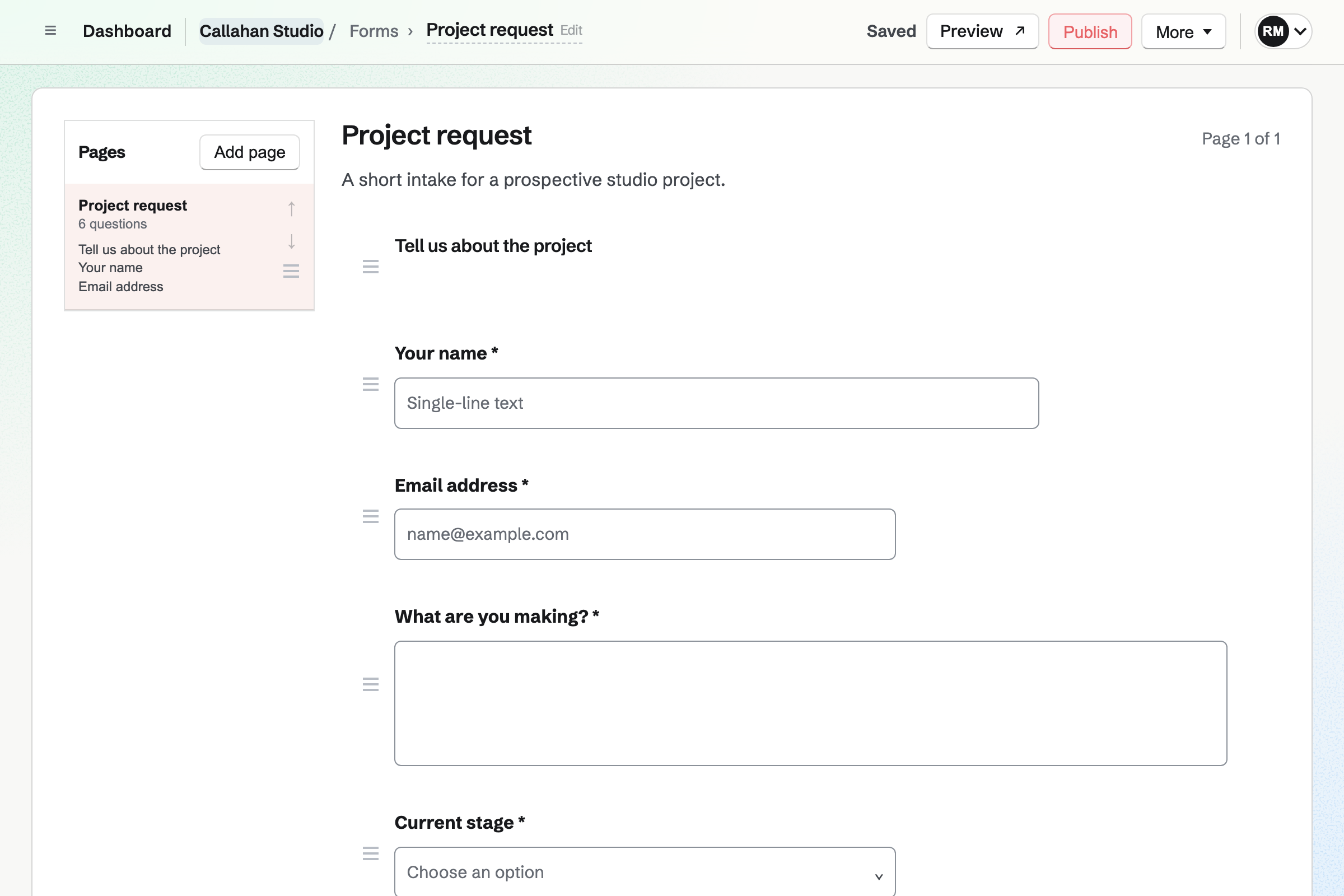
Callahan Studio’s draft Project request Form in the Form builder: a heading, then questions for a name, an email, the project, its stage, a budget and a target date, each with its answer type and reorder controls.

How is Magpie different?

1. Forms come with the rest of the business

One Magpie subscription includes the areas a small business would otherwise buy one at a time:

  • Forms, with pages, conditions, file uploads and paid forms
  • Meetings and Appointments for booking pages
  • E-Signatures for documents people sign
  • Contacts for the people you work with
  • Invoicing, with recurring invoices and online payment, and Store for selling online
  • Websites, Newsletter, Courses, Spreadsheets, Helpdesk and the other areas, in the same team

Everything is in one account with one bill. Typeform covers forms, quizzes and surveys, with contacts and automations as an add-on.

2. Responses have no monthly limit

No Magpie plan limits how many responses a form takes, or how many forms you have. The Free plan takes them too, with the Magpie link shown under each form. Each response stays attached to the version of the form it answered. Changing a published form never loses an answer.

3. A team pays one price

The Team plan is one price for up to 25 people. Its members build forms and read responses by the team's permissions. A free team has places for 3. Collaborators adds someone from outside the team to one form, as a guest who can view or edit.

Comparing Magpie and Typeform

Typeform does more inside the form; Magpie does more around it. Every line in the tables below was checked against Typeform's own pages, linked from each row, and against Magpie's code and Help.

Platform

WhatTypeformMagpie
Forms and surveysQuestions anyone can answer from a link Yes Yes
One question at a timeEach question on a screen of its own Yes One page at a time
Conditional questionsQuestions shown by earlier answers Yes Yes
Quizzes and scoresRight answers, points and lead scores Yes No
Payments in a formCard payment as part of a response Yes Fixed amount
Embed on your websiteThe form inside a page of another site Yes Yes
AI that writes and reads formsQuestions written from a prompt; answers summed up Yes Partly
Integrations and webhooksEach response sent to a CRM, Slack or Zapier Yes Webhooks
APIRead forms and responses from your own programs Yes Pro
Follow-up emails and automationsMessages sent to people after they answer Add-on, or Growth Flow No
Video answersRespondents record a video Talent and Growth Flow No
SignaturesPeople sign a document A form question E-Signatures, by email
Booking a timePeople choose a time to meet Inside a form, through Calendly or Growth Flow Meetings and Appointments
ContactsA list of the people you work with Add-on, or Growth Flow Yes
InvoicingInvoices paid online No Yes
Website and shopPages and products for sale No Yes
Email newslettersEmails to a list of subscribers No Yes
Responses without a monthly limitAny number of responses on any plan No Yes
Free planForms without paying Limited responses Yes
HIPAA, single sign-on and data locationHealth data, company sign-in, Europe or the United States Enterprise No

Good to know: Where Magpie says No or Partly, the line under the row says what Magpie does instead. Each gap has an item on Magpie's roadmap, and the line changes on the day it ships.

Building a form

Both start a form from a blank page or a ready-made one, with the usual question types. Typeform adds picture choice, ranking, grids, an Other choice and an AI builder. They do it better than we do today.

WhatTypeformMagpie
Start a form and add questions of the usual kinds Source Yes Yes
Start from a ready-made form, such as a sign-up or a feedback form Source Yes Yes
Describe a form and have AI write its questions Source Magpie: The assistant, and Claude or ChatGPT connected through Connected apps, create a draft form from one of the starting points, and Copy the prompt has your own chatbot write a JSON document to paste, but nothing writes a form's questions for you from a description. Yes Partly
Bring over a form I already made in another form tool Source Magpie: Paste JSON builds a form from a document, and Copy the prompt has a chatbot write that document from another tool's questions, but nothing reads a Google Form or a Typeform directly. Yes Partly
Show one question at a time, with a progress bar Source Magpie: A form shows one page at a time with Next and Back, so a page for each question gives one question at a time, but there is no progress bar and choosing an answer does not move on by itself. Yes Partly
Greet people with an introduction before the questions Source Yes Yes
Let people choose between pictures, or show a picture or video with a question Source Magpie: A form holds questions, headings, text and dividers; there is no picture or video. Yes No
Ask people to put a list of choices in order Source Magpie: No question puts choices in order; a Scale question for each choice stands in for it. Yes No
Ask the same question about several rows in one grid Source Magpie: Each row has to be its own Radio or Scale question. Yes No
Offer an Other choice where people type their own answer Source Magpie: Radio, Checkboxes and Select take only the choices listed; a Text question with a condition can follow up instead. Yes No
Set rules an answer must meet, such as a number range or a length Source Magpie: Email and URL answers must be valid addresses and choices must come from the list, but there are no number ranges, lengths or limits on how many boxes are ticked. Yes Partly

Good to know: A Magpie form can be built by pasting a JSON document. Copy the prompt gives a chatbot the format, so it can turn another form's questions into one.

Capturing answers

Both take files and card payments with a response. Typeform also keeps partial answers, records video, takes signatures and books a time inside the form.

WhatTypeformMagpie
Let people send a file with their answers Source Magpie: A File question takes one PDF, JPG, PNG, WebP or plain-text file of up to 10 MB, without the respondent signing in; other kinds of file, such as Word documents or videos, and several files at once are not taken. Yes Partly
Charge for a form response Source Yes Yes
Charge an amount worked out from the answers, such as an order Source Magpie: A paid form charges the same fixed amount for every response, whatever was answered. Yes No
See what people answered before they gave up on a form Source Magpie: Only sent responses are kept; answers typed into a form that is never sent are lost. Yes No
Let people answer by recording a video or their voice Source Magpie: A File question takes PDF, pictures and plain text only, and nothing is recorded in the form. Yes No
Have people sign as part of a form Source Magpie: Forms has no signature question. E-Signatures sends a PDF to the signers you name by email, not to anyone who opens a link. Yes No
Let people book a meeting as one step of a form Source Magpie: Meetings has its own booking page, which asks for a name, an email address, a phone number and notes; a form cannot include a booking. Yes No

Good to know: A paid Magpie form charges one fixed amount through your own Stripe account. Magpie takes 4% of each payment, and Stripe's card fees apply too.

Logic and quizzes

Both show a question only when an earlier answer calls for it. Typeform adds scores, quizzes, recalled answers, link details and an ending chosen by the answers.

WhatTypeformMagpie
Show different questions depending on earlier answers Source Yes Yes
Use earlier answers, such as a name, in later questions Source Magpie: Questions and the completion message are fixed text. Yes No
Pass details such as a customer number or a campaign through the form's link Source Magpie: The public form takes nothing from its link; every answer is typed by the respondent. Yes No
Score the answers, as a quiz or to rate leads Source Magpie: Forms has no right answers or scores. Courses has quizzes with a pass mark inside a course's lessons, but a form cannot be marked. Yes No
Show a different ending depending on the answers, such as a recommendation Source Magpie: A form has one completion heading and message, the same for everyone. Yes No
Send people to my own web page when they finish Source Magpie: After sending, the respondent sees the completion message on the form's page; a paid form goes to Stripe and comes back to it. Yes No

Good to know: A hidden question's answer is not stored in Magpie. A pasted JSON document adds not equals, contains, answered and not answered, with several rules on one question.

Branding and design

Typeform gives a form your own colours, fonts, logo and layouts. Magpie offers seven themes to choose from, and nothing of your own beyond them.

WhatTypeformMagpie
Give a form my own colours, logo, background picture and fonts Source Magpie: Appearance offers seven themes, Plain, Paper, Blue, Dark, Magpie, Ink and Sage; there are no colours, logo, background picture or fonts of your own. Yes Partly
Remove the form tool's name from my forms Source Yes Yes
Offer one form in several languages Source Magpie: A form's buttons and messages follow the team's language for customers, English, French, Spanish or German, but its questions are shown as written and one form holds one language. Yes Partly

Good to know: A form's buttons and messages follow the team's language for customers: English, French, Spanish or German. On a paid plan the Magpie link under a form can be turned off.

Sharing

Both publish a form at a link of its own and embed it in a page of another website. Typeform also opens a form as a popup or a slider, and closes it at a response limit. It sends people to your page at the end and emails them after.

WhatTypeformMagpie
Publish a form and send people its link Source Yes Yes
Put the form inside my own website Source Yes Yes
Give a form a web address of my own Source Magpie: A form's address is made from its first title and cannot be changed. Store, websites and Link-In-Bio Lists connect a domain of their own; forms do not. Yes No
Close a form once it has enough responses or on a set date Source Magpie: Close form in Form settings stops new responses by hand, and the public page shows a set closed message. Yes No
Email people after they send the form, such as a copy of what they said Source Magpie: The respondent sees the completion message; Forms emails them nothing. Yes No

Good to know: Close form in Magpie stops new responses and keeps every one already sent. A published form can also be shown beside a screen recording or under a Supporters post.

Security

Typeform adds reCAPTCHA and stops repeat answers by browser or link. Enterprise adds HIPAA, single sign-on and a choice of data centre; Magpie has none of the three.

WhatTypeformMagpie
Keep spam and bots out of my responses Source Magpie: A response can only be sent from the form's own page or its frame on another website, and files are limited for each connection, but there is no challenge or spam filter on a public form's answers. Yes Partly
Stop the same person answering twice Source Magpie: One response per person lets each person send the form once, but only with Require sign-in on, so every respondent needs a Magpie account. Yes Partly
Collect health information under HIPAA Source Magpie: Magpie signs no HIPAA business associate agreement. Yes No
Have my company sign in through its identity provider Source Magpie: People sign in with a password and a two-factor code, a passkey, or a Google, Apple, LinkedIn or GitHub account; there is no SAML single sign-on. Yes No
Choose to keep my responses in Europe or the United States Source Magpie: Magpie offers no choice of where data is kept. Yes No

Good to know: Require sign-in in Magpie takes responses only from people signed in to Magpie. One response per person then lets each of them send the form once.

Insights

Both sum up each question's answers and download every response. Typeform draws charts, counts drop-off by question, searches responses and has AI read the answers.

WhatTypeformMagpie
See each question's answers summed up as charts Source Magpie: Summary lists each choice's count and percentage in a table and every text answer, but draws no chart. Yes Partly
See how many people start a form, finish it, and where they stop Source Magpie: The Forms list shows each form's views and responses; there is no count of people who started, no completion rate or time taken, and no drop-off by question. Yes Partly
Find responses by searching or filtering them Source Magpie: The website shows a Summary of the answers to each question and lists every response, with Export CSV, but has no search or filter, and nothing narrows responses by date or by one answer. The Magpie app searches responses by any answer and narrows them by status and payment, but it is not yet in the App Store or Google Play. Yes No
Download the responses as a file Source Yes Yes
Change a published form without losing the answers people already gave Source Typeform: Edits can be made to a live form, but the reference for updating a form warns that removing a question deletes the results collected for it. Partly Yes
Have AI sum up the answers and answer questions about them Source Magpie: The assistant can list a form's responses by status and date, but it does not read their answers. Yes No
Have AI ask a follow-up question when an answer is vague Source Magpie: Every question in a form is written in advance. Yes No

Good to know: A Magpie response keeps the version of the form it answered. A question removed later is still shown on the responses that included it.

Automation and integrations

Both email you each new response, send it to a webhook as it arrives and have an API. Typeform also sends responses straight to HubSpot, Slack and Google Sheets. They do it better than we do today.

WhatTypeformMagpie
Get told when a response arrives Source Yes Yes
Send follow-up emails or text messages to people after they answer Source Magpie: Forms sends nothing to respondents and no rule acts on a response. Automations, which can email someone when a form is answered, is built but not open to members yet. Yes No
Keep the people who answer as contacts Source Magpie: Responses stay with their form; a respondent is added to Contacts by hand. Yes No
Find out each respondent's company and job title without asking Source Magpie: A form records only what the respondent types. Yes No
Have responses go into a spreadsheet as they arrive Source Magpie: Export CSV writes every response, and Spreadsheets can import that file as a new spreadsheet, but it is a copy that new responses do not reach. A webhook sends each new response to another app, such as Zapier or Make, as it arrives. Yes Partly
Send each response to my other tools, such as a CRM or Zapier Source Magpie: A webhook in Forms sends each new response to Zapier, Make or your own server as it arrives, signed and tried again if it fails, on every plan. Magpie connects directly to no CRM for form responses. Yes Partly
Measure a form's visits in Google Analytics or a Meta Pixel Source Magpie: The Forms list counts each form's views; nothing is sent to analytics or advertising tools. Yes No
Read forms and responses from my own programs Source Yes Yes

Good to know: A Magpie webhook signs each response it sends and tries a failed one again over about two days. Webhooks work on every plan, the Free plan included.

Plans and teams

Typeform's plans set a monthly response allowance and a number of seats. Magpie's plans set neither for Forms.

WhatTypeformMagpie
Build forms together with my team Source Yes Yes
Take as many responses as I need without paying for more Source Typeform: Every plan has a monthly response allowance: a small one on Free, 100 on Basic, 1,000 on Plus and 10,000 on Business, which add-ons raise to at most 750, 2,500 and 50,000. Partly Yes
Build a form and read its responses in a phone app Source Typeform: The pages read for this comparison name no phone app for building forms or reading responses.Magpie: Forms works in a phone's browser: the editor stacks its pages above the questions, every question type is added and changed, forms are published and closed, and Responses shows the summary, each response and Export CSV. There is no app to install yet: the Magpie app is built but not in the App Store or Google Play. Not stated Partly

Good to know: Forms works in a phone's browser, from building a form to reading its responses. The Magpie app is built but not yet in the App Store or Google Play.

Price comparison

How Typeform charges

Typeform charges by plan: Free, Basic, Plus, Business and Enterprise, with Growth Flow and Talent beside them. The plan sets the monthly responses, the seats and what a form can do. Free has a limited number of responses, Basic 100 a month, Plus 1,000 and Business 10,000, and add-ons raise them. Contacts and automations are an add-on on Plus and above. Prices are on Typeform's pricing page.

How Magpie charges

Magpie charges by plan, Free or a paid plan, for everything in the account: Forms, bookings, invoicing, a website and the rest. The plan sets how many team members you have and whether the Magpie link shows under a form. It does not limit responses. Magpie takes 4% of paid forms. Prices are on Magpie's pricing page.

On top of the planTypeformMagpie
ResponsesA monthly allowance on every plan: 100 on Basic, 1,000 on Plus, 10,000 on BusinessNo limit on any plan
Free planA limited number of responsesEvery question type, paid forms and no response limit
Payments in a formThrough your Stripe account, on Basic and above4% of each payment, through your own Stripe account
Removing the brandingPlus and aboveAny paid plan
People who build forms1 seat on Basic, 3 on Plus, 5 on Business3 in a free team, 25 on the Team plan
File uploadsUp to 1 GB on Basic, 2 GB on Plus, 4 GB on Business10 MB a file: PDF, pictures or plain text
Contacts and automationsAn add-on on Plus and above; included in Growth FlowContacts included; no automations
HIPAA, single sign-on, data locationEnterpriseNot available
Booking pages, invoicing and a websiteNot offeredIncluded

When to choose Magpie or Typeform

  • Want forms with no response limit beside your bookings, invoices, contacts and website, for one price for the whole team? Go with Magpie.
  • Want one question at a time, scores, AI and your answers in your CRM as they arrive? Typeform is the right choice.

Recommendations by kind of business

For a marketing team collecting leads
Typeform. Lead scores, partial responses, company details added to each response and HubSpot or Salesforce get each lead to sales. Magpie sends each response to a webhook, and has no CRM connection of its own.
For a researcher running surveys
Typeform. Ranking, grids, picture choice, recalled answers and charts of the results cover a survey from start to finish. Magpie's Summary lists each choice's count and percentage in a table.
For a service business taking enquiries or applications
Magpie. The form, the booking page, the contact and the invoice are in the same team. No plan limits how many responses the forms take.
For a class, an event or a paid registration
Magpie. A paid form charges one price through your own Stripe account, on any plan. Typeform works out a price from the answers, which suits an order form better.
For a small team on a small budget
Magpie. The Free plan takes any number of responses, with the Magpie link under each form. The Team plan is one price for up to 25 people.
For a teacher setting quizzes
Either. Typeform marks a quiz inside a form that anyone can answer from a link. Magpie's quizzes are inside Courses, with a pass mark, attempts and a time limit. Choose by whether the quiz stands alone or belongs to a course.

Frequently asked questions

What is the difference between Typeform and Magpie?

Typeform is a form builder with quizzes, scores, AI and many integrations, built around the form itself. Magpie is one subscription for a small business's software. Its Forms is one area beside booking pages, invoicing, contacts, e-signatures and a website. Typeform does more inside the form; Magpie does more around it.

Does Magpie replace Typeform?

Yes, for a business whose forms are enquiries, registrations, applications, feedback and RSVPs. Magpie builds them with pages and conditions, takes files and payments, and has no response limit.

Consider keeping Typeform if you score leads, run quizzes in a form, or need ranking, grids or picture choice. Keep it too if you send responses straight to a CRM. Typeform does each of these better than Magpie does today.

How much does Typeform cost?

Typeform has Free, Basic, Plus, Business and Enterprise plans, with Growth Flow and Talent beside them. Each plan has a monthly response allowance: Basic 100, Plus 1,000 and Business 10,000, and add-ons raise them. Free has a limited number of responses. The prices are on Typeform's pricing page.

How much does Magpie cost?

Magpie has a Free plan and paid plans, each covering every area. No plan limits a form's responses. A paid plan removes the Magpie link under a form. The Team plan is one price for up to 25 people. Magpie takes 4% of paid forms. The prices are on Magpie's pricing page.

Does Magpie show one question at a time?

Partly. A Magpie form shows one page at a time with Next and Back. A page for each question shows one question at a time. There is no progress bar, and choosing an answer does not move on by itself. Typeform shows one question per screen, with a progress bar.

Does Magpie have quizzes or scoring?

No, not in Forms: a form has no right answers or scores. Courses has quizzes with a pass mark inside a course's lessons. Typeform marks knowledge quizzes, adds up points and scores leads in any form.

Can I embed a Magpie form on my website?

Yes, in a page. Form settings gives a published form's code to paste into a page of your website, and visitors answer it there. A form that takes a payment or needs a sign-in opens on its own page instead. Typeform's embed code puts a form in a page, a popup, a slider or a side tab.

Does Magpie connect forms to Zapier, HubSpot or Slack?

Partly. A webhook in Forms sends each new response to Zapier, Make or your own server as it arrives, on every plan. Magpie connects to no HubSpot or Slack directly. On Pro, an API key reads forms and their responses through the REST API. Typeform sends responses to HubSpot, Slack, Google Sheets, Zapier and webhooks on every paid plan.

Does Magpie have conditional logic?

Yes. A question is shown only when another question's answer equals a value you enter. A pasted JSON document adds not equals, contains, answered and not answered, with several rules on one question. Typeform's logic also jumps to an ending and adds up scores.

Can I take payments in a Magpie form?

Yes. A paid form charges one fixed amount for each response by card, through your team's own Stripe account. Magpie takes 4% of each payment, and Stripe's card fees apply. A price cannot be worked out from the answers, as Typeform's can for an order.

Does Magpie limit how many responses I get?

No. No Magpie plan limits a form's responses or the number of forms, the Free plan included. Typeform's plans each have a monthly response allowance.

Does Magpie use AI to write forms or read responses?

Partly. The assistant can make a draft form from one of the starting points. Nothing writes a form's questions from a description. Nothing in Magpie reads the answers for you. Typeform's AI writes forms from a prompt and finds themes in open answers.

Can people upload files to a Magpie form?

Yes, one file per File question: a PDF, a picture or a plain-text file of up to 10 MB. Respondents do not need to sign in. Word documents, videos and several files at once are not taken. Typeform takes files of up to 1 GB on Basic and more on higher plans.

Does Magpie have a signature question?

No. Forms has no signature question. E-Signatures sends a PDF by email to the signers you name. Typeform's signature question takes a signature inside the form.

Can people book a meeting from a Magpie form?

No. Meetings has a booking page of its own. It asks for a name, an email address, a phone number and notes. A form cannot include a booking. Typeform books a time inside a form through Calendly, or with its own scheduler on Growth Flow.

Does Typeform have invoicing or booking pages?

No. The Typeform pages read for this comparison show no invoices and no booking pages of its own. A booking inside a form goes through Calendly or Growth Flow's scheduler. Magpie includes Invoicing, Meetings and Appointments in every plan.

Can I give a Magpie form my own colours and logo?

No. Appearance offers seven themes: Plain, Paper, Blue, Dark, Magpie, Ink and Sage. There are no colours, logo, background picture or fonts of your own. Typeform takes your own colours, fonts, layouts and logo.

Does Magpie save partial responses?

No. Magpie keeps only the responses people send, and answers typed into a form that is never sent are lost. Typeform sends the answers given so far once a respondent passes a partial submit point.

Can I search or filter responses in Magpie?

No, not on the website. Responses shows a Summary of each question's answers and lists every response, with Export CSV. The Magpie app searches responses, but it is not yet in the App Store or Google Play. Typeform's Responses API searches responses and narrows them by date.

Does Magpie keep old answers when I change a form?

Yes. Each response stays attached to the version of the form it answered. A question removed later is still shown on the responses that included it. Typeform warns that removing a question deletes the results collected for it.

Is Magpie HIPAA compliant?

No. Magpie signs no HIPAA business associate agreement, and offers no single sign-on or choice of where data is kept. Typeform offers all three on Enterprise.

Can I use Typeform and Magpie together?

Yes. A Typeform form can send people to a Magpie booking page or a Store product when they finish. Magpie runs the bookings, invoices, contacts and website, and Typeform the forms.

How do I move my forms from Typeform to Magpie?

Make each form again in Forms, or have a chatbot write it. Copy the prompt in Forms gives a chatbot the JSON format. Paste JSON builds the form from what it writes. Nothing reads a Typeform directly. Your old responses stay in Typeform, which downloads them as a CSV or Excel file.

What is included in Magpie's Free plan?

Forms with every question type, paid forms and no response limit, with the Magpie link under each form. Booking pages, Invoicing, Contacts, Store, 1 website, the Newsletter and a team of 3. A paid plan removes the Magpie link and adds the API and email at your domain.
If a line on this page is wrong, tell us and we will correct it.

Typeform changes, and so does Magpie. If a line is out of date about either product, email support@magpie.diy with the page that shows it. We check the line against that page, change it, and give it the new date. That goes for Typeform's own team as much as for anyone who uses it.

Make a form on Magpie's Free plan.

Create a Magpie account, then make your first form.

Create account