Discord compared with Magpie

Discord vs Magpie: an in-depth comparison

Discord and Magpie both give a group text channels, direct messages and ways to talk by voice. Discord is built around a community; Magpie puts the conversation beside the rest of a business.

  1. Discord is a free app for talking by text, voice and video in servers. Each server has its own channels, roles and moderators. It is built for groups of friends and for communities of any size, up to millions of members.
  2. Magpie is one subscription for a small business's software, and Team chat is one part of it. Beside the channels it includes Walkie Talkie, Video Chat, booking pages, invoicing and email at your domain. It is built for a small team whose chat is one part of running the business.
Create account
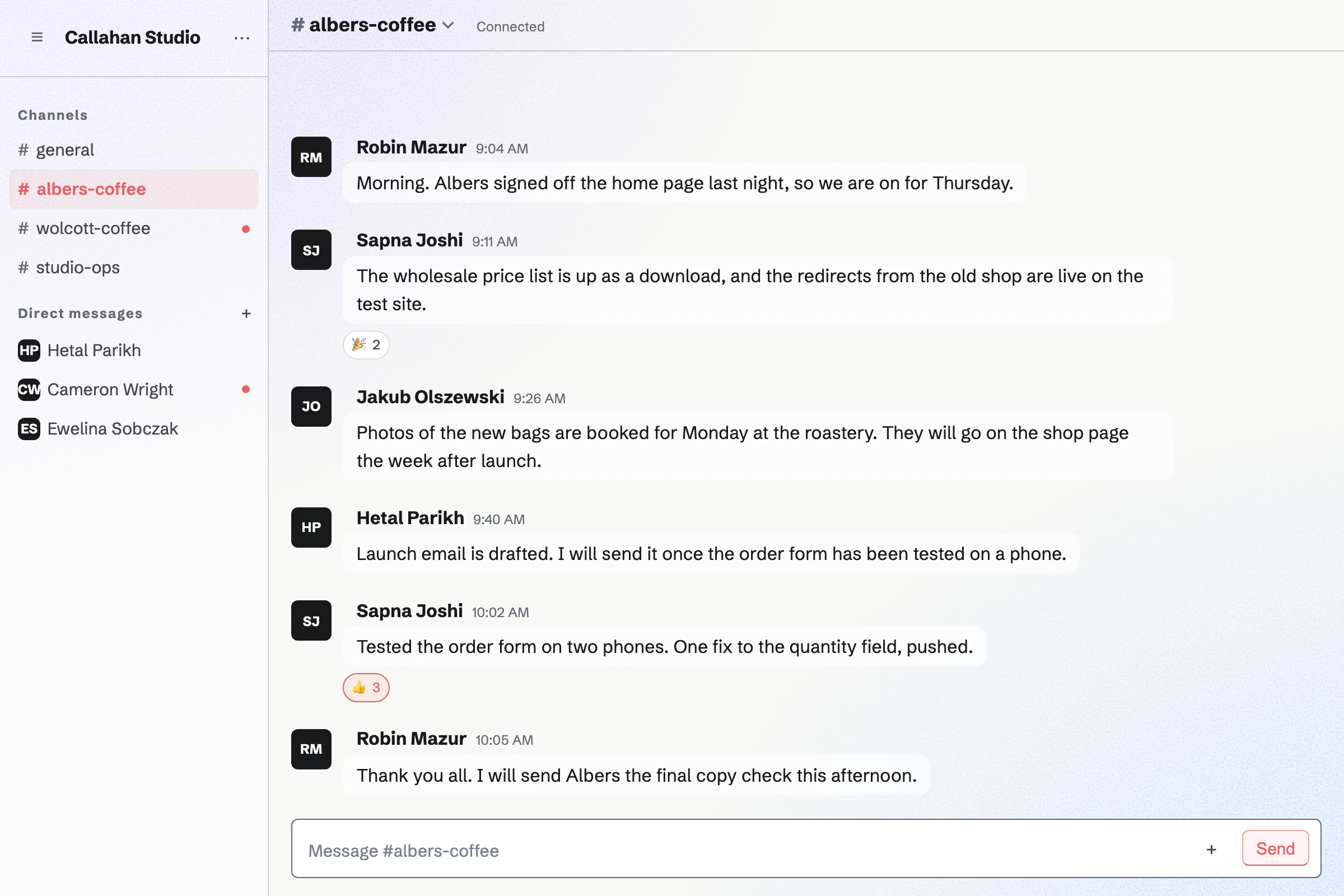
Callahan Studio’s team chat open at the Albers Coffee channel, with the morning’s messages about launching the client’s website and the team’s other channels and direct messages.

How is Magpie different?

1. Chat comes with the rest of the business

One Magpie subscription includes the areas a small business would otherwise buy one at a time:

  • Team chat for channels, direct messages and groups, and Walkie Talkie for talking by voice
  • Video Chat for calls, and Message Boards for public or team forums
  • Documents with a conversation beside each one, and To-dos and Kanban Boards for the work
  • Supporters for paid posts, Store for selling downloads, and Courses for lessons
  • Meetings, Appointments, Invoicing, Mail, Websites and the other areas, in the same team

Everything is in one account with one bill. Discord is for talking, and leaves the rest of a business to other software.

2. Every voice message is kept

Walkie Talkie's Talk button speaks live to everyone listening in a conversation, group or channel. Each message is kept, so people who were not listening play it later. Transcripts are made where they are turned on, and Search finds them.

3. The conversation is beside the work

Chat at the top of a Document opens the Document's own conversation beside it, so people talk while they write. A team's channels are in the same place as its To-dos, Calendar events, contacts and invoices.

Comparing Magpie and Discord

Discord does more for a community that talks; Magpie does more around a team that works. Every line in the tables below was checked against Discord's own pages, linked from each row, and against Magpie's code and Help.

Platform

WhatDiscordMagpie
Text channelsConversations for each topic Yes Yes
Categories and private channelsChannels under headings, or kept to some people Yes Partly
Roles and permissionsNamed roles that decide what people see and do Yes Admin, Member and Guest
Invite linksA link anyone can use to join Yes Guests, into one channel
Direct messages and groupsTalk with one person or a few Yes Yes
Threads and reactionsReply to one message, or react with an emoji Yes Eight reactions
Formatting, links and mentionsBold and code, links that open, @ a name Yes Partly
Pins, polls and forwardingKeep, ask and pass on messages Yes No
SearchFind any message or file Yes Messages, not files
Voice channelsAn open room people join to talk Yes Walkie Talkie
Push-to-talk kept to play laterSpeak live, and listen afterwards Live only Yes
Video calls with several peopleA group on camera together Yes Scheduled calls only
Screen sharingShow your screen during a call Yes Yes
Games and Watch TogetherActivities inside a call Yes No
ForumsTopics as posts with replies Yes Message Boards
Scheduled eventsAn event for the group, with who is coming Yes Calendar
Open community anyone can findThousands of members, listed for anyone to join Community servers No
Moderation and AutoModTime-outs, bans, slow mode and word filters Yes Partly
Paid membershipsMembers pay for access Server Subscriptions Supporters
Selling downloadsDigital products sold to the group Server Shop Store
Apps and botsOther software working in a channel Yes API and the assistant
Phone and desktop appsChat with notifications on every device Yes In the browser
Documents beside a conversationWrite together and talk about it No Yes
Booking pages and invoicingClients book a time and pay invoices online No Yes
Email at your domainMailboxes at the business's domain No Paid plans

Good to know: Where Magpie says No or Partly, the line under the row says what Magpie does instead. Each gap has an item on Magpie's roadmap, and the line changes on the day it ships.

Servers, channels and roles

Both split a group's talk into text channels and invite people with a link. Discord adds categories, channels kept to a role, and roles of your own. They do these better than we do today.

WhatDiscordMagpie
Talk with my group in text channels for each topic Source Yes Yes
Group channels under headings, so a long list stays easy to scan Source Magpie: Team chat lists a team's channels in one group, Channels, beside fixed groups such as Direct messages and Discussions. Channels cannot be put under headings of the team's own. Yes No
Keep a channel to the people or roles I choose Source Magpie: Every Team chat channel is read by the whole team. A channel opened to guests becomes members only, but anyone in the team can still join it from the channel list. A group of three or more people is private to them, and a Walkie Talkie channel can be closed to the team. Yes Partly
Give people roles, such as moderator, that decide what they see and may do Source Magpie: A team has three roles: Admin, Member and Guest. Admins choose which areas each member can use and whether members can edit or only view, and a guest uses only what they were given. A team cannot make roles of its own, and in Team chat only admins create channels, archive them and let guests in. Yes Partly
Invite people with a link I can post anywhere Source Magpie: A team admin creates an invite link to one Team chat channel. Up to 25 people can use it within 7 days, and they join as guests of the team; someone without an account creates one from the link. Members are invited by handle or email address, not by a link. Yes Partly

Good to know: A Magpie invite link lets up to 25 people into one Team chat channel as guests, within 7 days. A guest takes no place on the plan.

Text chat and messages

Both have threads, reactions, mentions, bold and code, and links that open, and both edit a sent message. Discord also formats headings, shows a link's preview and mentions a role or everyone. It pins, forwards and runs polls too, and does each of these better than we do today.

WhatDiscordMagpie
Reply to one message in a thread, without filling up the channel Source Yes Yes
React and write with any emoji, including my group's own Source Magpie: A message takes reactions from a set of eight emoji, such as 👍, ❤️ and 🎉, and a double tap on a phone adds 👍. You cannot react to your own message or add emoji of your own. Yes Partly
Format a message with bold, headings and code Source Magpie: Team chat shows bold, italic, code and blocks of code typed as in Markdown, on the website and in the app. Headings, lists, quotes and underline stay plain text, and there is no formatting toolbar. Yes Partly
Open a link someone posts, and see a preview of the page Source Magpie: A web address in a Team chat message opens with one click, on the website and in the app. No preview of the page is shown. Yes Partly
Mention someone, a role or everyone, so they are told Source Magpie: An @handle mentions one person who can read the conversation. On the website they get the dot on their avatar and the message sound; the Magpie app sends them a notification. A role, a group of people or everyone cannot be mentioned at once. Yes Partly
Edit or delete a message I sent Source Yes Yes
Share files and pictures in a conversation Source Magpie: On the website a message carries up to 10 pictures and no other files. The Magpie app also attaches PDF, Office, text or archive files of up to 25 MB each, but it is not yet in the App Store or Google Play. Nothing lists the files shared in Chat. Yes Partly
Pin important messages to a channel Source Magpie: Team chat has no pinned messages. In Walkie Talkie, Pinned keeps a conversation at the top of your own list. Yes No
Ask the group a quick question and see the votes Source Magpie: Team chat has no polls. Forms collects answers to a question, and a Supporters post can embed a Form as a poll. Yes No
Pass a message on to another conversation Source Magpie: A Team chat message cannot be passed on; Copy text puts its words on the clipboard to paste somewhere else. Yes No
Search every message and file Source Magpie: Search messages, in Chat on the website and in the app, finds messages by their words in the team's channels and your own conversations. Files are not searched, and the Search page does not cover chat. Yes Partly
Get a summary of a busy channel I missed Source Discord: In-channel summaries, which list a channel's recent topics with who took part, are an experiment in a few servers. AI summaries of public channels are rolling out on the web pages of discoverable servers.Magpie: Chat has no summary of its own. The assistant on Dashboard reads recent chat messages, up to 100 at a time from all your channels and conversations together, or those with given words, and sums them up when asked; it cannot ask for just one channel or thread. Partly Partly
See whether someone has read my message Source Discord: No Discord help article checked describes seeing whether a message was read, in direct messages, groups or channels. Not stated Yes
Write a document with my group and talk about it beside it Source Discord: Discord's pages describe text, voice, video, streaming and Activities, and no shared documents; a file can be posted and talked about in a channel or thread. No Yes

Good to know: In a Magpie direct message or group, Seen appears under your newest message once the others have opened it. Either person can turn read receipts off.

Direct messages, profiles and notifications

Both send direct messages and group messages, keep strangers' first messages apart and block people. Discord also shows who is online, with a status, and lets you choose notifications for each channel.

WhatDiscordMagpie
Message one person, or a small group, privately Source Yes Yes
Choose who can message me, and keep strangers' first messages apart Source Yes Yes
Block someone so I no longer see their messages Source Yes Yes
Show who I am with a picture, a name and a short bio Source Yes Yes
Show whether I am around, busy or away, with a status message Source Magpie: Walkie Talkie shows On Walkie Talkie now beside people on the same team who have it open. Team chat on the website shows nobody's presence; the Magpie app's Active now is not yet in the App Store or Google Play. There is no status message and no Do Not Disturb. Yes Partly
Choose which channels notify me, such as only when I am mentioned Source Magpie: On the website, direct messages, groups, support and mentions play a sound and mark the browser tab, and can show a browser notification for direct messages and groups. A team channel without a mention only marks the channel unread in Chat. One person can be muted, but one channel cannot be turned off, on the website or in the Magpie app, which is not yet in the App Store or Google Play. Yes Partly

Good to know: A Magpie direct message or group belongs to its people, not to a team. It is listed whichever team is selected. Who can message you is Anyone, People in my teams or Nobody.

Voice, video and streaming

A Discord voice channel is always open, on the free plan. People join with a click, talk, share a screen and play games. Magpie's talk by voice is in Walkie Talkie, and its calls are in Video Chat.

WhatDiscordMagpie
Drop into a voice room with my group whenever I like, without calling anyone Source Magpie: Walkie Talkie channels keep a team talking by voice: with Live on, people hear each other push-to-talk as they speak, one at a time, and every message is kept to play later. Team chat has no voice room, and a Video Chat call is a separate call started with a code. Yes Partly
Have a video call with several people at once Source Magpie: A Video Chat call is for two people and lasts 2 or 5 minutes on the free plan, or 2, 5 or 10 on Pro and the Team plan. A scheduled call takes up to 6 people, but only Hiring interviews, Courses live sessions and Coaching sessions create them, on Pro and Team plans. Yes Partly
Share my screen with the people I am talking to Source Yes Yes
Play games or watch videos together during a call Source Magpie: Video Chat and Walkie Talkie carry voice and video only; a call has no games and nothing to watch together. Yes No
Host a live talk for a big audience, inviting listeners up to speak Source Magpie: A Walkie Talkie Announcements channel lets only the people chosen speak while everyone else listens, and an Event channel queues people to speak and closes on its own. Up to 12 devices hear each message live, and everyone else plays the recording. Webinars is not open to members yet. Yes Partly
Keep calls private, so not even the company running them can listen Source Magpie: A Video Chat call, and live talk in Walkie Talkie, go from device to device over WebRTC, which encrypts them between the devices. A Video Chat call is not recorded; Meeting Notes, which can transcribe a scheduled call, is open only to site administrators. Magpie shows no way to check the encryption, and every Walkie Talkie message is also kept on Magpie's servers so it can be played later. Yes Partly
Send a short voice message instead of typing Source Yes Yes
Talk push-to-talk, heard live by whoever is listening, with each message kept to play later Source Discord: Push to Talk is a way to speak in a voice channel or call, heard live while you hold a key, and nothing is kept. A voice message is recorded first and sent when you let go. Partly Yes

Good to know: A Video Chat call is for two people. It lasts 2 or 5 minutes on the free plan, or 2, 5 or 10 on a paid plan. Walkie Talkie keeps each message to play later, which Discord's Push to Talk does not.

Community servers

Discord's Community servers add announcement channels, forums, events and rules for new members. A listing lets anyone find the server. Magpie's forums are Message Boards, and its events are in Calendar.

WhatDiscordMagpie
Have a channel where only some people post, such as announcements Source Magpie: Everyone who can read a Team chat channel can post in it. Walkie Talkie has Announcements channels, where only the people chosen speak and everyone else listens. Yes Partly
Hold discussions where each topic is its own post with replies Source Yes Yes
Schedule an event for my group and see who is coming Source Magpie: A Calendar event can be for a team's members or on a public calendar, takes RSVPs up to a capacity, and shows who is going. Nobody is reminded or told when it starts, and it is not linked to a Team chat channel. Yes Partly
Run an open community that hundreds or thousands of people can find and join Source Magpie: Team chat is for a team's members, up to 25 on the Team plan, and its guests, up to 100 on a paid plan, each let into a channel. Nobody can find a team to join. A public Message Board can be read by anyone and is listed to every member, so a community can talk there instead. Yes Partly
Have new members agree to the rules and choose their channels when they join Source Magpie: Someone who joins a team, or a channel as a guest, starts there at once, with no rules to accept and no questions that choose their channels. Yes No
See how my community is growing and which channels are busy Source Magpie: Team chat shows no activity figures; a Message Board shows how many posts it has. Yes No

Good to know: Anyone can read a public Message Board without an account. Anyone signed in to Magpie can post, comment and vote on it.

Moderation and safety

Discord's moderators time people out, ban them and slow a busy channel down, and AutoMod blocks words and spam. In Magpie a team admin deletes messages and removes people.

WhatDiscordMagpie
Time out, remove or ban someone who breaks the rules, and slow a busy channel down Source Magpie: A team admin deletes any message in the team's channels and removes a member or guest from the team, or a guest from a channel; someone removed stays out unless invited again. There is no time-out and no slow mode. Yes Partly
Have messages with banned words or spam blocked automatically Source Magpie: Nothing filters Team chat messages. A first message from someone outside your teams is a request, limited to 3 messages, and one person can start 20 requests a day. Yes No
Require everyone who moderates to use two-step sign-in Source Magpie: Each person can turn on two-factor authentication or use a passkey, but a team cannot require it of its admins or members. Yes Partly

Good to know: A first message from someone outside your teams arrives as a request. It holds at most 3 messages until you accept it. One person can start 20 requests a day.

Server subscriptions and the Server Shop

Discord's Server Subscriptions charge members monthly for roles and channels, and the Server Shop sells downloads. Magpie's Supporters charges monthly or yearly for posts, and Store sells downloads.

WhatDiscordMagpie
Charge members monthly for private channels and perks Source Magpie: Supporters takes free or paid tiers, monthly or yearly, through the team's own Stripe account and opens posts to each tier. A tier does not open a Team chat channel or any other place to talk. Yes Partly
Sell digital downloads to my community Source Yes Yes

Good to know: Supporters and Store are paid into the team's own Stripe account. Magpie takes 4% of Supporters payments and 4% of Store sales.

Apps, bots and webhooks

Discord's App Directory adds bots used through slash commands, and a webhook lets other services post into a channel. Magpie has no app directory, bots or incoming webhooks.

WhatDiscordMagpie
Add apps and bots, and have my other tools post into a channel Source Magpie: Team chat has no app directory, bots or incoming webhooks. A script with a Pro API key can post a message through the REST API, as the person who made the key, and a connected app such as Claude, or the assistant on Dashboard, can post in a channel you name. Yes Partly

Good to know: A script with a Pro API key can post a Team chat message. So can a connected app such as Claude, or the assistant on Dashboard.

Apps for each device and your data

Discord has apps for phones and for Windows, Mac and Linux. It sends you a copy of your messages on request. Magpie's Team chat is used in the browser.

WhatDiscordMagpie
Chat and talk from my phone, with notifications Source Magpie: Team chat, Walkie Talkie and Video Chat work in a phone's browser, but the website sends a phone no notifications. The Magpie app for iPhone and Android, with Team chat, push notifications, photos, files and voice notes, is built but not yet in the App Store or Google Play. Yes Partly
Use it as an app on my computer Source Magpie: Magpie runs in the browser on a computer. The Magpie app is for phones, and is not yet in the App Store or Google Play. Yes No
Download a copy of my messages Source Magpie: Team chat has no export, and Magpie has no download of an account's data; messages are read in Chat or found through the assistant. Yes No

Good to know: The Magpie app has Team chat with push notifications, files and voice notes. It is not yet in the App Store or Google Play.

Price comparison

How Discord charges

Discord is free, with servers, channels, voice, video and screen sharing on the free plan. Nitro Basic and Nitro are optional subscriptions each person buys for themselves. They raise the upload limit. Nitro adds emoji in every server, custom profiles, higher quality streaming and two Server Boosts. Boosts raise one server's limits and are bought one by one. Prices are on Discord's Nitro page and vary by country.

How Magpie charges

Magpie charges by plan, Free or a paid plan, for everything in the account. Team chat, Walkie Talkie and Video Chat are on every plan. A paid plan raises the channels, the history and the length of a call. The Team plan is one price for up to 25 people. Prices are on Magpie's pricing page.

On top of the planDiscordMagpie
Chatting without payingFree, with Nitro optionalFree plan, with 5 channels
How a group paysEach person buys Nitro; anyone can boost a serverOne Team plan for up to 25 people
File uploads20 MB a file free, 50 MB on Nitro Basic, 1 GB on Nitro10 pictures a message on the website
Group video callsUp to 25 people on cameraTwo people; scheduled calls of up to 6 from Hiring, Courses and Coaching on paid plans
Paid membershipsServer Subscriptions; the owner keeps 90% after deductions and must be in the United StatesSupporters, 4%, through your own Stripe account
Booking pages, invoicing and emailNot offeredIncluded; Mail needs a paid plan

When to choose Magpie or Discord

  • Want team chat and push-to-talk beside your bookings, invoices and email, for one price for the whole team? Go with Magpie.
  • Want voice channels with screen sharing, roles, moderation and a community anyone can find, all free? Discord is the right choice.

Recommendations by kind of business

For an open community or a fan group
Discord. A server holds thousands of members, with roles, moderators, AutoMod and a listing where people find it. A Magpie team has places for 25 members and 100 guests.
For friends who play or watch things together
Discord. Voice channels are free in every server, and calls run Activities such as Watch Together. A Magpie call shares a screen but has no games or videos to watch together.
For a small service business
Magpie. Team chat, booking pages, invoices, email at your domain and a helpdesk are in one team. The Team plan covers up to 25 people for one price.
For a crew on the move: a café, a trade, a shop floor
Magpie. Walkie Talkie speaks live to the people listening and keeps each message to play later. Staff Scheduling and Daily Operations are in the same team.
For a creator with paying fans
Either. Discord's Server Subscriptions open channels and roles to members who pay, for owners in the United States. Magpie's Supporters opens posts to paying tiers, and Store and Courses sell beside it. Choose by whether your fans pay to talk with each other or to read what you make.

Frequently asked questions

What is the difference between Discord and Magpie?

Discord is a free app for talking in servers by text, voice and video. It is built for communities of any size. Magpie is one subscription for a small business's software. Its Team chat is one area beside Walkie Talkie, Video Chat, Message Boards, Invoicing, Mail and booking pages. Discord does more for a community; Magpie does more around a team's work.

Does Magpie replace Discord?

Yes, for a small team that wants channels, direct messages and talk by voice beside the rest of its work. Magpie has channels, threads, reactions, guests, read receipts and Walkie Talkie. The same team holds the bookings, invoices and email.

Consider keeping Discord if you run an open community or talk in groups on camera. Keep it too if you rely on voice channels, roles, AutoMod or bots. Discord does each of these better than Magpie does today.

How much does Discord cost?

Discord is free, with servers, voice and video calls and screen sharing. Nitro Basic and Nitro are optional subscriptions for a person, with bigger uploads. Nitro adds custom profiles and two Server Boosts. Server Boosts raise a server's limits and are bought one by one. The prices are on Discord's Nitro page.

How much does Magpie cost?

Magpie has a Free plan and paid plans, each covering every area. A free team has 3 members and 5 channels. The Team plan is one price for up to 25 people, with 100 channels and every message shown. The prices are on Magpie's pricing page.

Does Magpie have voice channels like Discord?

No. Team chat has no voice room. Walkie Talkie channels keep a team talking by voice. With Live on, people hear each other as they speak, one at a time. Each message is kept to play later. Discord's voice channels are always open, and people join and leave them with a click.

Can I share my screen in a Magpie call?

Yes, from a browser on a computer. Share screen shows everyone in the call a screen, a window or a tab in place of your camera. A phone's browser and the Magpie app cannot share a screen. Discord's Go Live shares a window or a whole screen with up to 50 viewers.

Can more than two people join a Magpie video call?

Only a scheduled call, which takes up to 6 people on a paid plan. Hiring interviews, Courses live sessions and Coaching sessions create them. Any other Video Chat call is for two people. Group calls are on Magpie's roadmap. Discord puts up to 25 people on camera in a voice channel.

Does Magpie have @mentions?

Yes, for one person at a time. An @handle tells someone who can read the conversation. On the website they get the dot on their avatar and a sound; the Magpie app sends a notification. A role, a group or everyone cannot be mentioned at once. Discord mentions a person, a role, @everyone or @here.

Can I format messages or post links in Magpie's Team chat?

Yes. Bold, italic, code and blocks of code typed as in Markdown show formatted, and a web address opens with one click. Headings and lists stay plain text, and a link shows no preview. Discord formats bold, headings and code with Markdown, and shows a preview of a link.

Can I edit a message I sent in Magpie?

Yes. Edit message, in your message's menu, changes its words, and the message shows Edited. Its author can delete it too, and a team admin can delete any message in the team's channels. Discord edits and deletes sent messages too.

Does Magpie have roles and permissions like Discord?

Partly. A team has three roles: Admin, Member and Guest. Admins choose which areas each member can use and whether they can edit or only view. A team cannot make roles of its own. Discord's servers have up to 250 named roles, set for each channel.

Does Magpie have private channels?

Partly. Every Team chat channel is read by the whole team. A group of three or more people is private to them. A channel opened to guests becomes members only, but anyone in the team can still join it. Discord hides a channel from everyone without a given role.

Can I run a public community on Magpie?

Not in Team chat. It is for a team's members and the guests let into a channel. Nobody can find a team to join. A public Message Board can be read by anyone, and anyone signed in can post on it. Discord's Community servers hold thousands of members and can be listed for anyone to find.

Does Magpie have moderation tools like AutoMod?

No. A team admin deletes any message in the team's channels and removes a member or guest. There is no time-out, no slow mode and nothing that filters words. Moderation tools are on Magpie's roadmap. Discord's AutoMod blocks words and spam, and its moderators time people out.

Does Magpie have polls or pinned messages in chat?

No. Team chat has neither. Forms collects answers to a question, and a Supporters post can embed a Form as a poll. Both are on Magpie's roadmap. Discord pins up to 250 messages a channel and runs polls with up to 10 answers.

Can I charge members for access, like Discord's Server Subscriptions?

Partly. Supporters takes free or paid tiers, monthly or yearly, through your own Stripe account, for 4%. It opens posts to each tier. A tier does not open a Team chat channel. Discord's Server Subscriptions give paying members roles and channels, for owners in the United States.

Does Discord keep push-to-talk messages to play later?

No. Discord's Push to Talk is heard live while you hold a key, and nothing is kept. A voice message is recorded first and sent when you let go. Magpie's Walkie Talkie speaks live and keeps each message to play later.

Does Discord have booking pages, invoicing or email?

No. Discord is for talking by text, voice and video. Magpie includes Meetings, Appointments, Invoicing and Mail in the same team as Team chat. Mail needs a paid plan.

Does Discord have shared documents?

No. A file can be posted and talked about in a channel or a thread. In Magpie, Chat at the top of a Document opens its own conversation beside it, while people write together.

Does Magpie have a phone or desktop app?

Not yet. Team chat works in a phone's browser, but the phone gets no notifications from the website. The Magpie app has Team chat with push notifications, files and voice notes. It is not yet in the App Store or Google Play. There is no Mac, Windows or Linux app. Discord has apps for all of them.

Can I download a copy of my messages?

Not from Magpie. Team chat has no export, and messages are read in Chat or found through the assistant. An export is on Magpie's roadmap. Discord emails a data package of the messages you sent within 30 days of a request.

Can I use Discord and Magpie together?

Yes. A community can keep talking on Discord. The business behind it can use Magpie for bookings, invoices, email and selling. A Link-In-Bio List can link to your Discord server.

How do I move from Discord to Magpie?

Create a team, invite your people, and add a channel for each one you use. Magpie does not read Discord's data package, so your messages stay on Discord.

What is included in Magpie's Free plan?

A team of 3, with Team chat in 5 channels. It also includes Walkie Talkie, Video Chat, Message Boards, To-dos, booking pages, Invoicing, Store, a website and the Newsletter. Mail is not on the Free plan: email at your domain needs Pro or the Team plan.
If a line on this page is wrong, tell us and we will correct it.

Discord changes, and so does Magpie. If a line is out of date about either product, email support@magpie.diy with the page that shows it. We check the line against that page, change it, and give it the new date. That goes for Discord's own team as much as for anyone who uses it.

Put your team's chat beside the rest of the business.

Create a Magpie account, then make a team and invite the people in it.

Create account